Albert: Budgeting and Banking
- 38.91K
- 4.4
- Installs
- 10.00M
- Price
- Free

Screenshots



Analysis by Reviewed
When I first opened Albert: Budgeting and Banking, I wanted a clearer picture of where my money was going without turning budgeting into a second job. The app is built for everyday personal finance, bringing budgeting, banking, saving and investing together. That broad scope is useful, but I’d approach it as a set of connected tools rather than expect one screen to solve every money question at once.
What to expect from the app
Albert is a free finance app from Albert - Budgeting & Banking, and its 4.5 average from around 142,000 ratings suggests it has reached a large audience. It has over 5 million installs, an Everyone age rating, and version 10.0.20 runs on Android 7.0 or later. Those details make it accessible to many Android users, though the best reason to try it is the way it aims to make routine money management feel less scattered.
Instead of starting with a complex spreadsheet, I’d use Albert to get a broad view of income and spending, then decide what deserves attention first. That makes it a natural fit if you’re new to budgeting or want savings and banking tools close at hand. If you already rely on a detailed envelope budget, custom reports or a carefully maintained spreadsheet, you may prefer to keep that system and use Albert only where its combined approach suits you.
The Basics of Budgeting with Albert
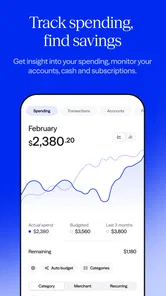
Right off the bat, Albert makes a strong impression with its clean and intuitive interface. It's like having a personal finance advisor in your pocket, minus the hefty fees. Setting up is a breeze; you link your bank accounts, and Albert does the heavy lifting by analyzing your income and spending patterns. This app is all about taking the guesswork out of budgeting, and it does so with aplomb.
Getting set up and finding a first win
For a first-time user, the useful goal is not to perfect a budget during setup. I’d begin by connecting the accounts I actually use for everyday spending and income, then check whether the activity looks sensible before relying on the overview. Linking accounts is convenient, but it also means giving a finance app access to sensitive financial information, so I’d only connect accounts I’m comfortable managing this way.
A practical first success is spotting one recurring expense or spending pattern you hadn’t noticed, then choosing a realistic amount to keep aside. For example, after a week of groceries, transport and small card purchases, I’d review the overall pattern before deciding whether a savings goal is achievable. That small check helps turn an automatic summary into a decision you control, rather than treating every suggestion as an instruction.
Features That Stand Out
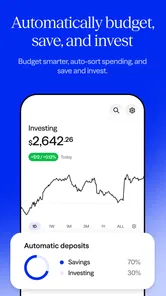
One of my favorite features is the automatic savings tool. It's like having a money-savvy friend who subtly nudges you to save more. You set your savings goals, and Albert uses its smart algorithms to tuck away small amounts automatically. You won’t even notice the money leaving your account, but over time, it adds up to a nice little nest egg.
More From Our News Desk

 Bolt: Request a Ride
Bolt and the Shift from One-Tap Rides to More Legible Trips
Bolt shows how ride-hailing is shifting from a one-tap taxi request toward a more legible, choice-driven trip, while leaving the hardest questions of price and reliability unresolved.

 Farm Land - Farming life game
Farm Land Review: A Small Island Farm with a Satisfying Loop
A bright, breezy island farm turns a few quick chores into a satisfying cycle of planting, harvesting, expanding, and deciding what to build next.

 Android Auto
’s Community Takes Shape in the Passenger Seat
Its most valuable network is not a public feed but a shared set of routes, voice habits, app integrations, and advice that make driving less isolating—and sometimes more complicated.

 My Talking Angela
 Makes the Virtual Pet Feel Personal
A polished pet-raising game built on small rituals, playful customization, and a character who gives everyday screen time a surprisingly personal rhythm.

 Google Translate
 Review: A Pocket Tool for the Small Frictions of Travel
From menus and signs to quick conversations, Google Translate earns its place by cutting the little delays that make unfamiliar language feel like a barrier.

 Shazam: Find Music & Concerts
Shazam’s Best Trick Is Turning a Song Into a Night Out
A few seconds of recognition can settle an argument, rescue a half-remembered chorus, and point toward a live show. Shazam’s real trick is what happens after the match.
Latest News



The trade-off is that “small” transfers still matter when cash flow is tight. I’d set a goal only after checking upcoming bills and leave enough room for an irregular expense, such as a repair or a higher-than-usual utility payment. Automatic saving is most helpful when it builds a habit from money you can spare; it is less suitable if your balance changes sharply or you need to approve every transfer yourself.
Albert also offers a subscription service called Albert Genius, which gives you access to real financial advisors. These aren't bots; they're real humans ready to text you advice whenever you need it. I found this particularly useful when I was trying to figure out if refinancing my student loans was a good move.
I’d treat that advice as a way to clarify questions and options, not as a replacement for comparing terms yourself. A useful message to an advisor should include the decision you’re weighing, the numbers you already know and what you’re unsure about. Also keep in mind that Genius is a subscription service, while the app itself is free; I’d check the current terms in the app before deciding whether that extra guidance is worth it for my situation.
Banking Made Easy
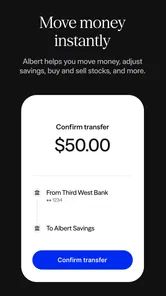
Beyond budgeting, Albert provides a full-fledged banking experience. With a no-fee cash account, you can manage your money without the hidden charges that often come with traditional banking. Plus, you get a nifty debit card that’s accepted everywhere. It's like having a bank that fits in your lifestyle, rather than the other way around.
For day-to-day use, I’d think carefully about whether I want a separate cash account and debit card or simply want a clearer view of accounts I already have. Keeping everyday spending in one place can make the routine easier to follow, but moving money between providers may add a step to your habits. Someone who prefers in-person service or already has a banking setup they like may get more value from Albert’s budgeting and savings tools without making it their primary account.
Common questions and practical limits
One common point of confusion is whether Albert is only a budgeting tool. It also brings banking, saving and investing into the same finance app, so it can cover more than tracking expenses. That breadth is convenient, but it doesn’t mean every user needs every part. I’d start with the task I want to improve—understanding spending, building a savings habit or managing an account—and add other tools only if they genuinely help.
Another question is whether account linking is essential. It is central to the setup described in the app’s budgeting flow, because connected activity lets Albert analyze income and spending. If you’d rather not link financial accounts, a manual spreadsheet or a budgeting method that doesn’t depend on account connections may feel more comfortable. Either way, I’d review the app’s current account and privacy settings before sharing financial access, and revisit them if my needs change.
Albert is not automatically the best choice for someone who wants deep, highly customized reporting or complete manual control over every budget category. Traditional bank apps can be simpler if all you need is a balance and card activity, while a dedicated budgeting tool or spreadsheet can suit people who enjoy assigning every dollar themselves. Albert’s appeal is the middle ground: connected money tools with less day-to-day bookkeeping, in exchange for relying more on the app’s analysis and workflow.
Security and Peace of Mind
Now, I know what you’re thinking—security. Rest easy, because Albert takes this seriously. The app uses bank-level security and encryption to protect your data, and they’re big on privacy. It's nice knowing that while you're focusing on saving and spending wisely, your personal information is locked down tight.
Even so, I’d make account security part of the setup rather than assume any finance app makes risk disappear. Use a strong, unique password, keep your phone’s own lock enabled, and check connected accounts periodically. Those are sensible habits for any app that brings banking information together, especially if you use a debit card or rely on automatic savings.
Who I’d recommend it to
Albert is a good match for someone who wants an approachable starting point and appreciates having spending awareness, savings goals and banking options in one place. A realistic use case is a person paid on a regular schedule who wants to check expenses after payday, set a modest savings goal and keep routine spending visible without maintaining a spreadsheet every evening. The key is to review the picture often enough to catch a change, even if the app handles much of the organizing.
I’d be more cautious if income is irregular, balances are frequently close to zero, or I prefer to approve every movement of money manually. In those situations, automatic saving may require extra attention, and a bank account plus a simple written budget can provide more direct control. Investing is also not a reason on its own to choose a finance app: I’d first be clear about my goals and comfort with risk rather than treating any in-app option as a shortcut to a financial plan.
A routine that makes the tools useful
One way I’d keep the app practical is to give it a short review slot after payday rather than checking every transaction as it happens. I’d first compare recent spending with the bills and purchases I expected, then decide whether the planned savings amount still makes sense. This gives the overview a job: it helps me notice a mismatch and choose what to do next, instead of becoming another screen I open without a clear purpose.
If a transaction looks unfamiliar, I’d avoid changing a budget or savings goal until I understand what it represents. A merchant name can be different from the shop name I remember, and a purchase may appear separately from a later adjustment. The useful habit is to check the account activity and my own receipts before treating one odd-looking item as a spending trend. That patience matters more when the app is doing much of the organizing automatically.
Choosing the right level of reliance
The main trade-off is convenience versus visibility into the details. Albert’s connected approach can spare me from entering every purchase by hand, but a person who wants to audit every category may find a spreadsheet easier to inspect and change. A bank’s own app is usually the more direct place to handle routine account activity, while Albert makes more sense when I want that activity connected to broader budgeting and saving decisions.
I’d also separate “having investing in the same app” from “being ready to invest.” The first can make the overall money picture feel convenient, but it does not settle questions such as how much risk I’m willing to take or whether I have enough accessible savings for near-term needs. For someone still trying to stabilize monthly spending, a simple budget and cash buffer deserve attention before investing becomes the main reason to use the app.
When I’d choose something else
I would skip Albert as my main system if I needed precise reporting for several complicated budgets, wanted to enter and categorize every transaction manually, or did not want to connect financial accounts. A spreadsheet offers more freedom to design categories and calculations, though it asks for more ongoing work. A standard bank app is a better fit when the task is simply checking a balance or managing the account I already use.
It may also be a poor match for someone who sees automatic transfers as stressful rather than helpful. If income varies from week to week, a fixed savings habit can take more monitoring, so I’d begin with a cautious goal and review it against upcoming obligations. The best feature is only useful when its timing and level of control suit the person using it; there is no need to use every part just because it appears alongside the others.
Making the first week count
In the first week, I’d avoid trying to overhaul every part of my finances at once. I’d connect only the accounts I want included, look for a spending pattern I can act on, and test whether the app’s view matches what I know about my own money. Then I’d choose one modest next step, such as setting a manageable savings target or checking expenses after payday. This is a low-pressure way to find out whether Albert’s combined approach fits my habits.
That first review is also a good moment to decide what not to use. If the banking option would split spending across accounts in a way that confuses me, I can focus on budgeting instead. If I am not ready to invest, I can leave that part for later. A finance app should support the routine I’m trying to build, not make me feel obliged to activate every tool before I have a clear reason.
In a world where financial apps are a dime a dozen, Albert: Budgeting and Banking manages to stand out by offering a comprehensive suite of tools that cater to both beginners and seasoned budgeters alike. Whether you're just starting to get serious about your finances or you're looking for a smarter way to manage your money, Albert is definitely worth checking out. It's like having a financial sidekick that's always ready to lend a hand.
Albert: Budgeting and Banking Frequently Asked Questions
Can I download Albert for free, and what does the app bring together?
Albert is free to download and is designed as a finance app that brings budgeting, banking, saving, and investing together. Its store summary describes it as a simple way to handle those activities in one place. That combination may be useful if you want to explore several aspects of money management through a single app, while choosing which tools fit your routine.
Does Albert support investing as well as budgeting and banking?
Yes. Albert’s stated scope includes investing alongside budgeting, banking, and saving. This makes it relevant for people looking for an app that covers several parts of personal finance rather than budgeting alone. Before using any investing-related tool, consider your own goals and comfort level, and review the information presented in the app so you understand what a feature is intended to do.
Who develops Albert: Budgeting and Banking, and how can I identify the right app?
The app is developed by Albert - Budgeting & Banking. When searching for it, check that name and the title Albert: Budgeting and Banking so you can distinguish it from other finance apps with similar wording. Albert’s short store description is simply “Albert,” while its broader purpose is to help users budget, bank, save, and invest through one app.
Can I use Albert if I already have a bank account and budgeting system?
Albert is designed to bring budgeting, banking, saving, and investing together in one app, so it may appeal to people who already manage money elsewhere but want a more consolidated view. Its budgeting tools can help users review spending and work toward savings goals. Whether it suits your existing routine depends on how you prefer to organize your finances and which services you want to use.
What should I know about Albert’s age and device requirements before downloading it?
Albert is rated for Everyone and is available for devices running Android 7.0 or later. The app is free to download, and its current version is 10.0.20. Checking that your device meets the operating-system requirement before installing can help avoid compatibility issues. Albert is a finance app, so you should also be comfortable using a mobile app to manage personal money.
Pros
- User-friendly interface simplifies budgeting.
- Comprehensive financial tools in one app.
- Automatic savings feature boosts savings.
- Real-time alerts for better expense tracking.
- Personalized financial advice available.
Cons
- Some features require a paid subscription.
- Limited customer support options.
- Occasional syncing issues with bank accounts.
- App may be overwhelming for new users.
- Limited investment options compared to competitors.