Al Quran Kareem: القران الكريم
- 441.00
- 4.4
- Installs
- 10.00M
- Price
- Free

Screenshots





Analysis by Reviewed
I find the most useful way to judge Al Quran Kareem: القران الكريم is by asking what changes when a Quran reading routine moves from a printed volume to a phone. The app’s central appeal is having the text close at hand, with recitation as a companion to reading. That can make a short pause in the day feel more intentional, though it does not automatically replace the focus of sitting down with a physical copy.
When recitation supports reading
Listening is most valuable when it serves a purpose rather than becoming background sound. I’d use a recitation to follow along with the text, revisit a passage I have already read, or make a quiet moment at home feel more focused. If I am commuting or handling other tasks, listening may be convenient, but I would not treat distracted listening as a substitute for careful study.
The practical choice is whether I want to read, listen, or move between the two. A printed Quran is a better fit for anyone who prefers a screen-free routine or finds it easier to concentrate with a book in hand. A general audio player may suit someone who only wants recordings, while this app is more relevant when keeping Quran reading and recitation together is the point.
For a realistic daily routine, I might open it during a quiet break, read a small passage, and then listen to the recitation while following the same section. That simple sequence makes it easier to give the text my attention without turning every session into a long study period. I would also silence unrelated notifications before starting; that is a small step, but it helps a phone feel less like a source of interruptions.
Reading and listening in everyday use
First off, let me tell you about the amazing features packed into Al Quran Kareem: القران الكريم. This app is not just a digital version of the Quran; it’s a full-fledged learning tool. The interface is super intuitive, making it easy for both beginners and seasoned readers to navigate through the Holy Book.
One of the coolest features is the audio recitation. You can listen to the Quran being recited by various renowned Qaris. It’s like having a spiritual guide with you, wherever you go. The audio quality is crisp, and you can even download your favorite recitations for offline listening. Perfect for those moments when you need a little peace and reflection.
Making a short session count
The app’s most useful role, in my view, is not necessarily to turn a phone into a complete study desk. It is to reduce the effort involved in beginning. When the text and recitation are together, I can use a few available minutes for a deliberate reading session instead of spending that time deciding which book or audio source to open. That convenience matters most when it helps establish a regular habit, not when it encourages me to rush through a passage just because the phone is already in my hand.
More From Our News Desk

Weather by Xiaomi Review: Clear at a Glance, Less Clear Up Close

X Under Pressure: Can It Recover When Posting Goes Wrong?

Clash of Clans Is Won Between the Battles

Android Auto Makes the Case for Quieter Car Software

MobiOffice: Transforming Mobile Productivity with Seamless Integration

EA SPORTS FC™ Mobile Soccer: Redefining Mobile Sports Gaming
A small but practical approach is to decide on a passage before pressing play. I would read it once at my own pace, then listen while following along, and finally pause for a moment to note what I want to remember. This order keeps audio from taking over the session. If I begin with playback while doing something else, it is easy for the recitation to become ambient sound; if I begin with the text, listening has a clear purpose.
For someone learning to read Arabic, listening while following the text can offer a useful point of reference, but it should not be mistaken for personal instruction. I would slow down and revisit difficult portions rather than assume that hearing a passage once means I have mastered its pronunciation or meaning. The app can support a learning routine; a teacher or trusted learning resource remains a better choice for detailed correction and questions that need context.
Useful tools without turning reading into admin
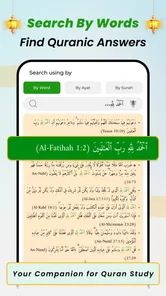
The app also offers interactive features that enhance your reading experience. You can bookmark verses, add notes, and even highlight passages. This is particularly useful if you're someone who likes to jot down thoughts or insights as you read. Plus, the search function is top-notch, helping you find specific verses or topics in no time.
These tools are most helpful when I use them with a clear purpose. For example, a bookmark can keep my place between short reading sessions, while a note can capture a question to look up later instead of interrupting the session. Search is useful when I remember a phrase or topic but not where it appears. I would still double-check a passage in context before relying on a search result for study, since finding a relevant match is only the first step toward understanding it.
There is a trade-off to these conveniences: highlighting and note-taking can make a session more personal, but they can also tempt me to keep tapping through menus instead of reading. I find it better to use one tool at a time. If the immediate goal is simply to continue from yesterday, a bookmark is enough; if a question comes up, a short note is less disruptive than stopping to search the web. I would save more involved research for after the reading session.
Search is especially helpful when I am returning to a passage from memory, but I would treat it as a way to locate text, not as a substitute for interpretation. A remembered word or topic can lead to a useful starting point, while reading around the result helps preserve its context. That distinction is important for anyone using the app for reflection or study rather than only for recitation.
Language support and its limits
Another standout feature is the translation and transliteration options. Whether you're a native Arabic speaker or someone who needs assistance, the app caters to all. You can choose from multiple translations to better understand the teachings, making it a great tool for learning and reflection.
I would use translation as a bridge, not as a reason to stop engaging with the Arabic text when that is part of my goal. Transliteration can help a reader who is still becoming familiar with Arabic script, but it cannot replace learning how letters and sounds work. Likewise, comparing translations may clarify a phrase, yet different wording is a prompt to think carefully, not proof that one brief reading has settled every interpretive question.
This makes the app particularly adaptable for mixed routines. A fluent reader might stay mostly with Arabic and use recitation to revisit a passage; a newer reader might rely more on transliteration and translation while building familiarity. I would set a modest goal for each session—reading, pronunciation practice, or reflection—rather than trying to make every available option serve all three purposes at once.
Who benefits most from a pocket Quran
If you're still on the fence about trying Al Quran Kareem: القران الكريم, let me give you a nudge. The app is designed to provide a seamless experience, with regular updates to keep it running smoothly. It's also lightweight, so it won't hog your phone's resources.
In practice, I think it suits readers who already know how they like to approach Quran reading and want a convenient way to keep that habit close. Beginners may appreciate being able to use translation or transliteration as support, but should take time to compare what they read with trusted learning resources when a passage raises a deeper question. Someone who prefers a fully guided course, extensive scholarly commentary, or a paper-first routine may be better served by a dedicated study resource or a printed Quran instead.
The clearest everyday use case is a person with a busy schedule who wants a consistent, manageable way to read rather than a long session that is difficult to fit in. For example, I could use a quiet lunch break to read a few lines, save my place, and return at home to listen more attentively. The value is not that a phone makes the text more profound; it is that it can remove the small practical barrier of not having a reading copy nearby.
It is less suited to someone who wants a course-like path that explains what to study next, tracks learning in a structured way, or offers extensive commentary as the main experience. It is also not the best pick for a reader who knows that screen use quickly leads to distraction. In those cases, a printed copy, a dedicated audio player, or a specialist study resource may fit better. I would choose based on the routine I can actually sustain, not on how many tools an app can put on one screen.
Moreover, the developers have ensured that the app is accessible to everyone. Whether you’re on Android or iOS, the app is free to download, with in-app purchases for additional features if you wish to expand your learning.
It is a free Books & Reference app from E-ALIM TECHNOLOGY LIMITED, with a 4.4 average from around 108,000 ratings and over 10 million installs. It is rated for Everyone, and its current version is 20.8, with a minimum OS requirement of 7.0. Optional in-app purchases are listed at $6.49 per item. I would start with the free experience and decide whether any paid option is useful to my own routine rather than assuming I need to buy something to begin reading.
Starting without a purchase is also a sensible way to judge whether this style of reading works for you. I would first test the basic routine I actually want: open the text, read a short section, and see whether listening alongside it helps me concentrate. If that combination becomes part of my week, I can then decide whether an optional purchase offers something I personally need. The app’s core appeal is convenience, so there is little point paying for extras before I know which parts I will use.
For audio on the move, I would plan around where and how I listen. A saved recitation can be useful when I expect to be without a connection, but I would prepare it in advance and check that it is available before relying on it during travel. At home, I would use headphones or a quiet room if I want to follow closely; in a noisy place, listening may be less useful than reading silently. These are simple choices, but they make the difference between having audio available and being able to give it attention.
One practical trade-off is that a phone offers convenience and audio in the same place, but also brings the usual screen distractions. Offline recitation can help when a connection is unavailable, though I would prepare downloads before leaving home rather than discovering mid-journey that I have not saved what I wanted. For a focused session, I would choose the passage first, use a bookmark if I plan to return, and keep notes brief so the tool supports reflection instead of pulling me into phone use.
Compared with a printed Quran, the app wins on portability and the option to pair reading with recitation, while a physical copy can make it easier to step away from notifications and screens. Compared with a general audio app, it makes more sense when I want the text close while listening instead of handling reading and playback as separate tasks. Neither alternative is automatically worse: the right choice depends on whether I value a screen-free experience, audio alone, or the convenience of bringing both together.
A routine that stays focused
One useful boundary is to keep the phone’s other jobs out of the session. I would silence notifications, open the passage before settling in, and avoid switching between reading and unrelated apps. If I am at home, placing the phone somewhere comfortable and using a bookmark at the end can make the next session easier to start. If I am away, I would choose a short passage and make sure any recitation I want is ready before I lose a connection.
Another helpful habit is to separate reading from follow-up research. I can mark a question in a note and return to it later, rather than breaking concentration to search immediately. That keeps the app useful as a reading companion without making it responsible for every part of learning. It also gives me a chance to consider the passage as a whole before focusing on a single word or phrase.
In a world where we're constantly on the go, having access to something as important as the Quran in such a convenient format is a blessing. It’s like having a portable library, ready to offer guidance and wisdom at any moment.
So, if you're keen on exploring the depths of the Quran and enhancing your spiritual journey, give this app a shot. Trust me, it's worth the space on your phone.
My recommendation
I would recommend it to readers who want Quran text and recitation close at hand and who can use a phone without letting notifications take over. Its strongest everyday benefit is the ease of moving between reading and listening, with bookmarks and notes available to support a continuing routine. For deeper guided study or a deliberately screen-free practice, I would choose a resource built for that purpose instead.
Al Quran Kareem: القران الكريم Frequently Asked Questions
Is Al Quran Kareem free to download, and what should I know about optional purchases?
Al Quran Kareem is free to download, so you can try its Quran reading and reference experience without paying upfront. The app also offers in-app purchases priced at $6.49 per item, which may appeal to users interested in optional content or features. Check the purchase details in the app before buying, and remember that the free download and optional purchases are separate.
What is Al Quran Kareem, and what kind of experience is it designed to provide?
Al Quran Kareem is a Books & Reference app for engaging with the Quran. Its stated aim is to let you recite with genuine feelings, as if holding an actual Quran Kareem in your hands. That focus makes it relevant to readers looking for a digital Quran experience, whether they want to read or listen as part of their personal routine.
Is Al Quran Kareem suitable for readers who are new to Quran apps?
Yes. Al Quran Kareem is a Books & Reference app built around reading and engaging with the Quran, and its straightforward layout is approachable for newcomers. You can explore the Quran text, translations, and recitations without needing to learn a complicated system first. The app is free to download, so new users can try its core experience before deciding whether it suits their daily reading habits.
What features does Al Quran Kareem offer?
Al Quran Kareem provides a comprehensive set of features for Muslim users looking to engage more deeply with the Quran. It includes the full Quran text in Arabic, translations in multiple languages, audio recitations, and tafsir explanations. Users can bookmark verses, search for specific ayahs, and adjust the font size for easier reading. Additionally, the app offers a night mode to reduce eye strain during nighttime reading.
Is Al Quran Kareem available offline?
Yes, Al Quran Kareem can be used offline once downloaded. This feature allows users to access the Quran, translations, and audio recitations without an internet connection, making it convenient for users to read and listen anywhere, anytime. However, initial download of certain audio files might require an internet connection.
Pros
- User-friendly interface for easy navigation.
- Includes multiple translations for better understanding.
- Audio recitations by renowned Qaris available.
- Bookmark feature for quick access to verses.
- Daily reminders for regular Quran reading.
Cons
- Requires internet for audio playback.
- Limited customization options for themes.
- Advertisements may interrupt usage.
- Some translations are not up-to-date.
- Offline mode lacks certain features.











