AI Tutor - Math Homework Help
- 134.00
- 4.0
- Installs
- 10.00M
- Price
- Free

Screenshots

Analysis by Reviewed
I judge a math helper by what happens after the first few scans: does it help me approach the next problem with more confidence, or does it become a shortcut I stop thinking through? AI Tutor - Math Homework Help is most useful when I treat its explanations as a way to get unstuck, then put the phone aside and try the work myself. Used that way, it can make a frustrating homework session feel manageable without pretending to replace a teacher or a full course.
Getting Started with AI Tutor
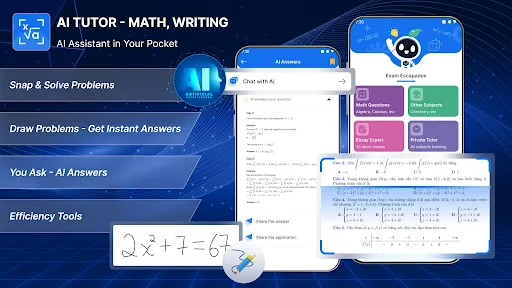
The first thing you’ll notice about the AI Tutor - Math Homework Help app is its sleek and intuitive interface. It's like having a personal tutor right in your pocket. The app is designed to be user-friendly, so you don’t have to be a tech wizard to navigate through it. Setting it up is a breeze. Just download it, and you’re ready to go. The app covers a wide range of topics from basic arithmetic to more complex calculus problems.
Why the First Few Uses Feel Appealing
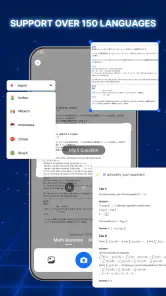
The quick appeal is easy to understand: you meet a problem you cannot quite untangle, take a picture, and get a worked explanation rather than only a result. That makes the app especially handy when you are studying alone and need a starting point before asking someone else. Its support for more than 150 languages may also make math explanations easier to approach for learners who would rather study in a language other than English.
I would not assume that a broad topic range means every explanation will match a particular school’s preferred method. Math classes can use different notation or expect a specific technique, so compare the steps with your notes. When the method differs, the useful question is not simply which answer is right, but whether you can explain why both approaches work and which one your assignment expects.
Features That Stand Out
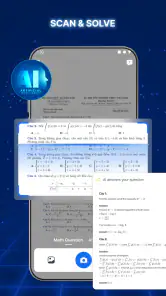
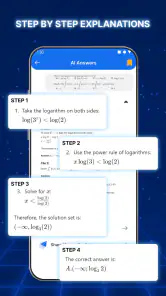
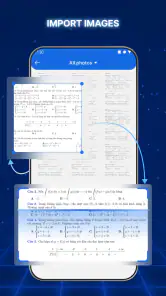
One of the coolest features of this app is the step-by-step solutions it provides. You can snap a picture of your math problem, and within seconds, the app breaks it down into simple, understandable steps. This isn’t just about getting the answer but understanding the process. I found this incredibly helpful for those "aha!" moments when everything finally clicks.
Another feature worth mentioning is the interactive quizzes. These are great for testing your knowledge and ensuring you’re not just passively learning. Plus, the instant feedback helps you learn from your mistakes in real-time. It’s like having a math class on-the-go!
The strongest workflow is to separate checking from learning. Before scanning, I’d write down what I think the first move should be, even if I am unsure. Then I can compare that attempt with the explanation and identify the exact decision I missed. If I scan immediately, it is tempting to read passively and mistake familiarity with the steps for being able to produce them unaided.
More From Our News Desk

Weather by Xiaomi Review: Clear at a Glance, Less Clear Up Close

X Under Pressure: Can It Recover When Posting Goes Wrong?

Clash of Clans Is Won Between the Battles

Android Auto Makes the Case for Quieter Car Software

MobiOffice: Transforming Mobile Productivity with Seamless Integration

EA SPORTS FC™ Mobile Soccer: Redefining Mobile Sports Gaming
Making a Scan Useful for More Than the Answer
In my experience, the best way to use a photo solution is as a checkpoint, not a shortcut. I’d try the first step myself, then scan the problem and compare the app’s method with mine. If the result differs, I can look for the exact line where my reasoning went off track instead of copying the final answer and moving on. That small change turns a quick scan into a more useful study routine.
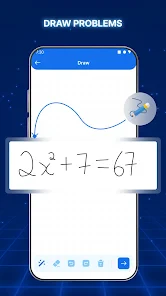
Handwriting recognition makes this workflow less reliable when a page is crowded or symbols are faint. I’d place the problem in good light, crop out unrelated work, and check that the app has read exponents, minus signs, and fractions correctly before trusting the explanation. If the expression is still misread, typing it in or rewriting it clearly is a better use of time than trying the same blurry image repeatedly.
A small but useful habit is to check the recognized expression before judging the explanation. A single misplaced minus sign can make a correct solution look nonsensical, and a fraction read as separate numbers changes the problem entirely. I would also avoid photographing a full page when only one exercise matters: isolating the question makes it easier to notice whether the symbols have been interpreted as intended.
Where It Fits in a School Week
Picture a student working through algebra after school who understands the lesson but gets stuck on one equation. A scan can offer a worked route to compare against class notes, while a quiz can help check whether the method makes sense on a fresh question. I would still keep the notebook open: writing the steps by hand reveals whether the student can reproduce the reasoning without the app beside them.
The app may suit learners who want quick explanations at home, families looking for a way to discuss a tricky exercise, and students who benefit from seeing a process broken into smaller steps. Its broad language support can also make the explanations more approachable for people who prefer studying in a language other than English. It is less suitable as the only source of instruction when a learner needs a teacher to diagnose a persistent misconception or explain why a particular method is required by their course.
For a realistic evening routine, I’d use it after the student has already tried the assigned question and marked the line where progress stopped. Scan that one exercise, compare the reasoning with the class example, then close the app and solve a nearby practice problem from the book. If the learner still cannot explain the key step, that is a signal to bring the question to a parent or teacher rather than run through more scans hoping one will make the idea click.
Why You’ll Love It
What I love about this app is its adaptability. Whether you're a middle school student or preparing for college entrance exams, the app adjusts to your level and learning pace. It’s like having a tutor that understands you and works with your strengths and weaknesses.
The app also includes a parent mode, which allows parents to track their child's progress. This feature is a game-changer, especially for those who want to be more involved in their child's education but might not have the time to sit down with them every day.
That progress view is most helpful as a conversation starter, not a substitute for looking at the actual work. A parent can ask which step felt confusing or invite the student to explain a solution in their own words. That keeps the focus on understanding rather than treating activity inside an app as proof that a topic has been mastered.
How It Compares With Other Ways to Get Help
Compared with searching the web for a worked example, a camera-based tutor can be more convenient when the exact question is in a workbook and you want to get started quickly. A textbook or teacher’s notes, though, may match the class’s notation and expected method more closely. Video lessons can be better for learning a whole topic from the beginning, while a human tutor can ask questions and adapt when the learner is confused. I see this app as a handy bridge between those options, rather than a replacement for all of them.
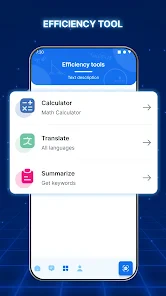
It also occupies a different role from a calculator. A calculator is better for checking arithmetic when you already know what operation to perform; a worked solution can help when the uncertainty is about the reasoning itself. Neither tool will reliably tell you whether you understand a concept well enough to use it on a differently worded question. For that, I’d try a fresh exercise without looking at the steps first.
One practical trade-off is that a fast answer can create a false sense of understanding. After reading a solution, cover it and try a similar problem from your own materials. If you cannot explain why each step works, return to the point of confusion or ask a teacher. That check helps distinguish genuine progress from simply recognizing a solution after seeing it.
Room for Improvement
While the app is pretty comprehensive, there’s always room for improvement. Occasionally, the camera feature struggles with handwriting recognition, which can be a bit frustrating. However, the developers seem committed to updates and improvements, so I have high hopes for future versions.
Another minor gripe is the occasional ad pop-ups, which can interrupt the flow of your learning experience. A premium version with an ad-free experience would definitely be a welcome addition.
These interruptions matter most during focused practice, when a student is trying to keep several steps in mind. If a scan or an ad breaks concentration, I would switch to a written example or class notes for that session instead of repeatedly reopening the app. The tool should reduce friction; when it becomes the source of it, paper is a sensible fallback.
What to Expect Before Making It a Habit
This is a free education app from Trusted Android App, with a 4.0 average from around 19,000 ratings and more than 10 million installs. It is rated for everyone, runs on Android 6.0 or later, and its current version is 1.0.46. Optional in-app purchases range from $4.99 to $199.99 per item, so I’d check the purchase details carefully before committing to anything. The app’s broad reach is encouraging, but popularity alone does not tell you whether its explanations fit your class or learning style.
For continued use, I’d keep the routine modest: bring it out for a specific sticking point, then return to independent practice. That keeps scanning from becoming the default response to every question. If ads interrupt concentration or image recognition repeatedly gets in the way, paper notes, a calculator for checking arithmetic, or help from a teacher may be less frustrating for that session.
Since the app is free to start but offers paid in-app items, I’d explore the available purchase choices before building a regular study routine around anything that costs extra. A learner who only needs occasional help may be satisfied with limited use, while someone planning to rely on it often should decide whether the ongoing experience is worth the purchase. The important point is to make that decision after testing it on real homework, not just because the first scan feels impressive.
It is also worth setting a simple boundary: use a scan after making an honest attempt, and stop once you can solve a similar question independently. That keeps the app from turning every assignment into a sequence of image checks. If a student repeatedly needs the same explanation, the better next step is to revisit the lesson or ask for personal guidance, since repeating answers may not address the underlying misunderstanding.
Month-to-Month Value and Sources of Fatigue
The app earns a lasting place only if it keeps helping with distinct sticking points rather than becoming a reflex. Its combination of scanned explanations and quizzes gives it more repeat value than a tool that only returns an answer, but repetition can still become tiring if the learner never moves from guided examples to independent work. I’d use the quiz option as a deliberate check after studying a method, not as something to tap through just to feel productive.
There are a few good reasons to take a break from it: repeated recognition errors, interruptions that break concentration, or explanations that do not align with the way a class teaches a topic. In those moments, a worked example in the textbook, a teacher’s notes, or a direct question to someone who can respond to the student’s specific confusion may be more useful. Choosing another resource is not a failure; it is a practical way to keep the learning moving.
For a learner who mainly needs occasional homework support, the free entry point and quick access can make the app convenient to keep around. It is less compelling for someone who wants a structured course, a carefully sequenced curriculum, or a tutor who can notice confusion and ask follow-up questions. The distinction matters: this is a handy helper for particular problems, not a complete plan for learning mathematics.
Long-Term Verdict
Its lasting value depends on whether the explanations help you solve the next problem without assistance. The quizzes can provide a useful check, but the real test is applying the same idea to a new exercise. For occasional homework support, that combination of scan, explanation, and practice can earn a place on your phone; for a complete course plan or personal teaching, I’d choose a more structured resource alongside it.
In conclusion, the app is a fantastic resource for anyone needing a little extra help with math. It’s not just about getting the right answers but truly understanding the material. With its interactive features and personalized approach, it’s a tool that can genuinely enhance your learning experience. So next time you’re stuck on a math problem, instead of feeling overwhelmed, just pull out this app and let it guide you to the solution.
AI Tutor - Math Homework Help Frequently Asked Questions
Does AI Tutor - Math Homework Help support different languages?
Yes. AI Tutor - Math Homework Help is described as supporting more than 150 languages, which may help learners who want to read explanations in a language they are comfortable with. This can be especially useful when a math question is difficult to follow in another language. The app is focused on helping users work through problems, so language support may make its explanations more accessible.
Can I use AI Tutor - Math Homework Help to check my homework, not just get answers?
The app is intended to do more than return a final answer: it provides step-by-step solutions and explanations that can help you review how a problem is solved. You can compare those steps with your own work to spot where your reasoning differs. Treat the explanation as a study aid and take time to understand the method, rather than copying a result without learning the underlying concept.
Is AI Tutor - Math Homework Help useful for learners who are studying in a language other than English?
Its store summary highlights support for more than 150 languages, which may make the app useful to learners who prefer help in a language other than English. The app also focuses on explaining solutions step by step, so language support can matter when following the reasoning behind a calculation. If you are considering it for study, choose the language that makes the explanations easiest for you to understand.
What devices and operating systems can run AI Tutor - Math Homework Help?
AI Tutor - Math Homework Help is an Android education app that requires Android 6.0 or later. Before downloading, check your device’s Android version and available storage so the installation can complete smoothly. The app is free to download, though it also offers in-app purchases. Its age rating is Everyone, making it accessible to a broad range of learners.
What is AI Tutor - Math Homework Help?
AI Tutor - Math Homework Help is an educational app designed to assist students in understanding and solving math problems. It uses artificial intelligence to provide step-by-step solutions and explanations for a wide range of math topics. This app aims to make learning math easier and more interactive for students of all ages. Its store summary highlights scanning problems and support for more than 150 languages, which can be useful for learners who prefer explanations in different languages.
Pros
- Real-time problem solving.
- Interactive learning sessions.
- Wide range of math topics.
- User-friendly interface.
- 24/7 availability.
Cons
- Requires internet connection.
- Limited free features.
- Occasional bugs.
- Ads in free version.
- High subscription cost.
- Category
- Education
- Version
- 1.0.46











