Fotor - AI Photo Editor
- 20.44K
- 4.3
- Installs
- 10.00M
- Price
- Free

Screenshots






Analysis by Reviewed
Ever wondered how to spruce up your photos without having to be a Photoshop wizard? Well, let me introduce you to the AI Photo Editor, Collage-Fotor. This app is like having a mini design studio right in your pocket, and trust me, it’s a game-changer for anyone who loves to play around with their photos.
Unleashing Your Creativity
The first thing you’ll notice about AI Photo Editor, Collage-Fotor is its super user-friendly interface. As someone who gets easily overwhelmed by too many options, I appreciated how intuitive everything felt. You don’t need a degree in graphic design to navigate this app. Seriously, even my grandma could use it, and that’s saying something!
Simplified Editing
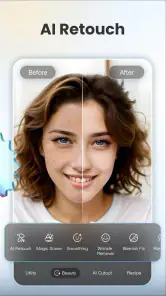
Let’s dive into some of the features, shall we? The app offers a variety of tools that are perfect for editing. Whether it’s adjusting brightness, contrast, or saturation, it’s all just a tap away. And if you’re like me and sometimes struggle with getting the perfect lighting, the auto-enhance feature is a lifesaver. It’s like having a magic wand for your photos.
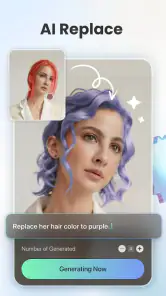
What’s really cool is the app’s AI capabilities. It can automatically detect the subject of your photo and suggest edits that make your image pop. I tried it on a picture of my dog, and let me tell you, it looked like it was straight out of a professional shoot.
Collage Crafting
Now, onto one of my personal favorite features – collage making. We’ve all been there, trying to fit a bunch of photos into one Instagram post. Well, this app takes the hassle out of creating collages. With countless templates and layouts, you can easily drag and drop your photos to tell your story.
And if you’re looking to add a bit of flair, the stickers and text options are a nice touch. Whether it’s a birthday collage or a travel diary, you can personalize it to your heart’s content. Plus, the app updates regularly with seasonal templates, which is neat if you want to keep things fresh.
Sharing Made Easy
Once you’ve got your masterpiece ready, sharing it is a breeze. The app lets you post directly to social media platforms like Instagram, Facebook, and Twitter. No more saving, switching apps, and uploading – it’s all streamlined, making it so much easier to share those special moments with friends and family.
On top of all this, the app is free to download, though there are some in-app purchases if you want to unlock additional features. Personally, I found the free version to be more than sufficient for my needs, but it’s nice to have the option to upgrade if you’re really into your photo editing.
In conclusion, AI Photo Editor, Collage-Fotor is a fantastic app for anyone looking to enhance their photos with ease. Its combination of powerful editing tools, AI features, and collage capabilities make it a must-have for photo enthusiasts. So, go ahead and give it a try – I promise, your Instagram feed will thank you!
Pros
- User-friendly interface
- easy to navigate.
- Wide range of editing tools available.
- Quick and efficient photo processing.
- Variety of collage templates offered.
- High-quality output results.
Cons
- Contains in-app purchases and ads.
- Limited features in the free version.
- Requires internet for full functionality.
- Occasional app crashes reported.
- Some features are not intuitive.

- Category
- Photography
- Version
- 8.0.11.3











