AdaptedMind Math
- 232.00
- 4.5
- Installs
- 100.00K
- Price
- Free

Screenshots
Analysis by Reviewed
I find AdaptedMind Math most useful when a child needs regular math practice but tends to switch off with worksheets. It turns practice into an app-based activity and adjusts the learning pace to the child, which can make it easier to keep going without an adult planning every question. That said, I’d treat it as a supplement to learning, not a replacement for a teacher or a chance to talk through a difficult idea.
How the learning experience fits everyday routines
AdaptedMind is an education app from AdaptedMind, aimed at children and rated for Everyone. It was released on May 28, 2024, and version 2.51125.09 requires Android 7.0 or later. The app is free to install, with in-app purchases listed from $9.95 to $9.99 per item. Its 4.5 average from around 2,000 ratings and more than 100,000 installs suggest that families have given it a meaningful try, but popularity alone won’t tell you whether its approach suits your child.
The practical value is in having math activities ready when a short practice session makes sense. For example, after school, a parent could set aside a brief stretch of time for a child to work through an activity, then ask what felt easy and what caused trouble. That follow-up matters: an adaptive app can guide practice, but a child may still need someone to explain why a step works rather than simply try another problem.
A useful way to judge the fit is to watch how your child responds to a wrong answer. If they stay curious and keep trying, the app’s interactive format may help sustain attention. If they become frustrated when a concept needs a different explanation, pause the session and work through an example together. I would use that moment as a signal about what to review, rather than expecting the app to resolve every learning difficulty on its own.
Where the price makes sense—and where it needs a closer look
The free starting point makes it reasonable to explore the experience before deciding whether it belongs in your routine. Paid in-app items are a separate consideration, so I’d check the purchase details in the app and decide what, if anything, is worth paying for before a child uses it independently. The listed price range is not the same as a complete description of what each purchase includes, so I wouldn’t assume that every lesson or feature is covered by one payment.
Compared with free worksheets or a general math game, this app’s appeal is the combination of guided practice and personalization. Worksheets can be easier when an adult wants to choose exactly which skill to review, while a general game may be better when the goal is casual entertainment. Here, the trade-off is that children follow an app-led learning experience, so it may be less suitable for families who want full control over the sequence or prefer screen-free practice.
Who is likely to get the most from it?
I’d consider it for a child who benefits from interactive repetition, needs a low-pressure way to practice, or is more willing to engage with math when it feels like an activity instead of a page of problems. It can also help a parent spot which areas deserve a conversation, especially if the child can describe what they found tricky after a session.
More From Our News Desk

Clash of Clans Is Won Between the Battles

Android Auto Makes the Case for Quieter Car Software

MobiOffice: Transforming Mobile Productivity with Seamless Integration

EA SPORTS FC™ Mobile Soccer: Redefining Mobile Sports Gaming

How Microsoft OneDrive Became a Mobile Productivity Giant

How Google Translate Breaks Language Barriers Effortlessly
It may not be the right choice for a child who needs close, real-time instruction, or for a family looking for a complete, teacher-led curriculum. In those cases, a tutor, classroom support, or a parent-selected lesson may be a better match. I’d also skip the paid items until you’ve seen how the free experience fits your child and checked the purchase terms for yourself.
For a balanced routine, I’d keep sessions short and end by asking the child to explain one answer in their own words. That small step helps reveal whether they understood the idea or merely completed an activity. If the explanation is shaky, switch to a worked example or a paper exercise; if they can explain it, the app has served as useful practice rather than just screen time.
Engaging Learning Experience
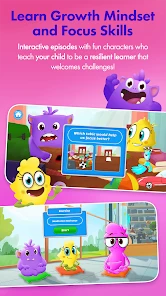
The first thing that caught my attention with AdaptedMind Math is its engaging approach to math. Seriously, who knew math could be this fun? The app is designed to adapt to your child's learning pace, ensuring that they're neither bored nor overwhelmed. It’s like having a personal math tutor in your pocket!
The lessons are broken down into bite-sized chunks, making it easier for kids to digest complex concepts. Plus, the app uses a lot of interactive elements like quizzes and puzzles, which is a huge win in my book. I’ve seen kids actually get excited about solving math problems, and that’s not something you see every day.
Rewards and Motivation
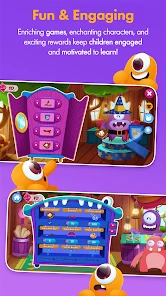
Another aspect I absolutely love is the reward system. Kids earn badges and certificates as they progress, which keeps them motivated and eager to learn more. It’s a smart way to encourage continuous learning without making it feel like a chore. Trust me, those little badges go a long way in boosting a child’s confidence.
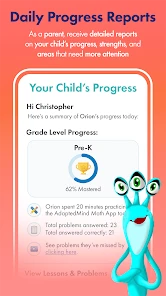
And let’s not forget the personalized feedback. The app provides insights into your child's strengths and areas for improvement, which is incredibly helpful for parents who want to stay involved in their child’s education. It’s like having a window into your child’s learning journey, allowing you to support them every step of the way.
A Versatile Tool for Home and School
What’s really cool about AdaptedMind Math is its versatility. Whether you’re homeschooling or just looking for some after-school practice, this app fits the bill perfectly. Teachers can also use it as a supplemental tool in the classroom, which speaks volumes about its educational value.
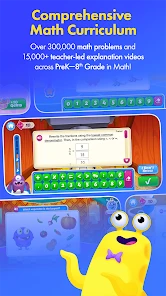
The app covers a wide range of topics tailored to different grade levels, from basic arithmetic to more advanced concepts. So, whether your child is mastering addition or tackling fractions, AdaptedMind Math has got you covered.
In conclusion, AdaptedMind Math is more than just an app; it’s a comprehensive learning platform that makes math approachable and fun. If you’re looking for a way to make math less intimidating and more enjoyable for your child, this app is definitely worth checking out. So go ahead, give it a try, and watch your child’s math skills soar!
Making a short session genuinely useful
I get the best sense of whether a learning app fits by looking beyond whether a child taps through the activities. A practical routine is to let the child work independently for a little while, then ask them to choose one problem or idea to explain aloud. This avoids turning every session into a test. It also gives a parent a quick way to notice whether the child understands the reasoning or has simply found a way to reach an answer.
For instance, a child might open the app after a snack while a parent handles dinner. When the session ends, a simple question such as “Which part made you stop and think?” is more useful than asking only whether they got everything right. If the child can point to a particular challenge, the adult can decide whether to revisit it on paper, discuss it together, or leave it for another day. That makes the app a starting point for a helpful conversation rather than a substitute for one.
There is also a useful distinction between practice and explanation. Repeating questions can build familiarity, but a child who has misunderstood the underlying idea may need a different example or a slower explanation. I would avoid extending a session just to finish a streak of activities if frustration is growing. A short pause, followed by a simple paper example, can be a better learning choice than insisting that the child keep going on-screen.
Personalization is helpful, but it is not the whole lesson
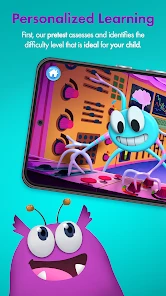
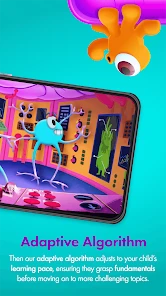
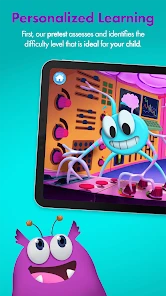
The adaptive approach is most valuable when a child’s confidence varies from topic to topic. A student who finds one skill comfortable and another uncertain may benefit from practice that responds to their progress instead of moving through a fixed worksheet at the same speed every day. This can reduce the awkward feeling of being given work that is obviously too easy or too hard. It is still worth checking in, because a change in pace does not necessarily explain why a concept is difficult.
One small but useful habit is to ask the child to name the kind of help they want before you step in. They might want a hint, a fresh example, or simply a moment to try again. That keeps the adult from taking over the activity and lets the child practise asking for the support they need. If they cannot describe what is confusing, that is a clue that a conversation or a teacher’s explanation may be more valuable than additional questions.
Personalized feedback can also help families make practice less random. Rather than repeating the same favorite activities, a parent can use the child’s response to choose a sensible next step: revisit a shaky idea, practise a skill that is almost comfortable, or stop while the child still feels successful. I would treat those insights as prompts for a discussion, not as a formal assessment or a complete picture of school progress.
Choosing between an app, worksheets, and direct help
Families have several ways to add math practice, and each solves a different problem. Paper worksheets make it easy for an adult to select a narrow skill and see the child’s written steps. A teacher or tutor can respond immediately when the child’s reasoning goes off track. A broad entertainment game may be a lighter choice when the aim is simply to make numbers feel less intimidating. AdaptedMind Math sits between these options: it offers a structured digital activity with an adaptive element, while still leaving room for adult support.
That middle ground is useful for a child who can work with some independence but needs encouragement to begin. It is less convincing if the child relies on a person to explain each instruction or becomes distressed by mistakes. In that situation, a parent-selected exercise or a direct conversation with a teacher gives more control over the pace and the wording. The right comparison is not which format is best in every home, but which one addresses the child’s current obstacle.
Screen time is another real trade-off. If a child already spends much of the day on a device, adding an educational activity may still feel like more of the same. A paper problem, a conversation using everyday objects, or a break from study could be a better fit on some afternoons. I would use the app when its interactivity helps the child start or stay with practice, not simply because a digital format is available.
Questions worth settling before a child uses it alone
Parents often want to know whether the free app is enough to judge the experience. I would begin with what is available at no charge and let the child try a small amount of practice before considering a purchase. Because paid items are listed separately, check the purchase screen and its terms rather than assuming that a single payment unlocks every part of the experience. If you are unsure what an item provides, it is sensible to wait until that is clear.
Another reasonable question is whether this can replace tutoring or classroom instruction. I would not use it that way. It can support practice and make it easier to notice which ideas might need attention, but it cannot take the place of a teacher who can diagnose a misconception, adapt an explanation in the moment, and connect the work to a child’s broader learning needs.
Families may also wonder how to tell whether the app is helping. Look for more than time spent or completed activities. Notice whether the child can explain a step, approach a similar question with less hesitation, or identify what still feels confusing. Those signs are more informative than a reward by itself. If the child enjoys the activity but cannot explain the math, keep the fun element but add an adult-led example or a different form of practice.
Finally, consider the child’s independence and your own routine. If an adult can check in briefly and the child is comfortable trying a problem before asking for help, the app may fit neatly into a home practice habit. If the child needs sustained one-to-one attention, or if using the app reliably leads to arguments about stopping or purchases, it may add friction instead of solving a problem. A good learning tool should make practice more manageable for the family, not create a new daily negotiation.
My buy-or-skip judgement
I would try the free experience if I had a child who avoids worksheets but is open to interactive math practice. The app’s adaptive approach, short activities, and motivational elements give it a clear role as a practice companion, especially when a parent can make time for a quick follow-up conversation. The free entry point is a sensible reason to test that fit before spending anything, while the paid items deserve a deliberate look rather than an automatic purchase.
I would skip it, or at least keep it as a secondary option, for a child who needs a person to teach each new concept, a family that wants a fully controlled lesson sequence, or anyone seeking a complete replacement for school support. In those cases, paper exercises chosen for a specific need, direct help from a teacher, or a tutor may offer more useful guidance. For a child who mainly needs a nudge to practise and a more inviting alternative to a worksheet, though, I think it is worth a careful try.
AdaptedMind Math Frequently Asked Questions
Is AdaptedMind Math free to download, and what may require payment?
AdaptedMind Math is free to download, so families can install the education app without paying upfront. It also offers in-app purchases, with items listed in the range of $9.95 to $9.99. Check the purchase details in the app before confirming, especially if a child will be using the device, and review your device’s purchase controls to avoid unexpected transactions.
What devices and operating systems can run AdaptedMind Math?
AdaptedMind Math is available for mobile devices and requires operating system version 7.0 or later. Before downloading, check the software version on the device your child will use and make sure it meets that minimum. Keeping the device’s software current can also help with app compatibility. The app is designed for learning on a mobile device, making it possible to access math activities without relying only on printed practice.
What is AdaptedMind Math and how does it work?
AdaptedMind Math is an educational app designed to enhance children's math skills through engaging and interactive lessons. The app adapts to each child's learning pace, ensuring they grasp concepts effectively. With a wide range of topics from basic arithmetic to advanced math, the app provides personalized learning experiences, using fun games and exercises to keep kids motivated and improve their math proficiency.
Is AdaptedMind Math suitable for all age groups?
Yes, AdaptedMind Math is designed to cater to a wide range of age groups, from kindergarten to middle school students. The app offers age-appropriate content and adjusts the difficulty level based on the child's progress. It provides a comprehensive curriculum that covers various math topics, making it a versatile tool for learners at different stages of their educational journey.
What features does AdaptedMind Math offer to enhance learning?
AdaptedMind Math offers several features to enhance learning, including interactive video lessons, practice questions, and progress tracking. The app uses adaptive learning technology to customize lessons according to each student's needs. Additionally, it includes motivational elements like rewards and badges to encourage continuous learning, ensuring children remain engaged and motivated to improve their math skills.
Pros
- Fun and interactive learning experience.
- Adaptive difficulty adjusts to child's level.
- Engaging rewards and badges for motivation.
- Comprehensive curriculum coverage.
- User-friendly interface for kids.
Cons
- Subscription required for full access.
- Limited offline availability.
- May require parental assistance initially.
- Interface can be cluttered on small screens.
- Some content may be repetitive.
- Category
- Education
- Version
- 2.51125.09











