Access Corrections
- 1.09K
- 3.5
- Installs
- 1.00M
- Price
- Free

Screenshots
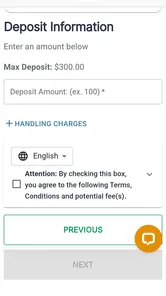
Analysis by Reviewed
When someone I care about is in a correctional facility, even a routine money transfer can take more thought than I expect. I see Access Corrections as a practical place to start when my main goal is to send financial support through a phone, rather than work out the process from scratch. The important thing is to treat it as a specific service for correctional facilities, not as a general money-transfer app that will suit every recipient or every need.
Start by checking that it fits your situation
Before installing or creating an account, I’d first confirm that the facility accepts Access Corrections for the kind of transaction I want to make. That simple check can save time: an app can be easy to use and still be the wrong route for a particular person or facility. I’d also ask what the recipient needs the funds for, since a transfer intended for one account or purpose may not solve a different need.
The app is most useful when the person sending money is not nearby, cannot make an in-person visit, or wants a phone-based option for recurring support. It is less compelling for someone who only needs to pay a friend or relative outside the correctional system; a familiar general payment service is usually a better fit for that. I would not assume that being in the finance category makes it interchangeable with a bank transfer or peer-to-peer wallet.
What is Access Corrections All About?
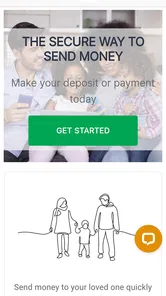
Imagine this: I want to send money or a message to someone in a correctional facility, but the process is more cumbersome than a cat stuck in a tree. That’s where Access Corrections comes in. This app is designed to facilitate money transfers, messaging, and gift services in a rather straightforward manner.
Its clearest role is financial: the app is in the finance category, and its central purpose is to help people send funds to a loved one. Keefe Group LLC develops it, and its current version is 4.1.0. The app is free to install, rated for Everyone, and has been available since February 3, 2017. It has reached over a million installs, with an average rating of 3.5 from around 3,700 ratings. Those figures suggest it is established, but they are not a guarantee that a particular facility or transaction will fit your situation.
Getting Started with Ease
Installing the app is a breeze, and setting up an account is as simple as pie. The user interface is intuitive, which means you don’t have to be a tech wizard to navigate through it. Once you’ve set up your account, the app guides you through the process of linking your payment methods, making the entire experience smooth sailing.
For a first transfer, I’d approach setup as a careful check rather than a quick tap-through. Make sure you have the recipient’s details exactly as the facility requires them, and review every confirmation screen before submitting payment. In this kind of service, a small mismatch can turn an otherwise easy workflow into a support problem. It’s also sensible to keep your confirmation information somewhere you can find it later, especially if you need to ask about a transaction.
More From Our News Desk

 Bolt: Request a Ride
Bolt and the Shift from One-Tap Rides to More Legible Trips
Bolt shows how ride-hailing is shifting from a one-tap taxi request toward a more legible, choice-driven trip, while leaving the hardest questions of price and reliability unresolved.

 Farm Land - Farming life game
Farm Land Review: A Small Island Farm with a Satisfying Loop
A bright, breezy island farm turns a few quick chores into a satisfying cycle of planting, harvesting, expanding, and deciding what to build next.

 Android Auto
’s Community Takes Shape in the Passenger Seat
Its most valuable network is not a public feed but a shared set of routes, voice habits, app integrations, and advice that make driving less isolating—and sometimes more complicated.

 My Talking Angela
 Makes the Virtual Pet Feel Personal
A polished pet-raising game built on small rituals, playful customization, and a character who gives everyday screen time a surprisingly personal rhythm.

 Google Translate
 Review: A Pocket Tool for the Small Frictions of Travel
From menus and signs to quick conversations, Google Translate earns its place by cutting the little delays that make unfamiliar language feel like a barrier.

 Shazam: Find Music & Concerts
Shazam’s Best Trick Is Turning a Song Into a Night Out
A few seconds of recognition can settle an argument, rescue a half-remembered chorus, and point toward a live show. Shazam’s real trick is what happens after the match.
Latest News



A calmer way to handle the first payment
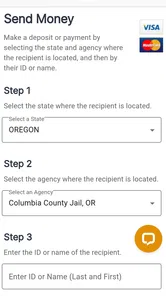
I’d choose a moment when I’m not rushed to make the first transfer. Have the recipient information ready, read each screen, and pause before the final submission to compare the details with what the facility requires. This is particularly useful if someone else has passed along the recipient’s information: copying it directly from a reliable source is safer than relying on memory or an old message.
A useful habit for repeat senders is to keep a private note of the date, intended recipient, amount, and confirmation reference for each transfer. That is not a substitute for the app’s own records, but it gives me a simple timeline if I need to explain a payment or distinguish it from an earlier one. I would avoid storing payment credentials or sensitive personal details in an unsecured note.
The Handy Features
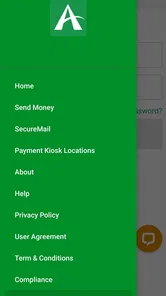
One of the standout features of Access Corrections is the range of services it offers. You can send money directly to an inmate’s account with just a few taps. Plus, the app provides options to send e-messages, which is a great way to stay in touch without the hassle of snail mail. There’s also a feature to send gift packages, which can be a delightful surprise for your loved one behind bars.
These options are useful, but I would keep the different purposes separate when planning. If my immediate need is financial support, I focus first on the funds workflow and verify the recipient before moving on to other services. Messaging or a gift can be a welcome extra, but they are not substitutes for checking that a payment is directed correctly. A family member who sends money on a regular schedule may find it helpful to decide in advance what they can afford, then use the app only for that planned amount instead of making rushed decisions during a stressful moment.
A realistic example is a relative who wants to help before the weekend but cannot visit in person. They can use the phone to initiate a transfer, then retain the confirmation and let the recipient know through an appropriate channel that support was sent. I would still avoid promising that funds will be available at a particular moment unless the app or facility confirms the timing; planning around a buffer is wiser than relying on an urgent transfer arriving instantly.
Plan around timing and keep your own record
For a recurring routine, I would treat the app as the place to start a transaction, not as a reason to wait until the last possible moment. If a particular expense matters to the recipient, sending support with some breathing room is more sensible than assuming every transfer will be processed instantly. The recipient’s needs and the facility’s procedures should guide the schedule, rather than a guess about how quickly a payment will appear.
It is also worth deciding who in a family is responsible for sending support. When several relatives act independently, they can lose track of what has already been sent or make plans based on different assumptions. A shared, simple record of completed transfers can prevent confusion, while keeping account access and payment details private. This small bit of coordination is more useful than repeatedly opening the app just to check what others may have done.
Security is another highlight. With all the sensitive information being handled, the app ensures that all transactions are secure. It uses encryption technology to keep your data safe, giving you peace of mind.
Where It Fits—and Where It Doesn’t
Compared with ordinary peer-to-peer payment apps, Access Corrections is aimed at a much narrower job: supporting someone connected to a correctional facility. A general payment app may feel more familiar, but it cannot be assumed to route money to the right facility account. Conversely, this app is not the obvious choice for sending money to friends or family outside that setting. The right option depends on the recipient and the facility’s accepted process, so I would check that first rather than choose by habit.
The app is most relevant for family members and friends who need a mobile way to provide financial support and value having related communication or gift options in one place. It is less suitable if you only need a general-purpose payment service, if you prefer handling every transaction in person, or if the facility involved does not support the service you need. Before relying on any feature, confirm that it applies to the person and location you have in mind.
Choosing between the app and other routes
For someone who already has a facility-specific way to send funds and is comfortable using it, switching just for the sake of using a phone app may offer little benefit. I’d compare the practical steps rather than the interface alone: whether the route is accepted for the recipient, how clear the payment confirmation is, and whether it suits the sender’s routine. If a facility directs families to another process, following that guidance is more important than preferring a particular app.
On the other hand, someone who handles support from home may appreciate having a focused mobile option instead of making an in-person trip or trying to adapt a general wallet to a specialized transfer. The trade-off is that this focus makes the app less useful outside its intended context. I see that narrowness as a sensible design boundary, not a reason to use it for unrelated payments.
Room for Improvement
While Access Corrections does a commendable job, there’s always room for improvement. The app could benefit from a few tweaks in its customer service area. Users have reported delays in responses, which can be frustrating when you’re in need of immediate assistance. A quicker support response time would certainly enhance the user experience.
That limitation matters most when a payment needs attention, so I would not use the app as the only plan for a last-minute obligation. Check the details before submitting, save the transaction confirmation, and allow time to resolve a question if one comes up. Those habits cannot remove support delays, but they can make it easier to explain what happened and avoid repeating a transaction unnecessarily.
If a transaction looks uncertain, I would resist the urge to submit it again immediately. First, check the confirmation and any available transaction information, then contact the appropriate support route if the status still needs clarification. Sending a duplicate out of worry can create a second issue rather than solve the first. Keeping a clear record of what I submitted makes that conversation more focused.
Moreover, while the app is generally user-friendly, some might find it a tad overwhelming at first glance due to the plethora of options available. A more guided onboarding process could help new users get acquainted with the app more efficiently.
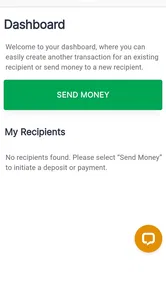
For a new user, the practical way to reduce that initial clutter is to begin with the task they actually need—usually finding the correct recipient and sending funds—rather than exploring every service at once. If your priority is only occasional financial help, you may never need to use the other options. If you expect to use messaging or gifts too, take time to understand each path separately so you do not confuse a communication feature with a payment step.
What to Expect as the App Evolves
The app has been available since 2017 and now sits at version 4.1.0, so it has continued through multiple stages of development. That history is useful context for existing users, but it does not by itself tell me which screens or workflows changed between versions. I would judge an update by whether it makes the core tasks clearer and more dependable, not simply by the version number.
If you already use it, review the recipient and payment details each time rather than assuming an older routine will always apply unchanged. If you are deciding whether to start, focus on whether the service matches the facility and the kind of support you need. For ongoing use, clearer guidance around transaction status and responsive help would be the improvements I would most want to see; until then, careful record-keeping remains a sensible part of the process.
What I would watch in everyday use
For existing users, the most meaningful signs of progress would be practical ones: clearer explanations during a transfer, an easier way to understand its status, and help that is responsive when a payment raises a concern. Those are the details that affect confidence more than a new-looking screen. I would welcome changes that reduce uncertainty without making the basic job harder to find.
When an update appears, I’d read its notes and then check that my usual steps still match what the app shows. I would not assume that a familiar workflow or saved habit guarantees that every detail is unchanged. This is a modest precaution, but it matters when the task involves identifying a specific recipient and directing financial support correctly.
Final Thoughts
In a nutshell, Access Corrections is a handy tool for anyone looking to maintain contact or provide support to someone in a correctional facility. Its straightforward features and focus on security make it a reliable choice. Despite a few hiccups in customer service, the app’s overall functionality is commendable.
So, if you find yourself needing to reach out to someone in such facilities, giving Access Corrections a try might just make the process less of a headache. Who knew connecting with loved ones could be this seamless?
Who I’d recommend it to
I’d recommend it to someone who has confirmed that the relevant facility supports the service, wants to send financial support from a phone, and is comfortable checking details carefully before paying. The messaging and gift options may be convenient for a person who wants those services nearby, but I would treat each as its own task and confirm suitability before relying on it.
I’d suggest looking elsewhere if you need a general payment app, strongly prefer face-to-face handling, or need a guaranteed immediate resolution when something goes wrong. The app can make a specialized process more accessible, but it cannot remove the need to verify the recipient, plan around timing, or keep a record. For me, that makes it a useful option when the fit is right—not a one-size-fits-all answer.
Access Corrections Frequently Asked Questions
Is Access Corrections free to download, and what should I know before creating an account?
Access Corrections is free to download and is intended for people who want to send funds to a loved one. You will need to create an account to use its services, so be ready to provide the information needed for registration and transactions. Before getting started, check that the correctional facility associated with your loved one is supported and review the details of each transfer in the app.
What is Access Corrections and how does it work?
Access Corrections is a mobile application designed to facilitate easy communication and fund transfers for individuals who have loved ones in correctional facilities. Through the app, users can send money, communicate via secure messaging, and access various correctional services. By creating an account, users gain streamlined access to these services, making the process more efficient and user-friendly.
Is Access Corrections secure for financial transactions?
Yes, Access Corrections is designed with robust security measures to ensure the safety of your financial transactions. The app uses encryption technology to protect your data and personal information. Additionally, Access Corrections complies with industry standards and regulations to provide a secure platform for sending money and managing account activities.
Can I track the status of my transactions in Access Corrections?
Absolutely, Access Corrections provides users with the ability to track the status of their transactions directly within the app. Once you have completed a transaction, you receive updates and notifications regarding its progress. This feature helps you stay informed about the status of your money transfers and ensures that your transactions are completed smoothly.
What types of payments does Access Corrections accept?
Access Corrections accepts a variety of payment methods to accommodate user preferences. Users can typically pay using major debit and credit cards, including Visa and MasterCard. Some facilities may also allow payments through alternative methods like bank transfers, though it's advisable to check specific requirements for the facility you are dealing with.
Pros
- User-friendly interface for easy navigation.
- Secure payment options for peace of mind.
- Fast processing times for transactions.,24/7 customer support availability.
- Supports multiple payment methods.
Cons
- Limited to specific correctional facilities.
- Occasional app crashes reported.
- Requires stable internet connection.
- Some features need improvement.
- High transaction fees.