AARP Now
- 7.50K
- 4.7
- Installs
- 5.00M
- Price
- Free

Screenshots



Analysis by Reviewed
I find shared-device use is where a lifestyle app either becomes genuinely handy or starts to feel awkward. Imagine a couple checking the day’s headlines over breakfast, then one person looking for a nearby event while the other reads an article. AARP Now can put those kinds of interests in one place, but I’d treat it as a shared window onto AARP content, not as a shared personal account or household organizer.
Keep personal choices personal
On a phone or tablet used by more than one person, it’s worth agreeing who is signed in and whose preferences are shaping what appears. A feed that feels relevant to one reader may not suit another, and account-based benefits are best approached as belonging to the person entitled to use them. I would avoid assuming that one person’s saved details or membership access automatically carries over to everyone else. If several people want their own experience, separate devices or carefully managed sign-in habits are a clearer arrangement.
That boundary matters most when someone is browsing discounts or member information. Before acting on an offer, check whose membership it applies to and whether its terms fit the person using it. The app can help surface things to investigate, but I would still read the details before making plans or expecting a saving.
Use it to coordinate, not to manage everyone
A practical household routine is to use the app as a conversation starter: one person spots an event, shares the idea in person, and the two decide whether it suits their schedule. That is different from relying on it to coordinate calendars, send reminders to family, or keep everyone’s plans synchronized. I would use the tools the household already trusts for those jobs and let AARP Now serve as a place to discover possibilities.
It can also be useful to browse together once in a while rather than pass a phone back and forth without context. One person can look through articles while the other checks what local activities might be interesting. This makes the app’s broad mix more useful, but it also reveals a trade-off: a wide selection is convenient when you want to explore, yet less efficient if you arrive with one very specific task.
Who is likely to get the most from it?
I’d consider it if you already follow AARP, want a convenient route to its news and events, or are curious about member benefits. AARP Now is a free lifestyle app from AARP, with optional in-app purchases shown at $20 to $55 per item. It has an Everyone age rating, though the most relevant content and membership-related features will naturally depend on the adult using it. The app has a 4.8 average from around 57,000 ratings and more than a million installs, which suggests it has found an audience, but those figures can’t tell you whether its particular mix is right for your household.
If your main goal is simply to read news from many publishers, a general news reader may offer a broader range of sources. If you only need event listings, a local events service may be more direct. The reason to choose this app is its AARP-centered combination, not an expectation that it will replace every news, planning, or deal-finding tool you use.
More From Our News Desk

Weather by Xiaomi Review: Clear at a Glance, Less Clear Up Close

X Under Pressure: Can It Recover When Posting Goes Wrong?

Clash of Clans Is Won Between the Battles

Android Auto Makes the Case for Quieter Car Software

MobiOffice: Transforming Mobile Productivity with Seamless Integration

EA SPORTS FC™ Mobile Soccer: Redefining Mobile Sports Gaming
A useful household routine
For households with one shared tablet, I’d make the app part of a low-pressure browsing routine rather than leave it open as a source of everyone’s daily updates. For example, after breakfast, one person can scan the articles that interest them and point out a local activity worth checking. The other person can then review the event details independently before deciding. That simple handoff keeps discovery collaborative while leaving personal choices and final decisions with each reader.
This approach is especially useful when family members have different interests. One may be drawn to practical information, another to a possible outing, and neither needs to treat the same feed as a complete picture of what matters to them. I’d also avoid turning a shared device into the household’s only place to remember an event: once everyone agrees on a plan, put it in the calendar or communication tool they already use.
What the app can and cannot settle
AARP Now works best as a starting point for finding material to read or something to investigate. An article can prompt a conversation, while an event listing can give a household an idea for a day out. But discovering a possibility is not the same as confirming that it fits everyone’s schedule, interests, or membership situation. I’d treat any listing or benefit as an invitation to check the relevant details, not as a completed plan.
That distinction also helps answer a common practical question: can it replace a family calendar or a general news service? I wouldn’t use it for either job. Its value is the AARP-oriented mix, while a shared calendar is better for coordinating commitments and a broader news reader is better if you want coverage from a range of publishers. Keeping those roles separate makes the app easier to use without expecting it to do more than it is designed to do.
Have you ever had one of those days where you just can't seem to keep track of everything? From health tips to fascinating articles, it feels like there's always something slipping through the cracks. Well, hold onto your hats because I've got just the app for you! Let's dive into the delightful world of AARP Now and see what makes it tick.
What's the Buzz About?
So, first things first, what exactly is AARP Now? Well, if you're over 50, this app is like your personal assistant that fits right in your pocket. It's designed to bring you everything AARP offers, from the latest news and events to member benefits and even local happenings. It's like having a concierge, newsstand, and event planner all rolled into one. And trust me, it's super easy to navigate!
Features That Stand Out
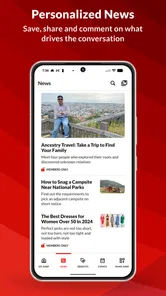
Alright, let's get into the nitty-gritty. One of the standout features of AARP Now is its news feed. You'll get a personalized stream of articles that cater to your interests. Whether you're into health, money, or even travel, there's something for everyone. Plus, the app updates in real-time, so you're always in the loop.
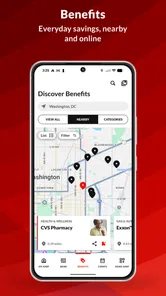
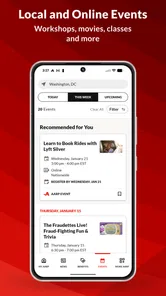
Another cool aspect is the events section. I love how it keeps you connected with local events that you might not have known about otherwise. There's always something happening, and this app makes sure you don't miss out. Plus, if you're a member, you can snag some sweet discounts and benefits. Who doesn't love a good deal?
Using it in everyday life
For a realistic example, imagine having a quiet moment before running errands: you skim an article, notice an event that could suit the weekend, and bring it up with someone at home before changing plans. That’s a useful discovery flow, but I wouldn’t count on the app to settle logistics. Check event details before leaving, and use your usual calendar or messaging method to confirm the time and who is going.
For a more focused visit, I’d start with the task rather than browse every section. If I want an article, I’d open the news feed; if I’m looking for an outing, I’d check events first. This small habit helps keep a broad app from turning into a long scroll. If neither route gives you what you need, switching to a specialist source is sensible rather than assuming the app is meant to cover every local listing or every topic equally well.
What to know before relying on it
Personalization can make repeat visits feel more relevant, but it also means the experience may reflect one person’s interests more than another’s on a shared device. I’d occasionally pause and ask whether the feed is still useful, especially if the phone changes hands in the household. A tailored stream is a convenience, not a guarantee that every important story or event will appear.
The app is free to install, and its current version is 4.5.0; it was released on April 29, 2011, and supports iOS 9 or later. That makes it worth checking compatibility on an older device before planning to use it there. The key question for a newcomer is whether AARP’s mix of news, events, and benefits matches what they actually want to check regularly. If not, a dedicated news app or local event source may be less cluttered.
Why You'll Love It
Now, let's chat about why this app might just become your new best friend. For starters, it's incredibly user-friendly. The interface is clean and intuitive, meaning you won't be fumbling around trying to find what you need. Everything is right where you'd expect it to be.
Another reason to fall in love with AARP Now is its focus on personalization. The app learns your preferences over time, so the more you use it, the more tailored your experience becomes. It's almost like the app knows you better than you know yourself!
Age, trust, and choosing the right reader
The Everyone rating is useful context for households deciding whether an app is appropriate to have on a shared device, but it doesn’t mean every section will be equally relevant to every age group. I’d think of AARP Now as an adult-oriented resource whose usefulness depends on the reader’s interests and relationship to AARP. A younger family member might browse an article or help someone find an event, while the person interested in membership information should make their own decisions about benefits and account details.
For anyone wondering whether membership is essential, I’d separate browsing from using member-specific offers. The app can still be worth exploring for its AARP-related news and events, while discounts and benefits should be checked against the person’s own eligibility and the terms attached to each offer. If you mainly want a neutral, wide-ranging news feed, or need a comprehensive directory of local activities, another dedicated service is likely a better fit.
The Verdict
So, what's the final word on AARP Now? In my humble opinion, it's a must-have for anyone looking to stay informed and connected. It's packed with features that make life easier and more enjoyable, and it's all wrapped up in a neat little package. If you're part of the AARP community or even just curious about what it offers, give it a whirl. You might just find it's exactly what you've been missing!
In a world where information is everything, having all you need at your fingertips is priceless. And with AARP Now, that's precisely what you get. So go ahead, download it, and see how it transforms your day-to-day life. You won't regret it!
AARP Now Frequently Asked Questions
What does AARP Now help me keep up with?
AARP Now is a lifestyle app for following AARP news, events, and savings. Its short description is simply “AARP Now,” while its store summary highlights updates and offers that matter to users. If you want a single place to explore AARP-related information on a phone, the app is designed to bring those topics together.
Is AARP Now available for both Android and iOS?
AARP Now is available on Android and iOS, so users can look for it in the app store for their device. On Android, it requires version 9 or later. The app is free to download, and its Everyone age rating makes it suitable for a broad audience. Check that your device meets the operating-system requirement before installing.
Is AARP Now suitable for people who are not AARP members?
AARP Now is available to download as a free lifestyle app, and its news and event information may be useful to people curious about AARP. Some benefits and member-only resources are intended for AARP members, so the experience can depend on whether you have a membership. The app is developed by AARP and is rated for Everyone.
What is AARP Now and what features does it offer?
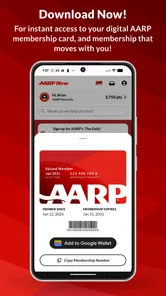
AARP Now is a mobile application designed specifically for AARP members, providing easy access to their benefits, discounts, and information on the go. Users can stay updated with the latest news and events, manage their membership, and access a variety of tools like a digital card, member-only resources, and local deals directly from their smartphone.
Is the AARP Now app free to download and use?
Yes, the AARP Now app is free to download from both the Google Play Store and Apple App Store. However, to access all the features and benefits, users need to be members of AARP. Membership comes with an annual fee, which allows access to exclusive content, discounts, and other resources available through the app.
Pros
- User-friendly interface for easy navigation.
- Provides real-time news and updates.
- Customizable notifications for member events.
- Access to exclusive member discounts.
- Connects members to local community resources.
Cons
- Limited features for non-members.
- Occasional app crashes reported.
- Some information requires internet access.
- Limited customization options.
- Can be slow on older devices.












