AARP SafeTrip™
- 142.00
- 4.3
- Installs
- 100.00K
- Price
- Free

Screenshots
Analysis by Reviewed
When I try a driving app for the first time, I want to know what it can realistically help me do before I build it into my routine. AARP SafeTrip™ is best approached as a driving-habits companion, not as something to fiddle with while the car is moving. The aim is to make everyday trips feel more deliberate, with feedback that can help you notice patterns behind the wheel. If you’re trying it for the first time, a short, familiar drive is a sensible place to begin: it lets you focus on the experience rather than on an unfamiliar route.
What to expect from a driving companion
This is a free Auto & Vehicles app from AARP, and it’s rated for Everyone. It has a 4.2 average from around 317 ratings, with more than 50,000 installs. Those figures suggest it has found an audience, but I’d judge it by whether its driving feedback suits your routine rather than by popularity alone. Its current version is aarp-v3.0.3.0-93872-g4272808-prod, and it runs on Android 8.0 or later.
For a first-time user, the useful distinction is between a tool that helps you reflect on driving and a dedicated turn-by-turn navigator. The app’s store summary frames it around safer habits. That makes it a more natural fit for someone who wants to pay attention to how they drive than for someone whose main need is detailed navigation or live traffic routing.
That distinction also sets a helpful expectation: this is not a replacement for attentive driving, sound judgement, or the navigation tool you already trust. I would judge it by whether its feedback gives you something understandable to consider after a trip, rather than by whether it makes a drive feel more technologically equipped. If you’re looking for a map first, this probably isn’t the app to open first.
Start with a low-pressure setup
When you install it, take a moment to explore the app while parked and get comfortable with its screens before you set off. Then choose a routine trip rather than a complicated journey. That small choice matters: familiar roads make it easier to connect any feedback you receive with what actually happened, instead of wondering whether an unfamiliar junction or detour affected the drive.
I’d also make the first outing a baseline, not a test you need to pass. Drive as you normally would and review what the app shows afterward. If you’re helping a parent or another new user get started, sitting together before the trip can make the setup feel less intimidating, while leaving the driver free to concentrate once the car is moving.
For a family helping someone install it, I’d keep the first conversation practical rather than framing the app as a way to judge someone’s driving. Agree on when you’ll look at the feedback—after the car is parked—and let the driver decide what seems useful. That approach makes the app a prompt for reflection, not a source of pressure. It also answers a common concern for new users: the point is not to keep watching a screen while driving.
More From Our News Desk

Weather by Xiaomi Review: Clear at a Glance, Less Clear Up Close

X Under Pressure: Can It Recover When Posting Goes Wrong?

Clash of Clans Is Won Between the Battles

Android Auto Makes the Case for Quieter Car Software

MobiOffice: Transforming Mobile Productivity with Seamless Integration

EA SPORTS FC™ Mobile Soccer: Redefining Mobile Sports Gaming
On Android, the minimum operating system is 8.0, so it is worth checking the device before planning a setup session. The app is free, which makes a low-commitment trial straightforward, but the time to judge it is after a few ordinary trips, not after tapping through the opening screens. A first-time user should also leave room to learn the interface at a relaxed pace rather than trying to configure everything just before leaving.
Turn a trip into a useful first result
A meaningful first success doesn’t have to mean a perfect score or a dramatic change. It can simply be finishing a familiar journey and using the app’s driving feedback to identify one habit worth watching on the next trip. Treat alerts or observations as prompts to consider, not as a substitute for your own judgement or for safe driving practices.
One practical routine is to review the experience after parking, then choose just one thing to focus on during your next drive. Trying to correct several habits at once can make the process feel like a chore. A single, manageable goal keeps the app’s purpose clear and makes it easier to tell whether its feedback is helping you drive more thoughtfully.
For example, someone who drives the same route to a grocery store each week can use one trip as a reference point, then check whether the next drive brings any feedback worth thinking about. The useful part is the comparison with your own routine, not a race against another driver or an abstract standard. If nothing stands out, that is still a result: you can decide the app has not yet shown a reason to change your habits.
What Makes AARP SafeTrip™ Stand Out?
First off, AARP SafeTrip™ is designed with senior drivers in mind, but honestly, it's a fantastic tool for anyone looking to enhance their driving experience. The app offers tailored driving routes, real-time traffic updates, and safety alerts that are incredibly useful, especially if you find yourself in unfamiliar areas.
Easy Navigation and Real-Time Updates
One of the standout features is the app's user-friendly interface. You don’t need to be tech-savvy to navigate through its features. The intuitive design means you can easily plan your routes, and with real-time updates, you’re always informed about road conditions, traffic jams, or any potential hazards ahead. This proactive approach not only saves time but also makes for a stress-free driving experience.
Safety First!
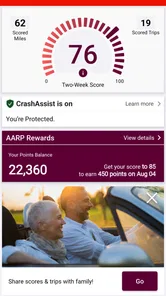
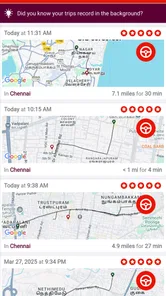
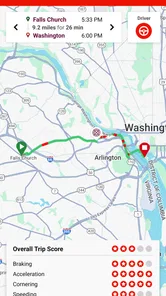
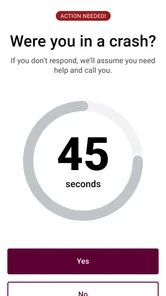
Safety is at the heart of AARP SafeTrip™. The app provides alerts for things like sudden braking, speeding, and even phone usage while driving. It’s like having a gentle reminder to keep your eyes on the road and drive responsibly. Plus, the app also tracks your driving habits over time, offering insights into areas where you might improve, which is a great way to become a more mindful driver.
Community and Connectivity
Beyond navigation and safety, AARP SafeTrip™ connects you with a community. You can share your routes, tips, and experiences with other users. It’s like being part of a club where everyone is dedicated to driving safely and sharing the best routes and tips.
Moreover, if you're an AARP member, there's an added bonus. The app sometimes offers exclusive discounts and promotions related to travel and driving, making it not just a tool for safety but also a value-packed addition to your travel toolkit.
Where it fits—and where it doesn’t
In everyday use, I’d pair SafeTrip with the tool that already handles the job it does best. If you need turn-by-turn directions, a dedicated navigation app is the better choice; if you want to reflect on your driving, SafeTrip’s focus on habits is the more relevant one. They serve different needs, so there’s no reason to expect one to replace the other. I’d avoid comparing a driving-habits app with a map app as if both offered the same kind of help.
It may be especially useful for a driver who regularly takes familiar commutes and wants a reason to check in on their habits, or for a family member who wants a structured way to discuss safer driving. It is less compelling if you rarely drive, don’t want driving activity assessed, or are looking for a tool whose main purpose is finding the fastest route. In those cases, an ordinary map app—or no additional app at all—may be a better fit.
There is a real trade-off between habit feedback and convenience. A navigator is built to answer “Where should I turn?” while a driving companion is more useful when the question is “What did I notice about my driving after that trip?” If you mainly want road directions, traffic avoidance, or a clear route preview, stay with a dedicated map service. If you already have those needs covered and are curious about driving patterns, SafeTrip can sit alongside it rather than compete with it.
I’d also skip it if the idea of having driving activity assessed makes you uncomfortable, or if reviewing feedback would add stress rather than help. A safety-oriented app only earns a place in a routine when its prompts feel constructive to the person using it. Someone who drives only occasionally may get little value from making a habit of checking results, while a frequent driver may have more repeated journeys to reflect on.
Make the feedback practical
Picture a weekday drive home after a busy day. Rather than glancing at a phone at a red light to inspect an alert, keep your attention on the road and look at the app only once you are safely parked. If a pattern stands out, use it to set one specific intention for tomorrow’s commute. That after-the-trip review is a small but important trade-off: it takes a little attention later, while avoiding the distraction of trying to interpret feedback during the drive.
For a longer trip, I’d keep navigation and driving reflection separate. Plan the route with the navigation tool you trust, then use SafeTrip for the driving-habit side of the experience. This avoids relying on one app to meet two different needs and makes it clearer what you’re asking each tool to do. If the app’s feedback doesn’t seem relevant to your driving, there’s no need to force a routine; the value depends on whether its observations lead to a useful adjustment.
A less obvious way to get a fair read is to avoid changing your driving just to produce a better-looking result on the first outing. If you alter your normal routine immediately, it becomes harder to tell whether the app’s feedback reflects your usual habits or a one-off effort. Start naturally, then make one modest adjustment only if the post-drive review gives you a clear reason. That makes the process more useful and less like a test.
Another sensible boundary is to keep the review short. You do not need to turn every drive into a detailed analysis session. Look for a pattern that is both understandable and possible to address, then leave the rest aside. If a particular observation seems inconsistent with what you experienced, use your own judgement rather than treating an app prompt as an unquestionable verdict.
A sensible next step
If you’re unsure whether it belongs in your routine, try it on a few ordinary drives before depending on it for a major journey. Ask yourself whether the feedback is understandable, whether reviewing it feels worthwhile, and whether it encourages a change you can realistically maintain. That gives you a fair way to judge the app without turning every trip into a performance review.
Its rating is only one part of that decision. AARP is the developer, and the app is free to try, so the more important question is whether its approach matches your comfort level and goals. A driver who likes practical reflection may appreciate it; someone who wants navigation above all else should keep using a dedicated navigator for that job.
It has been available since November 22, 2022, and its current version is aarp-v3.0.3.0-93872-g4272808-prod. I would not let a version label decide whether it suits you; what matters more is how clearly you can use it and whether the feedback fits your real trips. For someone considering it as a first driving-habit app, a handful of familiar journeys gives a more personal answer than assuming that the same approach works for every driver.
If you are setting it up for someone else, let them lead the first review. You can help with the phone while parked, but the driver is the person who knows whether a prompt matches the road and their experience. This keeps the tool from becoming a family scorecard and makes any conversation about driving more respectful and specific.
In conclusion, if you're looking for an app that not only guides you on the road but also ensures you do so safely, AARP SafeTrip™ is definitely worth checking out. It's more than just a navigation app; it's like having a travel companion dedicated to making your journey as safe and enjoyable as possible. So, the next time you're planning a trip, why not give AARP SafeTrip™ a try and see how it transforms your driving experience?
AARP SafeTrip™ Frequently Asked Questions
What operating system version do I need to install AARP SafeTrip™?
AARP SafeTrip™ is available for Android and iOS devices, and the Android version requires Android 8.0 or later. Before downloading, check your device’s operating system version so you can confirm it meets that requirement. The app is intended to help drivers build awareness of their habits, so a compatible phone is an important first step.
Is AARP SafeTrip™ suitable for someone who wants to become more aware of their driving?
AARP SafeTrip™ is intended to encourage safer driving habits by helping users pay attention to the way they drive. Its focus on driving awareness may appeal to people who want to reflect on their behavior behind the wheel and make thoughtful improvements. It is an Auto & Vehicles app developed by AARP, and its content rating is Everyone.
What is AARP SafeTrip™ and how does it work?
AARP SafeTrip™ is a mobile application designed to help users drive more safely by providing real-time feedback on driving habits. The app uses GPS and motion sensors to monitor driving behaviors such as speed, acceleration, braking, and cornering. It then provides insights and suggestions to improve overall driving safety and efficiency. This app is particularly beneficial for older drivers or anyone looking to enhance their driving skills.
Can AARP SafeTrip™ be used by drivers of all ages?
While AARP SafeTrip™ is designed with older drivers in mind, anyone interested in improving their driving habits can benefit from using this app. It offers valuable insights regardless of age, helping users to become more aware of their driving habits and make necessary adjustments to enhance safety. However, the app is particularly tailored to address the common safety concerns faced by older drivers.
Does AARP SafeTrip™ collect personal data and is it secure?
AARP SafeTrip™ does collect certain data to provide accurate feedback on driving habits, such as location and motion data. However, it prioritizes user privacy and data security, ensuring that all collected data is stored securely and used solely for the purpose of improving driving safety. The app complies with relevant data protection regulations to keep user information safe.
Pros
- User-friendly interface for easy navigation.
- Comprehensive tools for trip planning.
- Real-time traffic updates for safer travel.
- Customizable alerts for personalized needs.
- Compatible with both Android and iOS.
Cons
- Requires stable internet for full functionality.
- Limited features in offline mode.
- Occasional app crashes reported.
- Some users find ads intrusive.
- Battery drain on prolonged use.












