کتابراه: کتاب الکترونیک و صوتی
- 1.26K
- 4.6
- Installs
- 5.00M
- Price
- Free

Screenshots

Analysis by Reviewed
I find reading apps easiest to judge when something goes slightly wrong: a title takes time to open, I lose my place, or I need to choose between reading and listening. کتابراه: کتاب الکترونیک و صوتی brings e-books and audiobooks together in one reading app, which is useful if you switch formats rather than stick to one. It is free, aimed at everyone, and developed by Tose'e rah nashr electronic. Its 4.6 average from around 113,000 ratings suggests many readers have found it worthwhile, though that does not mean every book or workflow will suit every person.
Where browsing can slow you down
A broad digital library is only helpful if you can narrow it to something you actually want. When I browse, I try to decide first whether I want an e-book or an audiobook, then look for a genre or subject; that keeps casual discovery from turning into endless scrolling. The app has passed 5 million installs, and its Books & Reference focus makes it a natural fit for people seeking reading material rather than a general media hub.
One practical trade-off is that a large selection can make choosing harder, not easier. I would treat recommendations as starting points, not a promise that every suggestion will match my mood. If I already have a specific title in mind, searching for it is a more direct route than browsing categories. If I want a carefully curated reading list or a particular international catalogue, a specialist service may be a better match.
An Ocean of Books Awaits
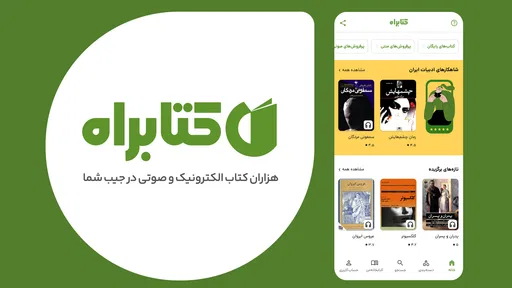
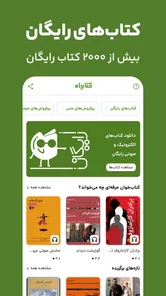
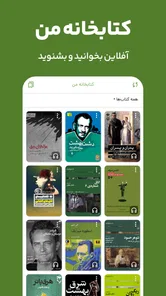
One of the standout features of کتابراه is its extensive collection of books across various genres. Whether you're into fiction, non-fiction, or self-help, this app has something for everyone. Navigating through the library is a breeze, thanks to its intuitive user interface. I found it quite satisfying to browse through the categories and discover new titles that piqued my interest.
Setup checks before settling in
The app was released on March 6, 2015, and its current version is 10.1, with Android 5.0 as the minimum operating system. Before blaming a book for failing to open, I would check that the device meets that requirement, that the app is up to date, and that the connection is working normally. These simple checks are especially useful when browsing or starting a title online.
If a book is available in both formats, I would choose based on the moment rather than assume one is always better. E-books suit quiet breaks when I can focus on the page; audio fits a walk or household task when looking at a screen is inconvenient. That flexibility is the main advantage over a reader limited to text or an audio-only service. The trade-off is that a combined library still requires me to check each title and format before settling on what to read.
For a first session, I would also keep the goal modest: find one title I genuinely want, open it, and make sure its format works for me. That quick trial answers practical questions more reliably than browsing for a long time. If I am choosing an audiobook for travel, I would test playback at home first; if I am choosing an e-book, I would spend a few minutes reading rather than judging it from its cover or description alone.
More From Our News Desk

Weather by Xiaomi Review: Clear at a Glance, Less Clear Up Close

X Under Pressure: Can It Recover When Posting Goes Wrong?

Clash of Clans Is Won Between the Battles

Android Auto Makes the Case for Quieter Car Software

MobiOffice: Transforming Mobile Productivity with Seamless Integration

EA SPORTS FC™ Mobile Soccer: Redefining Mobile Sports Gaming
The Audiobook Experience
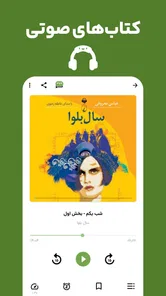
For those moments when reading isn't feasible, the app's audiobook feature is a lifesaver. I was particularly impressed by the quality of the audio and the selection of narrators. Listening to a captivating story while commuting or doing chores has never been more enjoyable. Plus, the ability to download books for offline listening is a game-changer for those of us with spotty internet connections.
Audio also changes how I choose a book. A narrator’s delivery can make a familiar subject feel inviting, but it may not suit everyone’s taste, so I would sample a short stretch before committing to a long listen when that option is available. I also think about the setting: a title with dense ideas may be easier for me to follow while seated than while multitasking, whereas a straightforward story can work well during routine chores. Treating listening as its own format, rather than a substitute that must fit every book, helps avoid disappointment.
Recovering a reading routine
For an everyday example, I might browse at home, pick an audiobook for a commute, and return to an e-book during a lunch break. If playback or loading stalls, I would first check the connection and whether the selected title is ready for offline use; downloading ahead of a trip is a sensible habit when internet access may be unreliable. If I lose track of a title, I would reopen it from my library and check the saved position before starting over. Small checks like these can prevent a temporary interruption from becoming a frustrating restart.
There is also a useful way to manage choice: keep a short mental shortlist rather than opening many books at once. I find it easier to compare a couple of promising titles by format and subject, then commit to one for the next few days. This is not a special feature; it is a practical way to make a wide catalogue feel manageable and to avoid spending more time browsing than reading.
If I have been away from a book for a while, I would use the title itself as an anchor instead of relying on memory: reopen it, check where I last stopped, and read or listen to a little before switching to something else. For a commute, I would decide in advance which title I want and prepare it while I have a reliable connection. That small routine reduces the chance of arriving at a quiet moment only to spend it searching, and it makes the app more useful as part of a daily habit.
Personalized Reading Journey
What makes کتابراه even more special is its personalized reading recommendations. The app learns from your reading habits and suggests books that align with your interests. I found this feature incredibly helpful, as it introduced me to authors and titles I might not have discovered otherwise. It's like having a personal book concierge in your pocket!
I would still keep a little distance from any recommendation stream. A suggestion can be a useful nudge when I do not know what to read next, but it is not the same as a trusted human recommendation or a carefully themed list. I use it to notice possibilities, then check whether the subject, format, and mood fit what I want now. That makes discovery more purposeful and avoids letting an endless supply of options crowd out the book I already started.
When the app may not be the cause
If a title will not load, I would not immediately assume the entire app is broken. A weak connection can affect browsing or playback, while an older device that does not meet the Android requirement can limit compatibility. I would try another title, check the connection, and reopen the app before deciding there is a wider problem. If one book alone behaves differently, the issue may be tied to that item rather than the whole reading experience.
Readers should also consider language and catalogue fit before making this their main library. کتابراه is a better choice for someone who finds appealing titles in its collection and wants books and audio in one place; it is less suitable if the priority is a specific title that is not available, or a reading service built around a different catalogue. The app has around 1,300 written reviews, but my advice is to judge it by whether its available books match your own habits.
When a problem persists, I would narrow it down before changing several things at once. I would check whether other titles open, whether the issue happens on a stable connection, and whether the device is running a supported Android version. If only one item is affected, switching to another book is a useful temporary workaround while I decide whether the difficulty is specific to that title. If several parts of the app struggle, restarting it and checking for an update are sensible first steps; repeated reinstalling or changing settings without a clear reason would not be my first move.
It is also worth separating access from preference. A title that opens correctly can still be the wrong fit because its format, subject, or presentation does not work for me. I would not take that as proof that the whole library is poor. On the other hand, if I repeatedly fail to find books in the language or subject I care about, switching to a service with a catalogue built around those needs is more useful than trying to force this app into the role of a universal bookstore.
User-Friendly Features
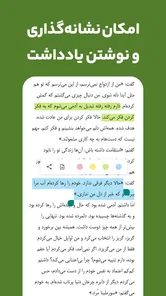
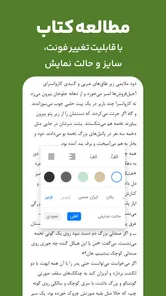
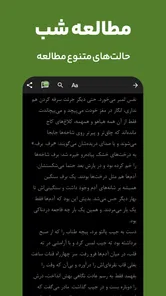
Beyond its rich library, the app offers several user-friendly features that enhance the reading experience. The adjustable font size and background color options are perfect for customizing your reading environment. Additionally, the app syncs your progress across devices, ensuring you never lose your place. Trust me, there's nothing worse than trying to remember where you left off in a gripping novel.
For longer reading sessions, I would adjust the page appearance early instead of waiting until my eyes feel tired. A comfortable font size and background can make it easier to return to a book after a busy day, while progress syncing is handy if I genuinely move between devices. I would still check that the same title is available where I plan to continue and confirm the position when I switch; those checks are simple, but they help make a multi-device routine feel dependable.
Who will get the most from it
I would recommend trying it if you like to browse for your next read, alternate between listening and reading, or want an app that can accompany both a quiet evening and a busy commute. Readers who prefer printed books, rely on a particular outside catalogue, or dislike discovering titles through recommendations may be happier with a bookshop, library service, or a more focused reader. In other words, its strongest appeal is convenience across formats, not a guarantee that every reader will find their ideal title.
It is particularly suited to readers whose habits change throughout the day. Someone who has a few quiet minutes at lunch, then wants audio while walking home, can use one service for both kinds of reading rather than maintaining separate apps for each. A student or curious reader might also use the catalogue to explore subjects casually, while someone with a fixed syllabus or a narrow list of required books should verify that the titles they need are available before depending on it.
The main comparison is with choosing a dedicated e-book reader and a separate audiobook service. Those alternatives can be better when a reader values one format above all else or already relies on another catalogue. کتابراه’s appeal is the convenience of having text and audio together, but a shared app does not automatically mean every title comes in both forms. I would compare availability for the books I actually want, not assume that a broad combined library replaces specialist services.
For readers deciding whether the free app is worth trying, I would treat the first few sessions as a catalogue test rather than a commitment. Search for a known title, browse one subject that interests you, and try the format you expect to use most. Its 5 million-plus installs and strong average rating make it a widely used option, but personal fit still comes down to the titles and reading habits that matter to you.
For a smoother start, I would choose one title, test the format that fits my routine, and download audio before relying on it away from a stable connection. Then I would use recommendations as a discovery tool and keep a note of any title I want to return to. Those habits make it easier to tell whether the app itself suits me, rather than confusing a momentary network problem or indecision with a poor reading experience.
My practical verdict
In conclusion, کتابراه: کتاب الکترونیک و صوتی is a must-have app for any book lover. Its vast selection of e-books and audiobooks, coupled with its user-friendly interface and personalized recommendations, make it a standout choice in the world of reading apps. If you're eager to embark on countless literary adventures, this app is your gateway. Happy reading!
کتابراه: کتاب الکترونیک و صوتی Frequently Asked Questions
Can I use کتابراه offline after downloading books?
Downloaded titles can be saved for offline reading or listening, which is useful when you do not have an internet connection. You can browse the catalog while connected, choose a book or audiobook, and save it in the app if that option is available for the title. Keep in mind that offline access applies to saved content, not necessarily the entire library.
Does کتابراه offer both e-books and audiobooks?
Yes. کتابراه brings together e-books and audiobooks, along with novels and magazines, so you can choose between reading a title and listening to it. The store summary describes it as a place to download electronic and audio books. Browse the catalog to see which formats are available for the specific titles that interest you.
Can I adjust the reading experience in کتابراه?
کتابراه offers customizable reading settings, which can make it easier to tailor the on-screen experience to your preferences. The app also provides offline access for books you save, so you can continue reading without relying on an active connection. Options can vary by title or app version, so explore the reading controls after opening a book to find what suits you.
Can I try کتابراه before paying for individual books?
کتابراه is free to download, so you can install it and explore the app before deciding what to read or listen to. The library includes e-books, audiobooks, novels, and magazines, and individual titles may be available for free or require purchase. Check each book’s details in the app to see what access options are offered.
What devices and software does کتابراه support?
کتابراه is an Android app in the Books & Reference category. It supports devices running Android 5.0 or later, and its current version is 10.1. Before downloading, check your device’s Android version and make sure you have enough space for the app and any books or audiobooks you choose to save.
Pros
- Extensive library of books available.
- User-friendly interface for easy navigation.
- Offline reading and listening options.
- Regular updates with new titles.
- Supports multiple languages for diverse readers.
Cons
- Limited selection of free books.
- Some audiobooks lack narration quality.
- Requires account creation to access content.
- Occasional app crashes reported by users.
- In-app purchases can be pricey.











