Stickman Party 234 MiniGames
- 9.81K
- 4.6
- Installs
- 500.00M
- Price
- Free

Screenshots


Analysis by Reviewed
I like Stickman Party 234 MiniGames most as a shared, pick-up-and-play arcade game: its appeal is less about mastering one deep system and more about finding a quick contest that gets everyone involved. That makes it a natural choice for a family room, a short wait with friends, or a trip where people can share a screen. The catch is just as clear: the fun depends on having a suitable group and being comfortable with several players crowding around one device.
A quick way to turn spare time into a contest
For a realistic use case, imagine waiting for food with friends and wanting something more interactive than passing around a phone to watch clips. You can choose a short match, hand the device around or set it between you, and let the result become the conversation. Because the game works offline, you do not need to make a reliable connection part of the plan. I would still check that everyone can see and reach the screen comfortably; shared-device play is convenient, but it is not the same as each person having a separate controller.
The same setup suits siblings or family members with different gaming habits. A simple contest gives newcomers a way in without asking them to learn a long campaign first. For a group, I would rotate who picks the next activity rather than letting one confident player choose every time. That small habit helps the collection feel like a shared game night instead of a series of rematches in someone else’s favorite mode.
What the collection does better than a single arcade game
Many arcade games are built around repeating one central action, which is ideal when you want to improve at a specific challenge. This one trades that focused progression for variety: racing, tanks and football sit alongside other mini-game choices, so the group can change pace when one kind of contest stops landing. I find that better for casual gatherings than a game that expects everyone to enjoy the same mechanic for a long session. If you want a carefully balanced competitive game to practice over time, though, a dedicated title is likely to be a better fit.
There is also a practical decision before installing: how will your group share the screen? On a larger phone or tablet, it is easier for several people to follow what is happening; on a small phone, elbows and visibility can become part of the challenge. I would treat the device itself as part of the setup, and choose the game when people can sit close enough to play without straining. That is a more useful expectation than assuming “multiplayer” automatically means comfortable for every group.
What Makes Stickman Party a Must-Have
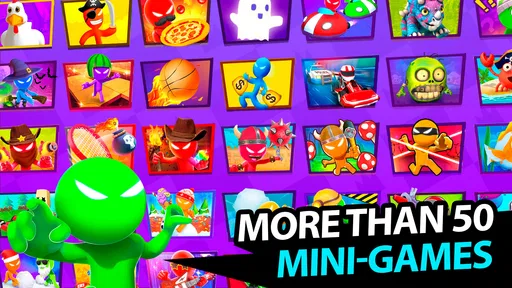
First things first, the variety of mini-games is impressive. From racing to soccer, each game is uniquely designed to keep you entertained. The controls are intuitive, so there's no need to spend ages figuring out how to play. You just dive right in! What's even better is that you can play offline, making it perfect for those moments when Wi-Fi is more fantasy than reality.
Multiplayer Madness
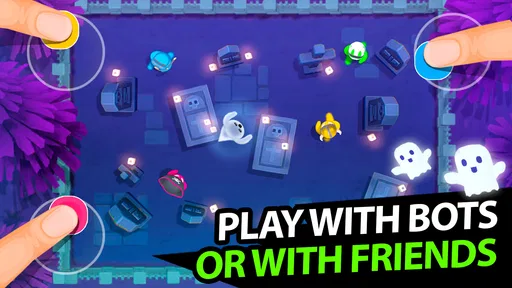
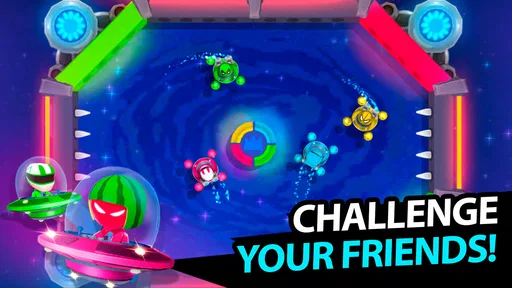
This app shines brightest when you have company. You can connect with up to three other players on the same device. Yes, you heard that right! No internet, no problem. Just gather around your phone or tablet and let the games begin. The interface is smooth, and the graphics, though simple, are colorful and engaging enough to keep everyone hooked.
More From Our News Desk

Weather by Xiaomi Review: Clear at a Glance, Less Clear Up Close

X Under Pressure: Can It Recover When Posting Goes Wrong?

Clash of Clans Is Won Between the Battles

Android Auto Makes the Case for Quieter Car Software

MobiOffice: Transforming Mobile Productivity with Seamless Integration

EA SPORTS FC™ Mobile Soccer: Redefining Mobile Sports Gaming
Solo Play - Perfect for Downtime
No friends around? No worries. Stickman Party 234 MiniGames offers a single-player mode where you can hone your skills. The AI opponents are surprisingly challenging, ensuring that even when you're alone, you're not short on fun. This makes it a great app to have when you're waiting in line or killing time during a commute.
Each mini-game comes with its own set of rules, providing a fresh experience every time you play. Whether it's a car race or a soccer match, each game requires different strategies, keeping your brain engaged and your reflexes sharp.
Why You Should Download It
In a world where apps are a dime a dozen, Stickman Party stands out because of its simplicity and the joy it brings. It's one of those apps that doesn’t require a hefty investment of time or money. Just a few taps, and you're in the game. Plus, the regular updates mean you're always in for something new, keeping the excitement alive.
Who I’d recommend it to
PlayMax Game Studio’s game is an arcade pick for people who want light competition without committing to a long session. It is free to download, rated for Everyone, and has an average rating of 4.6 from around 2.5 million ratings, with more than 100 million installs. Those figures suggest broad appeal, but I would choose it for its shared-screen format rather than popularity alone. The current version is 2.4.6, and it runs on Android 5.1 or later.
In-app purchases range from $0.99 to $19.99 per item, so “free” does not mean every possible purchase is included. I would let younger players know that purchases exist and agree on expectations before handing over the device. For adults who simply want a quick offline match, the basic appeal is easy to understand; anyone who wants a single-player arcade game with a more elaborate progression loop should look elsewhere.
Making mixed groups and mixed devices work
One thing I would do before inviting people to play is pick a place where the device can rest securely. Holding a phone in one hand while several players reach for controls can make a lively match awkward, and a table gives everyone a better view. It also keeps the game from turning into a debate about whose turn it is to hold the screen. If you only have a small handset, try a brief round first; that will tell you whether the layout feels manageable for your group before you settle in for a longer session.
The player count is another practical point to agree on. The game supports local play for two, three or four people, so a pair can enjoy it without assembling a full group, while a larger gathering can take turns if not everyone wants to crowd around at once. I would not assume that a four-player session will be equally comfortable on every device. A tablet or larger screen can make the shared setup easier, but the core trade-off remains: everyone plays together in one place rather than from separate phones.
For families, that format can be a benefit rather than a compromise. A parent can join a child without setting up accounts or coordinating separate devices, and the Everyone age rating makes it a straightforward option to consider for mixed-age company. I would still explain that optional purchases are available before a child plays. That conversation is more useful than treating “free” as a guarantee that no spending choices will ever appear.
How I’d choose and rotate the mini-games
The variety works best when the group treats it as a menu, not as a promise that every activity will suit everyone equally. A player who likes quick reactions may gravitate toward racing, while someone else may prefer the different rhythm of football or tanks. Rather than trying to find one universally loved choice, I would let each person nominate a mode and then move on after a round or two. That keeps the evening balanced and makes it easier for a quieter player to have a say.
There is a small fairness issue when newcomers play alongside people who already know the controls. I would begin with a low-stakes round and let everyone get comfortable before keeping score. If the group is split between experienced and casual players, changing the activity can also soften the advantage of repeated practice in one mode. This is not a substitute for formal matchmaking or carefully calibrated competition; it is a practical way to keep a casual local game welcoming.
The same variety gives the game a useful role as a social icebreaker. When conversation stalls, selecting a short contest gives people something immediate to react to, and the result can lead naturally into another round or a different activity. I would use it in that spirit rather than expecting it to carry an entire evening by itself. Groups looking for a deeper game-night centerpiece, with a long campaign or sustained strategic progression, will probably want to bring another title too.
Where the simple format has limits
Its compact, shared-screen approach is also the main reason I would not recommend it to everyone. Players need to be physically close, and anyone who prefers independent screens may find the setup cramped or distracting. It is less suited to remote friends who want to play together from different locations; the appeal here is local company gathered around one device, not a substitute for online multiplayer.
There is also a difference between broad variety and depth. Switching between several styles keeps casual play from feeling monotonous, but it does not automatically make any one activity a long-term competitive hobby. If your priority is mastering a single arcade mechanic, improving through structured progression, or competing with a stable set of rules, a focused arcade game is likely to serve you better. I see this collection as a flexible party option, not a replacement for every kind of arcade game.
Solo play helps when nobody else is available, but I would be cautious about making it the main reason to install. The game’s clearest identity is group play, and the collection feels most distinctive when players can react to one another. If you usually play alone and want a sustained challenge built around personal progression, a single-player title designed around that habit may hold your attention longer.
Details worth knowing before you install
The game launched on March 23, 2019, and its current version is 2.4.6. That gives a useful sense of where it sits as an established casual game, but I would not choose it on the assumption that every update changes the experience dramatically. PlayMax Game Studio is the developer, and the strongest reason to try its arcade collection is still the simple local format: a group can start quickly, play offline, and swap between different kinds of contests.
It is free to download, with optional in-app purchases priced from $0.99 to $19.99 per item. I would decide in advance whether purchases are relevant to your household and, for a child’s device, use the usual purchase safeguards. The game is rated for Everyone and requires Android 5.1 or later, which helps set expectations for compatibility. Those details make it easier to decide whether it fits your device and family, without confusing the basic download cost with every possible purchase.
One useful way to get more from the variety is to treat each change of mini-game as a reset, not a reason to keep score across everything. A racing round and a football round may reward different instincts, so a single overall winner can reflect familiarity with one style more than broad skill. If your group wants a fairer evening, rotate game choices and celebrate individual rounds rather than declaring one person the champion after a handful of mixed contests.
If you are wondering whether it needs an internet connection, the central attraction is that local multiplayer works offline, making it a sensible option for places where connectivity is patchy. If you are wondering whether it works for one person, the solo mode gives you something to do, though I see that as a useful fallback rather than the strongest reason to choose it. The best experience remains a small group sharing a screen and switching activities when the mood changes.
My verdict
I would recommend it to friends who want an uncomplicated way to start a quick, offline group game, especially when they are happy to share one phone or tablet. I would skip it if separate screens, deep competitive progression, or a focused arcade challenge matter more than variety. As a free game from PlayMax Game Studio, it offers an appealing low-commitment way to pass time together, with optional purchases to keep in mind. Its real strength is not that every mini-game will suit every player; it is that the group can try a different kind of contest without changing apps.
Stickman Party 234 MiniGames Frequently Asked Questions
Does Stickman Party 234 MiniGames work well for quick gaming sessions?
The game is built around short mini-games, so it suits a quick round when you have a little time to spare as well as longer sessions with friends. Racing, tanks, and football offer different kinds of competition, while the local setup keeps play centered on one device. It is an arcade game rather than a story-driven experience.
Can I play Stickman Party 234 MiniGames alone?
Yes. Stickman Party 234 MiniGames supports solo play as well as local multiplayer, so you can try the mini-games even when nobody else is available. Its quick-play format makes it easy to pick up for a short session. If you are mainly looking for a game to share with friends or family, the same-device multiplayer is another option.
What devices and operating systems can run Stickman Party 234 MiniGames?
Stickman Party 234 MiniGames is an arcade game for Android, and it requires Android 5.1 or later. Before downloading, check that your device meets this minimum requirement so you can install and launch the game. Its simple, quick-play format is aimed at local play on a device, making it an option to consider for casual gaming at home or on the go.
What is Stickman Party 234 MiniGames?
Stickman Party 234 MiniGames is a collection of fun and engaging mini-games that can be played solo or with friends. It offers a variety of challenges and gameplay styles, including racing, shooting, and puzzle games. Designed for Android, this game is perfect for those who enjoy quick, entertaining games with simple controls and vibrant graphics. It is free to download, with optional in-app purchases.
How many players can participate in Stickman Party 234 MiniGames?
Stickman Party 234 MiniGames supports both single-player and multiplayer modes. In multiplayer, up to four players can join on the same device, making it an excellent choice for group entertainment. The local multiplayer setup allows friends to compete against each other in a variety of mini-games, enhancing the social gaming experience without the need for an internet connection.
Pros
- Wide variety of mini-games to enjoy.
- Simple and intuitive controls.
- Multiplayer mode for more fun.
- Offline play available.
- Frequent updates with new content.
Cons
- Contains ads during gameplay.
- In-app purchases can be expensive.
- Some games are repetitive.
- Graphics are basic and simple.
- Requires storage space for updates.