Seat Away
- 874.00
- 3.9
- Installs
- 5.00M
- Price
- Free

Screenshots
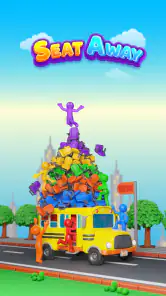
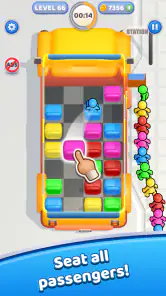
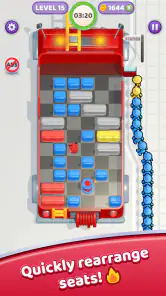

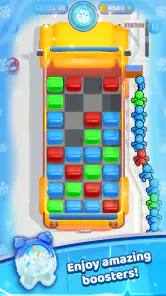

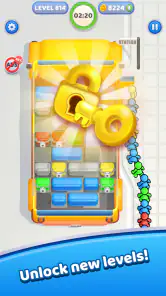
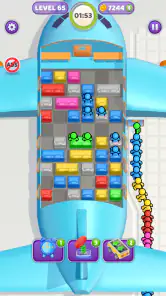
Analysis by Reviewed
I judge a puzzle game partly by whether it makes sense at a glance and partly by what happens when I’m tired, distracted, or playing in short bursts. Seat Away has a premise that sounds immediately approachable: passengers need seats, and I move seats to help them get there. That simple setup can make it an appealing change of pace from word puzzles or match-based games, especially when I want a small task rather than a long session.
That simplicity also sets expectations. This is a puzzle game from Rollic Games, not a travel utility, despite the name. Its appeal depends on enjoying the act of reading a seating arrangement and working out a sequence of moves. I would approach it as a casual brain teaser: something to try while waiting for a drink or taking a brief break, rather than an elaborate strategy game with a large cast of systems to learn.
Reading the board and finding a route
The core idea asks me to pay attention to where the seats are and how moving them affects the passengers’ route. That makes the screen itself the main source of information. A useful habit is to pause before making the first move and trace the likely path from passenger to seat. If I move something just because it looks convenient, I may miss how that change affects the rest of the arrangement. Looking for the tightest passage first can help me avoid undoing progress through trial and error.
This kind of puzzle can be easier to follow than a game built around a crowded interface of menus, counters, and upgrades: the problem is the focus. Still, a visually simple board is not automatically easy for everyone to read. People who have difficulty distinguishing small shapes, tracking several objects at once, or interpreting visual layouts may find that the main challenge is seeing the puzzle clearly rather than solving it. I’d try a few boards in a comfortable setting before deciding whether its presentation works for me.
Motor comfort, pace, and sensory context
Moving seats suggests direct, touch-based interaction, which is familiar to many mobile players. The practical question is whether each move feels forgiving enough for the way I use a phone. If I tend to tap precisely, a compact puzzle can feel neat and controlled; if my hands are unsteady or I use a smaller screen, aiming at individual pieces may take more effort. I’d play seated and with the phone held steadily when a board requires careful placement, rather than trying to solve it while walking.
The game’s puzzle format is also a better fit for some moments than others. A short, self-contained challenge can suit a quiet break, but concentrated visual work is not always relaxing in a noisy queue or on a bouncing ride. I would not assume it is ideal for every sensory context just because the rules are simple. If visual motion or repeated attempts become tiring, stopping and returning later is a sensible way to keep a casual game casual.
What is Seat Away?
If you’ve ever found yourself sandwiched between two strangers on a long-haul flight, you know how important seat selection is. This is where Seat Away comes into play. The app is designed to help travelers like us make informed decisions about seat selection by providing detailed maps and reviews of airplane seating arrangements. Think of it as a Yelp for airplane seats. Cool, right?
Easy Peasy Navigation
First things first, let’s talk about the user interface. The moment you open the app, you’re greeted with a clean and intuitive design. Navigating through the app is a breeze, even for those of us who aren’t exactly tech-savvy. The developers have done a stellar job in ensuring that the app is user-friendly. You can search for your flight by entering your flight number or browsing through the airline options. Once you’ve found your flight, you’ll be presented with a detailed seat map.
Seat Recommendations You Can Trust
What sets Seat Away apart is its community-driven reviews. Users can leave feedback about their seating experience, including legroom, proximity to the restroom, and even the friendliness of the cabin crew. This means you’re not just getting generic information; you’re getting insights from fellow travelers who’ve been there, done that. It’s like having a bunch of travel buddies sharing their best-kept secrets!
Why You’ll Love It
Aside from its user-friendly interface and community insights, the app also offers some neat features. You can set up alerts for when better seats become available, which is perfect for those last-minute upgrades. Plus, it integrates seamlessly with most major airline booking systems, making it super convenient to use. In a world where every inch of legroom counts, Seat Away is a game-changer.
So, next time you’re planning a trip, consider giving Seat Away a try. It might just make that long-haul flight a little more bearable. Happy travels!
How it fits into a real day
One practical way I’d use it is during a short pause between errands: open a puzzle, inspect the passenger and seat positions, then work through the moves without needing to remember a long story or plan. That stop-and-start rhythm is useful when I don’t know whether I’ll have two minutes or ten. I’d avoid beginning a tricky board when I’m about to cross a street, board transit, or answer a time-sensitive message; the visual planning is simple in concept but still asks for attention.
For a family or shared device, the puzzle premise is easy to explain without a lengthy tutorial. I can see taking turns suggesting a move, which gives a child and an adult a small cooperative activity even though each person may notice a different route. The age rating is Everyone, but that does not mean every player will enjoy the same level of visual planning. A younger player may appreciate talking through the board, while someone who prefers fast reactions may find the deliberate pace less exciting.
Where it sits among puzzle games
Compared with match-three games, where the familiar loop is to make combinations and chase a score, Seat Away puts more weight on spatial reasoning: I need to consider the position of seats and the path passengers need. Compared with a word puzzle, it asks less of my vocabulary and more of my ability to picture a sequence of moves. That makes it a sensible pick if I want a concrete, visual problem, but not if I’m specifically looking for daily word challenges, a narrative campaign, or a competitive leaderboard experience.
The trade-off is that a focused mechanic has to stay satisfying through its puzzles. If I enjoy figuring out a board, the narrow focus can feel refreshing; if I want new modes, a broad progression system, or lots of different kinds of challenges, I may prefer a larger puzzle collection. I’d treat it as a compact option for a particular mood rather than a replacement for every game on my phone.
Making play more comfortable
A helpful approach is to scan the whole arrangement before touching anything, then identify which passenger has the fewest obvious routes. Solving that constraint first can reveal which seats need to move and reduce random taps. If I get stuck, I’d change one part of the plan at a time instead of shifting several seats and losing track of what caused the problem. That small discipline makes a spatial puzzle easier to reason about and can also reduce unnecessary repeated gestures.
For readability, I’d adjust how I hold the device and where I play before concluding that a board is confusing. A stable grip and good ambient light can make it easier to distinguish neighboring pieces; taking a pause is better than squinting through a screen that feels uncomfortable. These are practical habits, not a claim that the game includes specific visual or motor accessibility settings. Anyone who needs adjustable text, strong contrast options, or alternative input should check how the current build feels on their own device before relying on it for regular play.
What to expect from the app itself
The game is free to start, with optional in-app purchases listed from around a dollar to around a hundred dollars per item. I’d look at the purchase details before confirming anything and decide whether I’m comfortable with optional spending; a free download does not by itself tell me what a particular purchase does. The game is rated for Everyone, has an average rating of 3.9 from around sixteen thousand ratings, and has been installed over five million times. Those figures suggest a substantial audience, but I would still judge the puzzle’s feel by trying it myself rather than treating popularity as a guarantee of fit.
It was released in late November 2023, and its current version is 0.84. It requires Android 7.0 or later. Those details are useful if I’m checking whether an older device can run it, while the version number is a reminder that the app can change over time. I’d keep expectations focused on the core puzzle experience and check the version available on my device if a menu or interaction differs from what I expect.
Who may want another option
I’d recommend giving this a try if you like spatial puzzles, prefer a clear objective, and want something that can fit into a short break. It may also suit someone who likes discussing possible moves with a friend or family member. On the other hand, I’d skip it if I mainly want a calm game that requires almost no visual attention, if repeated touch targeting is uncomfortable, or if I’m looking for a deep campaign with extensive variety. A turn-based word game may be a better choice when I want to play without studying a layout, while a conventional logic-grid puzzle may suit me better if I want written clues instead of moving pieces.
One question I’d ask before making it a regular habit is whether the game’s style stays comfortable over several sessions. My answer would depend on how clearly I can read each board and whether the act of moving pieces feels precise on my phone. Another is whether it works for quick play: its basic puzzle format lends itself to brief visits, but I’d still choose a moment when I can focus rather than treating it as background entertainment. Those distinctions matter more than assuming every casual puzzle suits every setting.
My inclusive verdict
For me, Seat Away’s clearest strength is that its central task is easy to describe while still asking for deliberate thought. It can offer a small, satisfying spatial challenge without demanding that I learn a complicated genre first. Its limits are tied to that same design: players need to comfortably inspect a visual arrangement and interact with individual pieces, and anyone seeking richer variety may reach for a different puzzle game.
Rollic Games has made a free puzzle with a broad age rating and a straightforward premise, but those facts do not settle whether it will be accessible or enjoyable for a particular person. I’d try it in a low-pressure moment, pay attention to how the board reads and how the controls feel, and keep it if the solving process is fun rather than frustrating. That is the most useful test for a casual game: not whether it promises to suit everyone, but whether its specific kind of thinking fits the way you like to play.
Seat Away Frequently Asked Questions
What kind of puzzles can I expect in Seat Away?
Seat Away is a puzzle game built around moving seats to get passengers. The central idea is arranging seats to meet that objective, so it may appeal if you enjoy visual puzzles and working out how pieces should be positioned. The game’s store summary is concise, making the seat-moving concept the clearest indication of what to expect before downloading.
Who developed Seat Away, and when was it released?
Seat Away was developed by Rollic Games and released on November 27, 2023. If you are checking whether the game is a recent addition or looking for its developer, those details can help you identify it in an app store. Its focus is a straightforward puzzle objective: move seats to get passengers.
Is Seat Away a puzzle game, and what should I expect when I open it?
Seat Away is a mobile puzzle game from Rollic Games. Its short description is simply “Seat Away,” while its store summary describes the goal as moving seats to get passengers. That makes it a game to consider if you enjoy arranging things to solve a clear puzzle objective, rather than an app for booking journeys or managing travel reservations.
What is Seat Away and how does it work?
Seat Away is a mobile app designed to simplify the process of booking and managing travel seats, whether for flights, trains, or buses. Users can search for available seats, compare prices, and make reservations all within the app. It also offers features such as seat selection, ticket management, and real-time updates on travel schedules. The app aims to make traveling more convenient and stress-free by providing a seamless booking experience.
Is Seat Away available on both Android and iOS platforms?
Yes, Seat Away is available for download on both Android and iOS platforms. You can find it on the Google Play Store for Android devices and the Apple App Store for iOS devices. This cross-platform availability ensures that users can access Seat Away's features regardless of their preferred mobile operating system, making it accessible to a wide range of travelers.
Pros
- User-friendly interface
- Accurate seat availability
- Fast booking process
- Secure payment system
- 24/7 customer support
Cons
- Limited to certain routes
- Occasional app crashes
- Requires constant updates
- High data usage
- No offline functionality

- Category
- Puzzle
- Version
- 0.84