Timeline Up
- 1.90K
- 4.1
- Installs
- 1.00M
- Price
- Free

Screenshots


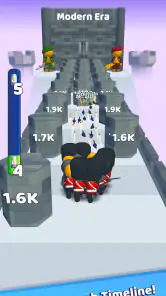
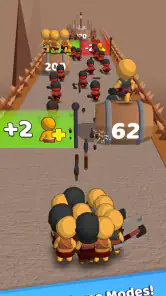




Analysis by Reviewed
I wouldn’t treat Timeline Up as a shared household calendar just because its name suggests organizing events. It is a racing game from Rollic Games, and its store summary points to evolving through different timelines. That makes it a very different kind of pick from a family planner: its appeal is a quick game experience, not coordinating appointments or dividing chores.
A casual game for a shared device
In a household where people take turns using one phone or tablet, Timeline Up may work best as a pass-around game: one person plays when they have a spare moment, then hands the device to someone else. I’d keep expectations modest, though. A shared device does not automatically mean shared progress, and I would not assume that players can keep separate profiles or save slots. If preserving individual records matters, check how the game behaves on your device before making it the household’s regular competition.
That distinction also helps when choosing between this and other racing games. Traditional racers often focus on steering, vehicle handling, or longer races; Timeline Up’s timeline-evolution premise sounds aimed at a lighter, more immediately approachable session. I’d consider it when I want something casual rather than a detailed driving simulator. If you’re looking for realistic car control, deep tuning, or a serious competitive racing setup, a more conventional racer is likely a better fit.
Keep expectations—and purchases—clear
The game is free to download, but it includes optional in-app purchases priced from under a dollar to just under a hundred dollars per item. On a shared device, I’d agree on purchase expectations before handing it to a child or another family member. A practical habit is to review the device’s purchase confirmation settings and make sure the person playing understands that free access does not mean every optional item is free. That avoids an awkward surprise without assuming the game offers family controls of its own.
For an everyday example, it could suit a short wait at a café: a child can try a quick racing game while an adult keeps the device nearby, then everyone can move on without needing to coordinate accounts or a long play session. I wouldn’t choose it as an activity that depends on several household members competing together, since a shared-device setup is not the same thing as a built-in multiplayer mode.
Getting Started with Timeline Up
So, first things first, getting started with Timeline Up is a breeze. As soon as you download it, you’re greeted with a clean, user-friendly interface. Setting up your profile and syncing your calendar is straightforward, which in my opinion, is a huge win. No one likes spending an hour just figuring out how to navigate an app, right?
Once you’ve got everything set up, the app offers a list of cool features to explore. I was particularly impressed with the task management system. It allows you to create tasks, set deadlines, and even prioritize them. Trust me, if you’re someone who constantly juggles multiple projects, this feature will be your lifesaver.
More From Our News Desk

Clash of Clans Is Won Between the Battles

Android Auto Makes the Case for Quieter Car Software

MobiOffice: Transforming Mobile Productivity with Seamless Integration

EA SPORTS FC™ Mobile Soccer: Redefining Mobile Sports Gaming

How Microsoft OneDrive Became a Mobile Productivity Giant

How Google Translate Breaks Language Barriers Effortlessly
Why You’ll Love It
What really sets Timeline Up apart from other scheduling apps is its visualization tools. The app provides a timeline view of your entire week or month, so you can see everything at a glance. This feature is especially useful when you’re planning long-term projects. Plus, there’s a nifty notification system to keep you on track. No more missing deadlines!
Another thing I found handy is the integration capability. Whether it’s syncing with your Google Calendar or connecting with other productivity apps, Timeline Up makes sure all your tools work seamlessly together. That’s a big plus for someone like me who relies on multiple apps for work and personal stuff.
Is There a Catch?
Now, let’s talk about the not-so-perfect stuff. While I genuinely enjoyed using the app, I did notice that it can be a bit sluggish at times, especially if you’re operating on an older phone. It’s nothing too major, but worth mentioning if you’re all about speed and efficiency.
Moreover, while the basic version is free, some of the more advanced features are locked behind a paywall. This isn’t uncommon with apps these days, but if you’re someone who prefers free tools, it could be a dealbreaker.
The Final Verdict
Overall, my experience with Timeline Up has been overwhelmingly positive. The app does a fantastic job of bringing all your schedules and tasks into one cohesive place. Its user-friendly design and robust features make it a top choice for anyone looking to boost their productivity.
So, would I recommend it? Absolutely! If you’re in the market for a reliable scheduling app that goes beyond the basics, give it a shot. It might just become your new favorite productivity tool.
Who I’d Hand the Device To
Timeline Up is rated Everyone, which makes it a reasonable option to consider for a broad age range, but that label is not a substitute for an adult checking whether a game suits a particular child. I’d also pay attention to the device itself: if several people use one account, progress and purchase decisions may be shared in ways that are inconvenient. A quick check of who is signed in and how purchases are confirmed is more useful than assuming the game separates household members automatically.
The game has an average rating of 4.1 from around 25,000 ratings, with roughly 1,900 written reviews and over a million installs. I read that as a sign that plenty of players have tried it, not a guarantee that its pace or style will suit everyone. It is free, currently at version 8.7, and was released on January 15, 2024; it requires Android 7.0 or later. I’d check device compatibility before downloading, especially if the phone is older, since a racing game that stutters is less enjoyable when you only have a few minutes to play.
My household verdict is simple: I’d try it for casual turns on a shared device, with clear boundaries around purchases and no assumption that it provides family scheduling, separate profiles, or group racing. If those distinctions matter, a game designed specifically around multiplayer or individual accounts is the safer choice. For a quick, accessible racing diversion, though, Timeline Up is worth a look—just keep its role clear and let each person decide whether its particular style clicks.
Making a Shared Session Work
The easiest way to make a pass-around session feel fair is to agree on the handoff before anyone starts. I’d keep the turns casual rather than treating the device as a family leaderboard, especially until you have seen whether the game keeps anything distinct between players. That small expectation-setting step prevents a common shared-device snag: one person assumes their result or progress is private, while the next person opens the same game and carries on from the same place.
For a quiet evening, this can be a useful alternative to handing over a full console or setting up a longer group activity. One person can play briefly while someone else is making tea, then pass the phone along. The point is convenience, not elaborate competition. If your household wants everyone to race simultaneously, compare times in a structured way, or maintain clearly separate records, I’d choose a game whose multiplayer and account features are explicit rather than trying to turn a simple mobile session into something it may not be designed to support.
There’s also a practical device-boundary issue when the same phone is used for messages, shopping, and games. Before a child takes it, I’d close anything they shouldn’t be looking at and make sure the purchase confirmation step is understood. That is sensible shared-device housekeeping, not a claim that Timeline Up provides a child profile or parental dashboard. The game can be a convenient time-filler, but the adult still manages the device and the expectations around it.
Choosing the Right Kind of Racing
Racing games cover very different moods. Some reward careful braking and steering, others ask players to build or tune vehicles, and some are most enjoyable when friends compete online. Timeline Up’s central appeal is its changing-timeline idea, so I would approach it as a lighter, concept-led option rather than expect the depth of a simulation or a full racing career. That difference matters: someone who wants to learn a track and improve lap technique may find a conventional racer more satisfying, while someone looking for an unusual, low-commitment diversion may be more open to this one.
I’d also think about how the player handles repetition. A quick mobile game can be appealing precisely because it asks for less planning than a long race, but that same simplicity may not hold the attention of someone who wants detailed controls, a lot of strategic choices, or a strong competitive ladder. The best test is not whether the game sounds like every other racer; it is whether its particular premise makes you curious enough to try a short session. If the timeline idea itself does not interest you, a familiar arcade racer may be a safer pick.
One useful approach is to try it during a naturally short gap rather than judging it against an evening-long gaming session. A bus stop wait, a pause between errands, or a few minutes before dinner gives the game a fair test on its own terms. If you find yourself wanting longer, more skill-driven play, that is a good signal to switch to a deeper racing title rather than expect this one to become a simulator.
Before You Install It on an Older Phone
Because the game requires Android 7.0 or later, an Android user can use that as a straightforward first compatibility check. Meeting the minimum system requirement does not by itself guarantee that every device will feel equally responsive, so I would leave room for a quick trial before recommending it to the whole household. This is particularly sensible when the phone is older or already feels slow in other games. If it runs poorly, the issue changes the experience more than it would in a turn-based game: a racing game depends on a responsive feel.
The download is free, so trying it does not require an upfront purchase, but optional items can range from under a dollar to nearly a hundred dollars apiece. I’d avoid handing it to someone with access to a payment method until purchase confirmation is clear. That advice is especially relevant when a device is shared by adults and children, because the person who taps an option may not be the person who receives the bill. The safest household routine is to review device-level purchase controls first and treat any in-game purchase as a deliberate decision.
People often ask whether free-to-download means completely free to play. I’d describe the distinction plainly: you can start without paying for the download, while optional in-app purchases are part of the offer. Whether those purchases matter to a particular player depends on how they approach the game; someone content to sample it casually may have a different view from someone who is tempted by every optional item. I would decide on a spending boundary in advance rather than rely on a child or a casual guest to infer one.
Age, Trust, and a Sensible Adult Check
An Everyone age rating makes Timeline Up broadly approachable as a candidate for family use, but I would still let an adult make the final call for a specific child. Age labels help with an initial decision; they do not tell you whether a particular child will enjoy the pace, understand purchase prompts, or be comfortable sharing a device. I’d sit nearby for the first try if the phone belongs to an adult, then decide whether the child can use it more independently under the household’s usual rules.
That first session can answer practical questions more effectively than assumptions. Does the game feel understandable to the player? Does the device remain easy to hand back? Does the child ask to buy something, or are they content just to play? Those are household observations, not hidden game settings. If a parent needs built-in play limits, child-specific accounts, or a way to separate activity between siblings, I would look for a title or platform setup that clearly offers those tools instead of expecting this racing game to manage family boundaries.
For siblings sharing one device, I’d be particularly clear about what counts as a turn and whether anyone is allowed to change settings or make purchases. If the game’s records are not obviously separated, avoid promising that each player will have an independent history. It is a small distinction, but it prevents the game from becoming a source of disagreement over whose progress is whose. Household coordination is often less about the game itself and more about making these limits clear before someone presses start.
Who Will Get the Most Out of It
I’d put Timeline Up on the shortlist for someone who wants a free-to-download racing game with an offbeat premise and a low-pressure role on a shared phone. It can also suit a player who is curious about the idea of moving through different timelines and does not need a realistic cockpit, extensive vehicle setup, or a serious online rivalry to stay interested. A casual player may appreciate being able to try it without first committing to a paid game or arranging a session with other people.
I’d skip it, or at least compare alternatives first, if the main goal is detailed driving, close control over separate household profiles, or dependable group competition. It is also not a solution for keeping family schedules straight, despite the word “timeline” potentially suggesting organization. The useful distinction is simple: this is entertainment in the racing category, not a calendar, coordination tool, or household account system.
My recommendation is therefore conditional rather than universal. If you want a short, accessible game to try between everyday tasks, and the evolving-timeline premise appeals to you, it is a reasonable free starting point. If you want a racing game that rewards long practice, or a family game that organizes multiplayer and individual progress, I’d pick a more specialized alternative. Keeping that expectation clear makes it easier to judge Timeline Up for what it is and decide whether its style belongs on your device.
Timeline Up Frequently Asked Questions
What should I know about Timeline Up before downloading it?
Timeline Up is a racing game whose store summary is “Evolve through the Timelines!” It is free to download and has optional in-app purchases, so you can try it without paying upfront while keeping spending in mind. The game is rated Everyone. If you are deciding whether it suits your tastes, consider whether a racing game with a timeline and evolution theme sounds appealing.
Which devices can run Timeline Up?
For Android users, Timeline Up requires Android 7.0 or later. Checking your phone or tablet’s operating system before downloading is a simple way to confirm compatibility. The game is also listed for iOS, so players can look for it on the Apple App Store. Its current version is 8.7, and it is free to download, though optional in-app purchases are available.
Is Timeline Up a racing game, and what kind of experience does it offer?
Timeline Up is a racing game from Rollic Games. Its store summary, “Evolve through the Timelines!”, suggests a progression-focused experience built around moving through different timelines. If you enjoy racing games and want a title with an evolution theme, this may be worth considering. It is free to download, with optional in-app purchases available.
What is Timeline Up and what does it offer?
Timeline Up is an innovative app designed to help users manage and organize their personal and professional lives efficiently. It offers features such as task scheduling, reminders, goal setting, and progress tracking. Users can customize their timelines to fit their unique needs, ensuring they stay on top of their daily activities and long-term projects.
How does Timeline Up differ from other productivity apps?
Timeline Up stands out due to its intuitive interface and comprehensive suite of features. Unlike other productivity apps, it combines task management with visual timeline tracking, allowing users to see their progress at a glance. Additionally, it offers seamless integration with popular calendar services and collaborative tools, making it ideal for both individual and team use.
Pros
- User-friendly interface design
- Seamless synchronization across devices
- Highly customizable timelines
- Includes collaboration features
- Offers offline access mode
Cons
- Limited free version functionality
- Occasional sync delays
- No integration with all calendar apps
- Steep learning curve for beginners
- In-app purchases can be costly
- Category
- Racing
- Version
- 8.7