Sudoku.com - Classic Sudoku
- 85.36K
- 4.7
- Installs
- 100.00M
- Price
- Free

Screenshots
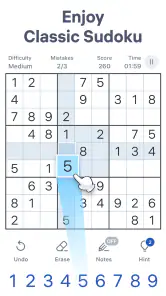
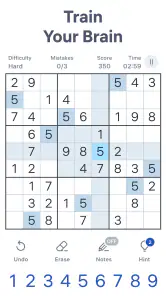


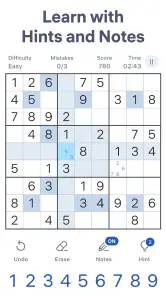



Analysis by Reviewed
I think a Sudoku app is best judged by a simple question: does it make it easy to settle into a puzzle, and does it give you enough room to improve without turning every game into a test? Sudoku.com - Classic Sudoku is a free puzzle game from Easybrain, and its appeal is that it keeps the familiar grid at the center. It suits quick sessions as well as longer ones, so I’d consider it if you want a straightforward way to play rather than a broader collection of games.
Who will get the most from it
The game is a natural fit for someone learning Sudoku, returning to it after a break, or looking for a quiet activity between other tasks. Its different difficulty levels let you begin gently and raise the challenge when easy boards stop holding your attention. I’d also recommend it to regular players who like a daily reason to open a puzzle, though people who want a story, action, or constant social interaction should look elsewhere.
A realistic use case is a short break when you have enough time to focus but don’t want to start a larger activity. I’d choose a comfortable difficulty, make a few deliberate moves, and leave the grid if my attention is pulled away. Sudoku rewards careful reasoning, so rushing through a puzzle while distracted can make it less relaxing. The option to use notes is especially useful here: write down candidates in uncertain cells, then revisit them as rows, columns, and boxes become more constrained.
How it compares with other ways to play
Compared with a paper puzzle book, this version is easier to carry and gives you hints when you reach a dead end. Paper may still be better if you prefer writing candidates by hand, want no screen involved, or enjoy choosing puzzles from a printed page. Compared with a general brain-training app, Sudoku.com is more focused: you get a recognizable number puzzle rather than a varied set of unrelated exercises. That focus is a strength if Sudoku is what you want, but a limitation if you need variety.
Its daily challenges provide a routine, while the statistics page can help you notice whether your solving pace is changing. I’d use those records as personal context, not as a measure of intelligence: a faster time can reflect a familiar pattern or an easier puzzle, not necessarily stronger logic. A practical tip is to focus on accuracy first, then use your own past results as a loose benchmark rather than trying to beat the clock every time.
First Impressions Matter
The first thing I noticed when I opened Sudoku.com - Classic Sudoku was the clean and intuitive user interface. It’s straightforward, which is exactly what you want when you’re about to tackle some number crunching. The app greets you with a minimalistic design, and the color scheme is easy on the eyes, allowing you to focus on the puzzle at hand without any distractions. I appreciated how everything is just a tap away, making the navigation feel seamless.
Diving Into the Gameplay
The app offers a variety of difficulty levels, ranging from easy to expert. This is perfect because it caters to both beginners and seasoned Sudoku pros. I started at the medium level, and let me tell you, it was the perfect balance of challenging yet solvable. The app provides helpful hints, which are a lifesaver when you’re stuck but don’t want to give up just yet. And if you’re like me and sometimes hit a wall, these hints gently guide you back on track without giving away the solution completely.
More From Our News Desk

Weather by Xiaomi Review: Clear at a Glance, Less Clear Up Close

X Under Pressure: Can It Recover When Posting Goes Wrong?

Clash of Clans Is Won Between the Battles

Android Auto Makes the Case for Quieter Car Software

MobiOffice: Transforming Mobile Productivity with Seamless Integration

EA SPORTS FC™ Mobile Soccer: Redefining Mobile Sports Gaming
One of the standout features is the daily challenges. Each day, you get a new puzzle to solve, and completing these can earn you trophies and rewards. It adds a layer of motivation to keep coming back each day, and honestly, who doesn’t love a little reward for their efforts?
Can’t Forget the Features
Aside from the basics, the app includes some nifty features that enhance the overall experience. There’s a notes section, which allows you to jot down possible numbers for each cell. It’s like having a digital notepad right at your fingertips. Plus, the app’s mistake limit is a neat feature that adds an extra challenge. You can only make a certain number of mistakes before you have to restart, which really hones your focus and accuracy.
Another cool element is the statistics page. I found it fascinating to see my progress over time, including how long it takes me to solve puzzles and how many puzzles I’ve completed. It’s a great way to track improvement and set personal goals.
Keeping the challenge useful
When a puzzle becomes difficult, I find it more useful to pause and scan one row, column, or box at a time than to guess. The notes feature supports that slower method: record candidates only where they genuinely help, and clear them as new placements rule options out. Filling every empty cell with possibilities can become busywork, so I’d keep notes selective and use a hint only after checking the obvious constraints. That makes hints a nudge rather than a substitute for solving.
The mistake limit also changes how I’d approach a session. It can make a familiar puzzle feel more focused, but it may frustrate anyone who likes experimenting freely. If that pressure gets in the way, choose a more comfortable difficulty and treat a restart as part of practice rather than a failure. For a relaxed solve, the point is to notice patterns; for a tougher session, the limit encourages me to check each move before committing.
Can’t Forget the Features
Aside from the basics, the app includes some nifty features that enhance the overall experience. There’s a notes section, which allows you to jot down possible numbers for each cell. It’s like having a digital notepad right at your fingertips. Plus, the app’s mistake limit is a neat feature that adds an extra challenge. You can only make a certain number of mistakes before you have to restart, which really hones your focus and accuracy.
Another cool element is the statistics page. I found it fascinating to see my progress over time, including how long it takes me to solve puzzles and how many puzzles I’ve completed. It’s a great way to track improvement and set personal goals.
The Social Side
What’s interesting about Sudoku.com - Classic Sudoku is its social component. You can connect with friends and see how you stack up against them on the leaderboard. It adds a nice competitive edge to an otherwise solitary game, and it’s fun to challenge friends to beat your scores.
Moreover, the app occasionally runs events where you can participate in themed puzzles. These events are time-limited and add a bit of spice to the regular routine. It’s a clever way to keep things fresh and engaging.
Cost, fit, and staying power
Sudoku.com is free to download, with optional in-app purchases listed from $2.49 to $14.99 per item. The free entry point makes it easy to try before deciding whether it belongs in your routine; I’d only spend if I were sure an optional purchase addressed something I actually wanted. It is rated for Everyone, has a 4.7 average from around 2.4 million ratings, and has been installed over 100 million times. Those figures suggest broad reach, but they don’t tell you whether its style suits you personally.
The game’s current version is 7.7.0 and it requires Android 8.0 or later. It was released on November 26, 2017, and the long-running format is a good match for players who want a familiar puzzle rather than a constantly changing premise. If you switch from paper, the main adjustment is entering candidates and numbers on a screen; if you already play digital Sudoku, the learning curve should feel modest. I’d skip it if you strongly dislike screen-based puzzles, mistake limits, or a focused single-game experience.
Choosing a routine that lasts
One useful way to decide whether this belongs in your day is to try it in the moment you would actually play, rather than saving it for an ideal stretch of free time. A puzzle can fit into a quiet break, but it still asks for attention: if you are waiting for a brief interruption, stop after a row or a small set of deductions instead of forcing yourself to finish. That makes the app a better companion for deliberate pauses than for restless, constantly interrupted minutes.
I’d also separate practice from performance. On a learning day, take your time, use notes to understand why a number fits, and treat a hint as a chance to learn what constraint you missed. On a routine day, choose a level you can enjoy without turning the clock into the point. This small change in approach makes the statistics more useful too: compare similar kinds of sessions, rather than reading every time as a direct measure of progress.
When another format is a better fit
If you enjoy Sudoku but want more variety within each session, a broader puzzle collection is a more sensible choice than expecting this focused game to supply different kinds of play. If you mainly value the tactile process of pencilling possibilities and erasing them, a printed book has a feel a phone screen cannot reproduce. And if your goal is to learn formal solving techniques in depth, a tutorial-led resource may serve you better than a game built around getting you into a grid quickly. I see those as different needs, not flaws that every Sudoku app should solve.
There is also a trade-off between convenience and concentration. The phone makes a puzzle easy to carry, but it can bring notifications and other distractions into the same space. I’d silence interruptions or choose a calm moment when I want to think carefully. If I only have a few seconds or need something that can be played without looking closely, Sudoku is simply the wrong activity; the numbers reward attention rather than half-listening.
Switching from paper or another Sudoku game
Moving to this app does not require learning new Sudoku rules, but it does mean changing how you mark uncertainty. I’d spend the first few boards getting comfortable with selecting a cell, entering a number, and using notes before choosing a harder level. That short adjustment is worthwhile if hints and a portable board are useful to you. If your current method already feels comfortable and you value handwritten solving, there may be little reason to switch just for the sake of changing tools.
For someone coming from another digital Sudoku game, the more important question is whether this app’s focused layout and daily routine suit your habits. Start with a board at a familiar difficulty and see whether the note-taking and mistake limit feel helpful or restrictive. You do not need to treat every feature as mandatory: the best workflow is the one that keeps you thinking through the puzzle rather than managing the interface.
Wrapping It Up
Overall, Sudoku.com - Classic Sudoku is a fantastic choice for anyone looking to sharpen their mind and have some fun with numbers. The app is well-designed, user-friendly, and offers enough variety to keep you entertained for hours. Whether you’re a newbie or a Sudoku master, there’s something here for everyone.
If you’re ready to dive into the world of Sudoku, or just want a fun way to pass the time while giving your brain a workout, I’d definitely recommend giving this app a try. Who knows, you might find yourself hooked just like I did!
My recommendation
I’d start with an easier board if you’re rusty, then move up only when you can solve it without leaning on hints. If you already know the rules and want a dependable daily puzzle, the daily challenges and progress view give you a reason to return without requiring a big time commitment. If you want a broad game library, a paper-first experience, or a puzzle with a narrative, another option will suit you better. For anyone who simply wants accessible classic Sudoku with a gentle path from practice to harder boards, this is an easy one to try.
Sudoku.com - Classic Sudoku Frequently Asked Questions
How much storage space does Sudoku.com - Classic Sudoku need?
Sudoku.com - Classic Sudoku is a mobile puzzle game for Android and iOS, but the amount of storage it uses can vary with the device and app version. Before installing, check the available space in your device settings and the app store page. Keeping some room free can also help your phone or tablet run smoothly.
Is Sudoku.com - Classic Sudoku suitable for short play sessions?
Yes. Sudoku is naturally easy to pick up for a brief break, and the game’s daily-puzzle focus gives you a clear activity to return to when you have time. You can also continue with a longer session if you prefer. Since solving a board takes as long as you need, it can fit around a commute, a quiet moment, or a more focused puzzle session.
Who develops Sudoku.com - Classic Sudoku, and when was it released?
Sudoku.com - Classic Sudoku is developed by Easybrain. It was released on November 26, 2017, and remains a straightforward option for players who want a mobile Sudoku game centered on number puzzles. Its current version is 7.7.0, so you can check your app store for the version available to your device before downloading.
What is Sudoku.com - Classic Sudoku?
Sudoku.com - Classic Sudoku is a puzzle game built around the familiar number-placement challenge. Its store summary describes daily puzzles for training your brain and logic, so it suits players looking for a focused activity they can return to regularly. The game is developed by Easybrain and is rated for Everyone.
What features does Sudoku.com - Classic Sudoku offer?
Sudoku.com - Classic Sudoku provides a range of features designed to enhance your puzzle-solving experience. It includes various difficulty levels from beginner to expert, daily challenges, and hints for those tricky puzzles. Additionally, users can track their progress with statistics and enjoy a clean, user-friendly interface.
Pros
- User-friendly interface enhances gameplay.
- Daily challenges keep users engaged.
- Hints and tips for beginners available.
- No intrusive ads during puzzles.
- Multiple difficulty levels suit all players.
Cons
- Limited customization options.
- Requires internet for daily challenges.
- Some ads between puzzles.
- Occasional lag on older devices.
- No multiplayer or social features.
- Category
- Puzzle
- Version
- 7.7.0