Piano Beat: Music Game
- 105.00
- 4.1
- Installs
- 50.00M
- Price
- Free

Screenshots
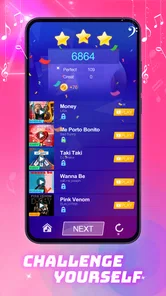

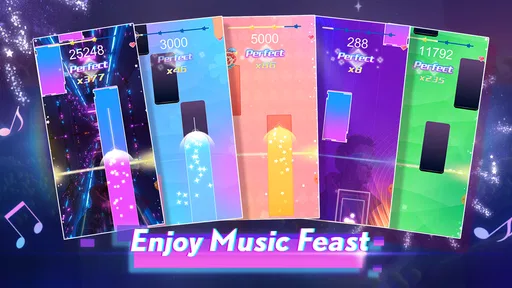

Analysis by Reviewed
For a shared phone, I’d treat Piano Beat: Music Game as a quick rhythm-game option rather than a family music-learning tool. It suits the sort of moment when one person has a few minutes to spare and someone nearby wants a turn too: tap along, see how the music feels, then hand over the device. That easy pass-around appeal is its clearest household strength. It is a game from Dream Tiles Piano Game Studio, and although its piano theme may suggest lessons, I would approach it as casual entertainment first.
A good fit for short, everyday turns
I can picture it filling a gap while dinner is finishing or while a family waits at home before heading out. One person plays, another watches, and the phone changes hands when the turn is over. That works better than expecting the game to hold a whole group’s attention for a long stretch. It is most useful when everyone already understands that this is a brief activity, not the main event.
On a shared device, the simplest way to enjoy a rhythm game is to keep turns short and agree on who plays next. Piano Beat can fit that routine well because its central appeal is interacting with music, not managing a long household project. I can imagine using it during a wait at home or in a quiet stretch before dinner: one person tries a song, another watches the timing, and the phone moves on when the round is done.
That scenario also points to a practical limitation. A rhythm game is most enjoyable when the player can focus on the screen and hear the music clearly. If several people are talking over it, or if someone is trying to use the device for something else, the experience is less satisfying. For a shared session, I’d pick a calm moment, keep the volume comfortable, and let each person play rather than crowd around the display.
It is worth setting expectations before handing it over. The piano presentation does not make this a substitute for learning an instrument, and tapping in time is not the same as practicing keys, reading notation, or building technique. If a child wants a structured lesson, I’d choose a dedicated learning app or a teacher-guided activity. If the goal is simply to enjoy a music-themed game together, this is a more natural fit.
Set device and purchase boundaries first
Because the game is free to download and offers in-app purchases, I’d decide in advance who is allowed to make purchases on a shared device. The listed purchase range runs from $0.99 to $39.99 per item, so it is sensible to keep purchase approval with the adult or device owner rather than leaving that decision to whoever happens to be playing. That is ordinary household coordination, not a feature I would assume the game itself provides.
I’d also separate game time from device ownership. If a parent lends a phone to a teen, it helps to say whether the turn ends after one session, whether sound should be muted around others, and whether the phone needs to be returned immediately afterward. Those small rules prevent a casual game from becoming an argument about screen time or a surprise purchase. They are useful with any free game that includes optional paid items.
More From Our News Desk

Weather by Xiaomi Review: Clear at a Glance, Less Clear Up Close

X Under Pressure: Can It Recover When Posting Goes Wrong?

Clash of Clans Is Won Between the Battles

Android Auto Makes the Case for Quieter Car Software

MobiOffice: Transforming Mobile Productivity with Seamless Integration

EA SPORTS FC™ Mobile Soccer: Redefining Mobile Sports Gaming
For households where more than one person uses the same device, it is also worth checking whose store account is active before anyone starts browsing purchase prompts. A shared phone can blur the line between the person playing and the person responsible for payments. I would not treat the game as a place to establish separate family identities or account boundaries; I’d handle those through the device and store settings already used by the household.
A practical extra step is to settle what happens when the device owner needs the phone back mid-session. Agreeing that a turn can end at any point avoids a tug-of-war over “just one more” round, especially when the phone also handles messages or other everyday tasks. It is a small arrangement, but it makes this kind of casual game easier to share without pretending the game itself manages household schedules.
Keep turns friendly and flexible
A music game naturally invites comparison: who can keep up, who reacts fastest, or who wants another attempt. That can be fun, but it can also leave a younger or less experienced player feeling behind. I’d make the shared goal enjoyment rather than winning. Letting each person choose when to pass, and avoiding pressure to match someone else’s performance, keeps the game welcoming across different ages and comfort levels.
One useful approach is to let the person waiting choose the next turn’s music mood or simply be the audience, instead of insisting that everyone compete. It gives the group something to do while one player has the phone and avoids treating a score or outcome as the only measure of a good session. I would also keep turns flexible: if someone is finding the pace frustrating, there is no reason to insist they continue just because the game is already open.
For a family outing or a long journey, I would not rely on it as the only activity. It can occupy a short gap, but repeated play may become tiring, especially for someone sensitive to fast visual or musical activity. A downloaded book, conversation, or another quieter option is a better backup when the group needs a change of pace.
That makes it a better choice for a spare moment than for keeping a group busy for an entire trip. I’d also avoid turning every handoff into a comparison of performance. If a player wants to stop, letting them pass without commentary keeps the activity light and makes it more likely that everyone can enjoy their own turn.
What to expect from the game
I’d use this section to set expectations before anyone in the household takes a turn: the game is built for interactive music play, not for teaching piano or replacing a music player. A quick trial can help you see whether its style suits the person borrowing the device and whether the session fits your household’s boundaries. From there, it’s easier to decide what kind of music experience you actually want.
Music play, not piano instruction
As a music game, Piano Beat is best judged by whether it makes interacting with songs entertaining. Its appeal is the link between listening and responding: the player is not just playing music in the background but engaging with it. That makes it more active than a music player, yet less educational than an app designed to teach piano fundamentals. I would install it for a light rhythm challenge, not to improve a child’s musicianship in a measurable way.
This distinction matters when choosing among music apps. If you want a calm playlist, a streaming or local music app is the more useful tool. If you want to learn to play piano, look for lessons, guided practice, and instrument skills. If you want a game that turns music into an interactive activity, Piano Beat belongs in that third group. It fills that recreational niche, though it will not replace the other two.
One practical tip is to try a short session before making it part of a regular routine. That gives you a feel for whether the musical interaction suits the person who will use it, without assuming that a piano theme automatically means everyone will enjoy it. A player who likes fast reactions may find it engaging; someone looking for relaxed listening or patient instruction may prefer another kind of app.
That short trial is also a useful way to check whether the shared-device setup feels comfortable. Let the intended player try it while the device owner is nearby, then decide whether it suits the household’s expectations for sound, timing, and purchases. I would keep the decision about installing it separate from any decision to spend money: liking the basic activity does not mean paid items are necessary.
Version, compatibility, and value
The game is free, with optional in-app purchases, and its current version is 1.7.6. It requires Android 6.0 or later, so an older Android device may not be compatible even if it still works well for other household tasks. The age rating is Teen, an important detail for parents deciding whether it belongs on a shared family phone. I would check that rating against the intended player and the household’s own rules before installing it for a younger child.
Its audience is substantial: it has passed 50 million installs and has an average rating of 4.1 from around 45 thousand ratings, alongside 105 written reviews. Those figures suggest many people have tried it, but they do not tell me whether it suits a particular player or household. I’d weigh them as context rather than a guarantee, especially because music preferences and tolerance for rhythm challenges vary widely.
Since the download costs nothing, trying it is a low-commitment way to see whether its style clicks. The paid items deserve a separate decision, though. I would not make a purchase simply because the game is being shared or because someone asks during a turn; first decide whether the free experience is enough and whether spending is appropriate for the device owner. That keeps the game’s optional spending from becoming an accidental part of a casual session.
If the household has an older Android phone set aside for shared games, checking compatibility before planning a session can save some frustration. The Android requirement is 6.0 or later, so the device’s operating system matters as much as whether the phone can still handle everyday calls and messages. On a compatible phone, I’d still start with a short trial rather than assuming that a familiar music-game format will suit every person who borrows it.
Age, trust, and a parent’s first check
The Teen content rating means I would not hand the game to a young child without a parent taking a look first. That is not a claim that the game is unsuitable for every younger player; it is a reminder to use the rating as a starting point and apply your own judgment. For a teen, it may be a straightforward music-game choice. For a younger child, I’d preview the experience and decide whether the age guidance fits.
On a shared device, I would also make the boundaries visible: who can approve purchases, which account is being used, and when the phone has to be returned. These are especially helpful when one person owns the device and another person is playing. I would not assume that the game manages those household arrangements for you; clear expectations from the adults or device owner are the reliable way to avoid confusion.
For caregivers, the useful question is not only whether the game is entertaining, but also whether it fits the moment. A short supervised turn can be an easy music-themed break. An unsupervised session on a device connected to a payment account calls for more care, particularly if the player is not old enough to understand optional purchases. That is a sensible boundary for any free-to-play game, and it is worth setting before the first turn rather than after a prompt appears.
The release date, June 20, 2025, and the current version, 1.7.6, help identify which edition a household is considering, but they do not replace a parent’s own suitability check. I’d focus less on treating the version number as a quality promise and more on whether the Teen rating and optional-spending setup fit the person who will use the phone. That distinction is especially helpful when an adult and a younger player share one device.
Who I’d recommend it to
I’d recommend Piano Beat to someone who likes music games, wants an easy activity to share in brief turns, or enjoys responding to songs rather than simply listening. It can work especially well for teens who already like rhythm-based play and for adults who want a light, music-centered diversion. Its large install base and solid average rating make it a familiar option in the category, but my recommendation still depends on wanting a game rather than a lesson.
I’d skip it if your main goal is formal piano practice, if you need a quiet background activity, or if fast musical interaction tends to frustrate the intended player. I’d also choose a different app if you want a household tool with explicit shared profiles or a structured learning path; I would not install this expecting those capabilities. The best comparison is not “which app teaches piano best?” but “which option makes a few minutes of music play enjoyable?”
It is particularly well suited to a teen or adult who is happy to pick up a phone, try a music-based challenge, and give it back without expecting a persistent family setup. If the main need is a shared listening queue, a music player is a better fit; if the aim is to build piano habits, a lesson-focused app is a better fit. Piano Beat makes most sense between those choices, as an interactive diversion rather than a tool for learning or organizing music.
My household verdict
For shared use, I see Piano Beat as a casual option that can make a spare moment more lively, provided everyone understands whose phone and payment account they are using. The most useful setup is simple: check the Teen rating, agree on turn-taking, and keep purchase decisions with the device owner. That small bit of coordination matters more than trying to turn the game into a family system it is not meant to be.
Overall, I’d try it if the household wants a free music game for short, informal sessions and is comfortable managing optional purchases outside the game itself. I would not choose it as a piano course or a guaranteed fit for every age. Its strongest role is shared, low-pressure rhythm play: a quick turn for someone who enjoys music and tapping along, followed by an easy handoff when it is time to give the phone back.
Piano Beat: Music Game Frequently Asked Questions
What is Piano Beat: Music Game?
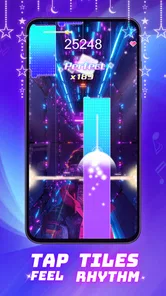
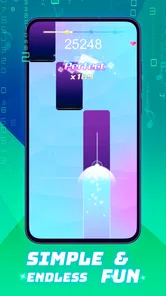
Piano Beat: Music Game is a rhythm game built around tapping musical tiles in time with the soundtrack. The main challenge is to follow the notes as they appear on screen while maintaining a steady rhythm and avoiding missed taps. It is designed for quick play sessions, though the pace and difficulty can become more demanding as you progress. The exact song selection and available modes may vary by version.
How do you play Piano Beat: Music Game?
Choose a song or stage, then tap the tiles as they reach the target area, following the music’s beat. Accuracy and timing are central to earning a better result, while missed or late taps can interrupt a run. A quiet place and headphones may make the rhythm easier to follow, but the game can also be played through your device’s speakers. Check the on-screen tutorial for controls and any mode-specific rules.
Is Piano Beat: Music Game free to download and play?
The game may be available to download without an upfront charge, but that does not necessarily mean every feature is free. Mobile games can include advertisements, optional in-app purchases, or content that becomes available only after meeting certain requirements. Review the listing for your device and the purchase details shown in the app before spending money. Availability, pricing, and payment options can differ between regions and app-store versions.
Can I play Piano Beat: Music Game offline?
Whether the game works without an internet connection can depend on its version and how its songs or other content are provided. Some rhythm games let you play previously loaded stages offline, while others may need a connection for downloads, advertisements, account features, or updates. If offline play matters to you, test the game after installation while disconnected and check its store description for current connectivity requirements.
Is Piano Beat: Music Game suitable for children, and what should parents check?
The tapping gameplay may be approachable for younger players, but suitability depends on the child and the content available in the installed version. Parents should review the age rating, song selection, advertisements, and any in-app purchases listed by the relevant app store. It is also sensible to check the game’s privacy information and device permissions, and to use available purchase restrictions if a child will play unsupervised.
Pros
- Simple tap controls make it easy to start playing.
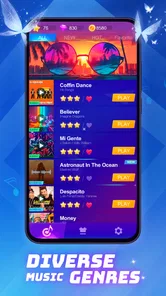
- Song selection offers variety for different musical tastes.
- Short levels work well for quick play sessions.
- Rhythm challenges can help improve timing and focus.
- Bright visuals and effects make gameplay engaging.
Cons
- Fast note sequences can be difficult for beginners.
- Ads may interrupt the experience
- depending on the version.
- Some songs or features may require in-app purchases.
- Gameplay can feel repetitive after extended sessions.
- Accurate taps may depend on your device's touch response.












