Magic Dancing Tiles
- 226.00
- 4.8
- Installs
- 50.00M
- Price
- Free

Screenshots
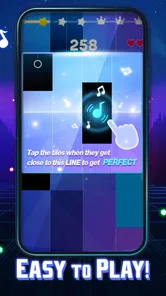
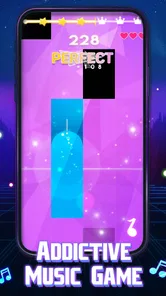
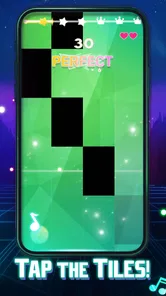


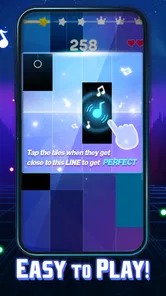
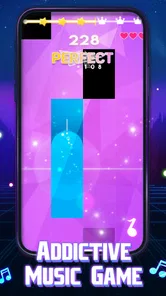
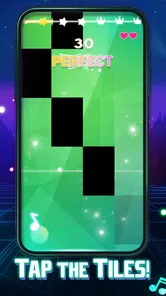
Analysis by Reviewed
Magic Dancing Tiles is a music game for quick bursts of concentration: you follow a song by tapping piano-style tiles in time with its beat. I’d reach for it when I have a few spare minutes and want something more active than listening to music, but less involved than learning an instrument or settling into a long game. Its appeal is immediate; whether it stays enjoyable depends on how much you like repeating rhythm challenges and how comfortable you are with occasional missed taps.
A good fit for brief, focused breaks
A realistic use for me is a short wait between errands: I can start a round, give the music my attention, and put the phone away when the wait is over. That works better than opening a game that expects me to remember a quest or manage several menus. I would avoid playing while walking, crossing a street, or trying to hold a conversation, though. The screen and beat both ask for attention, so this is a poor choice for multitasking even when the session is brief.
It may also suit someone who likes turning familiar downtime into a small coordination challenge, but not someone who needs every break to feel restful. If my hands are tired or I am already overstimulated, adding another task to follow can make a pause feel busier rather than more refreshing. I would treat that as a useful distinction: the game is for active engagement with music, not a guaranteed way to decompress.
What playing it feels like now
At its core, Magic Dancing Tiles asks you to keep your attention on the moving rhythm and respond with accurate taps. That simple premise makes the first few moments easy to understand, even if you have never played a piano-tile game. The challenge is not musical knowledge. It is staying focused as the pace and pattern demand more precision.
I like this format best in short sessions. A song gives a round a natural beginning and end, so I can play while waiting for a friend or taking a brief break without needing to remember a complicated story or manage a large set of controls. There is also a satisfying connection between hearing the music and acting on it: when my timing lines up, the tapping feels like part of the song rather than a separate task.
The trade-off is that a tap-based rhythm game leaves little room for distraction. If I glance away, hold the phone awkwardly, or start tapping before I have settled into the beat, small mistakes can quickly interrupt the flow. I would play seated or with the device held securely, especially when trying a track that feels demanding. A calm setting helps more than it might in a slower puzzle game.
PHY STUDIO makes this as a music game, and that focus is clear: the main attraction is interacting with rhythm, not building a character or exploring a world. The game is free to download, while optional in-app purchases range from $3.99 to $29.99 per item. I would start with the free experience and decide whether I want to spend only after I know how often I return to it; the existence of purchases is a reason to check the price shown in the game before confirming anything.
More From Our News Desk

Weather by Xiaomi Review: Clear at a Glance, Less Clear Up Close

X Under Pressure: Can It Recover When Posting Goes Wrong?

Clash of Clans Is Won Between the Battles

Android Auto Makes the Case for Quieter Car Software

MobiOffice: Transforming Mobile Productivity with Seamless Integration

EA SPORTS FC™ Mobile Soccer: Redefining Mobile Sports Gaming
Where it fits among rhythm games
Compared with a music player, this is a much more hands-on way to spend time with a song, but it does not replace simply listening when I want to relax. Compared with music-learning apps, it is better suited to quick reactions than practicing piano technique: tapping tiles should not be mistaken for learning how to play an instrument. And next to rhythm games built around complex controls, this style is approachable because its central action is easy to grasp.
That simplicity is also a limit. Players who want detailed instrument controls, a structured course, or a story-driven campaign may find the tile-tapping format too narrow. I would choose another game if I wanted richer interaction than timing taps, or a dedicated learning app if my goal were to develop musical skills outside the game.
Small habits that improve a session
One useful habit is to listen for the pulse before committing to a fast run of taps. Rather than reacting to each tile as a visual surprise, I try to let the music establish a steady count, then match my hands to it. This is especially helpful when the screen feels busy: the audio can anchor timing instead of leaving me to chase every visual cue.
Another practical adjustment is to keep the phone stable and use the same tapping posture across attempts. If I switch between holding the device in one hand and bracing it with both, my reach and accuracy can change even when the song is familiar. A stable grip also makes it easier to distinguish a genuine timing mistake from a simple change in hand position.
For a short break, I would pick a track with a comfortable feel rather than treating every session as a high-score test. If I keep missing, repeating the same round while frustrated is unlikely to make the experience more enjoyable. Pausing for a moment, resetting my attention, and then trying again makes more sense than tapping faster and hoping to recover.
What the release history does and does not tell me
The game was released on October 30, 2023, and its current version is 0.5.68. Those details give a useful point of reference for the product’s timeline and present build, but they do not by themselves demonstrate what has changed between versions. I would not assume a particular new mode, song selection, interface improvement, or performance fix simply from the version number.
For someone who already plays, the practical takeaway is to treat the installed build as the current experience rather than relying on old impressions from an earlier release. If a familiar song or control feels different after an update, it is worth checking the in-game experience directly before deciding that the whole game has changed. A version label alone cannot tell me whether an individual player’s routine will feel better or worse.
The game has a 4.7 average from around 48,000 ratings, and it has passed 50 million installs. That level of uptake suggests the quick, accessible rhythm format has broad appeal, though it cannot guarantee that every player will enjoy the same songs or difficulty. Its content rating is Mature 17+, so I would check the rating and make a considered choice before handing it to a younger player, rather than assuming that a simple tile game is automatically intended for every age.
What a returning player can reasonably expect
For an existing player, the version number is most useful as a way to identify the build, not as a promise of a particular direction. I would judge any change by the practical question of whether my usual session feels clearer, smoother, or more enjoyable. If I am deciding whether to return after time away, I would give the current build a few ordinary sessions before drawing a conclusion from memory; expectations about a past version can color how a familiar rhythm feels.
That cautious approach also helps separate a personal adjustment from a product change. A different grip, a noisy room, or simply being less focused can affect timing, so I would try the same comfortable conditions before deciding that performance has shifted. What I would watch for in future releases is a clear explanation of changes that matter to routine play, rather than reading more into a version label than it can support.
Who is likely to enjoy it—and who may not
I can see it working well for someone who already enjoys tapping along to music and wants a game that gets going without a long explanation. It also suits people who prefer compact rounds and are happy to improve through practice. If a friend wanted a casual game for waiting-room downtime, I would suggest trying it, provided they are comfortable with repeated timing challenges and the age rating is appropriate.
It is less suitable for anyone looking for a quiet, low-pressure way to unwind. The need to watch and react can feel more demanding than soothing, particularly when accuracy slips. Players who dislike repeating a difficult section may also lose patience. In that case, a music app offers a gentler way to enjoy songs, while a slower puzzle game may be a better fit for a break that does not require continuous attention.
It is also worth separating “music-themed” from “music-making.” The game lets you engage with music through timed taps, but that is different from composing, practicing scales, or controlling notes as you would on an instrument. If I wanted a creative outlet, I would look elsewhere; if I wanted a compact reflex challenge tied to music, this is much closer to the mark.
What I would check before spending or settling in
Before buying an optional item, I would make sure I understand what it offers and whether it addresses something I actually want from the game. With purchases priced from $3.99 to $29.99 per item, the sensible approach is to avoid treating a purchase as necessary just because it is available. First see whether the free play style holds your interest over several sessions; then decide whether paying adds value for your own habits.
I would also pay attention to the conditions in which I enjoy it most. A reliable connection to the sound, a comfortable screen position, and a few uninterrupted minutes can make a bigger difference to a rhythm round than they would in a game that can be paused at any moment. If I am tired, rushed, or unable to hear the music clearly, I would save it for another time instead of judging the whole game by an awkward attempt.
For anyone checking compatibility, the listed minimum operating system is 7.1. That is a useful baseline to compare with a device’s software, but I would still install it through the relevant app store and review the device’s own compatibility details before deciding. The current version is 0.5.68, which helps identify the build being discussed without promising a particular update schedule or future feature.
Questions worth answering before you try it
Does it work for a first-time rhythm-game player? I think so, if the player is comfortable learning by trying rather than expecting a tutorial to teach musical technique. The basic idea is easy to understand, but getting consistent is a separate matter. I would begin with a relaxed attempt and focus on hearing the pulse instead of trying to react at maximum speed straight away.
Is it a good choice for a child because it looks simple? I would not make that assumption. The Mature 17+ rating deserves attention regardless of the tile-based presentation, and an adult should check that rating before deciding whether it is suitable for a younger player. Is paying required to enjoy it? The game is free to download, so I would first see whether the core experience fits my habits; any optional purchase should be evaluated on its own terms rather than treated as an entry fee.
What if the taps feel inconsistent? I would first test a calmer session with the phone held steadily, the sound easy to hear, and my attention on the beat. That gives me a better basis for judging whether I am simply out of rhythm or whether the experience is not working for me. If accuracy still feels frustrating, I would switch to listening or another style of game rather than forcing repeated attempts.
My take on its staying power
Magic Dancing Tiles is at its best when I want a focused, music-led challenge that starts quickly and can fit into an ordinary pause in the day. Its straightforward tapping gives it an easy entry point, while the demand for steady timing supplies the challenge. Its limitations are equally clear: it is not a music lesson, a passive listening experience, or the right choice for someone who wants elaborate progression rather than repeated rhythm play.
As the game continues beyond its current version, I would watch for clearly described changes that affect the everyday experience—especially anything that improves how players understand a track’s challenge or makes returning to a favorite session more comfortable. Those are things I would welcome, not features I assume are already present. For now, I’d recommend giving the free game a try if you enjoy tapping along to music, keeping expectations centered on short rhythm sessions, and skipping it if what you really want is to learn piano or relax without needing to react.
Magic Dancing Tiles Frequently Asked Questions
What is Magic Dancing Tiles?
Magic Dancing Tiles is a rhythm game built around tapping or holding tiles in time with music. Its basic appeal is easy to understand: follow the notes as they appear, keep the beat, and try to complete each track accurately. Before downloading, check the store listing for the current song selection, game modes, and device requirements, since available content and features may vary by version or region.
How do you play Magic Dancing Tiles?
The game typically asks you to tap tiles as they reach the play area, with some notes requiring a press or hold rather than a quick touch. Timing matters: missed or inaccurate inputs can reduce your score or end a run, depending on the mode. Headphones may help you follow the rhythm, and adjusting to the pace of a song can make the controls easier to manage.
Is Magic Dancing Tiles free to download, and does it include purchases or ads?
The app may be available to download without an upfront charge, but that does not necessarily mean every feature or song is free. Mobile games can include advertisements, optional in-app purchases, or other limits on access to content. Review the current Google Play or App Store listing and the purchase details before installing, and use parental controls if children may play on the device.
Can I play Magic Dancing Tiles offline?
Offline availability can depend on the game version and how its songs or other content are delivered. Some rhythm games allow previously available tracks to run without a connection, while downloads, advertisements, account features, or newly added content may require internet access. If offline play is important, check the app’s current store description and test the relevant features before relying on it during travel.
Is Magic Dancing Tiles suitable for children, and what should I check before downloading?
The simple tap-based gameplay may be approachable for younger players, but suitability also depends on the app’s content, advertising, purchase options, and age rating. Check the current store listing for its rating, privacy information, permissions, and any notices about ads or in-app purchases. A parent or guardian should review those details and consider enabling purchase approval before a child uses the game.
Pros
- Simple tap controls make it easy to start playing.
- Quick rounds suit short breaks and casual sessions.
- Rhythm-based gameplay rewards timing and concentration.
- A broad song selection can add variety between sessions.
- Increasing difficulty offers a challenge for experienced players.
Cons
- Some tracks or features may require payment to unlock.
- Ads can interrupt play or appear between rounds.
- Fast songs may be difficult for new players.
- Gameplay can feel repetitive after extended sessions.
- Performance may vary across devices
- especially on older phones.











