Daily Spider Solitaire Classic
- 529.00
- 5.0
- Installs
- 1.00M
- Price
- Free

Screenshots






Analysis by Reviewed
I can see this working well on a household phone or tablet when someone wants a quiet card game between chores, during a commute, or while waiting for an appointment. Spider Solitaire is turn-based and easy to pause, so it suits short gaps better than games that demand a continuous session. A practical approach on a shared device is to agree on whose game is in progress before handing it over: a partly arranged tableau is much harder to pick up than a fresh deal, and another player’s moves could change the puzzle.
That shared-device convenience has a boundary. I wouldn’t treat a score, challenge result, or personal progress as private if several people use the same installation. The app is best thought of as one casual game space on that device, not as a family organizer. If separate histories or clearly divided player profiles matter to you, a game built around individual accounts may be a better fit.
Getting into the Game
From the moment you download Daily Spider Solitaire Classic, you’re greeted with a user-friendly interface that’s both intuitive and visually appealing. The app doesn’t bombard you with unnecessary tutorials—if you know Solitaire, you’ll know your way around this game. What makes this version stand out is its daily challenges. Every day, there’s a new puzzle to solve, and completing these daily challenges earns you rewards and badges. It’s a neat way to keep players coming back for more.
Gameplay and Features
The game sticks to the original rules of Spider Solitaire, which is a relief for purists like me who don’t want too many frills added to a classic. You can choose between one, two, or four suits, depending on how challenging you want the game to be. I personally love the four-suit option when I’m in the mood for a real brain workout.
The controls are smooth, and the card movements are fluid. I did notice that, on occasion, the app would lag slightly on older devices, but it wasn’t a deal-breaker. The game also offers hints and undos, which are a lifesaver when you’re stuck. Trust me, you’ll appreciate this feature during those “what was I thinking?” moments.
Choosing a difficulty that fits the moment
For a low-pressure session, I’d start with one suit; it lets me focus on uncovering cards and keeping sequences open rather than juggling suit-specific constraints. Two suits make a useful middle ground when I want more planning without turning a short break into a demanding puzzle. Four suits are better saved for a longer stretch of attention: the extra complexity is satisfying, but it can make a quick interruption more costly because I need to remember which cards are blocking useful moves.
Hints and undos are most helpful when used as learning tools rather than automatic shortcuts. When I’m stuck, I’d undo one move at a time and ask whether it exposed a card, opened a column, or simply shifted the problem elsewhere. A hint can help reveal a legal option, but it cannot decide whether that move preserves a better sequence for later. This makes the game more rewarding for someone who wants to improve, not just clear a deal.
More From Our News Desk

Weather by Xiaomi Review: Clear at a Glance, Less Clear Up Close

X Under Pressure: Can It Recover When Posting Goes Wrong?

Clash of Clans Is Won Between the Battles

Android Auto Makes the Case for Quieter Car Software

MobiOffice: Transforming Mobile Productivity with Seamless Integration

EA SPORTS FC™ Mobile Soccer: Redefining Mobile Sports Gaming
Small decisions that make a session easier
When I have only a few minutes, I choose a simpler suit setting and avoid starting a deal if I know I’ll need to leave immediately. Spider can be paused, but returning to a half-finished layout still takes a moment of concentration. If I do get interrupted, I try to note the main bottleneck before putting the device down: an empty column, a blocked face-down card, or a mixed sequence that is hard to move. That small mental bookmark makes it easier to resume without undoing useful work.
I also try not to treat every available move as equally good. Moving a card may create a neat-looking stack while leaving a face-down card covered, so I look for moves that reveal information or make a column more flexible. This is especially useful in four-suit games, where a sequence can be orderly yet still be awkward to shift because its suits do not match. The hint button is handy when I’ve overlooked a legal move, but I still decide whether it helps the overall layout.
The Visuals and Sound
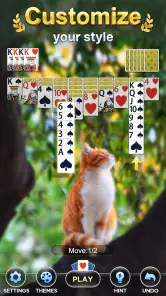
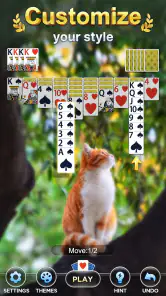
The graphics are clean and minimalistic, which keeps the focus on the game itself. There are a few customization options available, like changing the card backs and backgrounds, which adds a personal touch to your gaming experience. I found the sound effects to be quite pleasant, not too intrusive, and they can be turned off if you prefer to play in silence.
Age, cost, and expectations
Big Cake makes this free card game, and its Everyone age rating makes it suitable for a broad audience. There are in-app purchases priced from $1.99 to $9.99 per item, so I’d keep that in mind if a child is playing on a device where purchases are possible. The age label is a content guide, not a substitute for a household’s own rules about spending or screen time. I’d set expectations before handing over a shared phone, especially if younger players might tap through purchase prompts.
The game has been available since July 25, 2019, and version 17.0.8 requires Android 6.0 or later. It has a 5.0 average from around 9,200 ratings, with more than 1 million installs and 529 written reviews. Those figures suggest it has found an audience, but they don’t tell me whether its daily routine will suit a particular player. I’d judge it by whether the card layout, challenge rhythm, and level of difficulty feel comfortable on the device you actually use.
Sharing a device without mixing expectations
On a family tablet, I’d keep the arrangement simple: one person finishes or abandons a deal before the next person starts, and everyone understands that the app is being used as a shared game rather than a personal record. This avoids the familiar handoff problem where one player’s careful setup becomes another player’s experiment. It also makes the daily challenge easier to coordinate; people can take turns, but they should agree who is attempting it rather than assuming that each person has a separate run.
For younger players, the game’s card-based format is easy to understand, but the tougher suit settings may be frustrating before the rules feel familiar. I’d let a new player begin with one suit and build up only if they enjoy planning several moves ahead. A parent or device owner should also handle purchase boundaries through the device’s usual settings and household rules. I wouldn’t assume the game itself separates children’s activity from an adult’s.
Why You’ll Keep Playing
One of the reasons I found myself opening this app daily is the leaderboard feature. Competing against friends and other players adds a layer of competitiveness that’s surprisingly addictive. Achieving a high score or completing a particularly challenging puzzle gives a sense of accomplishment. Plus, the daily challenges are a constant draw, ensuring there’s always something new to tackle.
Making the daily challenge part of a routine
The daily format works best for me as a gentle prompt, not an obligation. I might open the game while waiting for a kettle or taking a break between tasks, play a few moves, and return later if the layout has captured my attention. If I miss a day, I don’t see a reason to force a catch-up session; the value is in having a fresh puzzle when I want one, rather than turning a relaxing card game into a checklist.
The leaderboard can add a little motivation for players who enjoy comparing results, but I would not make it the main reason to play. A score-focused approach can encourage rushed choices, while Spider often rewards patience and rearrangement. In a household, the comparison is most enjoyable when treated as friendly conversation—who found a clean route through the cards—rather than a demand that everyone play at the same pace.
How it compares with other card games
Compared with Klondike Solitaire, Spider Solitaire asks me to manage longer runs of cards and think about suit sequences, so it feels more like a planning puzzle than a quick sequence of obvious moves. Compared with a broad collection of card games, this app keeps its attention on one familiar format rather than asking me to learn several rule sets. That focus is a strength if Spider is the game I want, but a limitation if I’m looking for variety or a different kind of card challenge.
The daily challenge and leaderboard give a reason to return, while the suit choices let me adjust the mental load. Still, neither feature changes the basic character of Spider Solitaire: success depends on patience, and some deals call for careful rearranging rather than quick progress. If I want a fast, luck-heavy game or a social card table, I’d choose something else. If I want a quiet solo puzzle I can revisit in small sessions, this is a more natural match.
Where it fits—and where it doesn’t
I’d choose this over a general card-game collection when I already know I want Spider and would rather spend my time playing than browsing a menu. A collection is the better pick for a household with sharply different tastes, since one person may want a quick Klondike round while someone else prefers a different card format. This game’s narrower focus is satisfying for Spider fans, but it can feel repetitive if the household expects a fresh type of game every time the device comes out.
It is also not my first choice for a player who wants live competition, conversation during play, or a game that reliably ends after a very short burst. The leaderboard adds a competitive element, but the underlying experience remains a solo card puzzle. On the other hand, someone who likes quietly working through a layout at their own pace may find that structure more relaxing than a multiplayer game with turns to follow and other players waiting.
Who I’d recommend it to
I’d recommend it to Spider fans who want a familiar solo game with a regular challenge, and to casual players who like choosing how demanding a session feels. It is less suitable for someone who wants multiplayer card play, a large menu of different games, or a guaranteed quick win every time. For a shared household device, it can be an easy game to pass around, provided players are comfortable sharing the same app space and take care around purchases. My verdict is that its best use is simple: open it for a focused puzzle, choose a suit level that fits the time available, and enjoy the steady satisfaction of working through the cards.
For a first try, I’d keep the goal modest: play one deal on the easiest setting, use undo to understand a move that goes wrong, and see whether the longer sequence-building style feels satisfying. If it does, the daily puzzle and harder suit options offer room to keep learning without changing the core game. If it doesn’t, there is little reason to push through merely because the routine is daily; a faster solitaire variant or a collection with several formats would likely suit you better.
For a household, my recommendation comes with one practical condition: agree on shared use before play, especially when a challenge or unfinished deal matters to someone. The Everyone rating makes the game broadly approachable, while purchase awareness still belongs to the device owner. With those expectations in place, Big Cake’s card game is a straightforward choice for quiet breaks, patient puzzle solving, and friendly turn-taking—not a substitute for separate accounts or a lively multiplayer table.
In conclusion, Daily Spider Solitaire Classic is a delightful adaptation of a timeless game. It’s perfect for those who love a good card game and want a daily dose of Solitaire with a bit of a challenge. Whether you’re a casual player looking to pass the time or a Solitaire enthusiast aiming to top the leaderboards, this app has something for everyone. Give it a try, and you might just find yourself hooked like I did!
Daily Spider Solitaire Classic Frequently Asked Questions
Does Daily Spider Solitaire Classic work on my Android device?
Daily Spider Solitaire Classic is available for Android devices running version 6.0 or later. It is a card game from Big Cake, and its straightforward solitaire format makes it easy to understand before you begin. If your device meets the minimum Android requirement, you can download the game for free and see whether its style suits you.
Is Daily Spider Solitaire Classic free to download?
Yes, Daily Spider Solitaire Classic is free to download. Optional in-app purchases are available, priced from $1.99 to $9.99 per item, so you can choose whether to spend anything beyond the free game. The game is rated for Everyone, making it a straightforward option for people looking for a familiar card game to play casually.
What is Daily Spider Solitaire Classic?
Daily Spider Solitaire Classic is a card game app designed for both Android and iOS platforms. It offers an engaging and challenging twist on the traditional Spider Solitaire game, featuring daily challenges and various difficulty levels. Players can enjoy a seamless and smooth gaming experience with intuitive controls and visually appealing graphics.
Can I play Daily Spider Solitaire Classic offline?
Yes, you can enjoy Daily Spider Solitaire Classic offline. The game is designed to be fully functional without an internet connection, making it perfect for users who wish to play on-the-go or in areas with limited connectivity. This offline capability ensures that you can enjoy the game anytime and anywhere without interruptions.
Are there any in-app purchases in Daily Spider Solitaire Classic?
Daily Spider Solitaire Classic offers in-app purchases that enhance the gaming experience. While the game is free to download and play, users have the option to purchase additional features, such as ad-free gameplay, extra hints, or new card designs. These purchases are optional and are not necessary to enjoy the core gameplay.
Pros
- Classic solitaire experience
- Simple and intuitive interface
- Smooth animations
- Offline play available
- No intrusive ads
Cons
- Limited game variations
- Basic graphics
- No multiplayer mode
- Requires frequent updates
- Lacks advanced features
- Category
- Card
- Version
- 17.0.8