UNO!™
- 65.88K
- 4.4
- Installs
- 100.00M
- Price
- Free

Screenshots

Analysis by Reviewed
I like card games that need little setup, and the familiar rhythm of UNO!™ makes this one easy to pick up for a short break. The digital version keeps the basic appeal—watch the cards, choose when to play a special one, and try to empty your hand—while bringing opponents and play options onto the phone. My main reservation is that a quick round can turn into a longer session when I keep wanting to see how the next hand goes.
The first move is easy to understand
Jumping into a match feels approachable even if you have not played the physical game recently. The familiar colors and symbols make it fairly clear what can be played, so I can concentrate on the hand rather than learning a complicated interface. For a first visit, I’d start with a solo game to get comfortable, then try multiplayer once the pace feels natural.
The game is free to download, and Mattel163 Limited is the developer. It is rated for Everyone and has a 4.4 average from around 2.4 million ratings, with over 100 million installs. Those figures suggest a large audience, which is useful when I want to find opponents rather than arrange a table in advance. It was released in 2018, and version 1.14.9695 is listed for Android 4.4 and up.
Reads About UNO!™
That low barrier to entry is useful when I’m introducing the game to someone who knows the tabletop version but has never played on a phone. The central task remains recognizable, and the screen makes the current options visible without needing anyone to sort a physical hand. I’d still take a moment to check the controls and the match format before committing to a longer session, particularly if I’m playing with someone new. A little orientation makes the first hand more relaxed and gives everyone time to settle into the digital pace.
It is also worth separating “easy to learn” from “always relaxing.” The basic rules are familiar, but a competitive match can still bring swings in fortune and moments when a hand changes quickly. I enjoy that unpredictability when I’m in the mood for a lively contest; if I want a predictable, low-stakes pause, solo play is the safer starting point.
How a round turns into another
In a typical round, the action is simple: respond to the current card, make a choice when a special card changes the situation, and keep an eye on how close other players are to finishing. That repeated decision-making is what gives a short game its tension. I’m not just tapping quickly; I’m weighing whether to use a useful card now or hold it for a later turn.
Feedback, pace, and playing with others
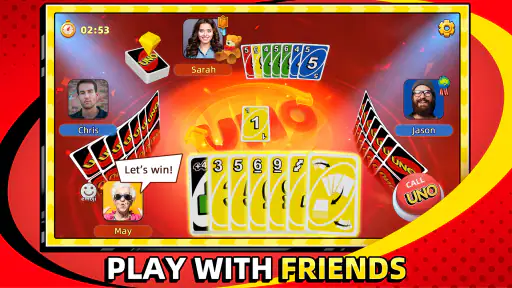
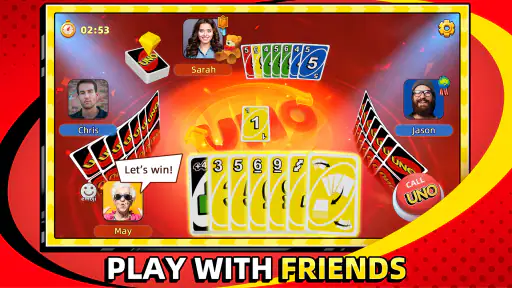
Jumping into the UNO!™ app is like slipping into a cozy pair of slippers. The interface is super user-friendly, and the app guides you through every step, making it easy even for first-timers. You can play solo against the AI or dive into multiplayer mode, where you can challenge friends or random opponents from around the globe. It’s like having a card party without needing a deck or a table!
More From Our News Desk

Weather by Xiaomi Review: Clear at a Glance, Less Clear Up Close

Clash of Clans Is Won Between the Battles

MobiOffice: Transforming Mobile Productivity with Seamless Integration

EA SPORTS FC™ Mobile Soccer: Redefining Mobile Sports Gaming

How Microsoft OneDrive Became a Mobile Productivity Giant

How Google Translate Breaks Language Barriers Effortlessly
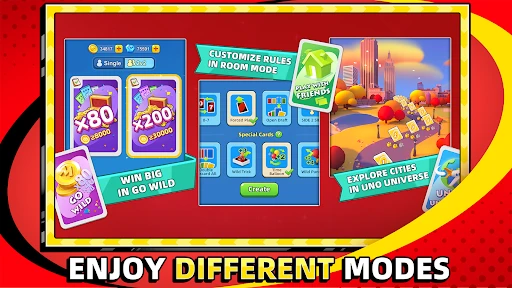
One of the coolest things about the UNO!™ app is its variety of modes. You can stick with the classic game or spice things up with special modes like 2v2 or tournaments. Plus, there are daily challenges and events that keep the gameplay fresh and exciting. The thrill of winning a tough match or completing a challenging event is quite satisfying!
The pace can be a real advantage when I have a few spare minutes: I can get into a match without gathering people or setting up cards. But the same convenience can be a drawback if I only meant to play one round. Multiplayer also depends on other people’s turns, so it is less suited to someone who wants every game to move at a perfectly predictable speed.
A practical way to choose a mode is to match it to the time and company I actually have, rather than treating every option as equally suitable. A solo round fits a brief wait because I can focus on my own decisions. A friend match makes more sense when the other person is ready to play, while a team format is better when I want the shared outcome to matter as much as my own hand. I avoid starting a multiplayer game when I know I may need to put my phone away at any moment; the convenience of digital cards does not make other players’ turns disappear.
That distinction is where the app differs from a quick offline card game. A physical deck lets everyone set the pace and talk across the table, but someone has to be present and willing to deal. Here, the easier access to opponents is a real advantage, while waiting for turns and interacting through a screen are part of the trade-off. If I’m choosing between the two, I ask whether I want easy access to a match or the livelier feel of people sitting together.
Rewards and small choices that matter
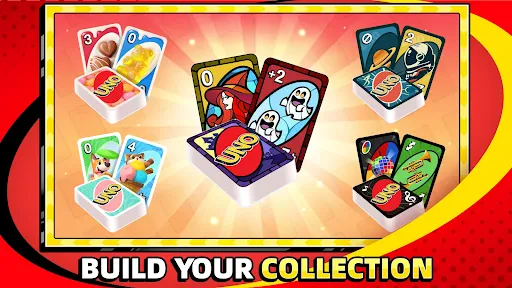
Another neat feature is the customization options. You can personalize your game with different themes and card designs. It’s a small touch, but it makes the game feel more personal and engaging.
I find the visual options most useful when I want the familiar game to feel less repetitive without changing the basic decisions. A practical approach is to try a theme you can read comfortably before settling on one; clarity matters more than decoration when the table gets busy. Events and challenges can give a round an extra goal, but I would treat them as optional reasons to return, not as a requirement for enjoying the core card game.
The app includes in-app purchases, with items ranging from $0.99 to $299.99. I’d keep that in mind if I’m installing it for a younger player or sharing a device: the game itself is free, but optional spending is part of the experience. If you prefer a completely purchase-free pastime, a physical deck or a simpler offline card game may be a better fit.
For families, that makes a quick check of purchase settings and expectations worthwhile before handing over a shared phone. I would explain that playing does not require buying anything, and agree in advance whether optional items are off limits. That small bit of preparation avoids confusing a game’s rewards with something a child needs to purchase to keep enjoying the cards. Players who prefer to avoid all in-app spending prompts may simply feel more comfortable with a physical deck.
The reward loop is most appealing when I treat it as feedback rather than a checklist. Winning a close hand feels good, and a challenge can give me a reason to try again, but I don’t need to chase every event for the core game to work. If I notice that I’m choosing a mode only to collect something instead of because I want that kind of match, I take it as a good moment to stop or switch back to a straightforward round.
Picking the right setting for your day
For an everyday use case, I’d open it while waiting for a ride or taking a short lunch break, choose solo play if I need a self-contained round, and save a friend match for a time when everyone can stay engaged. The 2v2 option is especially appealing when I want a shared contest rather than a string of individual turns, though it works best when teammates can coordinate and enjoy a bit of back-and-forth.
Compared with a physical deck, the app removes setup and makes it easier to find opponents, but it cannot replace the same face-to-face reactions around a table. Compared with a quiet solo puzzle, its multiplayer choices add unpredictability and social energy, at the cost of less control over the pace. I’d choose the physical version for a family evening together and this app for casual play when people are apart.
One small habit helps me keep a short break short: I decide before opening the game whether I have time for a single hand or a longer visit. If I’m waiting briefly, I lean toward solo play and avoid starting a match that depends on friends being available. If I have a proper window and want company, I make the social choice deliberately. The game’s quick restart is part of the fun, but it also makes it easy to lose track of that original plan.
It suits people who already enjoy the push and pull of shedding cards, want a familiar game within reach, or like having both solo and social ways to play. It is less convincing for someone seeking a deep strategy game, a fully quiet experience, or an offline distraction that never depends on another player. A dedicated puzzle is a better choice when I want full control over the pace; a tabletop deck is better when the point is being together in person.
New players may wonder whether the digital version demands knowledge of advanced tactics. I don’t think it does: starting with the familiar basic choices is enough to understand a hand, and experience comes from noticing when to spend a useful card or hold it. I also wouldn’t assume that every match is equally suited to a tiny spare moment. Solo play is easier to fit around interruptions, while multiplayer asks me to give the other people in the game a reasonable amount of attention.
Where it fits—and where it doesn’t
Playing UNO!™ on your phone is a breeze. The controls are intuitive, and the app runs smoothly, without any glitches that could interrupt your playtime. Trust me; there’s nothing worse than a game crashing right when you’re about to win!
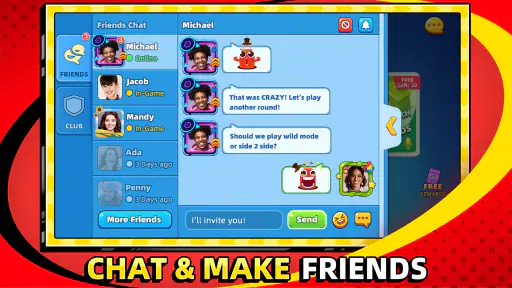
And let’s talk about the social aspect. The app includes a chat feature, which is perfect for some friendly banter or strategizing with teammates in 2v2 mode. Plus, you can add friends, making it easy to set up games and keep the competition going. It’s a fun way to stay connected with friends, especially when you can’t meet up in person.
That social side is also a matter of taste. I’d recommend it to someone who likes familiar rules, quick decisions, and the possibility of playing with friends or strangers. I’d skip it if I want a calm, entirely offline distraction, dislike waiting for multiplayer turns, or prefer games with a deeper strategy layer. If chat is not part of the appeal, solo play is the more comfortable way to enjoy the cards.
Chat and friend play are best thought of as options, not obligations. I can enjoy the card decisions without making conversation the focus, while a planned game with someone I know gives the social tools a clearer purpose. For a younger player, I’d consider whether those interactions suit the way they use a shared device and set expectations accordingly. People who would rather not communicate in a game can keep to solo play or choose a non-social alternative.
There is also a difference between this and a turn-based strategy title. The decisions here are quick and tied closely to the changing hand; I get tension from timing and uncertainty, not from building a complex plan across a long campaign. That makes it welcoming for casual players, but someone looking for a game that rewards extensive planning may find the choices too light. I see that as a matter of fit rather than a flaw in the card format.
If I’m deciding whether to install it, the practical questions are straightforward: do I enjoy the familiar card rules, am I comfortable with online opponents or chat as optional parts of the experience, and will I be happy keeping purchases optional? On an Android device, the listed minimum is version 4.4, and the current version is 1.14.9695. Its Everyone age rating makes it broadly approachable, while the purchase range is a useful reason for adults to set clear boundaries on a shared device.
The game’s reach is reflected in its 4.4 average from around 2.4 million ratings and over 100 million installs, but popularity alone cannot tell me whether its pace suits my habits. I’d use those figures as a sign that finding a familiar kind of match is part of its appeal, not as a promise that every session will be perfectly smooth or enjoyable. My own deciding factor is whether I want this particular blend of quick card choices, opponents, and easy rematches.
When the hand ends, the loop resets
So, is UNO!™ worth a download? I’d say absolutely! It’s a faithful adaptation of the beloved card game, with enough new features to keep things interesting. Whether you’re a seasoned pro or a newbie, this app has something to offer. It’s perfect for quick breaks or long gaming sessions. Plus, it’s a great way to connect with friends and family, no matter where they are.
Get ready to shout “UNO!” and enjoy the fun of a classic game reimagined for the digital age. You might just find yourself hooked!
What brings me back is the clean reset after a hand: the immediate goal is complete, but a new deal gives me another chance to read the table and make better choices. That loop is satisfying in small doses, especially when I have a friend to invite or a challenge I feel like trying. I’d keep spending optional and sessions intentional; the app is at its best when the next round is a choice, not an automatic habit.
My recommendation is strongest for someone who wants the familiar card game close at hand and likes switching between a quiet solo round and a social match. I’d pass if I needed guaranteed offline access, wanted every session to end neatly after one game, or was looking for layered strategy rather than brisk decisions. For me, the appeal is the loop itself: a clear move, immediate tension, a result, and a fresh hand that makes another try tempting. It is most enjoyable when I decide on that next try rather than letting the automatic momentum make the decision for me.
UNO!™ Frequently Asked Questions
Can I play UNO!™ with friends, or is it only for solo play?
UNO!™ includes online multiplayer, so you can play with friends as well as connect with players around the world. The familiar card-game format makes it easy to get started, while playing against other people brings a social and competitive element that a solo match cannot provide. If you prefer not to play online, the game also offers an offline mode against AI opponents.
Does UNO!™ offer different events or card styles?
UNO!™ adds digital features to the classic card game, including events and themed card decks. These options give matches some variety beyond the familiar gameplay and let players explore different visual styles. The app also has interactive features and online multiplayer, so its appeal is not limited to simply reproducing a tabletop round on a phone or tablet.
Is UNO!™ free to download, and what device requirements should I check first?
UNO!™ is a free card game from Mattel163 Limited, so you can download it without paying upfront. It does offer optional in-app purchases, with prices ranging from $0.99 to $299.99 per item, which is worth keeping in mind if children may use the device. Before downloading, check that your Android device runs version 4.4 or later; the game is also available on iOS.
What is UNO!™ and how does it differ from the classic card game?
UNO!™ is a digital adaptation of the classic card game UNO, available on Android and iOS devices. This app brings a fresh twist with vibrant graphics, interactive features, and online multiplayer modes. Unlike the traditional version, UNO!™ offers unique events, themed card decks, and the ability to connect with friends or players worldwide, enhancing the classic gameplay experience.
Can I play UNO!™ offline, or do I need an internet connection?
UNO!™ primarily focuses on online multiplayer gameplay, allowing users to connect with friends or global players. However, it also offers an offline mode where players can enjoy the game against AI opponents. While the offline mode is limited in features compared to the online experience, it ensures you can enjoy UNO!™ anytime, anywhere, without an internet connection.
Pros
- Engaging multiplayer mode
- Colorful and intuitive design
- Regular updates
- User-friendly interface
- Offline play available
Cons
- In-app purchases can be pricey
- Occasional connectivity issues
- Ads can be intrusive
- Requires internet for some features
- Limited customization options
- Category
- Card
- Version
- 1.14.9695