Beat Piano Dance:music game
- 488.00
- 4.5
- Installs
- 50.00M
- Price
- Free
Screenshots
Analysis by Reviewed
I judge rhythm games by more than whether they make tapping feel satisfying: I want the screen, sound, and pace to pull in the same direction. Beat Piano Dance: music game aims for that quick, music-led mood, with tiles turning a song into something you follow with your hands. It is a straightforward idea, but the appeal is easy to understand: a spare moment can become a small test of timing rather than another passive listen.
That makes it most appealing when you want a light game you can pick up without learning a complicated control scheme. I would be less likely to recommend it to someone looking for a deep piano simulator, a music library they can freely explore, or a long-form story. The focus here is on reacting to the beat, so the fun depends on whether that simple loop suits your mood.
A Small Game for In-Between Moments
The most useful way to think about this game is as an activity for a contained break, not something that needs to take over an evening. I can imagine opening it while waiting for a drink, sitting through a short pause between errands, or taking a mental breather after finishing a task. Those moments suit a game where the basic interaction is easy to grasp and the challenge comes from keeping attention on the music and tiles.
There is a practical trade-off to that convenience. A rhythm round asks for more concentration than casually scrolling, so it is not ideal when you need to keep watching your surroundings or listening for an announcement. On a bus or in a waiting room, I would choose a seat and situation where looking at the screen is comfortable. If I only have a few seconds, I would rather wait than begin a track and feel pressured to stop halfway through.
Making a Session Feel Fair
When a run goes badly, it is tempting to tap harder or faster, but that can make timing less consistent. I would first check whether I am watching the next tile early enough and listening for the pulse instead of reacting at the last instant. This is a small adjustment, but it changes the task from frantic chasing into anticipation. The point is not to turn the game into formal practice; it is to give myself a fair chance to settle into its rhythm.
Another useful approach is to keep one variable steady. If I am trying to improve, I would replay a familiar song rather than changing tracks and difficulty at once. That makes it easier to tell whether I am responding more cleanly, even if the score itself fluctuates. If I am playing purely for variety, then switching tracks makes sense; if I care about progress, frequent changes can make each attempt feel unfamiliar and harder to judge.
Choosing It Over Other Music Games
Compared with music games that lean on elaborate character stories, collectible systems, or instrument-like controls, this one is a more direct test of screen-based timing. That can be a welcome choice if I want to start playing quickly and do not want to manage a larger set of systems around each song. On the other hand, players who enjoy building a collection, exploring a campaign, or learning a more detailed musical interface may find those alternatives more satisfying over time.
More From Our News Desk

Weather by Xiaomi Review: Clear at a Glance, Less Clear Up Close

X Under Pressure: Can It Recover When Posting Goes Wrong?

Clash of Clans Is Won Between the Battles

Android Auto Makes the Case for Quieter Car Software

MobiOffice: Transforming Mobile Productivity with Seamless Integration

EA SPORTS FC™ Mobile Soccer: Redefining Mobile Sports Gaming
It also sits apart from a piano-learning app. A tile rhythm game can reward attention and quick reactions, but that is not the same as learning notes, hand position, or how to play a piece on a keyboard. I would not use it as a substitute for lessons or structured practice. Its better role is a casual game that borrows the visual language of piano keys and makes music the cue for a reflex challenge.
Feel the Beat in Your Fingertips
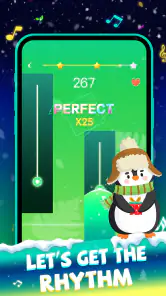
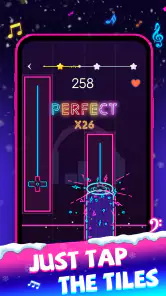
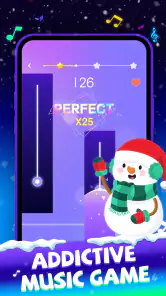
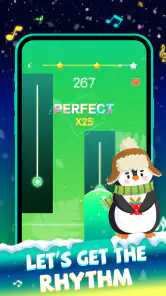
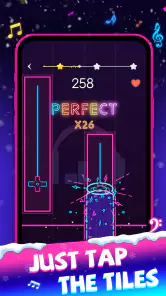
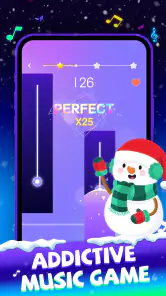
The essence of Beat Piano Dance: music game revolves around rhythm and timing. As soon as you launch the app, you’re greeted with a vibrant interface that’s both inviting and easy to navigate. The game involves tapping on the correct tiles that appear on your screen in sync with the background music. Trust me, it’s not as easy as it sounds, but that’s where the fun lies!
Gameplay and Features
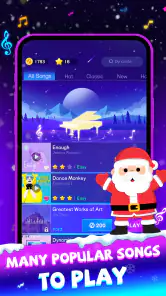
Once you dive into the game, you’ll notice a variety of songs that you can choose from. The selection ranges from classic melodies to the latest chart-toppers. Each song has different levels of difficulty, catering to both beginners and seasoned players. The game tests your reflexes and your ability to keep up with the beat, making it a challenging yet rewarding experience.
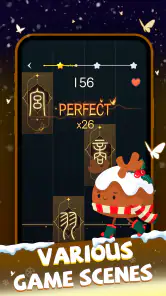
One feature I absolutely love is the multiplayer mode. You can challenge your friends or random players from around the world, turning it into a fun competition. Plus, the leaderboard keeps track of your scores, pushing you to improve and climb higher. The app also allows you to customize your gaming experience by selecting different themes and sound packs, which keeps the game fresh and exciting.
For a practical routine, I’d use a short session as a reset between tasks: choose a track, settle into its pulse, then stop before tired fingers turn the challenge into frustration. If you’re practicing, replaying the same song is more useful than jumping between tracks every time; it lets you notice whether your timing is improving rather than relying on a lucky run. In multiplayer, I’d treat a score as a friendly benchmark, not a verdict on musical ability. Tile timing rewards quick visual reactions as much as listening, so strong rhythm alone may not make every round feel easy.
How It Fits Among Rhythm Games
Compared with rhythm games built around elaborate character worlds or a broad instrument simulation, this one puts the immediate tap-and-beat loop first. That simplicity is a strength on a phone: there is little to learn before playing. It is also the trade-off. Players who want detailed composition tools, a realistic keyboard layout, or a narrative campaign will probably get more from a different kind of music game. I’d pick this when I want an accessible reflex challenge, not when I want to study piano technique.
On an ordinary commute or while waiting for someone, a brief round can make sense, but I’d use headphones in a noisy place so the rhythm is easier to follow. At home, sound packs and themes offer a way to vary the feel without changing the central task. One useful habit is to start with a comfortable difficulty and only raise the pressure once the beat feels familiar; pushing too soon can make misses seem random. If the screen feels visually busy, taking a pause is better than trying to compensate by tapping faster.
Graphics and Sound Quality
The developers have done a fantastic job with the graphics. The vibrant colors and smooth animations enhance the overall experience, making it visually appealing. But let’s not forget the sound quality, which is top-notch. The music is clear and well-synchronized with the gameplay, ensuring that every tap feels gratifying.
The visual and audio presentation works best when I let the beat lead and avoid treating every tile as a separate puzzle. That helps the game feel cohesive instead of frantic. There is still a limitation common to tap-focused play: a small mismatch between what I hear and what I perceive on screen can break concentration, especially if I am already distracted. For that reason, I’d play somewhere I can give the track my attention rather than using it as background noise.
Who Should Give It a Try
Beat Piano Dance: music game is a free music game from XGAME STUDIO, with an average rating of 4.5 from around 288 thousand ratings and more than 50 million installs. It is rated for Everyone, and version 2.0.0 requires Android 6.0 or later. Optional in-app purchases range from $2.99 to $24.99 per item, so I’d start with the free experience and decide whether anything extra matters to me before spending. Its release date is May 7, 2023.
I think it suits casual players who enjoy short bursts of concentration, friendly score-chasing, and music as the center of a simple game. The listed rating and reach suggest that it has found a sizeable audience, though popularity does not guarantee that its song selection or tapping style will match your taste. If you mainly want to listen rather than react, a music player is the better fit; if you want precision practice on piano, a learning app is a more sensible choice.
Checking the Fit Before Spending
The game is free to start, which makes trying its basic rhythm loop a low-commitment decision. I would spend time with the available play before considering any optional purchase; the listed in-app items range from $2.99 to $24.99 each, so the higher end is worth weighing against how often I expect to return. A purchase only makes sense if it improves something I personally value, such as extending the experience in a way I will actually use. I would not pay simply because I enjoyed one good session.
For Android players, the minimum system requirement is Android 6.0, and the current version is 2.0.0. The game is rated Everyone, but that age label is not a promise that every player will enjoy its pace or visual activity. If you are choosing it for a younger player, I would still consider whether rapid screen interaction suits them and whether in-app purchases need to be managed on the device. Those are ordinary household decisions, not reasons to assume the game is unsuitable.
A Measured Atmosphere Verdict
In conclusion, Beat Piano Dance: music game is a must-try for anyone who loves music and gaming. It offers a perfect blend of fun, challenge, and competition. The app is free to download, with in-app purchases available for those who want to enhance their experience. So, if you’re ready to feel the rhythm and challenge your reflexes, give this game a try. You might just find yourself hooked!
My recommendation is more specific: try it if you want music to set the pace of a quick, active break, and keep your expectations centered on timing rather than musical training. Its bright presentation and direct mechanics give it an approachable mood, while the need to watch, listen, and react keeps even a short session engaging. If that balance sounds enjoyable, it is an easy game to sample; if you prefer slower, less demanding listening, you can skip it without missing a deeper piano experience.
In the end, the atmosphere works because the colorful screen and beat-led tapping point toward the same kind of focused, upbeat session. The game is strongest when I have enough quiet and attention to follow both what I see and what I hear. It is less convincing as something to leave running in the background or as a replacement for a broader music experience. For a quick, hands-on change of pace, that focused identity is a reasonable reason to give it a try.
Beat Piano Dance:music game Frequently Asked Questions
Does Beat Piano Dance: Music Game need much storage or a powerful phone?
Before downloading, it is worth checking that your device has enough free storage and runs Android 6.0 or later. The game is designed around tapping to music rather than demanding advanced controls, but how smoothly it runs can vary with a device’s age and condition. Keeping your operating system up to date can also help with general compatibility.
Is Beat Piano Dance: Music Game suitable for someone new to rhythm games?
Its piano-tile format is approachable for newcomers: you listen to the beat and tap along on the screen. That makes it easy to understand the basic idea without needing experience with music games. As the challenge increases, timing and concentration become more important, so beginners can start casually and decide whether they want to keep practicing.
What devices and operating systems can run Beat Piano Dance: Music Game?
Beat Piano Dance: Music Game is a music game for Android, and it requires Android 6.0 or later. Check your device’s Android version before downloading to make sure it meets that requirement. The game is developed by XGAME STUDIO and is described as a piano-tile experience built around listening to the beat and playing along.
What is Beat Piano Dance: Music Game?
Beat Piano Dance: Music Game is an interactive rhythm game that challenges players to tap along to popular tunes using a virtual piano interface. It combines elements of dance and music to create an engaging experience for both casual and hardcore rhythm game enthusiasts. The game offers various levels and songs, ensuring hours of entertainment.
Is Beat Piano Dance: Music Game free to play?
Yes, Beat Piano Dance: Music Game is free to download and play. However, it may offer in-app purchases to enhance the gaming experience, such as unlocking new songs, removing ads, or accessing special features. Players can enjoy the core gameplay without spending money, but additional content may require purchases. In-app purchases range from $2.99 to $24.99 per item.
Pros
- Engaging gameplay with rhythmic challenges.
- Variety of music tracks to choose from.
- Visually appealing graphics and animations.
- Interactive tutorial for beginners.
- Regular updates with new content.
Cons
- Contains in-app purchases and ads.
- Requires internet for some features.
- Limited offline play options.
- Occasional bugs and glitches.
- Not suitable for non-music lovers.
- Category
- Music
- Version
- 2.0.0













