Wyze - Make Your Home Smarter
- 38.74K
- 4.4
- Installs
- 5.00M
- Price
- Free

Screenshots
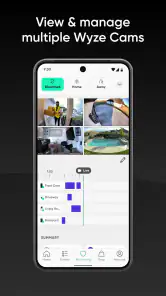

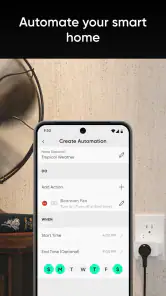
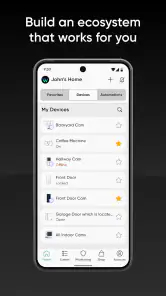

Analysis by Reviewed
I think the most useful way to judge Wyze - Make Your Home Smarter is not by how futuristic a connected home looks, but by whether I can check and manage it without adding needless hassle. Wyze is a free lifestyle app from Wyze Labs Inc. for bringing compatible Wyze devices together on a phone. Its 4.4 average from around 162,000 ratings and more than 5 million installs suggest it has found a broad audience, but a smart-home app is only a good fit when its approach to access and everyday control suits you.
Where the convenience comes from
For me, the main appeal is having a familiar place to check compatible devices rather than opening a separate app for every Wyze product. That can make simple routines easier to remember: check a camera, adjust a light, or see whether a device is responding. It is a practical kind of convenience, not a promise that every part of a home will work together automatically. The value depends on which devices you own and how often you actually want to control them from your phone.
That distinction matters when deciding whether to build around Wyze. If your home is already centered on its devices, a dedicated app can feel more direct than a general-purpose hub that asks you to organize products from several manufacturers. If you have a mixed collection, though, consolidating everything in a broader platform may be more useful than having a polished control point for only one brand. I’d choose based on the devices I already rely on, not on the appeal of adding more gadgets.
Getting Started with Wyze
First things first, setting up Wyze - Make Your Home Smarter is a breeze. All you need is a Wyze account, and you’re good to go. The app beautifully syncs with your Wyze devices, and with just a few taps, you’ll have your smart home ecosystem all set up. It’s like magic! Plus, the app's interface is super user-friendly, which is a huge relief for those of us who aren’t exactly tech gurus.
What to consider before connecting devices
The account is the hub for this experience, so I’d treat it as the front door to the rest of the setup: use an account you can reliably access, and take time to review the choices the app presents as you add devices or invite other people. A shared camera view, for example, is more sensitive than letting someone adjust a light. I’d give access according to what each person actually needs rather than treating every household member as an all-or-nothing administrator.
Smart-home convenience also means thinking about where a device points and when you want it active. Before relying on a camera alert, I’d test the view and notification behavior while I’m at home, then decide whether the placement and alerts feel appropriate. That small trial can prevent a stream of unhelpful notifications or an awkward camera angle from becoming part of daily life.
Features That Wow
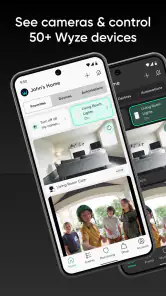
The features of Wyze are what make it a standout in the smart home market. You’ve got this all-in-one app that lets you control everything from security cameras to smart bulbs. Need to check who’s at the door? Just whip out your phone, and you can see a live feed from your Wyze Cam. Want to dim the lights for movie night? It’s just a tap away. The convenience is mind-blowing.
More From Our News Desk

Clash of Clans Is Won Between the Battles

Android Auto Makes the Case for Quieter Car Software

MobiOffice: Transforming Mobile Productivity with Seamless Integration

EA SPORTS FC™ Mobile Soccer: Redefining Mobile Sports Gaming

How Microsoft OneDrive Became a Mobile Productivity Giant

How Google Translate Breaks Language Barriers Effortlessly
What really knocked my socks off is the app's integration capabilities. You can link it with Alexa or Google Assistant, so you can literally control your home with your voice. Imagine walking into your living room and saying, “Hey Google, turn on the lights,” and voilà, it’s done. Talk about living in the future!
Everyday Usability
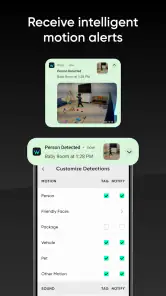
Now, let’s talk about how this app fits into everyday life. One of the things I love most is the notifications. If your Wyze Cam detects movement, you get an instant alert. It’s like having an extra set of eyes when you’re not around. Plus, the scheduling feature is a lifesaver. You can set your devices to turn on or off at specific times, which is perfect for saving energy and adding an extra layer of security when you’re away.
A practical routine is to use schedules for predictable tasks, such as lights you want on at a regular time, while keeping camera alerts for events that genuinely need your attention. If you’re away for a weekend, check that the devices you depend on are online and that alerts are enabled before you leave. I wouldn’t treat a phone notification as a substitute for checking a device’s status or having a backup plan for anything important.
Making routines less noisy
One useful way to keep a smart-home setup manageable is to decide which events deserve an interruption before enabling every alert. A camera aimed at a busy shared area may produce activity that is not meaningful to you, while a view of a less frequently used entry may be more actionable. I’d start with a limited set of notifications, live with them for a few days, and adjust only after seeing what actually helps. That is more effective than leaving every alert on and eventually ignoring the phone altogether.
Schedules also work best for predictable habits, not for situations that change constantly. A light that should come on at a familiar time is a good candidate; a routine tied to an irregular arrival may be less useful if it creates extra steps or surprises. Before relying on a schedule when traveling, I’d test it at home and confirm that the result is what I expect. The goal is to reduce small chores, not to build a routine that needs regular troubleshooting.
Another everyday question is whether a phone is the right control point for everyone in the household. It is convenient when I already have it in hand, but a voice assistant or a shared account arrangement may suit other people better, depending on the controls they need. I’d keep the setup simple enough that a guest or family member can understand the basic routine without needing to learn every setting. Smart devices are less helpful when only one person knows how to operate them.
One trade-off of a single app is that its usefulness depends on how much of your home is built around compatible Wyze devices. If you already use several brands, you may prefer a broader smart-home platform that brings those products together, even if it means giving up some of the direct, brand-specific convenience here. If you’re starting with Wyze gear, keeping setup and controls in one place is the clearer advantage.
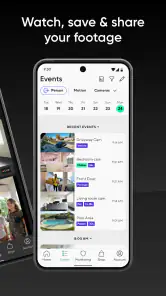
Another neat aspect is the sharing feature. You can share access with family members, so everyone in the house can control the smart devices. It’s a nice touch that makes managing your home a collaborative effort.
Sharing without losing track of access
Sharing is most useful when the people receiving access have a clear reason to use it: perhaps someone needs to check a camera while you are away, or another person regularly operates the household lights. I’d review who still needs access when living arrangements or responsibilities change, rather than assuming an old invitation remains appropriate indefinitely. That small bit of housekeeping helps keep convenience from turning into a vague, uncontrolled arrangement.
For a household with different comfort levels, it is worth discussing what camera views are acceptable before setting them up. A person may be happy to share control of a lamp but not a view inside a private room. I’d make those boundaries part of the setup conversation, then place devices and grant access in a way that respects them. That is a more useful privacy habit than treating the app’s sharing option as an automatic yes for everyone.
Who it suits, and where I’d be cautious
I’d recommend Wyze to someone who wants a straightforward way to use compatible cameras and lights, check in while away, or give household members shared control. A realistic example is arriving home with groceries: a quick camera check can help you see whether someone is at the door, while a scheduled light routine can make the evening feel less hands-on. The benefit is practical coordination, not a guarantee that a connected device will always be available or catch every event.
I’d be more hesitant if you want one app to manage a mixed collection of smart-home brands, or if you’re uncomfortable creating an account and connecting cameras to a phone-based service. The app is free to download, but in-app purchases range from $2.99 to $259.99 per item, so I’d check the cost of any optional purchase before committing rather than assuming every capability is included at no charge. It’s rated for Everyone, but camera access still deserves thoughtful household boundaries.
A realistic day with connected devices
Imagine leaving home for work and wanting a quick check later in the day. You could use a camera view to check the entry when a delivery is expected, then rely on a light schedule to make one familiar part of the evening automatic. If another person at home needs to check the same device, shared access can spare you from being the only person who can respond. That is a modest, believable benefit: less back-and-forth for routine questions, without pretending the app can replace being present or handling an urgent situation.
The same scenario also shows where I would keep expectations grounded. If a notification arrives while I am in a meeting, I may not be able to respond immediately; and if a device is offline, an app cannot make it useful at that moment. For anything that matters beyond convenience, I would have a human backup plan. Wyze can make checking and routine control easier, but it should not be the only plan for security, access, or urgent household needs.
It is also sensible to think about who else might see a phone screen or receive alerts. A camera notification can reveal more than the name of a device, especially when the phone is shared or visible to other people. I’d use a lock screen and notification setup that feels appropriate for my household, and avoid sharing access simply to make setup faster. These are ordinary phone habits, but they become more important when a device can show activity inside or around a home.
Trust, control, and the daily trade-off
When privacy is a priority, I recommend reviewing the account and device choices you encounter during setup and sharing, then keeping only the access you actually use. I wouldn’t grant camera access casually just because sharing is convenient. Voice control is another choice: it can make lights easier to operate, while anyone who prefers fewer connected services can simply use the app’s on-screen controls instead. These are practical ways to match the setup to your comfort level without assuming that convenience automatically makes every setting right for every home.
For a cautious first setup, I’d connect one device, learn how its controls and alerts behave, and only then add another. That makes it easier to spot whether a notification is too frequent or a shared-access arrangement is confusing before the system becomes part of several rooms and routines. It also gives you a clearer sense of whether the app solves a real annoyance or merely adds another thing to maintain. I find that a gradual setup is more useful than buying into an idea of a fully automated home all at once.
A common decision is whether to choose a dedicated brand app or a general smart-home platform. I see Wyze’s direct approach as appealing when the devices you want to use are already compatible and the main jobs are checking cameras and managing lights. A broader alternative makes more sense when your priority is organizing products from several brands in one place. The trade-off is not simply “simple versus advanced”: it is whether you value a focused path for Wyze devices or a wider view of a mixed setup.
Wyze is currently at version 3.8.7.725 and requires Android 10 or later. The app has been available since October 18, 2017, and its scale is reassuring in one limited sense: it is an established product rather than an obscure new utility. Still, popularity alone doesn’t answer whether its account-based, device-centered approach matches your expectations. I’d start with one or two devices, learn how alerts and shared access behave, and expand only if the routine feels genuinely useful.
Final Thoughts
So, is Wyze worth it? Absolutely. It’s a powerhouse of features packed into a simple, easy-to-use app. Whether you’re a tech enthusiast or just someone looking to make life a bit easier, Wyze is a game-changer. It’s affordable, reliable, and incredibly intuitive. It’s like stepping into the future, one smart device at a time.
If you’re ready to transform your living space, give Wyze a whirl. Trust me, once you start, you’ll wonder how you ever lived without it. Happy smart homing!
Wyze - Make Your Home Smarter Frequently Asked Questions
Do I need a Wyze account to set up and manage devices?
Wyze is intended to connect with compatible Wyze smart-home products, so setting up and managing a device is central to using the app. The app serves as the place to access and control your setup from a phone. Before downloading, consider whether you are ready to use Wyze products and follow the account and setup steps shown in the app.
Can I use Wyze without owning a Wyze smart device?
Wyze is the companion app for managing Wyze smart-home devices, so its main purpose is to connect the app with compatible products such as cameras, bulbs, and plugs. You can install it and explore the app, but its practical value comes from having devices to set up and control. If you are considering a download, think about which Wyze products you want to manage and whether the app fits that setup.
What phones and operating systems support the Wyze app?
Wyze is available for Android and iOS, and its current version requires Android 10 or later. Before downloading, check that your phone’s operating system meets the requirement and that your device has room for the app. The app is free to install, though optional in-app purchases are available. Wyze is rated for everyone, so it is presented as suitable for a general audience.
What is Wyze and how does it work to make my home smarter?
Wyze is a smart home application designed to enhance the convenience and security of your home. It connects with various Wyze smart devices such as cameras, bulbs, and plugs, allowing users to control these devices remotely via their smartphones. By using Wyze, you can monitor your home in real time, automate lighting, and even receive alerts for unusual activities, all contributing to a smarter and more efficient home environment.
Can I control Wyze devices when I am away from home?
The app is designed to let you control compatible Wyze devices remotely from your smartphone, which can be useful when you are away from home. Its role is to bring device controls and related features together in one place. To make use of remote access, you will need a compatible Wyze product set up with the app and a working connection for your phone and device.
Pros
- Affordable smart home solution
- Easy to set up and use
- Wide range of devices supported
- Regular software updates
- Good customer support
Cons
- Limited integration with other platforms
- Subscription required for full features
- Occasional connectivity issues
- Limited offline functionality
- Some devices lack advanced features

- Category
- Lifestyle
- Version
- 3.8.7.725