WSB-TV Weather
- 2.11K
- 4.7
- Installs
- 500.00K
- Price
- Free
Screenshots


Analysis by Reviewed
I reach for WSB-TV Channel 2 Weather when I need a quick local check before heading out, especially if rain or unsettled weather could change my plans. It is a free weather app from Cox Media Group Inc., built around Atlanta’s WSB-TV weather coverage. I find that local focus more useful than a broad forecast when I want context for conditions near home, rather than a general picture for a much larger area.
Quick checks and what to expect
The app is best approached as a glanceable forecast and radar tool, not as a promise that every screen will open instantly on every phone. Its current version is 5.17.713, and the service has been available since Dec 20, 2013. Those details tell me it is an established app, but they do not guarantee identical performance across devices or connections. In practice, I would give it a moment to load before relying on a radar view while already rushing out the door.
The main screen brings several kinds of weather information together, which is convenient once I know where to look. On a first visit, that density may feel busier than a minimalist app that presents only a temperature and a simple daily summary. My tip is to use the first screen for a quick decision, then open the more detailed view only when the forecast could affect a specific plan. That keeps the app useful without turning a routine check into a long browse.
First Impressions: Clean and User-Friendly
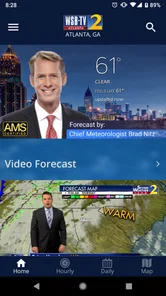
From the get-go, the WSB-TV Channel 2 Weather app makes a solid impression with its clean and user-friendly interface. Right after downloading and installing it, I appreciated how intuitively designed everything felt. No need to dig through endless menus or settings; everything you need is right there at your fingertips. The home screen greets you with the current weather conditions, complete with temperature, precipitation, and wind speed details. It’s kind of like having a personal meteorologist in your pocket!
Features Galore
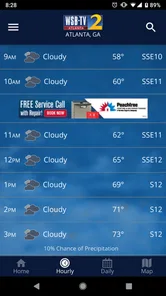
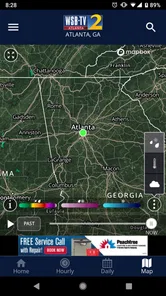
Diving deeper into the app, I was pleasantly surprised by the plethora of features on offer. First up, the live radar maps. These are fantastic! You can zoom in and out to get a detailed view of weather patterns, which is perfect for planning your day around any potential rainstorms. Additionally, the app provides hourly forecasts, so you can anticipate weather changes throughout the day.
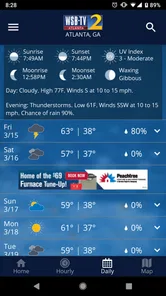
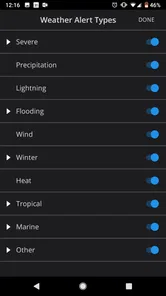
Another standout feature is the app’s severe weather alerts. Living in an area where the weather can be somewhat unpredictable, these alerts are a lifesaver. The app sends push notifications directly to your phone, keeping you informed so you can take necessary precautions. And for those who love to stay ahead of the game, the app offers a 10-day forecast. It’s like peeking into the future!
Using radar and forecasts thoughtfully
A practical way I use the radar is to check it before leaving, then compare what I see with the hourly forecast rather than treating either view as a guarantee. A radar image helps me judge where precipitation appears to be, while an hourly outlook helps me think about timing. If I have a flexible errand, I can decide whether to leave now or wait; if the plan is important, I still build in a buffer because local weather can shift.
More From Our News Desk

Weather by Xiaomi Review: Clear at a Glance, Less Clear Up Close

X Under Pressure: Can It Recover When Posting Goes Wrong?

Clash of Clans Is Won Between the Battles

Android Auto Makes the Case for Quieter Car Software

MobiOffice: Transforming Mobile Productivity with Seamless Integration

EA SPORTS FC™ Mobile Soccer: Redefining Mobile Sports Gaming
For a realistic weekday example, imagine I am deciding whether to walk to a nearby stop or drive. I would check current conditions first, look at the hourly outlook for the window I expect to be outside, and use radar if showers seem likely. That workflow is more useful than checking only the day’s high temperature. The 10-day view is better for broad planning, such as choosing an outdoor day for a gathering, than for making a precise call about rain many days ahead.
Choosing the right forecast for the question
One useful habit is to match the view to the decision instead of treating every screen as equally important. For a quick school pickup or short walk, current conditions and the hourly outlook are the practical starting points. For an event later in the week, the longer forecast can help me spot a possible change in the pattern, but I would revisit it as the day gets closer rather than lock in a plan based on an early estimate.
That distinction also helps keep the app from feeling crowded. I do not need to inspect radar every time I want to know whether a jacket is sensible; equally, a simple temperature reading is not enough when a passing shower could affect an outdoor commute. I find the best workflow is to start small, add detail only when the choice has consequences, and leave a little flexibility when the forecast is unsettled.
Who benefits from the local focus
This is a natural fit for people around Atlanta who already want WSB-TV’s weather perspective close at hand, including commuters, parents coordinating school-day plans, and anyone whose outdoor routine depends on changing conditions. Its 500K+ installs and 4.8 average from 7.7K ratings suggest that many users have found a reason to keep it around, though ratings cannot tell me whether its presentation suits every person.
If you mainly want a bare-bones forecast with as little detail as possible, a simpler weather app may feel calmer. Likewise, someone who needs forecasts for many distant locations may prefer a service organized around travel and saved places rather than a local television weather team. I would choose this app when the Atlanta-area perspective is the point, not just because I want any weather icon on my phone.
How it compares with everyday alternatives
Compared with a general-purpose weather app, this one has a clearer identity: it is tied to a local broadcaster and makes sense when that Atlanta-area perspective is what I want. A minimalist alternative may be quicker to read when all I need is a temperature and a simple outlook. A travel-focused service may be more convenient when I routinely check several cities. Neither is automatically better; the useful choice depends on whether local context or a simpler, broader layout matters more to me.
I would not make the app my only choice for a complicated trip across multiple regions. In that situation, I would want a tool that makes comparing destinations especially straightforward, then use this app for the local view when Atlanta is the place I care about. For ordinary nearby plans, its radar and hourly forecast give me more decision-making context than a single glance at a weather symbol, but that extra information is not necessary for everyone.
Down to the Nitty-Gritty
As with any app, it’s not all sunshine and rainbows. While the features are robust, I did notice that the app can be a bit slower to load on older devices. It’s not a deal-breaker by any means, but something to keep in mind if you’re running an ancient phone. Also, while the design is sleek, some might find the amount of information on the main screen a tad overwhelming at first glance. But trust me, you’ll get used to it pretty quickly.
Heavy-use moments are where I would be most deliberate: repeatedly opening detailed views while moving between a weak connection and a stronger one can make any weather app feel less responsive. I would check the forecast before setting off, rather than depend on refreshing it at the roadside. If a screen seems slow, returning to the basic conditions view and trying again after the connection settles is a sensible recovery step; I would not assume that a delayed display means the forecast itself has changed.
Staying useful during a busy day
On a day when I am checking conditions several times, I would avoid turning every brief pause into a full app session. A practical routine is to make one deliberate check before leaving home, then consult the hourly view only if the timing of a later trip matters. That reduces unnecessary loading and makes it easier to notice a meaningful change rather than repeatedly scanning the same information.
For a parent juggling pickup, an errand, and an outdoor activity, the app is most helpful when each check answers a specific question: Is the next hour likely to be wet? Should I allow extra time outside? Is the afternoon still suitable for the plan? Radar can help with the first question, while the broader forecast provides context for the later ones. I would still leave room for changing conditions instead of treating a screen as a guarantee.
Reliability, alerts, and sensible backup habits
Weather information is only useful if I can access it when I need it, so I judge reliability in practical terms: does the app give me a local view I can consult, and do I have another way to make a decision if loading is slow? The local focus is a strength for Atlanta-area routines, while dependence on an internet connection and the demands of a detailed screen can introduce friction at inconvenient moments. Checking before leaving is a small habit that reduces that risk.
Alerts are valuable as an extra prompt, particularly when severe weather could affect a plan, but I would not treat a phone notification as a substitute for paying attention to conditions around me. If an alert arrives, I would open the relevant information when it is safe to do so and reconsider the plan rather than assume the notification alone tells the whole story. For consequential decisions, I would keep ordinary caution in play and consult another trusted source if needed.
Who should skip it, and what to check before installing
I would steer someone toward another option if they strongly prefer an uncluttered screen, need a tool centered on many locations, or use an older phone where load delays would be especially frustrating. People outside the Atlanta area may also get less value from a service whose appeal is its connection to local WSB-TV weather coverage. The app is most compelling when that regional perspective is relevant to everyday decisions.
It is free, carries an Everyone content rating, and is developed by Cox Media Group Inc. The minimum operating system is version 9, so I would check that my device meets that requirement before trying it. With 2K reviews and a 4.8 average, it has a strong user response, though personal comfort with the layout and performance is still something I would judge on my own phone. The current version is 5.17.713.
Final Thoughts
All in all, the WSB-TV Channel 2 Weather app is a solid choice for anyone looking to stay ahead of the weather. With its rich set of features, from live radar to severe weather alerts, it’s got you covered whether you’re planning a picnic or just trying to get to work without getting drenched. Sure, it may have a couple of minor hiccups, but what app doesn’t? If you’re in the market for a reliable weather app, give this one a shot. Who knows, it might just become your go-to weather buddy!
My bottom line is that its strongest reason to install it is the combination of local weather coverage and tools that help me turn a forecast into a decision. It is free, and I would recommend trying it if you are in its intended viewing area and do not mind a screen with plenty to scan. If you want a stripped-down interface, broad travel planning, or consistently quick loading on an older phone, I would compare it with alternatives before making it your only weather source.
WSB-TV Weather Frequently Asked Questions
What devices and operating systems can run the WSB-TV Channel 2 Weather app?
The app is made for mobile devices and requires iOS 9 or later. Before downloading, check the operating system version on your device to make sure it meets that requirement. WSB-TV Channel 2 Weather is a weather app from Cox Media Group Inc., focused on Atlanta forecasts and information from Severe Weather Team 2.
What features does the WSB-TV Channel 2 Weather app offer?
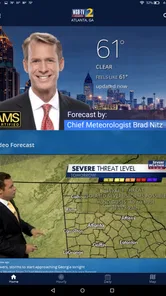
The WSB-TV Channel 2 Weather app provides comprehensive weather forecasts, live radar, and severe weather alerts. It includes features such as detailed hour-by-hour forecasts, current weather conditions, and a 7-day forecast. Users can also access video forecasts and weather news updates directly from WSB-TV Channel 2's team of meteorologists.
Is the WSB-TV Channel 2 Weather app free to download and use?
Yes, the WSB-TV Channel 2 Weather app is free to download and use. It offers a variety of features at no cost to the user, including real-time weather updates and radar. However, there may be occasional advertisements within the app, which help support the free version.
How accurate is the weather forecast from the WSB-TV Channel 2 Weather app?
The WSB-TV Channel 2 Weather app is known for its accuracy, as it sources data from a team of experienced meteorologists and reliable weather models. The app provides up-to-date information with high precision, helping users plan their activities around the most current weather conditions and forecasts.
Can I receive severe weather alerts through the WSB-TV Channel 2 Weather app?
Yes, the WSB-TV Channel 2 Weather app can send you severe weather alerts. Users can customize notifications to receive alerts for specific conditions like thunderstorms, tornadoes, or floods. This feature is particularly useful for staying informed about sudden weather changes that may affect safety.
Pros
- Accurate local weather forecasts
- Real-time severe weather alerts
- User-friendly interface
- Customizable weather maps
- Hourly and 10-day forecasts
Cons
- Ads can be intrusive
- Occasional app crashes
- Limited international coverage
- Slow loading on older devices
- Requires constant internet













