Action News Jax
- 415.00
- 4.3
- Installs
- 100.00K
- Price
- Free

Screenshots





Analysis by Reviewed
When I want local information for Jacksonville, I usually prefer an app that helps me check several things without jumping between unrelated services. Action News Jax is built for that purpose, bringing news, weather, and sports into one mobile experience. It is a free News & Magazines app from Cox Media Group Inc., available for everyone to use.
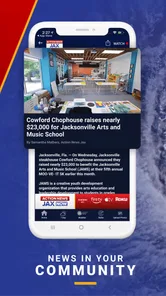
My overall impression is that it works best as a quick local check-in rather than as my only source for every story. The appeal is straightforward: I can open it to see what is happening around Jacksonville, look for weather information before heading out, and catch local sports coverage in the same place. That combination makes sense for residents, commuters, families, and anyone who follows the area closely.
The app has been available since February 23, 2011, and its audience has grown to over one hundred thousand installs. Its average rating sits at 4.3 from around one thousand two hundred ratings, with more than four hundred written reviews. Those figures suggest a generally positive reception, while also reminding me that a local news app can feel very different depending on where I live, what alerts I expect, and how quickly I need information.
Getting past the first points of friction
The first place I would expect users to get stuck is not the news itself, but the setup around location and notifications. A local app is most useful when it understands the area I care about, yet people often move between Jacksonville neighborhoods, nearby communities, workplaces, and travel destinations. If the opening experience asks me to make choices, I would take a moment to select only the locations and notifications that genuinely matter to me.
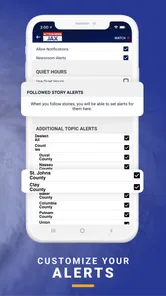
That small bit of discipline makes a difference. If I allow every possible alert immediately, the app can become noisy and important updates may blend into routine notifications. I prefer to begin with the most relevant local coverage, then adjust after using the app for a few days. This is especially helpful for people who want severe-weather awareness without turning their phone into a constant stream of headlines.
I also recommend checking the phone’s notification settings after installing it. If alerts do not appear, the problem may be a system-level restriction rather than the app. Android and iOS can pause notifications through focus modes, battery-saving settings, quiet hours, or app-specific permissions. Looking at those controls is a more useful first step than repeatedly reinstalling the application.
Another practical check is the device’s connection. Headlines may load on a weak connection while images, video, or richer story elements take longer. When the app seems slow, I first compare it with another news service or a normal web page. If everything is struggling, switching between Wi-Fi and mobile data tells me more than clearing the app immediately.
More From Our News Desk

Weather by Xiaomi Review: Clear at a Glance, Less Clear Up Close

X Under Pressure: Can It Recover When Posting Goes Wrong?

Clash of Clans Is Won Between the Battles

Android Auto Makes the Case for Quieter Car Software

MobiOffice: Transforming Mobile Productivity with Seamless Integration

EA SPORTS FC™ Mobile Soccer: Redefining Mobile Sports Gaming
What I check before blaming the app
My basic setup routine is simple. I make sure the phone has a stable connection, confirm that automatic date and time are enabled, and check that the app is allowed to send notifications if I want breaking updates. I also keep enough free storage for normal phone operation, because a device that is nearly full can behave unpredictably across many apps.
If the app opens but content appears stale, I close it fully and open it again. I then compare the timestamp or order of stories with another local source. News is constantly changing, so a short delay can sometimes be a refresh issue, while a broader delay may reflect the publication cycle or a developing event. I avoid assuming that every difference means something is broken.
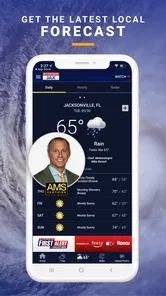
For weather, I pay attention to whether I am viewing information for my current area or for a selected Jacksonville location. A forecast can appear incorrect when the app is simply showing a different place than the one I have in mind. This is one of the most important checks for people who live outside the city but work there, or who regularly travel through the region.
Sports coverage has a similar consideration. I use the sports area when I want local context, but I would not expect it to replace a dedicated league or team service for every score, statistic, or nationwide result. The strength here is keeping local sports alongside local reporting, not necessarily matching a specialized sports product in depth.
A useful daily workflow
My preferred routine starts with a quick morning visit. I scan the main headlines, check weather before planning travel, and then leave the app rather than endlessly scrolling. This keeps it useful without making it another source of background distraction. Later, I return when there is a developing story or when I want a local update that national news apps are unlikely to prioritize.
A realistic example would be a weekday commute across Jacksonville. Before leaving, I use the weather section to decide whether I need extra time or different clothing, then glance at local headlines for incidents that could affect my route. During a break, I can check whether the situation has developed. In that workflow, the app is valuable because it combines local context and practical planning in one place.
The trade-off is that a quick glance does not always provide the full background I need. A headline may tell me that something is happening, but I may still want to read the complete article, compare another source, or wait for official information. I treat the app as a convenient starting point and a way to stay connected to Jacksonville, not as permission to stop checking context.
One useful habit is to save mental space for follow-up. If a story affects travel, school, work, or safety, I reopen it later instead of relying only on the first notification. Early reports can change as more details become available. The app helps me notice a story quickly; careful reading helps me decide what it actually means.
Recovering when a screen or update does not behave normally
When a section does not load correctly, I work through the least disruptive fixes first. I return to the previous screen, reopen the section, and verify the connection. If that does not help, I force-close and relaunch the app. These steps often distinguish a temporary loading problem from a persistent issue without removing any personal settings.
If the problem affects only one article, I try another story. If several sections fail at once, I test another connection and check whether other apps are also having trouble. This matters because local news content depends on current delivery systems, and a general service interruption can look like an app fault from the user’s side.
Updating the app through the normal Android or iOS store is another sensible recovery step when an update is offered. I would not install unofficial copies or use random download sources. The official free version is the appropriate route, particularly for a news app that may handle location choices and notifications.
Reinstalling is a last resort for me. It can clear a stubborn local installation problem, but it may also reset notification choices or other preferences. Before doing it, I make a note of the settings I want to restore. If the app works after reinstalling, I add notifications gradually instead of enabling everything at once.
When contacting support becomes necessary, I would describe the exact section affected, the phone platform, the type of connection, and whether the issue happens every time. “The app is broken” is much less useful than explaining that headlines load but weather does not, or that notifications appear only when the app is opened. Clear details make troubleshooting more efficient.
When the app is not the cause
News apps are especially sensitive to timing. A developing event may have limited details, a weather situation may change rapidly, and a sports story may be updated in stages. That can create an experience that feels inconsistent even when the app is operating normally. I try to separate a delayed update from a technical failure by checking whether the rest of the app remains responsive.
Notification behavior is another area where expectations can be misleading. A notification is not guaranteed to arrive at the exact moment an event begins, and a phone’s focus or battery settings can delay it. I use notifications as a prompt to look at the app, not as a replacement for checking information directly when the matter is urgent.
Location can also make a correct report feel irrelevant. Jacksonville is a broad area from a user’s perspective, and the story that matters to someone near work may not matter to someone at home. Before judging the local focus, I verify which location or coverage area I am viewing. This is a small step, but it prevents many false conclusions.
I would not use any news app as my sole authority during an emergency. For urgent safety decisions, I look for official instructions from the relevant authorities as well. Action News Jax can help me discover local developments and follow continuing coverage, but a news report and an official directive serve different purposes.
How it compares with the usual alternatives
Compared with a national news app, this one is more useful when the question is specifically, “What is happening around Jacksonville?” National services are better for broad politics, international events, and stories from many regions. Their advantage is scale; the local app’s advantage is focus. I would keep the local option if Jacksonville is part of my daily life.
Compared with a weather-only app, Action News Jax offers less specialization but more context. A dedicated weather service may be the better choice for detailed forecast tools, long-range planning, or people who monitor conditions throughout the day. The local app makes more sense when I want weather as part of a wider morning news routine.
Compared with a sports-only service, its sports coverage is likely to be more convenient for local headlines than for exhaustive statistics or broad league tracking. Dedicated sports apps win when scores, schedules, standings, and game-by-game detail are my main concern. Here, sports are one part of a Jacksonville-centered package.
Compared with visiting a news website in a browser, the app can feel more direct for repeated check-ins. I do not need to search for the local outlet each time, and the mobile format is designed around quick reading. On the other hand, a browser may be preferable on a desktop, when I want several sources open together, or when I do not want another app managing alerts.
Who will appreciate it, and who should skip it
I think it is a strong fit for Jacksonville residents who want one familiar place for local headlines, weather, and sports. It is also useful for people who commute into the area, keep up with local events from nearby communities, or want a regional perspective that national applications often overlook. Since it is free and rated for everyone, it is easy to try without a financial commitment.
It is less suitable for someone who wants a highly customizable national news reader, extensive international coverage, or a specialized weather dashboard. It may also disappoint users who expect every local story to appear instantly or who want sports information at the depth of a dedicated service. In those cases, I would use it alongside another app rather than force it to serve every purpose.
The developer, Cox Media Group Inc., gives the app a clear local-news identity rather than a general-purpose aggregator feel. That focus is its main reason to install it. I would choose it because I care about Jacksonville coverage, not because I want a universal replacement for every news, weather, and sports tool on my phone.
After using it as a daily local check-in, I see Action News Jax as a practical companion for Jacksonville awareness, not an all-purpose information command center. Its free access, local emphasis, and mix of news, weather, and sports make it convenient for ordinary routines. The main work is setting notifications thoughtfully, confirming location choices, and knowing when a slow update comes from connectivity or timing rather than the app itself.
My recommendation is straightforward: install it if Jacksonville is important to your day and you want local coverage close at hand. Start with a restrained notification setup, test it during a normal morning, and add other sources only where you need deeper weather, sports, or national reporting. If that focused workflow matches your needs, the app earns a place on the phone; if you want broad coverage or specialist tools, it is better treated as a useful local supplement.
Action News Jax Frequently Asked Questions
Is Action News Jax suitable for children?
Action News Jax is rated Everyone, and it focuses on local news, weather, and sports for Jacksonville. As with any news app, stories may cover serious events or emergencies, so parents may want to consider whether that kind of content is appropriate for a child. The app is free to download, and its news coverage is intended for a general audience.
Who develops Action News Jax, and is it focused on a particular area?
Action News Jax is developed by Cox Media Group Inc. and focuses on Jacksonville and surrounding communities. Its news coverage is most relevant to people who live in the area, work there, or want to follow local developments. The app also covers weather and sports, giving users a place to check those topics alongside local news.
What is Action News Jax, and what can I use the app for?
Action News Jax is a local news application focused on Jacksonville, Florida, and surrounding communities. After exploring the app, its main purpose is to provide access to breaking news, weather updates, traffic information, live broadcasts, video reports, and stories from the station’s newsroom. It is especially useful for users who want local coverage in one place rather than relying only on national news apps or social media.
Does Action News Jax provide live news, weather, and traffic updates?
Yes, the app is designed to keep users informed with several types of real-time or frequently updated content. Depending on the current programming and local events, you may find live newscasts, breaking-news alerts, weather forecasts, radar information, severe-weather coverage, and traffic reports. Availability can vary by location, broadcast schedule, internet connection, and the station’s coverage priorities, so some features may not be active at all times.
Can I receive breaking-news and severe-weather notifications?
Action News Jax can send push notifications about important local developments, including breaking news, severe weather, traffic disruptions, and emergency situations. During setup, you may be asked to allow notifications, and you can usually manage alert preferences through the device settings or the app’s options. Keep in mind that frequent alerts may use your attention and mobile data, so it is worth adjusting them according to your interests.
Pros
- Fast local updates for Jacksonville and Northeast Florida.
- Live newscasts and breaking-news alerts keep you informed on the go.
- Weather forecasts include radar
- warnings
- and location-based updates.
- Video reports make major stories easy to follow without reading long articles.
- Coverage includes traffic
- community events
- and local investigations.
Cons
- Frequent breaking-news notifications may feel excessive for some users.
- Some stories can take time to load on slower mobile connections.
- Advertising may interrupt browsing and video-watching.
- Coverage is primarily regional and offers limited national news depth.
- Certain live or on-demand video features may require a stable connection.













