

Wildlife Weather
- 300.00
- 4.7
- Installs
- 10.00K
- Price
- Free

Screenshots

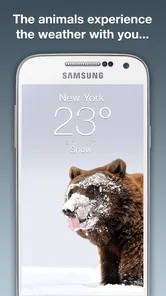
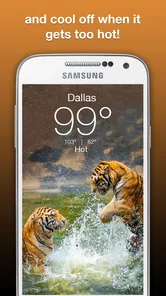
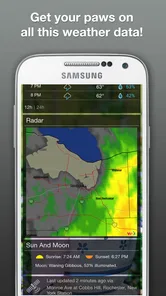
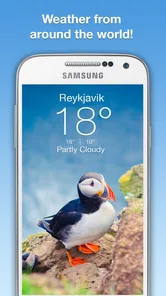
Analysis by Reviewed
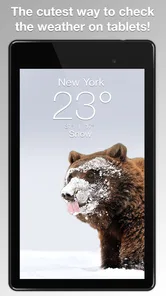
Weather apps usually compete by packing in more maps, alerts, charts, and settings. Wildlife Weather takes a quieter route. It combines everyday weather checking with animal photography, so opening it feels less like consulting a technical dashboard and more like taking a brief visual break before deciding what to wear or whether to go outside. I found that difference matters: the app is appealing when I want a quick glance and a pleasant image, but it is less suitable when I need a deep forecasting workspace.
Developed by Weather Creative Inc., this free weather app is aimed at people who enjoy nature as much as practical information. Its store description presents the central idea clearly: wildlife imagery sits alongside the weather experience. That makes it unusually specific within its category. Rather than trying to replace every specialist weather tool, it offers a focused combination of atmosphere and utility.
My overall impression is that Wildlife Weather works best as a calm, lightweight weather companion, not as a complete replacement for a data-heavy forecast service. That distinction is important before downloading it. If you mainly need a fast look at current conditions and appreciate animal photography, it has a clear personality. If you plan outdoor activities around detailed radar, long-range planning, or advanced warnings, a conventional weather app may be the better primary choice.
How Wildlife Weather feels in everyday use
I find Wildlife Weather most useful when I treat it as a small part of a daily routine rather than a place to plan every outdoor decision. A quick glance can prompt me to check the sky, pack a light layer, or decide whether to look up a more detailed forecast. That simple habit makes the app’s visual approach feel purposeful, and it leads naturally to the first setup choices that help a new user get oriented.
A weather check with a visual reason to return
The strongest part of the concept is its emotional contrast. Weather information can be repetitive: temperature, conditions, and the same familiar symbols appear day after day. Wildlife Weather gives that routine a more memorable setting by placing the animal kingdom at the center of the visual experience. I can imagine opening it in the morning, checking whether I need a jacket, and spending an extra moment looking at the featured image rather than immediately closing the app.
That small change makes the app particularly pleasant for nature lovers, families, and anyone who finds standard weather screens dull. It also suits a bedside or home-screen routine where the goal is not detailed meteorological analysis but a quick, friendly update. The wildlife theme is not merely decoration in that context; it gives the app a recognizable identity that ordinary forecast utilities often lack.
At the same time, the visual emphasis creates a trade-off. People who prefer dense information may see the photography as space that could have been used for more forecast detail. I would not choose this app solely because I want the most technical presentation. I would choose it because I want weather information delivered in a more enjoyable way.
More From Our News Desk

 Gmail
GmailGmail in a Busy Inbox: Who Benefits Most?
From first account to crowded workday, Gmail earns its place through dependable search and flexible sorting—but its best fit depends on how much inbox maintenance you can tolerate.

 Prime Video
Switching to Prime Video: What Changes in Your Viewing Routine
Prime Video can make a compelling second home for streaming, but switching means learning a different catalog, rental layer, and route from browsing to playback.

 Universal TV Remote Control
Universal TV Remote Control Works Best as a Reliable Backup
A phone remote earns its place through quick setup and reliable habits. Here is how to get more from Universal TV Remote Control—and where its limits show.

 Weather - By Xiaomi
Weather by Xiaomi Review: Clear at a Glance, Less Clear Up Close
Xiaomi’s weather app makes everyday forecasts quick to scan, but its calm surface can leave useful details and recovery paths harder to find than they should be.

 X
XX Under Pressure: Can It Recover When Posting Goes Wrong?
A resilience-focused review of X, examining setup, mistaken posts, interruptions, weak connections, and the gaps that matter when recovery needs to be dependable.

 Clash of Clans
Clash of Clans Is Won Between the Battles
Its raids are quick; its community is a long-term project of coordination, teaching, rivalry, and shared responsibility—with all the friction that entails.
Latest News



What I would use it for during a normal day
My most realistic use case would be a short morning check before commuting. I would look at the current conditions, decide whether to carry an umbrella or add a layer, and then leave. A second useful moment would be before an evening walk: the app can serve as a quick reminder to check the sky before heading out, while the wildlife imagery makes the habit less tedious.
It also makes sense for a shared household device. A child who is interested in animals may be more willing to look at the weather when the screen includes wildlife photography. That does not turn it into an educational nature app, and I would not present it as one, but the theme gives a basic weather routine more appeal than a plain numerical display.
For travel planning, I would treat it as a first glance rather than the final authority. Before a long drive, hike, flight, or outdoor event, I would still want a service designed around detailed timing, warnings, and location-specific information. Wildlife Weather is more convincing for repeated everyday checks than for high-consequence decisions.
Speed expectations without overpromising
The app’s focused purpose suggests a straightforward experience: open it, absorb the main weather information, and move on. I found that this simplicity is more valuable than a crowded interface when I am in a hurry. There are fewer reasons to wander through complicated screens, and the photography gives the opening experience a clear visual focus.
Still, the image-led design means that the app may feel different from a bare-bones weather utility. Visual content can make an app feel richer, but it can also make the opening moment feel less immediate to someone who wants only a number. My advice is to judge speed by your own routine. If your ideal weather check takes a few seconds, the app’s focused layout should feel appropriate. If you expect instant access to several layers of technical information, the same design may feel slower simply because it asks you to engage with more than a plain forecast card.
I also would not confuse a clean experience with a guarantee of identical performance on every phone. The current release is version 6.2.7, and it supports devices running Android 7.0 or later. That broad compatibility is useful for people keeping an older phone in service, although age, storage pressure, and general device condition can still influence how any image-oriented app feels.
What happens during heavier use
Wildlife Weather is not the kind of app I would expect to stress a device through constant interaction. Its natural workload is a few short visits spread across the day. That makes it a good match for casual checking rather than extended sessions. I would open it before leaving home, perhaps again before an outdoor plan, and close it once I had the information I needed.
The heavier moments are likely to come from repeated refreshing, switching locations, or keeping the app open while comparing conditions over time. Those are precisely the situations where I would pay attention to battery and responsiveness. Because photography is central to the experience, users with limited storage or older hardware may prefer to keep expectations modest. I would not install it on a device that is already struggling with space or general sluggishness and then blame the app for every delay.
A practical habit is to use it as a quick check rather than leaving it open continuously. That preserves the app’s strongest quality: a brief, pleasant interaction. It also avoids turning a simple weather tool into an unnecessary background habit. For people who check forecasts constantly during a storm or outdoor event, a specialist weather service with clearer monitoring tools would be more sensible.
Reliability and the difference between routine and urgent use
Reliability has two sides here. One is whether the app remains comfortable to open repeatedly; the other is whether it provides enough information for the decision I am making. For ordinary choices such as clothing, a short walk, or deciding whether to carry rain protection, its focused format is easy to understand. I do not have to decode a complicated collection of charts just to make a small decision.
For urgent weather situations, I would be more cautious. A visually appealing weather app should not be my only source when conditions could affect safety, travel, or an outdoor event. In those cases, I would pair it with a service known for detailed warnings and more specialized forecasting tools. That is not a criticism of its wildlife theme; it is simply the right boundary for a compact, general-purpose app.
The app’s public reception is encouraging, with a 4.7 average from around 1.4 thousand ratings and over 300 written reviews. Those figures suggest that the concept connects with a meaningful group of users, but they do not remove the need to test it against your own routine. A high average can tell me that many people enjoy the experience; it cannot tell me whether its information depth matches my particular needs.
I also appreciate that the app is rated Teen. That makes the audience positioning clear enough for families to consider, although parents should still apply their own judgment to any app used by younger household members. The rating does not change the central question: whether the combination of wildlife imagery and weather information is useful enough for the person using it.
Older phones, storage, and practical device limits
Support for Android 7.0 or later gives Wildlife Weather a place on older compatible devices, which is valuable if you do not own the newest phone. However, operating-system support is only the starting point. An older phone may have less memory, slower image handling, or limited free storage. Those factors can affect how comfortable a photography-focused app feels, even when the operating system meets the requirement.
On a newer device, I would expect the visual side to be easier to appreciate, especially if the screen is bright and sharp. On an older handset, the app may still be useful, but the photography may not have the same impact. This is an important trade-off: the wildlife images are part of the reason to choose the app, so the quality of your display and the responsiveness of your phone influence how much value you get from it.
I would also avoid judging it during a particularly crowded phone session. If several demanding apps are open, the experience of launching any weather tool can become less smooth. Closing unused apps, keeping reasonable free storage, and installing the current version are sensible preparation steps. The app is free to download, while optional in-app purchases range from $1.99 to $29.99 per item, so I would review any purchase screen carefully and decide whether the basic experience already meets my needs before spending money.
How it compares with ordinary weather alternatives
Compared with a standard weather app, Wildlife Weather wins on character. Many alternatives present weather as a utility to be consulted and forgotten. This one gives the routine a visual hook, which can make repeated checks feel less mechanical. If I want an app that I enjoy opening, rather than one that merely displays information, Wildlife Weather has a stronger personality.
Standard alternatives usually win when I need breadth. They may be better suited to detailed hourly planning, radar interpretation, severe-weather monitoring, multiple layers of forecast information, or frequent location changes. I would choose one of those tools for a long hike, a weather-sensitive job, or a trip where timing matters more than presentation.
The best arrangement may be to keep Wildlife Weather for everyday awareness and use a more technical service when the situation demands it. That avoids forcing one app to serve two very different purposes. It also reflects the app’s real strength: making a routine weather check more inviting without pretending that visual appeal alone replaces specialist information.
Who will enjoy it most
I recommend Wildlife Weather to people who like animal photography, prefer uncluttered weather checks, and want a free app with a distinctive mood. It is especially suitable for casual users who mainly need a quick sense of the day before commuting, walking, shopping, or making simple outdoor plans. The wildlife theme can also make a shared family device feel more welcoming than a strictly technical forecast screen.
The app is less convincing for meteorology enthusiasts, outdoor professionals, frequent travelers, and anyone who wants a single tool for every weather-related decision. If you need deep forecast analysis, I would look elsewhere first. If you dislike decorative elements and want the fastest possible route to a temperature reading, the photography may feel like an unnecessary layer rather than a benefit.
Its install base of over 10 thousand shows that it has found an audience, while its release history stretches back to 2016. That combination gives it the feel of an established concept rather than a brand-new experiment. Even so, I would focus less on popularity and more on fit: the app succeeds when its visual idea adds pleasure to a task you already perform.
Small habits that improve the experience
First, I would make it part of a fixed routine instead of opening it randomly throughout the day. A morning check and a pre-outdoor check are enough for most casual users. This keeps the app useful without encouraging constant refreshing, and it lets the wildlife imagery remain a pleasant detail rather than background noise.
Second, I would use it as a decision starter. If the conditions look uncertain, I would then consult a more detailed source instead of expecting Wildlife Weather to answer every follow-up question. This two-step workflow is more efficient than trying to make a compact, visually focused app perform the job of a specialist forecast platform.
Third, I would install it on the device where I actually enjoy viewing photography. A larger, clearer screen can make the central idea more rewarding, while a cramped or aging display may reduce the app to an ordinary weather check. That is a subtle but important point: the app’s value is partly informational and partly experiential, so the hardware changes the balance.
Finally, I would check the free experience before considering any optional purchase. Since individual in-app purchases can reach $29.99, the sensible approach is to decide what you genuinely need rather than paying simply because the app is attractive. The free starting point makes experimentation easy, but it does not mean every optional item will be worthwhile for every user.
My performance verdict
After weighing its speed expectations, everyday workload, reliability needs, and device constraints, I see Wildlife Weather as a focused app with a clear audience. It is not trying to be the most comprehensive weather workstation. Its appeal comes from making a familiar task feel more human and more connected to nature.
I would keep it for quick daily checks, especially when I want a pleasant visual moment along with practical weather information. I would not rely on it alone for severe conditions, complex travel planning, or activities where precise forecasting is essential. That limitation is easy to accept once the app is understood on its own terms.
Wildlife Weather is worth trying if you want your weather routine to feel less mechanical. Weather Creative Inc. has built an app around a simple but effective idea: pair useful daily information with the beauty of wildlife. For the right user, that is enough to make it more memorable than a conventional forecast screen. For everyone else, particularly those seeking technical depth above all else, a more specialized alternative will remain the better choice.
Wildlife Weather Frequently Asked Questions
Who is Wildlife Weather designed for?
Wildlife Weather may appeal to anyone who enjoys checking the weather alongside wildlife photography, from nature lovers planning a casual walk to people preparing for an outdoor outing. Its focus combines weather with imagery of the animal kingdom, making it a distinctive option for users who would like their weather app to feel connected to nature. It is categorized as a weather app and is rated for Teen audiences.
What is Wildlife Weather, and what does it offer?
Wildlife Weather is a weather-focused app designed for people who spend time outdoors, including hikers, campers, birdwatchers, photographers, and wildlife enthusiasts. It presents current conditions and forecasts in a way that can help users plan outdoor activities. Its presentation pairs weather checking with glorious photography of the animal kingdom. Depending on the available version and location, information may include temperature, precipitation, wind, visibility, sunrise and sunset times, and other practical weather details.
Can Wildlife Weather provide accurate forecasts for outdoor locations?
The app can be useful for checking weather conditions before visiting parks, trails, forests, or other natural areas, but forecast accuracy depends on the quality of the data source, your location, and changing local conditions. Remote environments can experience weather that differs from nearby towns. For safety-critical activities, compare Wildlife Weather with official meteorological services and always prepare for sudden changes.
Does Wildlife Weather require location access?
Wildlife Weather may request location permission to identify your current area and display relevant local forecasts. You can usually choose whether to allow precise or approximate location access, depending on your device and operating system. If you prefer not to share your location, you may be able to search for places manually, although some personalized features and automatic updates could be limited.
Does Wildlife Weather work without an internet connection?
The app generally needs an internet connection to download current weather observations, forecast updates, radar information, or location data. Some previously loaded information may remain temporarily available through caching, but it should not be treated as a dependable offline forecast. If you are traveling to an area with weak reception, check conditions in advance and consider carrying a separate offline map and emergency weather information.
Pros
- Provides weather information tailored to wildlife and outdoor conditions.
- Useful for planning hikes
- camping trips
- and nature photography sessions.
- Presents forecasts in a focused format without unnecessary social features.
- Can help users anticipate changing conditions before visiting natural areas.
- Relevant for birdwatchers
- hunters
- anglers
- and other outdoor enthusiasts.
Cons
- Accuracy may vary significantly in remote areas with limited weather stations.
- Some wildlife-related insights may feel too general for experienced users.
- Forecast details may depend on location permissions and available regional data.
- Outdoor users may still need specialist alerts for severe or dangerous weather.
- The app may offer limited value for people who rarely spend time in nature.













