

Weather Kitty - App & Widget
- 14.06K
- 4.9
- Installs
- 1.00M
- Price
- Free

Screenshots


Analysis by Reviewed
I find Weather Kitty easiest to judge by the small moment it aims to improve: checking the forecast before deciding what to wear or whether to take an umbrella. It is a free weather app from Weather Creative Inc., with a playful cat-centered presentation rather than the restrained look of a typical forecast tool. That personality is the main reason to try it; whether it suits you depends on how much you value a cheerful interface alongside practical weather information.
What you get without paying
You can start using the app for free, while in-app purchases are listed from $0.99 to $49.99 per item. I would treat that as a clear distinction: the basic decision to try it costs nothing, but some optional purchases can cost considerably more. Before buying anything, I’d check what the specific item adds and whether it changes the experience in a way I personally care about. The listed range alone does not tell me which purchase is worthwhile.
The audience and track record also help set expectations. Weather Kitty is rated Teen, has a 4.9 average from around 74,000 ratings, and has been installed over a million times. Those figures suggest that many people enjoy the idea, but they don’t guarantee that its forecast presentation or purchase options will fit your habits. I’d still judge it by whether its everyday information is easy for me to read and useful where I live.
What Makes Weather Kitty Stand Out?
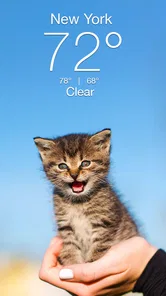
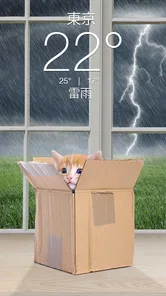
First off, let's talk about the interface. It’s super user-friendly, with a clean design that’s easy to navigate. When you open the app, you're greeted by a cute cat picture that changes depending on the weather conditions. It’s like having a little furry friend to brighten your day, no matter how gloomy the weather might be. And who wouldn’t want that?
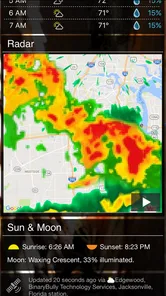
The app provides accurate weather forecasts, which is, of course, the main reason you’d download a weather app. But the twist is how it delivers these updates with a playful twist. You can expect all the standard weather info: temperature, humidity, wind speed, and more, but each with a side of kitty cuteness.
Features You’ll Love
One of the most endearing features is the ability to customize the cat theme. You can choose from different cat packs, such as seasonal cats, grumpy cats, and even celebrity-themed cats. It’s a personalized touch that makes the app feel uniquely yours.
Another great feature is the widget. You can add a Weather Kitty widget to your home screen, allowing you to get a quick glance at the current weather conditions without even opening the app. It’s both functional and adorable, which is a win-win in my book.
More From Our News Desk

 Gmail
GmailGmail in a Busy Inbox: Who Benefits Most?
From first account to crowded workday, Gmail earns its place through dependable search and flexible sorting—but its best fit depends on how much inbox maintenance you can tolerate.

 Prime Video
Switching to Prime Video: What Changes in Your Viewing Routine
Prime Video can make a compelling second home for streaming, but switching means learning a different catalog, rental layer, and route from browsing to playback.

 Universal TV Remote Control
Universal TV Remote Control Works Best as a Reliable Backup
A phone remote earns its place through quick setup and reliable habits. Here is how to get more from Universal TV Remote Control—and where its limits show.

 Weather - By Xiaomi
Weather by Xiaomi Review: Clear at a Glance, Less Clear Up Close
Xiaomi’s weather app makes everyday forecasts quick to scan, but its calm surface can leave useful details and recovery paths harder to find than they should be.

 X
XX Under Pressure: Can It Recover When Posting Goes Wrong?
A resilience-focused review of X, examining setup, mistaken posts, interruptions, weak connections, and the gaps that matter when recovery needs to be dependable.

 Clash of Clans
Clash of Clans Is Won Between the Battles
Its raids are quick; its community is a long-term project of coordination, teaching, rivalry, and shared responsibility—with all the friction that entails.
Latest News



The app also offers various notification settings, so you can stay updated with real-time weather alerts. Whether it's a sudden downpour or a sunny day ahead, Weather Kitty ensures you’re never caught off guard.
How I’d use it day to day
The home-screen widget is most useful when I’m deciding quickly, not when I need to study a forecast in depth. I’d glance at it while getting ready, then open the app if the temperature, humidity, or wind could change what I pack. For a commute, that means checking before leaving and using alerts as a backup—not assuming a notification replaces a deliberate look at changing conditions.
A practical way to keep the playful design from becoming clutter is to choose a cat theme you genuinely enjoy and leave it alone for a while. The point is a pleasant, familiar glance, not spending every morning browsing decorative options. If you like changing things up, seasonal or grumpy-cat packs can make the app feel more personal; if you want a strictly functional screen, the customization may feel like extra noise.
Where it fits among weather apps
Compared with the standard weather app on a phone, Weather Kitty puts more emphasis on personality and a glanceable widget. That can make routine checks feel less sterile, especially if you already enjoy cat imagery. A conventional weather app may be a better fit if you prefer a minimal interface or want all your weather tools to follow the same familiar layout. I would keep a more detailed source handy for decisions where conditions are changing quickly, rather than asking the cat theme to make the forecast itself more certain.
That distinction matters for planning outdoors. If I were arranging a walk, I’d check the forecast before setting out, then pay attention to any relevant alerts rather than relying on one early snapshot. Weather can shift, and no attractive presentation removes that uncertainty. The app’s usefulness is in making routine information approachable; the responsible choice is still to recheck when timing or safety matters.
Who is likely to get the most from it?
I’d recommend trying it if you check local weather several times a day, enjoy cats, and want a widget that feels more cheerful than a plain block of numbers. It also makes sense for someone who wants weather details such as temperature, humidity, and wind in an app with a distinct visual identity. Since it is free to start, you can see whether that combination suits your routine before deciding whether any optional purchase is worth considering.
I’d skip it if you dislike themed visuals, want the most restrained possible forecast screen, or are looking for a purchase whose value is obvious from the price range alone. The app’s appeal is partly personal: a cat picture is a genuine perk to one person and an unnecessary decoration to another. The version listed is 6.1.0, and it supports operating systems from 7.0 onward, so it is worth checking that compatibility before installing on an older device.
Features You’ll Love
One of the most endearing features is the ability to customize the cat theme. You can choose from different cat packs, such as seasonal cats, grumpy cats, and even celebrity-themed cats. It’s a personalized touch that makes the app feel uniquely yours.
Another great feature is the widget. You can add a Weather Kitty widget to your home screen, allowing you to get a quick glance at the current weather conditions without even opening the app. It’s both functional and adorable, which is a win-win in my book.
The app also offers various notification settings, so you can stay updated with real-time weather alerts. Whether it's a sudden downpour or a sunny day ahead, Weather Kitty ensures you’re never caught off guard.
Why You Should Try It
Honestly, if you’re a cat lover, this app is a no-brainer. But even if you're not, the app's charm is undeniable. It turns something as routine as checking the weather into a moment of joy. It’s the little things, like seeing a cute cat photo that matches the weather, that can bring a smile to your face.
Moreover, it’s not just about the aesthetics. The app is reliable and provides the accurate weather information you need to plan your day. It combines functionality with fun, making it a great addition to your app collection.
In conclusion, Weather Kitty is more than just a weather app. It’s an experience that brings a bit of joy into your daily routine. So, if you’re tired of the usual, mundane weather apps, give Weather Kitty a try. You might just find yourself looking forward to checking the weather more often!
A useful routine for changing plans
For a day with several stops, I would use the widget as a prompt, not as the whole plan. A quick morning glance can tell me whether to think about a light layer or rain gear; before a later outdoor errand, I’d open the app again and look at the current details. This two-step habit is more dependable than checking once at breakfast and assuming the conditions will stay the same. It also gives the widget a clear job: reduce friction for routine checks, while the full screen is there when I need to pay closer attention.
That workflow is particularly helpful if I tend to forget to check the weather until I am already heading out. A home-screen view makes the information visible where I already look, and notifications can serve as another nudge. I would still treat alerts as a supplement rather than a guarantee that every change will be surfaced at the perfect time. If missing a shift would have serious consequences, I’d deliberately recheck a forecast from a source I trust for that situation.
What the playful presentation changes—and what it cannot
The cat art can make repeated checks feel warmer, but it does not change the underlying job of a weather app. I would not choose it because I expect a more precise forecast than the alternatives; the meaningful difference is how the information is presented and how readily I want to look at it. That is a modest benefit, but one that can matter when a tool is part of a daily habit. A design you enjoy may make you more willing to check before leaving, while a plain, compact screen may be faster for someone who only wants numbers.
There is also a practical trade-off between customization and consistency. Trying several cat packs can be fun, but frequent changes make it harder to settle into a familiar glance. I’d pick a look that stays readable to me and judge the widget by whether I can quickly find the weather detail I need. If the decorative elements compete with the information on your screen, there is little reason to keep them just because they are distinctive.
Choosing whether any purchase is worthwhile
Because the app is free to try, I’d separate two decisions: first, whether I like using it at all, and later, whether a particular optional item is worth paying for. I would not treat the existence of cat packs or a broad purchase range as a reason to buy immediately. Spend time with the free experience and notice whether the theme, widget, and forecast checks have become part of your routine. If they have not, paying for more decoration is unlikely to fix that mismatch.
If you are tempted by an item, check its exact description and price at the point of purchase, then ask whether it adds something you will actually use rather than something that only looks appealing in the moment. The listed in-app purchase range runs from $0.99 to $49.99 per item, so the upper end is a meaningful commitment for an optional weather-app purchase. I’d be cautious about assuming that a more expensive item improves forecast quality; the available price information does not establish that, and value depends on what the individual purchase offers.
When another weather app is the better tool
For quick local checks, this app’s personality and widget can be enough. For a minimalist setup, a phone’s built-in weather option may be more convenient because it avoids adding another themed interface. For more involved planning, I’d compare details with a fuller forecast source rather than relying on a cheerful graphic or one glance at the home screen. The best choice depends on the task: a pleasant daily check and a high-stakes weather decision are not necessarily the same job.
I would also think about how much visual customization I want to maintain. Someone who enjoys switching themes may see the cat packs as part of the fun; someone who wants one stable, uncluttered display may prefer an app that puts less emphasis on personalization. Neither preference makes one tool universally better. Weather Kitty earns its place when its distinctive presentation encourages useful checks without getting in the way of the information.
My buy-or-skip verdict
I’d start with Weather Kitty if I wanted a free weather app that gives routine checks a friendly, cat-themed feel and offers a widget for quick access. Its 4.9 average and roughly 14,000 reviews point to a well-liked app, but I would still make the decision based on my own screen, habits, and local needs. It is best judged in ordinary use: can I read what matters at a glance, and do I find myself checking before I leave?
Skip it if a themed interface feels distracting, if you need a more focused tool for detailed weather planning, or if you are hoping a paid purchase will solve a problem you have not identified. I see its strongest value in the free starting point, its distinctive visual character, and the convenience of the widget—not in an assumption that optional purchases are necessary. For cat fans who want a little personality in a practical daily tool, it is an easy app to try; for everyone else, the standard weather option may be all they need.
Weather Kitty - App & Widget Frequently Asked Questions
What does the Teen rating mean for parents considering Weather Kitty?
Weather Kitty has a Teen content rating, which is worth checking if you are choosing apps for a younger user. Parents and guardians can review the rating alongside the app’s description and their device’s family settings before installing it. The rating is a useful guide, but each family can decide what is appropriate for its own needs.
How popular is Weather Kitty?
Weather Kitty has more than a million installs and an average rating of 4.9 from around 74,000 ratings. That suggests the cat-themed approach has found a substantial audience among people looking for a lighter way to check the weather. Popularity and ratings can help with your decision, but it is still worth considering whether its style and features suit your own preferences.
Who makes Weather Kitty, and what is the app like to use?
Weather Kitty is a weather app from Weather Creative Inc. Its central idea is simple: make checking the local forecast more cheerful by pairing weather information with cats. The app combines forecast features with kitty-themed visuals, so it may appeal to people who want a more playful look than a standard weather app while still checking everyday conditions.
What devices and software versions are compatible with Weather Kitty?
Weather Kitty is available for Android and iOS, so it can suit users across both major mobile platforms. Its minimum operating-system requirement is version 7.0. Before downloading, check that your device meets the relevant system requirement and that the app is offered for your device through its app store. This can help avoid compatibility surprises.
What features does Weather Kitty offer?
Weather Kitty is a fun and delightful app that provides accurate weather forecasts along with adorable kitty themes. Users can enjoy detailed weather reports, including temperature, humidity, wind speed, and precipitation chances. The app also offers widgets for quick access to weather updates, and users can customize their experience by selecting from a variety of cute cat themes that change with the weather.
Pros
- Adorable cat-themed weather visuals.
- Real-time weather updates.
- Customizable widgets.
- Easy-to-use interface.
- Supports multiple locations.
Cons
- Limited free features.
- Ads in the free version.
- Somewhat large app size.
- Occasional widget bugs.
- Requires internet for updates.













