

Weather Puppy - App & Widget
- 6.19K
- 4.9
- Installs
- 1.00M
- Price
- Free

Screenshots
Analysis by Reviewed
I like weather apps that make a useful daily habit feel inviting rather than obligatory, and Weather Puppy - App & Widget has a clear idea: pair everyday forecast information with dog imagery and a home-screen widget. That combination is appealing if you enjoy a bit of personality on your phone, but the forecast still needs to do the practical work. I’d judge it by whether it helps you check conditions comfortably and often, not by the cuteness alone.
The current appeal: a forecast with personality
The app is a weather tool from Weather Creative Inc., built around familiar local conditions and puppy photos. I find that focus more distinctive than another screen designed to squeeze in as many weather graphics as possible. The visual treatment can make a routine glance feel warmer, especially for someone who already enjoys dogs or wants a less austere home screen.
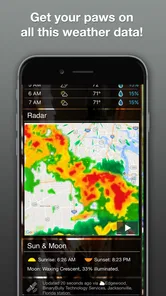
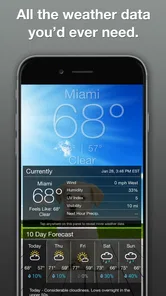
Its strengths are most relevant to ordinary decisions: whether to bring a jacket, expect rain on a walk, or check the week before making casual plans. It includes temperature, precipitation, wind speed, and a forecast for the week ahead. That is a useful starting point for day-to-day planning, though I wouldn’t mistake those basics for specialist forecasting tools.
The app is free to download and has a 4.9 average from around 32,000 ratings, with over 500,000 installs. It is rated Teen, and its current version is 6.0.9. It has been available since January 29, 2015, and runs on devices using version 7.0 or later. Those figures suggest an established app with a sizeable audience, but they don’t tell me whether a forecast will suit every location or whether its style will suit every user.
The practical question is whether you want weather information presented with a personal touch. If a friendly photo makes you more inclined to check before stepping outside, that can be a small but genuine advantage. If you prefer a compact, neutral display and rarely care about visual customization, the puppy theme may feel like extra decoration rather than a reason to switch.
How it fits into a daily routine
I find the strongest case for this app is the small pause before heading out: checking the forecast can feel less like scanning a plain utility screen and more like a pleasant part of the morning. If a puppy photo makes you more likely to check conditions before leaving, that is a practical benefit, not just decoration. On a rainy weekday, I’d look at the precipitation and wind before choosing a coat or deciding whether to walk; the image adds charm, while the forecast details still need to guide the decision.
The home-screen widget is useful when I want a quick glance without opening the app. I’d treat it as a reminder to check the weather, rather than assume a small widget can replace a closer look at the forecast before a longer trip or a changeable day. A useful habit is to check the full view when the conditions matter, then rely on the widget for casual awareness later.
More From Our News Desk

 Gmail
GmailGmail in a Busy Inbox: Who Benefits Most?
From first account to crowded workday, Gmail earns its place through dependable search and flexible sorting—but its best fit depends on how much inbox maintenance you can tolerate.

 Prime Video
Switching to Prime Video: What Changes in Your Viewing Routine
Prime Video can make a compelling second home for streaming, but switching means learning a different catalog, rental layer, and route from browsing to playback.

 Universal TV Remote Control
Universal TV Remote Control Works Best as a Reliable Backup
A phone remote earns its place through quick setup and reliable habits. Here is how to get more from Universal TV Remote Control—and where its limits show.

 Weather - By Xiaomi
Weather by Xiaomi Review: Clear at a Glance, Less Clear Up Close
Xiaomi’s weather app makes everyday forecasts quick to scan, but its calm surface can leave useful details and recovery paths harder to find than they should be.

 X
XX Under Pressure: Can It Recover When Posting Goes Wrong?
A resilience-focused review of X, examining setup, mistaken posts, interruptions, weak connections, and the gaps that matter when recovery needs to be dependable.

 Clash of Clans
Clash of Clans Is Won Between the Battles
Its raids are quick; its community is a long-term project of coordination, teaching, rivalry, and shared responsibility—with all the friction that entails.
Latest News



A realistic routine might be checking the full forecast over breakfast, deciding whether to carry an umbrella, and then using the widget for a quick look before leaving work. That split gives each view a sensible job: the full app for decisions and the widget for a reminder. It also avoids expecting a small home-screen panel to answer questions that require more context.
For a household with a dog, the imagery can make the screen feel especially at home, but the useful detail is not limited to pet owners. I can see it working for anyone who likes a cheerful interface and wants a simple reason to build a regular forecast-checking habit. If you need weather information for outdoor work, a long drive, or a plan where conditions could change the outcome, I’d use a more detailed source alongside it.
What Makes Weather Puppy Stand Out?
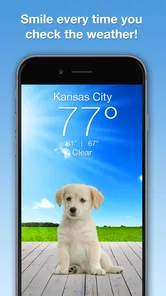
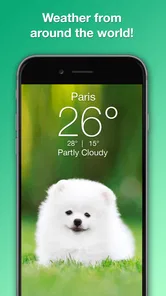
Imagine waking up, grabbing your phone to check the day’s weather, and instead of a bland, conventional weather screen, you’re met with the picture of a cute puppy. That’s what Weather Puppy - App & App & Widget is all about. It’s not just about displaying temperatures and forecasts; it’s about brightening your day with images of man’s best friend.
That visual approach makes Weather Puppy a natural fit for dog lovers and anyone who enjoys a more personal-looking home screen. It may be less appealing if you want a dense, information-first weather dashboard or depend on specialist tools for detailed planning. I’d keep a conventional forecast app in mind for those jobs: the puppy presentation is the distinctive part here, but a friendly design does not make every forecast screen equally suited to every need.
Customization that still has to work as a forecast
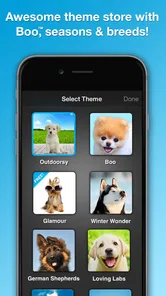
Besides the delightful imagery, this app doesn’t skimp on the essential weather features. You get the basic weather details – temperature, precipitation, wind speed, and forecasts for the week ahead. But where it really shines is in the customization options. You can choose from different puppy themes, and even better, upload your own puppy photos to personalize your experience. How cool is that?
For a more personal setup, I’d choose photos that stay easy to read against the weather information rather than treating the screen as a photo gallery. If you share the phone with family, using a familiar pet image can also make the app feel like a small household touch. The trade-off is simple: the more you value a clean, at-a-glance forecast, the more you should pay attention to whether a chosen image keeps the details legible for you.
One useful way to approach customization is to start with a photo that has uncluttered space behind it, then check whether the forecast remains easy to scan in the places you use most. A picture that looks great when the app is open may be less helpful if it competes with the information you want to read quickly. I’d also think about who else uses the device: a personal photo can be charming on your own phone, while a shared household device may call for an image everyone likes.
Another feature that caught my attention is the widget functionality. You can have the cutest weather widget right on your home screen. It’s super convenient and let’s be honest, who doesn’t want a cute dog on their screen?
Weather apps often compete by packing in maps, alerts, and specialist layers; I’d choose those alternatives when I need more than everyday conditions. This app’s appeal is the combination of basic forecast information with dog-themed customization, not a promise that it replaces every dedicated weather tool. Before relying on any weather app for a time-sensitive plan, I’d check the forecast close to departure and use a more detailed service if the decision depends on specialist information.
That comparison is less about one app being universally better and more about choosing the right level of detail. A standard weather app may be a better fit if you mainly want a plain, dense display; a service built for maps or severe-condition monitoring is more appropriate when those details drive your plans. Weather Puppy makes the strongest case when presentation matters alongside a straightforward forecast, rather than when you need every possible layer in one place.
What the version tells existing users
Using Weather Puppy is like having a personal weather assistant that also happens to love dogs as much as you do. The app is easy to navigate, and the integration of puppy images is seamless. Plus, the forecast data is sourced from reliable weather providers, so you’re not sacrificing accuracy for aesthetics.
Weather Puppy is a free weather app from Weather Creative Inc. It has a 4.9 average from around 32,000 ratings, and has been installed over 500,000 times. The app is rated Teen, and its current version is 6.0.9. It has been available since January 29, 2015, and supports devices running version 7.0 or later. Those details make it an established option, though age and longevity alone can’t tell me how well a particular forecast fits my location or plans.
For existing users, a version number is a useful point of reference, but it is not a changelog. I wouldn’t read 6.0.9 as proof of a specific redesign, forecast improvement, or new widget behavior. If you already use the app, the sensible test is whether the current view remains easy to read, the widget fits your home screen, and the forecast information meets your everyday needs.
That matters because established users may have a setup they already like. Before changing a theme or replacing a familiar photo, I’d check how the new choice affects readability and whether the widget still gives the quick glance I expect. If something about the experience feels different after a version change, comparing the full app with the widget can help identify whether the issue is the display you rely on or the information itself.
There is also a cost question beyond the free download: the app offers in-app purchases ranging from $0.99 to $49.99 per item. I’d start with the free experience and decide whether the available puppy themes and personalization are enough before spending anything. The key question is whether you’ll enjoy the visual extras regularly; if you only want temperatures and rain chances, paying for cosmetic options may not add much to your routine.
For someone weighing a purchase, I’d first spend a few ordinary days with the free version and notice how often the images and customization actually improve the experience. If the app becomes part of a daily routine, extra personalization may feel worthwhile; if you open it only when the weather looks uncertain, the standard forecast may be all you need. That is a more useful test than buying an option simply because it is available.
One question a new user may have is whether this should replace their current weather app. I wouldn’t make that decision on appearance alone. Try it for ordinary local checks, then keep a more detailed service for plans where maps, alerts, or specialist information matter. Another practical question is whether the widget can do everything the full view can; I’d use it for quick awareness and open the app when the decision calls for more context.
One practical limitation is that the cute presentation can’t answer every planning question by itself. For a commute, I’d check the relevant conditions before leaving; for a longer outdoor plan, I’d compare the week-ahead view with a more detailed source if timing or changing weather is important. That makes the app a cheerful everyday companion rather than my sole tool for decisions where highly detailed local information matters.
What I’d watch in future versions is straightforward: whether the widget stays genuinely useful, whether the forecast remains easy to read alongside the imagery, and whether personalization continues to feel optional rather than intrusive. Those are the areas most closely tied to why I’d choose this app in the first place. Until there is a clear reason to expect a particular change, I’d judge it by how well the current version serves my own routine.
Who is likely to enjoy it?
While it might seem like a novelty at first glance, the app’s practical features ensure it’s more than just a gimmick. It’s a useful tool wrapped in an adorable package. Whether you’re a dog lover or just someone who appreciates a bit of visual flair with their weather updates, this app might just be your next download.
I’d recommend giving it a try if a dog-themed screen would make you smile and you mainly need the everyday basics. It is less suited to someone who wants a no-frills interface, highly detailed weather analysis, or a single app for every kind of outdoor planning. In that case, a conventional or specialist weather service is the more sensible primary choice, and this one may be better as a light, personal alternative.
In conclusion, Weather Puppy - App & Widget is more than just a weather app; it’s a mood lifter, a smile inducer, and yes, a reliable source for your weather needs. It’s an app that understands the little joys in life and presents them in the form of cuddly puppy pictures. If you’re looking for an app that combines practicality with a personal touch, this might just be the one for you.
Weather Puppy - App & Widget Frequently Asked Questions
Does Weather Puppy need my location to show local weather?
Weather Puppy is designed around local weather, so location access can make it easier to see conditions for where you are. If you prefer not to share your device’s location, check the app’s location options and use a manually selected location if available. The most convenient setup depends on whether you want forecasts to follow you or stay focused on a particular place.
Can I use Weather Puppy for more than one location?
If you regularly check weather for home, work, or a place you plan to visit, it is worth looking at the app’s location controls after installation. Weather Puppy focuses on local forecasts, and having the right location selected is important for making its information useful. You can decide whether its location setup suits the way you keep track of weather in different places.
Is Weather Puppy suitable for someone who wants a quick weather check without opening the full app?
Weather Puppy includes a widget, making it a handy choice if you like checking local weather from your home screen. Its playful puppy visuals add a cheerful touch to the forecast, while the app is centered on weather information. Whether the widget fits your routine will depend on how you prefer to view forecasts and organize your phone’s screen.
What is Weather Puppy - App & Widget and how does it work?
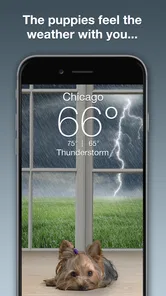
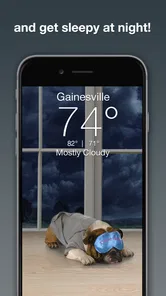
Weather Puppy - App & Widget is a weather application available for Android and iOS devices that provides current weather conditions, forecasts, and weather-related alerts. What makes this app unique is its integration of adorable puppy images that change according to the weather and time of day, providing a delightful visual experience alongside practical weather information.
Is Weather Puppy free to use or does it require a subscription?
Weather Puppy offers a free version with basic features, including current weather conditions and forecasts. However, for an ad-free experience and access to premium features like extended forecasts and additional puppy themes, users can opt for a subscription plan. The app provides in-app purchase options to enhance the user experience. It is free to download, with optional in-app purchases ranging from $0.99 to $49.99 per item.
Pros
- Adorable puppy themes enhance user experience.
- Accurate weather forecasts for multiple locations.
- User-friendly interface with intuitive navigation.
- Customizable widgets with real-time updates.
- Frequent updates with new puppy themes.
Cons
- Limited free features without subscription.
- Occasional ads can be intrusive.
- Puppy themes may not appeal to everyone.
- Requires internet for updated forecasts.
- Subscription needed for premium features.













