

Weather BUB
- 2.15K
- 4.9
- Installs
- 100.00K
- Price
- Free

Screenshots
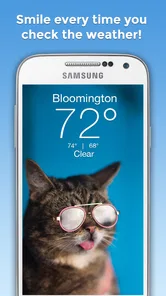
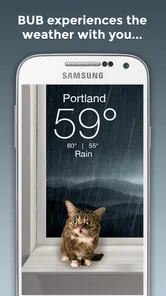
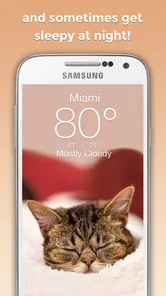
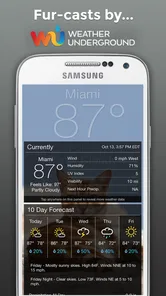
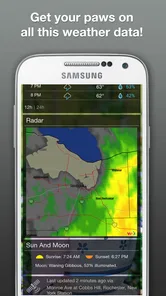
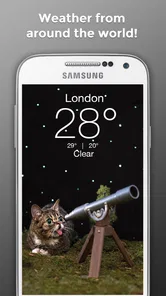
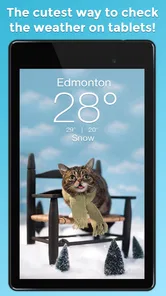
Analysis by Reviewed
Weather apps usually compete by showing more maps, more alerts, and more technical detail. Weather BUB takes a different route. After spending time with it, I see it as a friendly, lightweight weather companion for people who want checking the forecast to feel pleasant rather than clinical. Its personality is immediately clear, and that matters because weather is often something I check several times a day without wanting to study a dashboard.
That charm is not the whole decision, though. I would choose this app for quick everyday checks, especially if a cheerful presentation helps me build the habit of looking before leaving home. I would look elsewhere when I need a highly technical forecast, specialist outdoor planning tools, or the broadest possible set of weather controls. The useful question is not whether Weather BUB is “better” than every alternative, but whether its focused approach matches the way you actually use weather information.
What I looked for in a daily weather app
My first test was simple: could I open it and understand the day without working through clutter? A weather app earns a place on my phone when it answers practical questions quickly: Is it worth taking an umbrella? Will the morning be uncomfortable? Should I change what I planned to wear? Weather BUB is built around that kind of casual decision-making rather than turning every check into an analysis session.
The second criterion was emotional friction. Many weather applications are useful but visually cold, filled with dense numbers and serious-looking panels. Weather BUB, developed by Weather Creative Inc., makes a deliberate effort to make the experience cute and approachable. That does not improve the atmosphere outside, of course, but it can make the routine of checking conditions less boring. For families, younger users, or anyone who responds well to expressive design, that is a meaningful advantage rather than a decorative extra.
I also considered whether the app could fit different habits. Some people glance at weather once before work and move on. Others compare hourly changes, watch radar movement, or plan around changing conditions. A good choice depends on which group you belong to. Weather BUB feels most convincing when the priority is a quick, friendly overview. It becomes a less obvious choice when detailed forecasting is the main reason for installing an app.
There is also the question of trust. A polished interface cannot compensate for information that is difficult to interpret. I paid attention to whether the presentation helped me make a decision or merely made the screen look lively. The best part of this app’s concept is that the visual personality supports a simple weather-checking routine instead of trying to replace every specialist tool.
A cheerful approach that makes quick checks easier
The strongest impression is the app’s tone. Weather BUB is not pretending to be a professional meteorology workstation. It is designed to make the forecast feel more welcoming, and that gives it a clear identity in a crowded category. The store summary promises a smile whenever you check the weather, and in practical terms that means the app puts friendliness at the center of the experience rather than treating it as a minor theme.
More From Our News Desk

 Gmail
GmailGmail in a Busy Inbox: Who Benefits Most?
From first account to crowded workday, Gmail earns its place through dependable search and flexible sorting—but its best fit depends on how much inbox maintenance you can tolerate.

 Prime Video
Switching to Prime Video: What Changes in Your Viewing Routine
Prime Video can make a compelling second home for streaming, but switching means learning a different catalog, rental layer, and route from browsing to playback.

 Universal TV Remote Control
Universal TV Remote Control Works Best as a Reliable Backup
A phone remote earns its place through quick setup and reliable habits. Here is how to get more from Universal TV Remote Control—and where its limits show.

 Weather - By Xiaomi
Weather by Xiaomi Review: Clear at a Glance, Less Clear Up Close
Xiaomi’s weather app makes everyday forecasts quick to scan, but its calm surface can leave useful details and recovery paths harder to find than they should be.

 X
XX Under Pressure: Can It Recover When Posting Goes Wrong?
A resilience-focused review of X, examining setup, mistaken posts, interruptions, weak connections, and the gaps that matter when recovery needs to be dependable.

 Clash of Clans
Clash of Clans Is Won Between the Battles
Its raids are quick; its community is a long-term project of coordination, teaching, rivalry, and shared responsibility—with all the friction that entails.
Latest News



I can imagine opening it while getting ready for school, work, or a short walk and knowing what I need to know without feeling buried in information. That is especially useful for people who tend to ignore weather apps because they look complicated. A simpler emotional entry point can encourage more regular checks, which is valuable when conditions change during the day.
The app is also a good fit for a shared household device or a phone used by someone who finds conventional forecast screens intimidating. Its Teen content rating makes it suitable for a teen audience, while the playful presentation can appeal to adults who simply prefer a softer visual style. I would not mistake that rating for a guarantee that every person will love the design, but it does reinforce the app’s approachable positioning.
Where the focused design helps in real life
Consider a normal weekday. I wake up, check the morning conditions, and decide whether a light jacket makes sense. Before leaving work, I check again because the afternoon plan involves walking. In that situation, I do not necessarily need a wall of charts. I need a fast answer and an interface I will not resent opening. Weather BUB’s main strength is that it makes this repeated habit feel lighter.
Another useful situation is planning a casual outing with children. A playful weather presentation can make checking the forecast part of the conversation instead of an adult-only task. Rather than simply announcing that the weather is unpleasant, I can use the app as a more inviting prompt to discuss what to wear or whether an outdoor plan still makes sense. That is a small use case, but it is more specific and practical than saying the app is merely “cute.”
I also think it works well for people who already have a separate source for serious weather decisions but want a more enjoyable everyday view. You might use a specialist service when travel, storms, or outdoor work require closer attention, then keep Weather BUB for the quick checks that happen throughout the week. It does not have to be the only weather tool on your phone to be useful.
A less obvious benefit is consistency. When an app has a distinctive personality, I am more likely to remember it and return to it than I am with a generic utility that feels interchangeable. That does not make the forecast more accurate, and I would never choose an app on charm alone, but habit is part of usefulness. An app that gets checked regularly can be more practical than a technically impressive one that I rarely open.
What the current release means for prospective users
Weather BUB has been available since September 9, 2016, so it is not a brand-new experiment. The current release is version 6.2.7, and the minimum operating system is Android 7.0. That makes the app relevant to people using older Android phones as well as more recent devices, provided their software meets that requirement. If you are considering it for an older handset, checking the operating system before switching is the sensible first step.
The app is free to install, which makes trying its style relatively low-risk. It has an average rating of 4.9 from around 8,700 ratings, with about 2,100 written reviews, and it has passed 100,000 installs. Those figures suggest that the personality-led approach has found a receptive audience, although they should not replace your own judgment about whether you prefer playful simplicity or technical depth.
There are in-app purchases ranging from $1.99 to $29.99 per item. I would treat the free starting point as an opportunity to test the basic experience before spending anything. The important decision is not simply whether an optional purchase exists, but whether the app’s core style already suits you. If you immediately want features or presentation that belong to a different type of weather service, paying more will not solve that mismatch.
Where ordinary weather alternatives may fit better
The usual alternatives in this category tend to fall into a few broad groups. Some focus on minimal daily summaries, some emphasize detailed hourly information, and others are built around maps, warnings, or specialist planning. Weather BUB’s advantage is its personality and approachable routine. A more conventional app may be better if you want to compare many data points at once or customize the way information is displayed.
I would choose a technical weather service for activities where a broad overview is not enough. If I were planning a long hike, arranging outdoor work, or making a travel decision around changing conditions, I would want the alternative whose tools are designed for that level of scrutiny. Weather BUB can still offer a useful first look, but its friendly presentation should not be confused with a complete replacement for specialist forecasting resources.
There is a similar trade-off for users who want weather to disappear into the background. Some people prefer a plain utility with no personality, minimal visual decoration, and a familiar information hierarchy. For them, the very quality that makes Weather BUB memorable may feel unnecessary. If your ideal app is something you open only to read a compact line of information, a more restrained alternative could be a better fit.
On the other hand, users who find standard weather applications dull or intimidating may gain more from this app than from a technically richer option. The category is not only about data density. It is also about whether the design encourages people to check conditions before making plans. That is where Weather BUB has a credible reason to exist.
The practical cost of changing from another app
Switching weather apps is usually easy because the basic task is familiar, but the adjustment is still worth considering. If you already rely on a particular layout, you may initially look for information in the wrong place. A playful interface can change the rhythm of a check: instead of scanning a familiar list of figures, you may spend a little time learning how this app communicates the forecast.
My advice is to keep your current weather tool available while testing Weather BUB for ordinary decisions. Use the new app for morning clothing choices, short errands, and casual plans. Then compare how quickly you reach a confident decision, not just which screen looks nicer. This gives you a fair test without putting an important trip or outdoor commitment entirely on an unfamiliar interface.
There is also a financial switching cost, even though the initial download is free. The presence of optional purchases means I would avoid buying anything immediately. First decide whether you enjoy the app’s basic approach and whether it fits your routine. If you later choose an in-app purchase, it should be because it adds value to a style you already like, not because you are trying to force the app to behave like a different category of weather service.
One useful habit is to define your personal “good enough” forecast before switching. For me, that means knowing the general conditions, making a clothing decision, and deciding whether a simple outdoor plan is sensible. If that is also your standard, Weather BUB has a fair chance of replacing a conventional daily app. If your standard includes detailed planning and close monitoring, keep a more specialized option in your workflow.
Who should install it, and who should skip it
I recommend Weather BUB to people who want a friendly daily weather app rather than a technical control panel. It is particularly appealing if you enjoy expressive design, want something approachable for a teen, or have stopped checking forecasts because other apps feel too serious and crowded. The free entry point also makes it easy to see whether the personality works for you before making a commitment.
I would also recommend it as a companion app for someone who already uses a specialist forecast source. In that arrangement, Weather BUB handles the quick, low-pressure checks while the other service handles situations where more detail matters. That division of labor is sensible and avoids demanding that one app serve every possible weather habit.
I would skip it if your main requirement is advanced weather analysis, highly specialized outdoor planning, or a completely plain interface. I would also hesitate if you dislike decorative presentation in utility apps. A cute design is subjective; what feels encouraging to one person can feel distracting to another. The app’s central idea is strong, but it is also the reason it will not be the right choice for everyone.
Before installing, ask yourself one direct question: do I want weather information to be more enjoyable, or do I want it to be more exhaustive? If the honest answer is “more enjoyable,” this app is unusually well aligned with that goal. If the answer is “more exhaustive,” compare it with alternatives built around depth instead of personality.
My recommendation after using it
My final view is positive, with a clear boundary. Weather BUB succeeds because it understands that a daily utility does not have to feel sterile. Its cute, welcoming identity can turn a forgettable routine into something I am more willing to repeat, and that makes it genuinely useful for quick decisions at home, at work, or before a casual outing.
I would install it first as a low-commitment trial, use it for ordinary weather checks, and wait before considering any optional purchase. Pay attention to whether the presentation helps you decide faster or simply entertains you. Also keep a more detailed alternative available for travel, serious outdoor plans, or any situation where a quick friendly overview is not enough.
In short, Weather BUB is a strong choice for people who value approachability and personality in a weather app. It is free, established, compatible with Android 7.0 and later, and supported by a notably positive user response. Its limitation is not that it tries to do too little by accident; it is that its focused, cheerful identity may not satisfy users who want a comprehensive forecasting toolkit.
If you want a weather check that feels lighter and more inviting, I would recommend giving Weather BUB a try. If you need maximum technical depth, choose an alternative designed for that purpose instead. The best decision depends on whether your everyday priority is enjoying the check or investigating every detail behind it.
Weather BUB Frequently Asked Questions
Is Weather BUB available for my phone’s operating system?
Weather BUB is a weather app from Weather Creative Inc. and is available for Android and iOS. On Android, it requires version 7.0 or later, so check your device’s software version before downloading. The app is free to install, and its Teen content rating is worth noting for families reviewing apps on a shared device.
What does Weather BUB cost, and are there in-app purchases?
Weather BUB is free to download, but it also offers in-app purchases. Optional items range from $1.99 to $29.99 each, so review the purchase details in your app store before buying anything. The app’s free download does not mean every available item is free, and you can choose whether to make purchases while using it.
What is Weather BUB, and what does the app offer?
Weather BUB is a weather application designed to provide quick access to current conditions and forecasts in a simple, visually friendly interface. During testing, the app was useful for checking temperature, precipitation, wind, and general weather trends without navigating through complicated menus. Depending on the version and device, available features may include location-based forecasts, weather alerts, widgets, and forecast details for multiple places.
Does Weather BUB require access to my location?
Weather BUB can use your device’s location to automatically display weather information for your current area, which makes setup faster and more convenient. However, users who prefer greater privacy can usually deny location permission and enter a city manually. Before accepting access, review the permission request carefully and check the app’s settings, since location availability and accuracy may depend on your device, operating system, and enabled privacy controls.
How accurate are Weather BUB forecasts?
Weather BUB presents forecast information supplied by external weather-data services, so its accuracy can vary depending on the region, forecast period, and quality of local data. Short-term conditions are generally more dependable than forecasts several days ahead, particularly during rapidly changing weather. It is best used as a practical guide rather than a guarantee, and official warnings should always be checked through local authorities.
Pros
- Clean interface makes current conditions easy to check at a glance.
- Useful forecasts help with planning commutes
- trips
- and outdoor activities.
- Weather details are presented in a simple
- beginner-friendly format.
- Quick access to local conditions reduces the need to search manually.
- Lightweight design should run smoothly on most modern phones.
Cons
- Forecast accuracy can vary depending on location and weather conditions.
- Some features may require location access to work properly.
- Frequent alerts could become distracting if notification settings stay enabled.
- Information may feel limited for users wanting advanced meteorological data.
- Battery and data use may increase when location updates run in the background.













