EOBD Facile: OBD 2 Car Scanner
- 285.00
- 4.0
- Installs
- 5.00M
- Price
- Free
Screenshots
Analysis by Reviewed
My first question with a car-scanning app is not whether it can name a fault, but whether it helps me make a sensible next move. EOBD Facile: OBD 2 Car Scanner is for drivers who want to connect a phone to an ELM327 interface and get a clearer view of what their car is reporting. It sits in the Auto & Vehicles category, is made by Outils OBD Facile, and is free to install, with in-app purchases offered for additional items. Its audience is broad: the age rating is Everyone, and it has a 4.0 average from around 78,000 ratings. That level of use makes it familiar to many drivers, but I still treat its readings as a starting point, not a substitute for a proper diagnosis.
Connecting the app to a real-world car
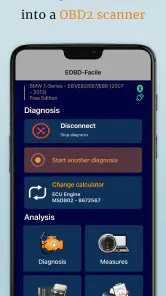
First things first, let’s talk about getting this bad boy installed. It’s available for both Android and iOS, so no one’s left behind. The installation process is pretty straightforward. Once you download it, you’ll need an ELM327 interface to connect your smartphone to your car. Yeah, it sounds techy, but trust me, it's simpler than it seems. The app guides you through the setup, making it a breeze even for the not-so-tech-savvy folks.
Getting ready before you plug in
The first practical decision is the adapter, because the app depends on that small piece of hardware to communicate with the vehicle. I would not choose one solely because it is cheap or described as “universal.” Confirm that it suits the car and the phone you plan to use, and keep the purchase details so you can return it if the connection proves unreliable. A questionable adapter can make a capable app look broken, while a stable connection makes the first scan much less frustrating.
I’d also set aside a few quiet minutes for the initial pairing rather than trying to learn the setup in a crowded parking lot. Park safely, follow the app’s prompts, and avoid handling the phone while driving. If the connection does not work immediately, check the adapter’s fit and the phone’s connection settings before repeatedly restarting the car or clearing anything. That simple order helps separate a pairing issue from a vehicle fault.
Reading faults without jumping to conclusions
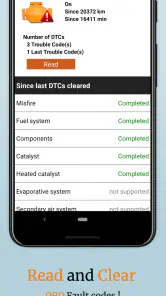
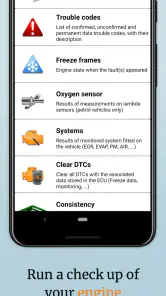
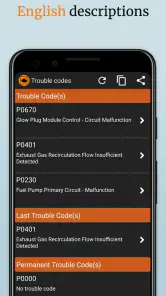
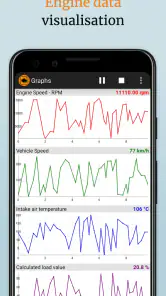
Now, onto the juicy stuff – the features. EOBD Facile is packed with all the goodies you’d expect from a top-notch OBD 2 scanner. You can read and clear trouble codes, which is a fancy way of saying you can see what’s making your car’s check engine light pop up. Plus, it provides real-time data like engine speed, temperature, and even fuel consumption. It’s like getting a health report for your car every time you open the app.
What I love about it is the detailed explanations it gives for each error code. You don’t just get a code number; the app explains what it means, what might be causing it, and even suggests potential fixes. It’s like having a mechanic whispering in your ear. And for those who love data, the app allows you to log everything, so you can keep track of your car’s performance over time.
Making the readings useful in practice
The most useful habit is to note a code before clearing it. A warning light that disappears after a reset can still return, and the original code gives a mechanic a better clue than a blank history. I’d also record the conditions around a fault—whether the engine was cold, the car was idling, or the warning appeared during a drive—alongside any logged readings. That context can help distinguish a one-off alert from a repeatable problem.
More From Our News Desk

Weather by Xiaomi Review: Clear at a Glance, Less Clear Up Close

X Under Pressure: Can It Recover When Posting Goes Wrong?

Clash of Clans Is Won Between the Battles

Android Auto Makes the Case for Quieter Car Software

MobiOffice: Transforming Mobile Productivity with Seamless Integration

EA SPORTS FC™ Mobile Soccer: Redefining Mobile Sports Gaming
For example, if the check-engine light comes on during a commute, I can pull over somewhere safe, connect the interface while parked, and read the code before deciding what to do next. A code explanation may help me describe the issue when calling a garage, but it doesn’t prove which component has failed. I would not clear a warning just to make the dashboard look normal, especially if the car is running poorly or the light returns quickly.
There is a useful middle ground between ignoring a warning and attempting a repair. I can write down the exact code, the symptoms, and when they occurred, then give that information to a mechanic. If the car feels normal and the warning is steady, that record may help me have a more focused conversation; if the car is losing power, behaving unpredictably, or showing a serious warning, I would prioritize safe driving decisions and professional help over experimenting with live readings.
Interface, stored information, and trust
Let’s talk about the user interface because, honestly, no one wants to deal with a clunky app. Thankfully, EOBD Facile has a clean and intuitive design. Everything is neatly organized, so you’re not fumbling around trying to find what you need. The navigation is smooth, and the icons are pretty self-explanatory, making it user-friendly for people of all ages.
One thing that stood out to me was the app's ability to work offline. I mean, how cool is it to still have access to stored data and reports even when you’re off the grid? This is particularly useful for those who love road trips and might find themselves in areas with spotty internet coverage.
That offline use is handy after a connection has been established and information is already available on the phone; it should not be confused with a way to scan a car without the required interface. I’d check that the adapter is compatible with my vehicle and phone before buying one, then test the connection while parked rather than troubleshooting it beside a busy road. The app’s current version is 3.81.1131, and Android users need version 5.0 or later. The adapter is a separate practical dependency, so the free app alone is not the entire setup.
On trust, I keep my expectations tied to what I can actually see and control on the phone. I would review the app’s permission prompts and the choices shown during setup, granting only what makes sense for the task I am doing. Permission screens and privacy choices can vary between devices and operating systems, so I would not assume that a particular control is available everywhere. The practical point is to pause when a request seems unrelated to scanning, rather than approving it automatically.
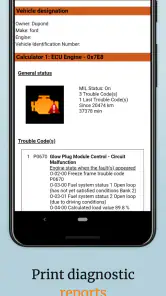
Diagnostic information can become personal in an ordinary way: a saved report may reveal when a fault appeared, while a screenshot or file shared with someone else can carry details I did not mean to pass along. Before sending a report to a garage or posting it in a forum, I would check what is visible and share only what helps explain the problem. Keeping a clear note of which scan belongs to which vehicle is useful too, especially if I help more than one driver; it reduces the risk of acting on the wrong car’s history.
Who benefits, and where another option makes sense
This is a good fit for a driver who wants more information than a dashboard warning provides, especially someone comfortable learning what a code can—and cannot—tell them. Compared with a basic handheld code reader, a phone app can make it easier to view explanations and keep a record of readings in one place. A workshop-grade diagnostic tool is still the better choice when a fault needs deeper testing, or when the vehicle requires functions beyond ordinary OBD2 checks. If you only want a quick yes-or-no check and do not want to buy or pair an adapter, a simple reader or a garage visit may be less hassle.
There are a few trade-offs to keep in mind. OBD2 coverage and the information available can vary by vehicle, and an inexpensive or unreliable ELM327 interface can make connection frustrating. Live figures are most useful when you know what you are looking at; a number changing on screen is not automatically a diagnosis. I’d use the app to prepare better questions for a mechanic, not to attempt a repair that involves safety-critical systems or unfamiliar work.
It is also worth being clear about what kind of driver will get the most from it. If you enjoy learning what a code refers to, want to compare a reading with how the car feels, and are comfortable keeping notes, the app can make routine ownership less mysterious. If you want a tool that tells you with certainty which part to replace, or you are not interested in pairing a phone with a separate adapter, it is a poor match. A nearby garage is the better choice when you need a confirmed diagnosis rather than an informed first look.
For a used-car buyer, I would treat a scan as one small part of a broader inspection, not as proof that a vehicle is trouble-free. A code reader can help surface something worth asking about, but clearing codes before a sale or relying on a clean screen would not reassure me on its own. The app is more useful when the seller is willing to discuss a fault openly and a qualified person can check anything consequential.
One everyday workflow I find sensible is to scan only when there is a clear reason, save or note the result, and then compare it with the symptoms over the next drive. That avoids turning every changing live value into a worry. If a reading seems unusual, I would first confirm the connection and vehicle context, then look at the code explanation as guidance. The difference between observing a pattern and declaring a part defective is exactly where a phone-based scanner needs a cautious user.
A measured recommendation
Overall, the EOBD Facile: OBD 2 Car Scanner app is a solid choice for anyone looking to take control of their car’s health. Whether you’re a DIY mechanic or just someone who wants to avoid unnecessary trips to the garage, this app has got your back. It’s user-friendly, packed with features, and gives you the confidence to tackle car issues head-on.
It has more than 5 million installs, and its May 8, 2012 release gives it a long history as a car-diagnostics app. I’d still approach it with sensible caution: diagnostic explanations are useful guidance, not a guarantee that a suggested cause is correct. The app is free, while optional in-app purchases range from $21.99 to $43.99 per item, so I would check what an offered purchase includes before paying. If you’re happy to use an adapter and interpret results carefully, it can be a practical companion; if you expect a phone to identify and fix every fault on its own, it is not the right tool.
The purchase decision is easier if I separate the app from the full setup. Installing it costs nothing, but using it with a car depends on having a compatible ELM327 interface, and paid items are optional rather than something I would buy blindly. I would start with the free experience, confirm that my phone and adapter communicate with the car, and only consider a purchase if its described benefit matches a real need. That keeps the cost decision grounded in my own use instead of an assumption that every driver needs the same extras.
If you’re in the market for an OBD 2 scanner app, give this one a shot. It’s like having a trusty sidekick for your car, always ready to help you out. Happy driving!
EOBD Facile: OBD 2 Car Scanner Frequently Asked Questions
Can EOBD Facile help me understand a warning light before I visit a garage?
Yes. When paired with a compatible OBD2 adapter, EOBD Facile can read diagnostic trouble codes and vehicle information that may help you understand what is behind a warning light. A code is a starting point, not a complete diagnosis: the underlying cause can require further checks. If a warning concerns safe driving or the car is behaving unusually, have it assessed by a qualified mechanic.
What adapter connection does EOBD Facile use, and what should I check before buying one?
The app connects to the vehicle through an OBD2 adapter, with Bluetooth and Wi-Fi adapters used for this purpose. Before choosing one, check that it works with your phone and vehicle and is suitable for the app. The adapter is separate from the app, so its cost and compatibility are worth considering before downloading or purchasing equipment.
Is EOBD Facile: OBD 2 Car Scanner suitable for someone with no mechanic experience?
The app is intended to help car owners read diagnostic information, so it can be useful even if you are not a mechanic. It can make trouble codes and vehicle data easier to inspect, but interpreting a code and deciding what repair is needed are different tasks. Treat its readings as helpful information rather than a substitute for a qualified mechanic when a problem is unclear or safety-related.
What is EOBD Facile: OBD 2 Car Scanner used for?
EOBD Facile: OBD 2 Car Scanner is a mobile application designed to help car owners diagnose their vehicles' health. By connecting to the car's OBD2 port, the app reads diagnostic trouble codes and provides insights into engine malfunctions, emission levels, and other critical data. It is a valuable tool for understanding what's happening under the hood without needing professional mechanical assistance.
Is EOBD Facile compatible with all vehicles?
While EOBD Facile is compatible with a wide range of vehicles, it primarily supports cars manufactured after 1996 that comply with OBD2 standards. However, compatibility can vary based on the car's make, model, and the specific OBD2 protocol it uses. Users should verify the app's compatibility with their specific vehicle by consulting the app's official documentation or website.
Pros
- User-friendly interface for quick diagnostics
- Supports a wide range of car brands
- Real-time data tracking and analysis
- Compatible with most OBD2 interfaces
- Regular updates for new features
Cons
- Limited free features; premium required
- Occasional connectivity issues
- Interface may feel cluttered at times
- Some data requires technical knowledge
- Ads can be intrusive in free version
- Category
- Auto & Vehicles
- Version
- 3.81.1131