WeMuslim: Muslim, Prayer&Qibla
- 26.00
- 4.2
- Installs
- 5.00M
- Price
- Free

Screenshots

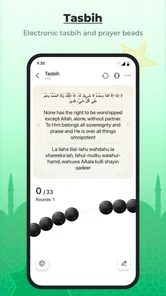
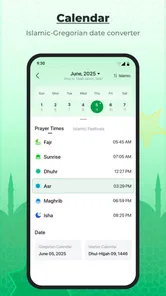
Analysis by Reviewed
When I choose a Muslim lifestyle app, I care less about how many tools appear on the home screen and more about whether the essentials are easy to reach at the right moment. WeMuslim: Muslim, Prayer&Qibla brings several familiar needs together: prayer times, the call to prayer, Qibla direction and Quran access. That makes it appealing if you want one place to check during an ordinary day, rather than opening separate apps for each task.
My view is that its strongest case is convenience, not a claim that every feature will suit every worshipper. Prayer-time methods, local settings and personal habits matter, so the useful question is whether an all-in-one layout matches your routine. If you mainly need one carefully tuned function, a focused alternative may feel simpler. If you regularly move between checking prayer times, finding direction and reading Quran, this app is a practical candidate.
One place for the daily essentials
I find that bringing prayer times, Qibla direction and Quran access together is most useful when I plan how I’ll use them before I’m rushed. A quick first check at home can help me learn the layout and notice which settings deserve attention. From there, the next question is whether that convenience outweighs the strengths of tools built around a single task.
Start with the decisions that affect your routine
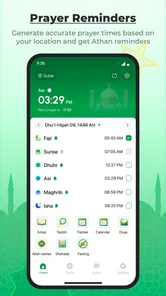
Before making WeMuslim your daily reference, check whether its prayer schedule aligns with the method and local conventions you follow. The app is built around Muslim daily practice, but a schedule is only helpful when you trust its settings. I would compare its displayed times with a source you already rely on before depending on notifications or planning a commute around them.
Location is another practical consideration. Qibla guidance and local prayer times are most useful when the app has the information it needs to orient them correctly. If you prefer not to share location access, look at what can be set manually and decide whether that workflow is comfortable; don’t assume every feature will behave identically without it. That small setup check can prevent a frustrating first impression.
It also helps to decide whether you want an all-in-one companion or a specialist tool. Bringing prayer times, Athan, Qibla and Quran together can reduce app switching, but it can also mean navigating a broader interface when all you want is one quick answer. I’d judge the home screen by how quickly you can reach your most-used item, not by the total number of things it contains.
Where the combined approach earns its place
The clearest strength is the way the app’s purpose maps to real moments. You might check the next prayer while getting ready, confirm direction before praying somewhere unfamiliar, then return later to Quran reading. Keeping those tasks in one app can make a routine feel more continuous, especially for someone who does not already have a preferred app for each one.
More From Our News Desk

Weather by Xiaomi Review: Clear at a Glance, Less Clear Up Close

X Under Pressure: Can It Recover When Posting Goes Wrong?

Clash of Clans Is Won Between the Battles

Android Auto Makes the Case for Quieter Car Software

MobiOffice: Transforming Mobile Productivity with Seamless Integration

EA SPORTS FC™ Mobile Soccer: Redefining Mobile Sports Gaming
A useful, less obvious habit is to test the whole chain before you need it: set your location and prayer preferences, check the times, then try the Qibla tool in a place where you can verify your orientation. Doing this at home is more sensible than troubleshooting in a station, office or hotel room. It also helps you distinguish a setup issue from a problem with the compass environment around you.
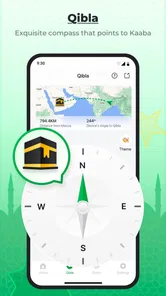
For travel, I would treat the app as a convenient reference rather than a substitute for judgment. Buildings, nearby metal objects and the way a phone is held can affect compass readings, so move to a clearer spot and recheck if the direction seems inconsistent. That is a general limitation of phone-based Qibla tools, not a reason to dismiss this one; it is simply worth knowing before you rely on a single reading.
The same idea applies to prayer times. If you are travelling between areas or crossing time zones, take a moment to verify that the app is reflecting your current location and chosen settings. A saved routine that works well at home may need attention after a trip. I find that brief check more useful than assuming any prayer app will automatically match every local practice in every circumstance.
A realistic day with WeMuslim
Imagine leaving home for work and wanting to know when to plan a break. You open the app to check the schedule, then use the Qibla feature later when you are in an unfamiliar building. In the evening, you return to the Quran section instead of switching to a separate reading app. That is the practical promise here: fewer context changes, with the main tools gathered around a familiar daily rhythm.
To make that workflow genuinely smooth, I would put the most important settings first. Confirm the location and prayer-time preferences before building a habit around alerts. Then spend a little time finding the Quran entry point and Qibla control, so you are not searching through screens when you are in a hurry. A short setup session can matter more than repeatedly adjusting the app during the day.
There is a trade-off: a combined app makes it easier to keep related tasks together, but a crowded or unfamiliar interface can add friction. If you only use the prayer schedule, the extra sections may not add much value. If you use several parts, the convenience is more compelling. I would give the app a fair trial based on the tasks you actually perform, rather than expecting every feature to become part of your routine.
How it compares with focused alternatives
Compared with a dedicated prayer-time app, WeMuslim’s appeal is breadth: prayer times sit alongside Athan, Qibla and Quran access. A specialist schedule app may be preferable if you want a narrow, familiar view with minimal distraction, particularly when you already have a separate Quran reader you like. I would not switch solely because one app has more sections; the best choice is the one whose settings and daily flow you trust.
Against a standalone Qibla finder, the advantage is convenience when you already use WeMuslim for other reasons. A one-purpose compass tool can make sense if direction is your only need or you want to keep it separate from your reading and prayer routine. In either case, phone compass readings deserve a quick sanity check in a new place. The app can guide you, but your surroundings and setup still matter.
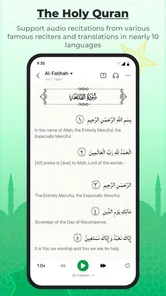
For Quran reading, the right comparison depends on how you read. Someone who wants a dedicated reading environment may prefer an app built around that activity, while WeMuslim may suit a person who values having Quran access close to prayer and direction tools. I would try the reading experience with the passages and routine I use most, rather than assuming that inclusion alone makes it the ideal reader.
What switching really involves
Moving from several apps to one sounds simple, but the practical cost is rebuilding confidence in settings and habits. You may need to confirm location, select the prayer preferences that fit you and learn where each tool lives. If your current apps already give reliable times and a reading experience you enjoy, switching all at once could create more work than benefit.
A gentler approach is to keep your existing reference for a short comparison period. Check WeMuslim’s prayer schedule against it, test Qibla in a familiar place and try Quran access during your normal reading time. Once the routine feels dependable, decide whether the convenience of consolidation outweighs the comfort of your current setup. This is especially helpful if prayer-time precision is important to how you plan the day.
On the other hand, if you are starting fresh, there is less to migrate. You can learn one interface from the beginning and see whether it covers your actual needs. I would still avoid enabling every alert before understanding the settings; choose only reminders that help your routine, then adjust after using the app for a while. That keeps a useful tool from becoming another source of unnecessary interruptions.
Who should choose it—and who should pass
WeMuslim is a sensible option for people who want prayer times, Athan, Qibla and Quran access gathered in a Muslim lifestyle app. It is particularly worth considering if you often move between those tasks and prefer a single starting point. The app is free, and its Everyone age classification makes it broadly accessible as a general lifestyle tool, though families should still decide what suits their own use.
Its developer is Metaverse Technology FZ-LLC. The app has an average rating of 4.2 from around 20,000 ratings, with more than 5 million installs; that suggests it has reached a sizeable audience, but popularity cannot tell you whether its prayer settings match your personal practice. It was released on May 30, 2025, and version 1.4.1 is the current version. It requires Android 6.0 or later, so check device compatibility before planning a switch.
I would skip it if you need only a bare prayer timetable and already have a dependable one, or if you strongly prefer a dedicated Quran reader or Qibla tool. It may also be a poor fit if you are unwilling to review location and prayer settings before relying on the results. Those are not flaws unique to WeMuslim; they are reasons to choose a narrower tool or keep the app you already trust.
For someone who wants several everyday Muslim tools in one place, though, I think it is worth trying. Set it up carefully, verify the schedule against your usual reference, and test Qibla somewhere familiar before depending on it while travelling. If that first week reduces app-hopping without making your routine harder, the all-in-one approach is doing its job. WeMuslim is best viewed as a convenient daily companion, not an automatic replacement for every specialist app or personal practice.
A few practical checks before settling in
If you are deciding whether to install it, I would begin with one question: what do you reach for most often during a normal week? Someone who checks prayer times, needs Qibla direction occasionally and reads Quran may get meaningful value from having the tools together. Someone who only checks a timetable once a day may find that a dedicated, familiar option is faster. The best test is not whether the app can cover several needs, but whether those needs actually overlap in your life.
For a new user, a useful first-day routine is to verify the schedule at a time when you can compare it calmly, then close and reopen the app later to see whether the information is still easy to locate. Try the Qibla feature away from obvious interference, and repeat the check in another suitable spot if you are unsure. This turns setup into a small practical rehearsal instead of leaving the first real test until you are already under time pressure.
One trade-off worth considering is how much you value a unified starting point versus a highly specialized experience. A single app can lower the mental overhead of remembering which tool handles which task. But if you have built a trusted Quran-reading habit elsewhere, moving it simply for the sake of consolidation may interrupt a routine that already works. I would keep the parts that serve you and switch only when the combined workflow feels genuinely easier.
When a different routine is the better fit
There are situations where I would not make this the only reference. If your community follows a particular prayer-time convention, confirm that the displayed schedule agrees with it before planning around it. If you are in a place where phone sensors are unreliable, do not treat a single Qibla reading as definitive. And if you need a reading environment tailored to a specific study habit, compare that experience directly with a dedicated Quran app before moving your routine.
These checks are not reasons to avoid the app; they are ways to use it with sensible expectations. Prayer times and direction are personal, practical matters, so a tool earns trust through repeated agreement with the references and habits you already rely on. Once that confidence is there, having the other essentials nearby can be a real convenience rather than just a longer feature list.
My recommendation
I would recommend giving WeMuslim a try if you want a single Muslim lifestyle app for several recurring tasks and are willing to spend a little time checking its settings. Its strongest fit is someone who values convenience across prayer schedule, Athan, Qibla and Quran access, not someone searching for the most specialized experience in only one of those areas. Since it is free, testing it alongside a trusted reference is a low-commitment way to decide whether it suits your routine.
After that trial, make the decision based on your own use: are the times dependable for your practice, can you orient yourself without confusion, and does Quran access feel natural enough to return to? If the answer is yes, it can simplify the small transitions that make up a day. If you find yourself opening another app for nearly everything, there is no need to force the all-in-one approach. A good daily tool should make worship-related routines easier to manage, not create another task to maintain.
WeMuslim: Muslim, Prayer&Qibla Frequently Asked Questions
What is WeMuslim: Muslim, Prayer&Qibla?
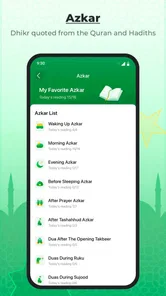
WeMuslim is an Islamic lifestyle app designed to bring several useful tools together in one place. Depending on the features available in your region and app version, it may provide prayer-time schedules, Qibla direction, Quran reading and listening, and other faith-related resources. It is intended as a convenient companion for everyday use; users should review the app’s current feature list and permissions before downloading.
How accurate are WeMuslim’s prayer times and Qibla direction?
Prayer times are calculated using settings such as your location, time zone, calculation method, and juristic preference, so results can differ from a local mosque’s timetable. Check that location access and calculation options are configured correctly, and compare the schedule with a trusted local source when precision matters. Qibla guidance also depends on location and device sensors, which may need calibration and can be affected by nearby metal or electronics.
Does WeMuslim work without an internet connection?
Some features may remain usable offline after relevant content has been downloaded or cached, while others—such as location lookup, fresh updates, streaming audio, or online services—may require an internet connection. Offline availability can vary by feature and app version. If you expect to use WeMuslim while travelling or without reliable data, open the app beforehand and check which resources are available offline.
Does WeMuslim cost money, and are there ads or in-app purchases?
The app’s price, advertising, and optional purchases can differ by platform, country, and version. Check its current Google Play or App Store listing for details before installing, and review any subscription terms carefully if they are offered. A free download does not necessarily mean every feature is free, so confirm the cost and renewal conditions of any paid option before completing a purchase.
What permissions does WeMuslim request, and is my personal information protected?
Permissions may be requested for functions such as determining your location for prayer times and Qibla guidance, or sending notifications for prayer reminders. The exact requests depend on the version and your device settings. Before granting access, review the permission prompts and the developer’s privacy policy on the relevant store listing. You can usually manage or revoke permissions later in your phone’s settings, though some features may then be limited.
Pros
- Prayer times can be adjusted to match your calculation method and location.
- Qibla compass helps you find the direction of Mecca while traveling.
- Includes Quran text and audio recitations for convenient daily reading.
- Prayer reminders can help you keep track of upcoming salah times.
- Available in multiple languages
- making it accessible to a broad audience.
Cons
- Accurate prayer times and Qibla direction depend on location access and device sensors.
- Some features or content may require a paid subscription.
- Prayer time calculations may differ from those used by your local mosque.
- Audio downloads can use considerable storage and mobile data.
- Ads or upgrade prompts may interrupt use of some free features.












