Weedmaps: Buy Local Weed
- 37.15K
- 4.7
- Installs
- 5.00M
- Price
- Free

Screenshots
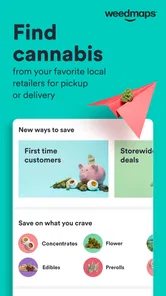
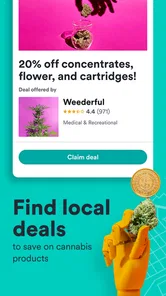
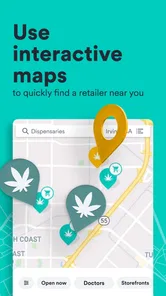
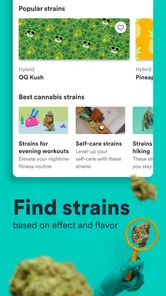
Analysis by Reviewed
I use Weedmaps: Buy Local Weed as a practical starting point when I want to understand what cannabis options are available nearby without opening several dispensary websites one after another. It is a free lifestyle app from Weedmaps, aimed at adults who want to browse dispensaries, compare products, look for deals, explore brands, and arrange delivery where that service is available. My overall impression is that it works best as a discovery and planning tool rather than as a replacement for knowing the rules, stock policies, or service area of a particular retailer.
The app has been around since Apr 18, 2010, and its current version is 9.80.0. It runs on Android 7.0 or later, carries a Mature 17+ rating, and has built a large audience: more than 5 million installs, with a 4.7 average from roughly 97 thousand ratings and around 37 thousand written reviews. Those figures suggest that it has become a familiar destination for cannabis shoppers, but they do not remove the need to check each order carefully. Cannabis availability, delivery, and purchasing rules can vary considerably by location.
How I use Weedmaps from the first search to the final decision
I find the first search works best when I decide what matters before opening the menu: distance, a particular product type, or whether I want delivery or pickup. That keeps a broad local directory from turning into aimless scrolling, and it gives me a clear basis for comparing retailers. Once I have a few plausible options, I move on to checking the details that can affect the final choice.
Starting with location instead of browsing blindly
The most useful first step is setting the location accurately. I prefer to begin with the area where I actually plan to shop, then browse the nearby dispensaries rather than scrolling through a broad list. This makes the app more relevant immediately: the available stores, menus, delivery choices, and local deals are tied to the place I am considering.
That matters because a menu can look impressive while being inconvenient in practice. A store across town may have a product I want, but a nearby retailer with a smaller menu could be the better choice if I need a quick pickup. I treat the map and search results as a way to narrow the field, not as a guarantee that every displayed item is still in stock.
From there, I usually compare dispensary pages before opening individual product listings. I look at the store’s location, ordering method, visible menu, and the general shape of its offers. This is a more reliable workflow than choosing the first result, especially when several retailers serve the same neighborhood.
Reading menus with a little skepticism
Product browsing is where the app feels most useful for everyday planning. I can move from a category or search term to individual listings and compare options without switching between unrelated retail pages. I pay attention to the product name, format, brand, and available details, then check the selected dispensary before treating the item as a realistic purchase.
More From Our News Desk

Weather by Xiaomi Review: Clear at a Glance, Less Clear Up Close

X Under Pressure: Can It Recover When Posting Goes Wrong?

Clash of Clans Is Won Between the Battles

Android Auto Makes the Case for Quieter Car Software

MobiOffice: Transforming Mobile Productivity with Seamless Integration

EA SPORTS FC™ Mobile Soccer: Redefining Mobile Sports Gaming
My habit is to make a short list rather than fill a cart immediately. I note the products that appear suitable, then revisit the store page to see whether the same retailer has a better deal, a different size, or a more convenient ordering option. This avoids a common mistake: finding an attractive item through a general search and only later discovering that it belongs to a store I do not want to use.
I also avoid judging products from a single headline detail. A listing can help me discover something new, but I still consider the format, intended use, and information shown by the retailer. For someone new to cannabis, this slower approach is especially sensible. The app can organize choices, but it cannot replace personal medical advice or responsible decision-making.
Using delivery and pickup as separate plans
Weedmaps is helpful when I decide whether delivery or pickup makes more sense. I do not assume that every dispensary offers both. Instead, I check the individual retailer’s available ordering path and confirm the final details before committing. Delivery can be convenient when I am staying home, while pickup is often the simpler plan when I am already nearby and want more control over timing.
A realistic example is a busy evening when I want to place an order without calling several stores. I set my location, review nearby dispensaries, compare the visible menus, and identify a couple of suitable products. Before ordering, I check the store’s own instructions inside the listing and make sure the selected option is actually available for the service I want. That small pause prevents the app from becoming a source of false confidence.
Checking deals without letting the discount decide
Deals are one of the strongest reasons to open the app, but I use them as a comparison prompt rather than an automatic buying signal. A discount may apply to a particular brand, category, customer situation, or ordering method. I read the offer details and compare the final choice with similar products at nearby stores.
The practical trick is to calculate the value in context. A deal at a distant store may not be worthwhile once travel or delivery costs are considered. Likewise, buying an unwanted product just to qualify for an offer is not really saving money. I find the app most useful when it helps me notice possibilities I would otherwise miss, while I remain responsible for deciding whether the offer fits my needs.
Settings and account habits worth checking
I recommend reviewing the app’s location behavior and notification choices early. Location is central to the experience, so an incorrect area can make search results and menus less useful. If notifications become distracting, adjusting them is worthwhile; I prefer alerts that support an active shopping plan rather than a constant stream of reminders.
It is also worth checking the account and checkout details before the first urgent order. A calm setup is better than discovering at the last step that information needs updating or that a retailer requires a particular process. I keep my browsing organized around one location at a time, especially when traveling, because mixing neighborhoods can make comparisons confusing.
Privacy-conscious users should think about how much personal information they want to share with any location-based shopping service. I do not enable every convenience automatically. I use the minimum access needed for the task, then make decisions based on the retailer information shown in the app. That is not a criticism unique to Weedmaps; it is simply a sensible habit for any service that connects location, shopping, and delivery.
Shortcuts that make repeat visits faster
Experienced use is less about secret controls and more about repeating a clean routine. I start with the same location, compare a small number of dispensaries, filter my search by the product type I actually want, and inspect the store-specific menu before making a decision. This removes much of the wandering that can make cannabis shopping feel overwhelming.
When I already know a preferred retailer, I use broad discovery less often and go directly to that store’s page first. I then use search to check whether the desired product is present, instead of browsing every category. When I am exploring, I reverse the order: I search by product or brand, identify suitable retailers, and then compare the complete shopping experience.
Another useful pattern is separating research from ordering. I browse earlier, make a shortlist, and return later when I am ready to purchase. This gives me time to compare deals and formats without rushing. It also reduces impulse decisions caused by a colorful menu or a limited-time promotion.
I would not rely on screenshots or old notes as proof of current availability. Menus change, and a product that appeared earlier may no longer be orderable. My shortcut is to use saved mental preferences—nearby location, preferred format, acceptable brands—while still verifying the live listing when it matters.
Where the app saves the most time
The app is particularly strong for people who are new to a city or visiting an unfamiliar legal market. Instead of learning each retailer’s website separately, I can get a broad view of nearby options in one place. That makes it easier to understand which stores offer delivery, which have the products I am looking for, and which promotions deserve a closer look.
It is also useful for comparison shoppers who care about convenience as much as selection. A store with a large menu is not automatically the best store for me. I weigh distance, ordering method, product availability, and deal conditions together. Weedmaps brings those considerations into the same browsing session, which is more efficient than collecting separate browser tabs.
For regular customers, the benefit is consistency. I can return to familiar retailers, check their current menus, and look for changes without starting the search from zero. The app does not eliminate every step, but it gives me a repeatable place to begin.
Limits that experienced users should understand
The biggest limitation is that the app is an intermediary layer over retailer information. A listing can be helpful and still require confirmation. Stock may change, a deal may have conditions, and delivery availability may depend on the specific address or ordering flow. I regard the app as a window into the market, not as an independent guarantee of what will happen at checkout.
Another limitation is choice overload. A large collection of dispensaries and products sounds ideal until I am faced with dozens of similar listings. Without a personal shortlist, browsing can become tiring rather than helpful. I solve that by deciding in advance what matters most: location, format, brand familiarity, delivery, or price.
The app is not the right choice for someone who wants a completely offline shopping experience, dislikes location-based browsing, or already has a trusted dispensary with a simple ordering system. In those cases, the retailer’s own app or website may be faster. A person seeking medical guidance should also use a qualified healthcare professional rather than treating product pages as personalized advice.
There is a practical responsibility around age and local law as well. The app is rated Mature 17+, but that rating should not be confused with permission to buy or consume cannabis. I would check the rules that apply to my location and follow the retailer’s requirements before placing an order. That is especially important when delivery is involved or when traveling between jurisdictions.
How it compares with ordinary alternatives
Compared with searching the web manually, Weedmaps gives cannabis shopping a more focused structure. A general search may find individual dispensaries, but it often requires visiting several pages to compare menus and offers. The app is better when I want a market-wide view and a quick way to identify nearby options.
Compared with a dispensary’s own ordering system, it may offer broader discovery but less direct certainty. A retailer’s own channel can be the better final checkpoint for store-specific policies, order instructions, or the most current checkout experience. My preferred approach is to use Weedmaps for discovery and comparison, then read the selected retailer’s details carefully before finishing.
Compared with asking friends for recommendations, the app gives me more immediate control over location and product browsing. Personal recommendations can be valuable, but they may not match my neighborhood, preferences, or current availability. Weedmaps is more practical when I need current options rather than a general opinion.
My final assessment for everyday users
After using it as a planning tool, I see Weedmaps as a strong fit for adults who want one organized place to explore dispensaries, brands, deals, pickup, and delivery. Its free price removes an obvious barrier, and the combination of local search and retailer menus makes it more useful than a simple directory. The app’s high average rating and broad adoption also reflect that it solves a real discovery problem for many shoppers.
My recommendation comes with one important condition: use it deliberately. Set the correct location, compare more than one retailer when practical, read deal terms, and confirm availability before relying on a listing. The best results come from treating the app as part of a repeatable shopping routine rather than pressing the first attractive button.
For a newcomer, I would begin slowly with one nearby dispensary and a short product list. For an experienced user, I would use location and search habits to reduce browsing time, then compare the final retailer details. If I already trusted a dispensary and wanted nothing beyond a quick reorder, I might choose that retailer’s direct channel instead.
My verdict is positive, with realistic expectations: Weedmaps is most valuable when I need to discover and compare local cannabis options, not when I expect every menu, promotion, or delivery detail to be effortless and final. Used with a little verification, it turns a scattered search into a manageable process and gives me enough flexibility to choose based on convenience, selection, and value.
Weedmaps: Buy Local Weed Frequently Asked Questions
Can I use Weedmaps just to browse without placing an order?
Yes. Weedmaps can be useful as a discovery tool even if you are not ready to buy anything. You can look through cannabis businesses, menus, product details, customer reviews, and location information in supported areas. Browsing does not mean you are committing to a purchase; any order or transaction remains subject to the retailer’s process and local rules.
What should I consider before sharing my location with Weedmaps?
Location information helps Weedmaps show nearby dispensaries, delivery services, and other listings, making local discovery more useful. If you prefer not to share your location, you can still explore by entering an area manually where that option is available. Consider your privacy preferences before enabling location access, and review your device’s app-permission settings if you want to change access later.
Is Weedmaps free to download, and what devices can run it?
Weedmaps is a free Lifestyle app for people who want to explore cannabis businesses and products in supported locations. It requires Android 7.0 or later, so check your device’s operating system before downloading. The app is intended for a mature audience, with a 17+ content rating. Local laws and eligibility requirements still apply when browsing or ordering.
Is Weedmaps suitable for someone who has never used a cannabis marketplace app?
The app is designed to help users discover dispensaries, delivery services, products, and related businesses, so it can be useful even if you are new to browsing cannabis listings. You can explore menus and business information to get familiar with what is available nearby. Keep in mind that cannabis laws and purchase requirements vary by location, and users should follow local rules.
What is Weedmaps: Buy Local Weed used for?
Weedmaps is a marketplace and discovery app for finding licensed cannabis dispensaries, delivery services, products, doctors, and related businesses in supported locations. After entering your area, you can browse menus, compare prices, read product information and customer reviews, check store hours, and view ordering or delivery options. Availability depends on local laws and the businesses listed in your region.
Pros
- Detailed menus make it easy to compare products
- prices
- and availability.
- Pickup and delivery options are clearly shown for participating retailers.
- User reviews and ratings can help identify reputable local dispensaries.
- Deals and special offers may reduce the cost of eligible purchases.
- Store profiles usually include hours
- location
- and contact information.
Cons
- Availability and features vary considerably by state and local regulations.
- Some listings may become outdated when inventory changes quickly.
- Delivery often requires extra fees
- minimum orders
- or limited service areas.
- Product quality and accuracy depend on information provided by retailers.
- Age verification and location permissions may feel intrusive to some users.











