WAFF 48 First Alert Weather
- 1.79K
- 4.6
- Installs
- 100.00K
- Price
- Free
Screenshots
Analysis by Reviewed
I use weather apps for very ordinary decisions: whether I can walk to the shop, when to leave for work, and whether an outdoor plan needs a backup. WAFF 48 First Alert Weather is built for that kind of quick local check. Developed by Gray Media, it is a free weather app connected to WAFF 48, with a focused purpose rather than a broad collection of unrelated tools. In my experience, that focus makes it most useful when I want weather information tied to the WAFF 48 viewing area instead of a general forecast service.
The app sits in the weather category and is suitable for Everyone. Its long presence on mobile devices also shows in its established user base: it has more than 100 thousand installs, a 4.6 average from around 7 thousand ratings, and roughly 1.8 thousand written reviews. Those figures do not replace personal testing, but they do suggest that the app has become a familiar option for people who want weather information from this local news brand.
How the app handles readability and navigation
The first thing I value in a weather app is not visual decoration. I want to open it, understand the current situation, and find the forecast without hunting through several layers. WAFF 48 First Alert Weather is appealing because its identity is clear from the start: it is a dedicated weather companion, not a news app where forecasts are hidden among headlines, videos, and alerts.
That narrow purpose can make the experience easier for people who prefer a straightforward routine. A user who checks the weather at the same times every day can build a simple habit around it: open the app, review the current conditions, scan the upcoming forecast, and decide what to wear or whether to change plans. I find that less mentally demanding than moving through a crowded app with many competing sections.
Readability matters especially when I am checking a screen in a hurry. Weather information usually contains several layers at once, including current conditions, future changes, and potentially serious weather developments. The practical advantage of a local weather app is that these pieces are presented within one recognizable weather context. Instead of combining a national forecast with a separate local news source, I can use WAFF 48’s weather offering as the starting point for a regional check.
Still, people read weather information in different ways. Some prefer a compact summary, while others need a visual forecast, a longer outlook, or more explanation before they feel confident. A screen that feels clean to one person may feel too dense to another when several forecast elements appear together. I recommend taking a little time on the first use to identify the parts you personally rely on most, rather than trying to interpret every item during a time-sensitive situation.
A useful habit is to distinguish between a quick glance and a proper weather check. For a quick glance, I look for the immediate conditions and the broad direction of the day. Before driving a long distance, planning outdoor work, or sending children outside for an extended period, I would spend longer reviewing the forecast and any available local weather information. No weather app should be treated as a single glance that answers every question.
More From Our News Desk

Clash of Clans Is Won Between the Battles

Android Auto Makes the Case for Quieter Car Software

MobiOffice: Transforming Mobile Productivity with Seamless Integration

EA SPORTS FC™ Mobile Soccer: Redefining Mobile Sports Gaming

How Microsoft OneDrive Became a Mobile Productivity Giant

How Google Translate Breaks Language Barriers Effortlessly
The app’s current version is 6.2.512, and it runs on devices using Android 9 or later. That makes the operating-system requirement fairly approachable for people who do not replace their phone frequently, although anyone using an older device should check compatibility before planning around it. The free price also removes a financial barrier for users who simply need a local weather tool rather than a subscription service.
Making a repeatable checking routine
One of the less obvious strengths of a focused weather app is consistency. If I use the same app before leaving home, during a lunch break, and before an evening activity, I become familiar with where the important information appears. That familiarity can help users who find changing layouts or unfamiliar terminology tiring. It is also helpful for family members who may not want to learn several different weather services.
For someone with limited attention or a busy schedule, I would suggest deciding in advance what information matters. For example, a morning check might focus on temperature changes and rain during the commute, while an evening check might focus on the next day. This is not a special setting; it is a practical way to prevent information overload and make the app serve a real routine.
The local-news connection can also support trust and recognition. People who already know WAFF 48 may find the weather section easier to identify than an unfamiliar standalone service. On the other hand, users who want a highly customizable dashboard or a large collection of international weather tools may find this focused approach less flexible than a major global weather platform.
Motor and sensory considerations in everyday use
Weather apps are often used with one hand, while walking, carrying groceries, or preparing to leave the house. That makes large, clear interaction areas and predictable movement especially important. I found the best way to use this app is to pause briefly instead of trying to operate it while moving. A weather check takes only a moment, but rushing increases the chance of tapping the wrong forecast area or missing an important change.
Users with limited dexterity may prefer to use the app while the phone is resting on a table. That small adjustment reduces the need to grip the device tightly and makes scrolling more controlled. If a person relies on a stylus or an alternative input method, the most useful test is whether the main weather information can be reached without repeated, precise gestures. Because individual devices and input settings vary, I would test the app during a calm moment rather than during a storm or urgent trip.
For people with low vision, the key issue is not simply whether text exists on the screen. Weather information can become difficult when several values, labels, icons, and colors compete for attention. I recommend increasing the phone’s text size or display scaling where needed and checking whether the resulting layout remains comfortable to navigate. Larger system text can improve legibility, but it can also cause more scrolling, so the best setting is a compromise between readable type and a manageable amount of movement.
Color perception is another consideration. Weather interfaces commonly use visual differences to communicate conditions, but I would not rely on color alone when deciding whether travel is safe. Read the accompanying wording and look for the broader forecast context. This is good practice for anyone, and it is particularly important for users who do not distinguish certain colors easily or who are viewing the screen in bright sunlight.
People with hearing loss may prefer information that is available directly on screen rather than depending on audio from a broadcast-style experience. A weather app is naturally suited to visual checking, but users should still make sure that any important warning is understood from the displayed information and not assume that a sound or vibration will be noticed in every environment. Someone who is deaf or hard of hearing may want to pair the app with another reliable visual alert method for serious weather situations.
For users who are sensitive to motion, flashing, or visual clutter, I would keep the checking process deliberate and brief. Avoiding unnecessary movement through the interface can make the experience calmer. The app is most comfortable when treated as a tool for targeted information rather than something to browse continuously.
Reading under difficult conditions
Many weather checks happen in poor conditions: outside in glare, inside a dim room, or while wearing gloves in cold weather. Bright sunlight can make contrast and small text harder to interpret, while gloves can make precise taps unreliable. I find it safer to check the forecast before stepping outside and then use the phone only for a quick confirmation when necessary.
Someone with cognitive or learning difficulties may benefit from a fixed sequence. I would start with the immediate conditions, then look at the next part of the day, and finally check for any urgent local weather message. Using the same order each time reduces the need to decide where to begin. It also makes it easier for a caregiver or family member to help without having to explain the whole app repeatedly.
For older adults, the free cost and local identity are meaningful advantages, but the first setup should not be rushed. I would sit with the person, adjust the phone’s text and contrast preferences, and practice opening the app before bad weather arrives. A familiar routine is more valuable than a complicated collection of options when the user is stressed.
Situational access for travel, work, and safety
A realistic example is a morning appointment across town. I open the app before leaving, check the conditions for the start of the trip, and then look at how the weather is expected to change during the time I will be away. If rain is likely later, I can decide whether to carry protection or arrange a different ride. For a wheelchair user, a person with balance difficulties, or anyone who finds wet surfaces hazardous, that extra planning time can affect the entire journey.
For outdoor workers, the app can support planning around heat, rain, and changing conditions. I would use it before a shift to decide what equipment or clothing may be needed, then check again during a break rather than constantly monitoring the phone. The limitation is that a general forecast cannot understand the exact conditions at one worksite, such as shade, wind exposure, drainage, or indoor heat. It should inform a plan, not replace workplace safety procedures.
Parents and caregivers can use a local weather app as a shared decision tool. Before a school run or playground visit, I would check the forecast and explain the decision in simple terms: whether the child needs an extra layer, whether outdoor time should be shorter, or whether the plan needs to move indoors. This can be useful for children with sensory sensitivities, since clothing and sudden weather changes may affect them more strongly than adults.
For people who travel between areas, the app may be less convenient than a service designed around many saved locations. Its local-news identity is a benefit when the WAFF 48 area is the place that matters most, but it is not automatically the best single tool for someone moving between regions every day. In that situation, I would keep this app for local awareness and use a broader weather service for destination planning.
During severe weather, accessibility becomes a safety issue. A person with limited mobility may need more time to move indoors, arrange transportation, or contact a support network. Checking local weather information earlier can create that time. I would not wait until conditions are already dangerous to open the app, and I would not depend on one phone application alone for emergency decisions. Keep the device charged, know where safer shelter is, and use official emergency guidance when a serious event develops.
People with limited data confidence may also appreciate the app’s recognizable local purpose. A familiar news brand can make the weather screen feel less intimidating than a technical service packed with specialized charts. At the same time, users who need detailed atmospheric information, aviation-style observations, or extensive historical analysis may find the app too approachable rather than sufficiently deep.
Choosing it over the usual alternatives
The usual alternatives fall into two groups: the weather widget already installed on a phone and large national weather services. A built-in widget wins for speed because it can show a brief update without opening a full app. It is useful when I only need a quick temperature check. WAFF 48 First Alert Weather is more attractive when I want a local-news weather experience and enough context to make a practical decision.
Large national services often provide broad location coverage and more personalization. They may be better for frequent travelers, people who compare many places, or users who want extensive technical detail. The trade-off is that a larger service can feel busier and less connected to the local perspective that makes a regional news weather app useful.
I would choose WAFF 48 First Alert Weather for a person who lives in the WAFF 48 viewing area, values a recognizable local source, and wants a free weather app without needing a complex forecasting workspace. I would look elsewhere for someone who needs a highly specialized interface, many international locations, or a workflow built around detailed weather data rather than everyday decisions.
Remaining barriers and practical workarounds
The biggest accessibility barrier is not necessarily a single missing control. It is the possibility that weather information becomes difficult to interpret when the user is tired, hurried, visually distracted, or already dealing with a stressful situation. A person with low vision may need larger system text; a person with limited dexterity may need a stable surface; and a person with cognitive fatigue may need a fixed checking order. The app can be part of an accessible routine, but the phone’s own settings and the surrounding situation matter just as much.
Another limitation is the tension between simplicity and depth. A focused local weather app can be easier to understand than a feature-heavy alternative, but users who need extensive customization may feel constrained. I would not recommend switching to it solely because it is free if the person depends on specialized alerts, multiple travel locations, or a very particular visual layout. The right choice depends on whether local clarity matters more than breadth.
There is also a human barrier: some users may assume that a familiar local weather brand removes the need for personal preparation. It does not. Forecasts change, conditions vary by neighborhood, and accessibility needs can make a small weather change much more significant. Someone who is vulnerable to heat, cold, flooding, or slippery paths should build extra time into plans and confirm important decisions through appropriate local guidance.
For shared use, I suggest setting up a simple agreement with family or caregivers. Decide who checks the forecast, what information needs to be communicated, and how the person will be contacted if plans change. This is especially useful for older adults or people who cannot easily read a screen outdoors. The app then becomes one part of a dependable communication routine instead of the only source of support.
Device age can be a practical concern as well. The minimum operating system is Android 9, so owners of older phones should verify that their device can run the current release. If the app cannot be installed on a particular phone, a browser-based weather option or the phone’s existing weather tool may be more realistic. That is not a criticism of the app’s purpose; it is simply an important compatibility check before relying on it.
An inclusive verdict for local weather users
After using WAFF 48 First Alert Weather as a local forecast companion, I see its main value in its focused identity. It is free, made by Gray Media, rated 4.6 on average, and designed for ordinary weather decisions rather than technical forecasting work. Its Everyone age rating also makes it suitable as a household tool, provided that adults help younger or more vulnerable users understand serious weather information.
The strongest accessibility benefit is the chance to build a simple, familiar weather routine around a local source. That can help people who prefer clear purpose over a crowded interface, caregivers who need a shared reference point, and users who want to make practical plans before leaving home. The app is especially sensible for local residents who already recognize WAFF 48 and want weather information close to that community context.
My recommendation is more cautious for people who need advanced customization, extensive travel coverage, or highly specialized weather detail. I would also avoid treating it as a substitute for emergency communication, personal safety planning, or professional guidance during dangerous conditions. Accessibility is strongest when the app is combined with suitable phone settings, a comfortable checking environment, and enough time to act.
Overall, I would recommend it to a friend who wants a straightforward local weather app and does not need a technical dashboard. I would suggest adjusting text size, testing the interface in the situations where it will really be used, and creating a repeatable check before work, travel, or outdoor activities. For that audience, WAFF 48 First Alert Weather offers a practical balance of local focus, no purchase cost, and everyday usability, while its limits are clear enough to plan around.
WAFF 48 First Alert Weather Frequently Asked Questions
Is WAFF 48 First Alert Weather available for my device?
WAFF 48 First Alert Weather is available for compatible Android and iOS devices, and its current version is 6.2.512. Before downloading, check that your device meets the operating-system requirement shown for the app; the minimum OS is version 9. The app is intended for everyday weather checking, so it is worth confirming compatibility and allowing enough storage for an installation and future updates.
Who makes WAFF 48 First Alert Weather, and what is it designed for?
The app is developed by Gray Media and is a weather app built around WAFF 48’s local audience. Its purpose is to help people follow conditions and forecasts, particularly across the Tennessee Valley and surrounding areas. It can also be useful for visitors or people keeping an eye on weather in the region, with local information presented alongside tools for monitoring changing conditions.
What is WAFF 48 First Alert Weather?
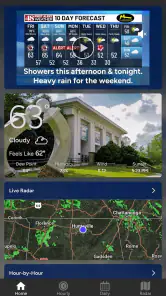
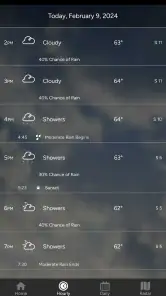
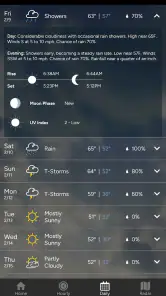
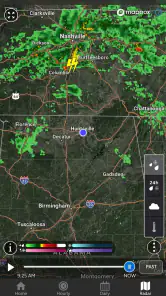
WAFF 48 First Alert Weather is a local weather app for viewers in the Tennessee Valley and surrounding areas. It provides current conditions, hourly and extended forecasts, radar imagery, severe-weather alerts, and updates from the WAFF 48 weather team. The app is designed to help users monitor changing conditions at home, during commutes, or while traveling through the region.
What weather information and features does the app provide?
The app typically includes current temperature, feels-like conditions, wind, humidity, visibility, precipitation chances, and forecasts for multiple days. Users can also view interactive radar maps, satellite imagery, severe-weather information, and video updates when available. Its local focus makes it especially useful for tracking storms, heavy rain, damaging winds, flooding risks, and other conditions affecting the WAFF 48 coverage area.
Does WAFF 48 First Alert Weather send severe-weather notifications?
Yes, the app is intended to provide weather alerts and notifications for important conditions, including severe thunderstorms, tornado threats, flash flooding, winter weather, and other hazardous events. Notification availability can depend on your location, device permissions, and the alert settings you select. After installation, review the app’s notification and location permissions so urgent warnings can reach you promptly.
Pros
- Clear hourly and 10-day forecasts for quick planning
- Live radar helps track rain and storms in your area
- Severe weather alerts can provide important advance warning
- Easy access to local news and weather updates
- Useful maps show temperature
- wind
- and precipitation details
Cons
- Some features may require location access to work properly
- Radar data can take time to refresh during severe weather
- Frequent alerts may feel excessive during active weather events
- Forecast accuracy depends on your selected coverage area
- Video and map content may use significant mobile data
- Category
- Weather
- Version
- 6.2.512













