KY3 Weather
- 3.41K
- 4.6
- Installs
- 500.00K
- Price
- Free

Screenshots
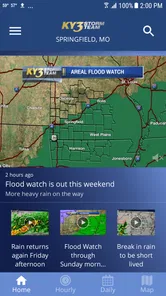
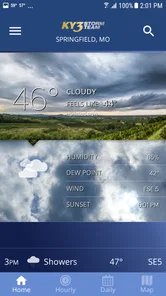
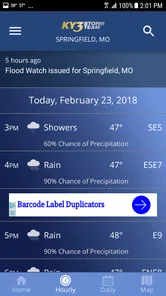
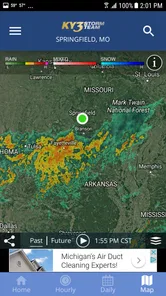
Analysis by Reviewed
I find a local weather app most useful when it helps me make a decision, not just glance at a temperature. For people in the Ozarks, KY3 Weather is built around regional conditions, so its appeal is less about having every possible weather tool and more about getting information tied to the area. I’d treat it as a practical companion for planning a commute, checking on a storm, or deciding whether an outdoor plan needs a backup.
Where a weather app can trip you up
The first hurdle is choosing a location and learning where the information you need sits. A forecast can be less useful if it is set to the wrong town, especially when weather changes across a region. I’d check that the displayed place matches where I am, then compare it with the destination if I’m travelling. That small habit matters more than repeatedly refreshing a screen that is already showing a different location.
Weather apps also present several kinds of information that answer different questions. A forecast helps with the general shape of the day; radar is more useful when I’m trying to judge whether rain is approaching. I wouldn’t read a radar image as a precise promise about what will happen at my front door. For a time-sensitive decision, I’d use it as one clue alongside the forecast and any alert that arrives.
Getting to Know KY3 Weather
So, what’s all the buzz about the KY3 Weather app? First off, it's tailored specifically for the Ozarks area, which means you get hyper-local forecasts that are spot on. No more guessing whether you'll need an umbrella or if it's safe to leave the house without a jacket. The app delivers real-time weather updates, and the best part? It’s incredibly user-friendly.
Setup checks for a useful first look
When I first open a local forecast app, I make a quick setup pass before relying on it: confirm the location, look over which notifications are enabled, and open the forecast and radar once so I know where to find them later. With this app, notification preferences are worth checking against your routine. If you only want interruptions for severe conditions, tune them for that purpose rather than letting every notification compete for attention.
The app is free, is rated for Everyone, and is published by Gray Media. It has a 4.6 average from around 12,000 ratings, with more than 3,000 written reviews, and over 500,000 installs. It first appeared on September 22, 2011; version 5.17.706 supports Android 9 and later. Those details make it easy to judge whether it suits your device and comfort level, but they don’t replace checking how it behaves on your own phone.
Features that Stand Out
One of the things I love about this app is its radar feature. You can literally track storms and see them approaching in real time. It gives you a heads-up like nothing else. Plus, the push notifications are super handy. They alert you about severe weather conditions, so you're never caught off guard. And yes, the alerts are customizable, which means you can tweak them according to your preferences.
More From Our News Desk

Weather by Xiaomi Review: Clear at a Glance, Less Clear Up Close

X Under Pressure: Can It Recover When Posting Goes Wrong?

Clash of Clans Is Won Between the Battles

Android Auto Makes the Case for Quieter Car Software

MobiOffice: Transforming Mobile Productivity with Seamless Integration

EA SPORTS FC™ Mobile Soccer: Redefining Mobile Sports Gaming
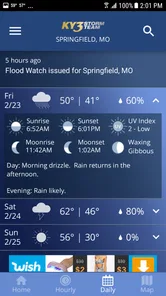
Another cool feature is the daily and weekly forecasts. The app gives you a detailed breakdown of what to expect, and it even includes a section for pollen levels and air quality. For those who suffer from allergies, this is a much-needed lifesaver.
A routine that makes the information actionable
For a realistic weekday use, I’d check the forecast before leaving home, then look at radar only if rain or storms could affect the trip. If I’m planning to spend time outdoors later, the daily outlook gives me a broader view, while the weekly forecast helps me decide which day is easier to rearrange around. Pollen and air quality information can also help someone with allergies think about when to plan a walk, rather than relying on temperature alone.
One useful trade-off is that a locally focused forecast can be more relevant to an Ozarks resident than a broad national weather app, while a general-purpose alternative may be handier for someone who regularly moves between many regions. If I were travelling, I’d check that the selected location follows the place I actually care about; I wouldn’t assume a home-area view tells me what is happening elsewhere. The local focus is a strength when the location fits, not a substitute for checking it.
Recovering when a check doesn’t help
If the screen seems stale or an alert doesn’t appear when expected, I’d avoid immediately treating that as proof the forecast is wrong. First, reopen the app and confirm the selected location; then check that the phone is connected and that the relevant notification setting is still enabled. If a problem persists, closing and reopening the app is a sensible basic step. I’d also keep an eye on the sky and use another trusted source for urgent decisions rather than depending on one phone display.
Sometimes the app isn’t the cause of the uncertainty. A storm can change direction, conditions can differ between nearby towns, and a forecast is guidance rather than a guarantee. For a severe-weather decision, I’d pay attention to alerts and follow local safety instructions instead of using a radar view to decide that it is safe to go outside. That’s a limitation of interpreting weather information, not a reason to expect any app to predict every change perfectly.
Why It’s Worth the Download
Now, I know what you're thinking: "Another weather app, really?" But hear me out. The KY3 Weather app isn't just any weather app. It’s developed by the trusted KY3 news team who know the area inside out. This means the data is not only accurate but also relevant to the local context. Plus, the interface is sleek, intuitive, and doesn’t overwhelm you with too much information.
And if you’re someone who likes to stay informed, the app also offers video updates straight from the KY3 weather team. It's like watching the news on TV, but on your phone. How cool is that?
The video updates are a nice option when a short explanation is more helpful than scanning conditions yourself. I’d use them when I want context about an unfolding local situation, then return to the forecast or radar for a quick practical check. Someone who wants nothing beyond a simple temperature on a home screen may find this broader mix unnecessary; someone who follows regional weather closely is more likely to value it.
Final Thoughts
In a world where weather can be unpredictable, having a reliable source of information is crucial. The KY3 Weather app offers just that and more. With its precise forecasts, real-time radar, and insightful video updates, it’s definitely an app that earns a spot on your home screen. So, next time you’re planning a day out or just want to know if you should carry that umbrella, you know which app to check.
All in all, the KY3 Weather app is a must-have for anyone living in the Ozarks. It’s more than just a weather app; it’s a tool that helps you plan your day with confidence. Give it a try, and I bet you’ll wonder how you ever lived without it!
Who I’d recommend it to
I’d recommend it first to people who live in or often plan around the Ozarks and want local forecasts, radar, alerts, and weather-team videos in one place. It can also suit allergy-sensitive users who want pollen and air-quality details in their daily planning. If you mainly need a bare-bones forecast, travel widely, or prefer a single view that covers many places without changing locations, a more general weather service may fit better.
My practical verdict is that this is most valuable when you use its local focus deliberately: verify the place, choose alert settings that matter to you, and use radar as context rather than certainty. That approach makes the app easier to trust without asking it to do more than a weather app can.
Making it work around a changing day
I’d also use the app differently depending on how fixed my plans are. If I’m leaving for work at a regular time, a quick forecast check is enough to decide whether to bring rain gear or allow extra time. If I’m arranging an outdoor event, I’d check the broader outlook earlier, then return closer to the event to see whether the local picture has changed. That second check is more useful than treating a forecast made much earlier as settled fact.
For a family outing, the combination of a daily forecast and radar can help answer separate questions: whether conditions look comfortable overall, and whether rain appears to be moving toward the area. I’d still keep a simple backup plan, such as an indoor option, because weather can shift and a map is not a guarantee. The practical benefit is having enough context to make a reasonable choice without assuming the app can remove uncertainty.
Choosing what deserves an interruption
Customizable alerts are helpful, but I wouldn’t enable every available notification simply because the option exists. Too many interruptions can train me to ignore the one that matters. I’d start with the alerts most relevant to my household and routine, then adjust if they prove too frequent or too quiet. This is especially useful if the phone is also used for work or school messages and weather notices need to remain noticeable.
If an alert is important, I’d treat it as a prompt to check the situation, not as a complete safety plan. Read the notice, confirm which location it concerns, and follow appropriate local guidance. A notification tied to the wrong place is easy to misread when travelling, so checking the displayed location is a small but worthwhile step before changing plans.
When another weather source is the better fit
Compared with a basic phone weather panel, KY3 Weather offers a more regional experience, especially for someone who wants radar, local updates, and video context in the same weather-focused app. The simpler option may be faster if all I need is a quick temperature glance, while a broad weather service can be more convenient for frequent trips across different areas. I see KY3 as a useful local reference rather than a universal replacement for every weather tool.
It may also not be the right choice for someone who rarely visits the Ozarks or who wants one consolidated view of many locations without manually checking which town is selected. In that case, a travel-oriented or multi-location service could better match the routine. For someone whose everyday decisions happen in the region, though, local relevance is a reasonable reason to choose a dedicated app over a generic glance-only forecast.
A calm troubleshooting sequence
If the app behaves unexpectedly, I’d work through the basics in order rather than changing several settings at once. Confirm the location first, check the phone’s connection, and then revisit the notification preferences if alerts are the issue. Closing and reopening the app is a straightforward next step. Changing one thing at a time makes it easier to tell whether the problem was a location mismatch, a connection hiccup, or a setting that no longer matches what I want.
For an urgent weather concern, I wouldn’t wait on an app to resolve a technical problem. I’d consult another trusted source and follow local emergency instructions while sorting out the phone display later. That distinction matters: an app can be useful in a routine, but no single screen should be the only basis for a high-stakes decision.
My overall recommendation is straightforward: if you’re in the Ozarks and want more than a bare temperature check, this is a sensible free weather app to try. I’d make the location and alert setup part of the first use, use its forecasts for planning, and reserve radar and video for the questions they answer best. If your needs are mostly global travel or the smallest possible glance at current conditions, another style of weather app may be a better match.
KY3 Weather Frequently Asked Questions
Who develops KY3 Weather, and what is it designed for?
KY3 Weather is a weather app developed by Gray Media, built around the KY3 Storm Team’s weather coverage. It is intended for people who want forecasts, radar information, and weather alerts in one mobile app. Its focus is practical: check conditions, follow changing weather, and receive updates that can help you plan your day.
What features does the KY3 Weather app offer?
The KY3 Weather app provides users with comprehensive meteorological data, including real-time radar updates, weather forecasts, and severe weather alerts. It also offers customizable notifications for different weather conditions and an interactive map that allows users to view current weather patterns. The app aims to keep users informed about weather changes with precise and up-to-date information.
Can I customize weather alerts in the KY3 Weather app?
Yes, the KY3 Weather app allows users to customize weather alerts according to their preferences. You can set up notifications for specific weather conditions like thunderstorms, tornado warnings, or snow forecasts. This feature ensures you get timely alerts about weather changes that matter most to you, enhancing your preparedness for any situation.
Is the KY3 Weather app free to use?
The KY3 Weather app is free to download and use. However, some features may require in-app purchases or subscriptions for enhanced functionalities. It is designed to provide essential weather information at no cost, but users can opt for premium services if they require more detailed data or additional features.
How accurate is the weather forecast on the KY3 Weather app?
The KY3 Weather app is known for its accuracy, utilizing advanced meteorological technology and data from reliable sources. It offers precise weather forecasts, including hourly updates and long-term predictions. While no weather app can guarantee 100% accuracy, KY3 Weather is highly regarded for its reliable and timely information, helping users plan their activities accordingly.
Pros
- Accurate and up-to-date weather forecasts.
- User-friendly interface with easy navigation.
- Customizable weather alerts.
- Detailed radar and satellite imagery.
- Covers local and national weather news.
Cons
- Contains ads that can be intrusive.
- Requires internet for full functionality.
- Limited features in free version.
- Occasional app crashes and bugs.
- Location accuracy can vary.













