Voloco: Auto Vocal Tune Studio
- 20.46K
- 4.6
- Installs
- 10.00M
- Price
- Free

Screenshots
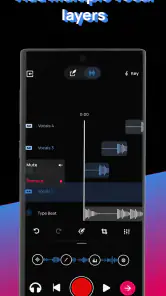
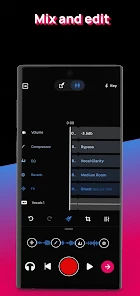
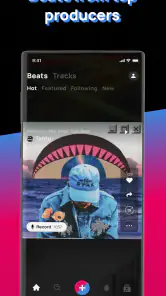
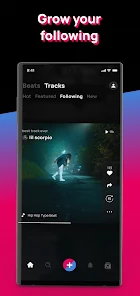
Analysis by Reviewed
I’d put Voloco in the “make an idea audible right now” corner of music apps. Its defining trick is automatic vocal tuning: you record a voice, choose a vocal treatment, and hear the performance shaped around the music. That immediacy is useful when I want to test a melody or mood without first learning a full desktop recording setup. It is not a substitute for careful editing, but it can make a rough phone recording feel like a deliberate creative choice.
What automatic tuning changes
Auto-tuning can do more than correct notes. A strong effect makes the tuning itself part of the sound, while a lighter treatment can keep the performance closer to a natural vocal. I’d treat presets as starting points, not magic fixes: the same setting can flatter one melody and sound distracting on another. If a take feels artificial, I’d try a gentler option or sing the phrase again before assuming the app needs to repair it.
That makes Voloco especially handy for sketching. I can capture a chorus idea, compare a few vocal characters, and decide whether the tune works before spending time polishing it elsewhere. The main trade-off is that the finished sound depends on both the performance and the chosen treatment; automatic processing can shape a take, but it cannot replace a confident delivery or thoughtful arrangement.
A practical recording workflow
In everyday use, I’d start with a beat or instrumental, then record a short test line before committing to a full verse. A quick check helps me hear whether my timing and vocal effect sit comfortably together. I’d also record somewhere reasonably quiet: an expressive tuning effect can draw attention to a voice, but it cannot make a noisy room sound like a controlled studio. Listening back with headphones is a useful way to catch timing or phrasing issues that are easy to miss while singing.
For example, if a lyric idea arrives while I’m away from my usual setup, I can lay down a rough hook over a backing track and keep the creative momentum. Later, I can share the result or use it as a reference for a more detailed session. That is a different job from producing a final, carefully mixed release, and it is where a phone-first vocal tool makes the most sense.
Getting more from a rough idea
I find it helps to separate the first creative pass from the decision about whether a take is worth keeping. On the first pass, I focus on the melody and words rather than chasing a perfect vocal sound. Then I replay the recording and decide whether the tuning supports the phrase or pulls attention away from it. That small pause keeps me from mistaking a striking effect for a strong song idea.
When I’m testing a hook, I’d keep the trial short and repeat the same line with a couple of treatments. Keeping the words, rhythm, and backing consistent makes the comparison meaningful: otherwise, a change in delivery can make one preset seem better when the real difference is the performance. I also listen at a comfortable volume. A treatment that feels exciting when loud can become tiring when the track is played quietly or repeated several times.
More From Our News Desk

Weather by Xiaomi Review: Clear at a Glance, Less Clear Up Close

X Under Pressure: Can It Recover When Posting Goes Wrong?

Clash of Clans Is Won Between the Battles

Android Auto Makes the Case for Quieter Car Software

MobiOffice: Transforming Mobile Productivity with Seamless Integration

EA SPORTS FC™ Mobile Soccer: Redefining Mobile Sports Gaming
A useful habit is to save or share a promising sketch with enough context to remember what I was trying to do. A rough vocal alone may be hard to interpret days later, while a take over its backing track preserves the mood and timing that gave the idea its shape. I wouldn’t treat that as a substitute for keeping organized project files in a full production setup, but it can prevent a fleeting chorus from disappearing before I can revisit it.
Where it fits among music apps
Compared with a general-purpose audio editor, Voloco puts the vocal effect at the center and makes it quick to try a sound. That is the advantage when I want to sing over a beat without first arranging a complicated session. A multitrack music workstation is the better choice when I need detailed edits, careful balancing across many elements, or more control over how a finished recording is built. These tools solve different problems rather than competing on every step.
It also isn’t the same experience as recording a clean vocal and leaving it untouched. If I’m aiming for a natural acoustic performance, a simple recorder or a more traditional recording workflow may suit me better. Voloco is most persuasive when tuning and vocal character are part of the creative goal, whether that means an obvious processed sound or a subtler polish. The key question is not whether the app can make every voice sound “better,” but whether its treatment fits the song I’m trying to make.
Unlock Your Inner Pop Star
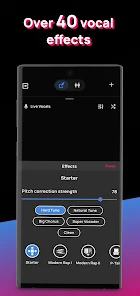
First off, the main attraction here is the app's ability to automatically tune your vocals. No need for expensive equipment or software! Voloco comes packed with a variety of presets that let you transform your voice. Whether you're going for that classic T-Pain effect or something a bit more subtle, there's something for everyone. It’s like having a mini recording studio in your pocket.
Easy to Use Interface
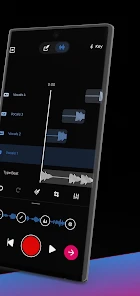
The user interface is super intuitive. Even if you're a complete beginner, you'll find it easy to navigate through the options. The dashboard is clean, with all the essential features right at your fingertips. Just pick a track, hit record, and sing your heart out. The app takes care of the rest by syncing your vocals with the beat seamlessly. Honestly, it’s so satisfying to see (and hear) your raw recordings transform into something polished.
Still, I wouldn’t choose a preset solely because it sounds impressive in isolation. I’d compare a couple against the same phrase and listen to the whole track, since an effect that dominates a solo voice may crowd the instrumental. Recording a short chorus before a longer take is a simple way to settle on a sound without wasting time or building an entire song around the wrong vocal character.
Beat Maker's Paradise
But wait, there’s more! Voloco isn't just about vocal tuning. It also offers a range of beats and instrumental tracks to collaborate with. Whether you’re into hip-hop, electronic, or R&B, you’ll find beats that match your style. You can layer your vocals over these tracks to create a full song. And the best part? You can even export your creations to share on social media or with friends. The whole process is so smooth and hassle-free, it’s hard not to get addicted.
Compared with a conventional audio editor, the appeal here is speed and a vocal-focused workflow, not detailed control over every production decision. That makes it a good fit for singers, casual creators, and anyone experimenting with a hook on a phone. If I needed fine-grained editing or a more involved mix, I’d move to a fuller music-production tool instead. Voloco’s beats can help get an idea moving, but choosing a track that leaves room for the vocal still takes a bit of judgment.
Choosing a backing track with care
A beat can inspire a melody, but it can also quietly steer the whole performance. I’d listen for where the instrumental leaves space for the words, especially in the part where the vocal needs to stand out. If the rhythm is already busy, a dense delivery and a strong tuning effect can make the result feel crowded. Trying a simpler phrase or changing the vocal approach may work better than adding more layers.
For a practical first session, I’d choose a backing track because it supports the mood I want, not only because it sounds exciting on its own. Then I’d record a short section, replay it, and ask whether the vocal and beat feel like one idea. This is an easy way to avoid spending a long time recording over a track that turns out to be the wrong fit. It also helps beginners hear how arrangement choices affect a vocal before they move on to more complex production tools.
Collaborate and Share
One of my favorite features is the ability to collaborate. You can easily share your mixes or invite friends to join in the fun. This makes it perfect for group projects or just jamming with your buddies. Plus, the app supports video recording, so you can capture your performance and post it online for all to see. Just imagine the possibilities for virtual collaborations!
Sharing is most useful when I treat a recording as a sketch or a performance to pass around, rather than assuming every export is ready for a formal release. A friend can react to the melody, suggest a different delivery, or add an idea of their own. For a group project, agreeing on the beat and the vocal style before everyone records can save a round of mismatched takes.
When a shared take needs another step
I’d be clear with collaborators about what kind of feedback I want. Asking whether the hook is memorable is different from asking whether the tuning feels natural, and a friend’s response is more useful when the question is specific. If the recording is only a rough reference, I’d say so rather than letting a quick phone mix stand in for a finished master. That keeps expectations sensible and makes it easier to use the feedback constructively.
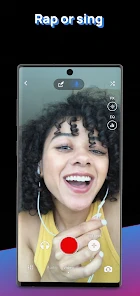
Video can make a performance more immediate, but it changes the goal from simply capturing a vocal to presenting a moment. I’d check that the room and framing suit what I want to share, then focus on delivering the line rather than constantly adjusting effects mid-performance. For a quick post, that combination of voice and image can be more engaging than an audio sketch; for precise sound work, I’d still keep the recording process as the priority.
Who will get the most from it
RESONANT CAVITY’s music and audio app is free to start, with in-app purchases ranging from $0.99 to $69.99 per item. It has a 4.6 average from around 385,000 ratings, and more than 10 million installs. Its Teen age rating is worth keeping in mind if a younger listener will use it. The app has been available since January 2, 2011, and its appeal is clearest for people who want to record, shape, and share vocals without beginning in a complex studio program.
Because it is free to start, I’d try the basic workflow before deciding whether any optional purchase is worthwhile for my needs. The useful test is not how many effects I can browse, but whether I can record a phrase, find a treatment that suits it, and get a result I actually want to hear again. If I only need an occasional memo, I may not need to spend anything; if I’m building a more involved production, I should compare the workflow with a dedicated editor before investing further.
I’d recommend it to a singer who wants quick feedback on a melody, a beginner curious about vocal effects, or a creator who needs a rough demo while an idea is fresh. I’d skip it if my priority were natural, untouched vocals, detailed mixing, or a full production environment with precise editing. The automatic treatment is the point, so listeners who dislike tuned vocal colors may find the core sound more distracting than helpful.
It is also a particularly good fit for someone who wants to experiment without feeling that every recording must become a finished song. A student trying a melody after class, a singer sending a chorus idea to a friend, or a casual creator making a quick vocal clip can all get value from the short path between singing and hearing a shaped result. If I were recording an important lead vocal for a release, though, I’d use a more controlled setup and treat Voloco as a place to develop the idea rather than the only production environment.
All in all, Voloco: Auto Vocal Tune Studio is a fantastic tool for anyone interested in music production. Whether you're a seasoned producer or just starting, this app offers everything you need to create professional-sounding tracks. Give it a try, and you might find yourself falling in love with music all over again. Happy singing!
Voloco: Auto Vocal Tune Studio Frequently Asked Questions
Can I use Voloco to record a song without a separate microphone?
Voloco is built around recording and processing vocals on a mobile device, so it can be useful for capturing ideas without setting up a full studio. You can try recording with your device and explore the vocal effects in the app. For a polished result, your surroundings and recording setup still matter, so a quiet space can help.
Can I share recordings made in Voloco with other people?
Voloco supports sharing projects and recordings from the app, which can make it easier to show a musical idea to collaborators or listeners. You can also use its community-oriented appeal to work toward growing an audience. Before sharing, listen back to your track and check that you are comfortable with the version you are sending.
Is Voloco free to download?
Voloco is free to download, so you can try its vocal recording and processing tools without paying upfront. The app also offers in-app purchases, with items ranging from $0.99 to $69.99. If you are considering a purchase, check the available options in the app and decide whether the additional creative tools suit your needs.
What age group is Voloco intended for?
Voloco is rated Teen, which is useful to know before installing it for yourself or someone else. It is a music and audio app for creating and working with vocal recordings, rather than a general-purpose social network. As with any app, parents and guardians can review its features and use their own judgment about whether it is appropriate for younger users.
What is Voloco: Auto Vocal Tune Studio used for?
Voloco is an app designed for both amateur and professional musicians who want to enhance their vocal recordings. It offers real-time audio processing with features like auto-tuning, harmonization, and vocoding. Users can choose from a variety of effects and presets tailored to different musical styles, making it a powerful tool for creating polished vocal tracks on the go.
Pros
- User-friendly interface for beginners
- Real-time audio processing
- Wide range of vocal effects
- Integration with music platforms
- High-quality sound output
Cons
- Limited free version features
- Occasional app crashes
- Requires stable internet for some features
- In-app ads can be intrusive
- High battery usage during extended use
- Category
- Music & Audio
- Version
- Varies with device











