Voice Recorder: Memos & Audio
- 3.97K
- 4.2
- Installs
- 5.00M
- Price
- Free

Screenshots
Analysis by Reviewed
I tend to judge a voice recorder by what happens after the first burst of enthusiasm: does it become a dependable habit, or does it sit unused until the next forgotten idea? Voice Recorder: Memos & Audio is aimed at quick voice capture, and its appeal is easiest to see when I need to save a thought before I can type it out.
Useful when a thought cannot wait
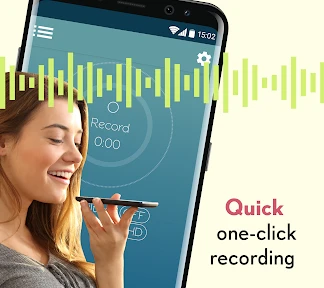
For a first recording, the attraction is simplicity. I can imagine opening it to capture a reminder while walking, a line of dialogue, or a detail from a conversation I want to revisit. A dedicated recorder can feel less fussy than opening a full music or editing app, especially when the goal is simply to speak now and sort things out later.
That quick-capture role is also where I would set expectations carefully. A voice memo is a record of sound, not automatically a finished note. I still need to give recordings useful names or labels and decide what deserves keeping. A practical habit is to say the subject at the start of a memo, then label it soon afterwards; that small step can make a growing collection much easier to search by eye.
A realistic day with a voice memo
Picture remembering an appointment change while carrying groceries. Typing on a phone is awkward, but a short recording can preserve the new time and the one detail you might otherwise forget. I would keep the memo focused—appointment, revised time, any action needed—rather than narrating the whole errand. Later, I could listen once, update my calendar, and delete or archive the recording according to how I manage notes. That capture-then-act routine is more valuable than accumulating a long stream of audio.
For students, the same approach works best for personal prompts rather than replacing lecture notes: record a question to revisit, a concept to look up, or a reminder to review a chapter. For someone writing, it can hold a phrase or rough idea before it disappears. The useful distinction is between capturing a small thought and trying to preserve an entire discussion. The former is quick to review; the latter can become a time-consuming file that is difficult to navigate.
Does it earn a place in your routine?
As a free app in the music and audio category, it has a low barrier to trying it. Voice Recorder & Memos Studios is the developer, and the app has a 4.2 average from around 28,000 ratings, with over five million installs. It is rated for Everyone, while optional in-app purchases range from $1.99 to $28.99 per item. Those details make it worth considering, but the better question is whether its recording workflow matches how you actually work.
From novelty to a useful habit
The app is most likely to stick for people who regularly think aloud: students collecting quick study reminders, people who want to remember errands, or anyone who prefers speaking a rough idea before shaping it into writing. A realistic routine might be recording a short reminder on the way home, then reviewing it when you sit down to plan the next day. That second step is what turns an audio clip into something useful rather than another item to forget.
More From Our News Desk

Clash of Clans Is Won Between the Battles

Android Auto Makes the Case for Quieter Car Software

MobiOffice: Transforming Mobile Productivity with Seamless Integration

EA SPORTS FC™ Mobile Soccer: Redefining Mobile Sports Gaming

How Microsoft OneDrive Became a Mobile Productivity Giant

How Google Translate Breaks Language Barriers Effortlessly
Compared with a phone’s built-in recorder, a separate app needs to earn the extra space by fitting your routine better. Compared with a full audio editor, a memo recorder is a more natural choice when trimming, mixing, or polishing sound is not the point. I would choose this kind of tool for quick personal notes, but not for a project that depends on detailed editing or a carefully managed production workflow.
Picking the right tool for the job
The built-in recorder is often the sensible first choice if you only make an occasional memo: it avoids maintaining another app and may already sit where you expect it on your phone. A dedicated recorder becomes more compelling when its particular capture flow feels easier to reach or its organization suits the way you revisit clips. I would test that difference during an ordinary week instead of assuming that a separate app must be better simply because it is specialized.
At the other end, transcription services and typed note apps are better when the main task is finding a specific sentence later. Searching text is usually faster than replaying several minutes of sound. A full editor makes more sense for music, voice-over work, or audio that needs deliberate cleanup. This app’s role is narrower: quickly preserving spoken material. That focus is an advantage only when it matches the job.
Keeping recordings manageable
Recording is only half the job. If you capture several clips in a day, use a consistent naming pattern—such as a topic followed by a short context—and clear out duplicates once you have acted on them. For interviews, classes, or important discussions, I would also check that recording is appropriate and get consent where needed. A phone recorder should not be treated as a substitute for careful note-taking when accuracy or a formal record matters.
One useful trade-off to consider is how you will retrieve a memo later. Audio is convenient at the moment of capture, but replaying it takes longer than scanning a written list. I would keep recordings brief when possible and use labels that describe the point, not just the date. If you mainly need searchable text, a transcription-focused tool or typed notes may fit better.
A small review routine prevents clutter
I would pair recording with a predictable review moment, such as checking new clips after dinner or when planning the next day. Start by listening only to recent recordings, then turn each useful one into an action: add a calendar entry, write the thought in a project note, or send the detail to the person who needs it. Once that is done, decide whether the audio still has a reason to stay. This prevents the recorder from becoming an unindexed archive.
It also helps to be selective before pressing record. If the thought can be captured in a few words in a task list, typing may be quicker to revisit. If speaking preserves nuance, saves effort, or lets you keep moving, audio earns its place. That simple choice keeps the habit practical instead of turning every passing thought into another clip to manage.
What to expect over time
The app is free to start, but its optional purchases mean it is sensible to check what an upgrade offers before paying; I would not spend simply because a recorder has become part of my routine. Its current version is 4.3.1.1882, and it runs on Android 10 or later. If your phone uses an older Android release, compatibility is a practical reason to look elsewhere. The app was released on November 14, 2014, so it has been around for years, but longevity alone does not make it the right fit for every recording task.
First impressions matter
Downloading and installing the recorder was a breeze. It's available for both Android and iOS, so no one gets left out. Upon opening the app, the clean and intuitive interface immediately caught my attention. It's not cluttered with unnecessary features, making it straightforward for anyone to use. I mean, who needs a manual when the app is this user-friendly?
Features that stand out
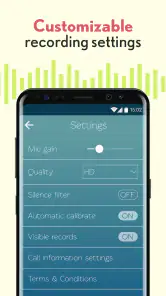
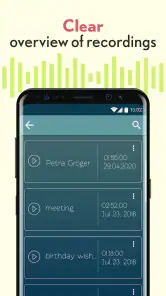
One of my favorite features is the ability to organize recordings into different categories. You can label recordings, making it super easy to find that important memo or class note when you need it. Plus, the sound quality is top-notch. Even in a crowded room, the app does a commendable job of filtering out background noise, ensuring your recordings are crystal clear.
Another cool feature is the option to share your recordings. Whether you're sending it to a friend, uploading it to the cloud, or sharing it on social media, the app has got you covered. It also supports a variety of audio formats, which is great for those tech-savvy users out there.
Performance and usability
The app performs like a charm. It's quick to launch, and there's no lag when starting a new recording. This is crucial, especially when you're trying to capture something spontaneously. The battery consumption is minimal, so you won't have to worry about the app draining your phone's battery.
One thing I noticed, though, is the occasional ad pop-up. While they aren't overly intrusive, it would be nice to have an ad-free version for a small fee. But hey, a free app has got to make money somehow, right?
When I would look elsewhere
I would skip this kind of recorder if my work depended on a dependable searchable transcript, exact quotations, or a formal record that needed careful verification. In those situations, I would use a transcription or note-taking workflow and check the result against the original source. Likewise, someone producing polished audio should choose a proper editing tool rather than expecting a memo app to handle a production task.
It is also not ideal for people who rarely replay recordings. If you capture a clip and never return to it, the convenience lasts only a moment while the collection keeps growing. I would try the app with a small, real task and ask after a week whether I acted on the recordings. If not, a written reminder or the phone’s existing recorder may be the better fit.
Final thoughts
In conclusion, the recorder is a reliable companion for anyone in need of a portable recording solution. Its ease of use, coupled with the high-quality recording and organizational features, makes it a must-have in your app arsenal. Sure, it has a few ads, but they’re a small price to pay for such a handy tool.
So, whether you're a student, a journalist, or just someone who loves to document life as it happens, give this app a whirl. You might just find it becoming one of your go-to apps!
Long-term verdict
For lasting value, I would judge it by whether it shortens the distance between having an idea and doing something with it. A quick memo can be genuinely useful when speaking is easier than typing, and labels plus a review habit can keep the collection from becoming a burden. The trade-off is that audio needs playback time, so it is not automatically a better home for every reminder.
My recommendation is to give it a place if you regularly capture spoken thoughts and are willing to review and sort them. If you only need occasional reminders, your phone’s built-in tool may be enough; if you need searchable text or polished sound, another category of app is a better match. The free starting point makes a personal trial straightforward, but the lasting reason to keep it is simple: it should help you retrieve and use what you record, not merely make recording easy.
Voice Recorder: Memos & Audio Frequently Asked Questions
What does Voice Recorder: Memos & Audio do, and what is it mainly designed for?
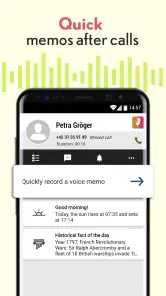
Voice Recorder: Memos & Audio is a voice recording app in the Music & Audio category. Its short description is simply “Voice Recorder,” and it is presented as a quick, simple way to capture voice memos after a call ends. It may suit people who want a straightforward option for saving spoken reminders or thoughts without making recording feel complicated.
Is Voice Recorder: Memos & Audio suitable for quick voice memos and everyday reminders?
The app’s emphasis is on quick voice memos, especially recording one after a call ends. That makes it a possible fit for capturing a reminder, idea, or thought while it is still fresh. If you are considering it for a particular routine, think about when you need to start recording and whether the app’s simple recording focus matches that need.
Is Voice Recorder: Memos & Audio free to download, and are there optional purchases?
Voice Recorder: Memos & Audio is free to download, so you can try the app without paying upfront. It also offers in-app purchases, with items priced from $1.99 to $28.99. Consider whether you need any paid options before purchasing; the core appeal is convenient voice recording, while optional purchases may be relevant if you want additional features.
Which devices can install Voice Recorder: Memos & Audio?
The app is listed for devices running Android 10 or later. Before downloading, check your device’s operating system version and available storage, since both can affect whether installation and recording work smoothly. Voice Recorder: Memos & Audio is an app in the Music & Audio category, and its age rating is Everyone.
Can Voice Recorder: Memos & Audio record a memo after a phone call?
The app is presented as a quick way to record voice memos after a call ends, which may be useful when you need to capture a thought or reminder immediately. The emphasis is on simple, fast recording. Call-related recording behavior can depend on your device and settings, so consider how you plan to use the app before relying on it for important conversations.
Pros
- Easy to use interface.
- High-quality audio recording.
- Supports multiple audio formats.
- Allows background recording.
- Good file organization features.
Cons
- Contains ads in free version.
- Limited editing features.
- No cloud sync in free version.
- Consumes battery quickly.
- Occasional app crashes.

- Category
- Music & Audio
- Version
- 4.3.1.1882