Toomics - Read Premium Comics
- 1.30K
- 4.0
- Installs
- 5.00M
- Price
- Free

Screenshots


Analysis by Reviewed
I treat a digital comic app differently from a shelf of collected issues: the best one is the service that makes it easy to find a story, settle into its reading format and decide whether I want to keep going. Toomics is a comics app from Toomics Global, and its appeal is the range of genres gathered in one place. It’s free to install, but access to premium reading can involve in-app purchases, so I’d approach it as a place to browse first and spend only after I know the kind of series I want to follow.
A comfortable way to start reading
My most useful habit with a large comic library is to begin with a mood rather than scroll without a plan. If I want something light, I look for a romance; if I have time for a more absorbing session, I might try action or a thriller. That small choice makes browsing feel less like work and helps me judge a series on its premise and artwork instead of opening titles at random. The app is rated Teen, a point parents should consider when deciding whether it suits a younger reader.
For an everyday use case, imagine a short break between errands. I’d pick one series beforehand, read a little while I have a few minutes, then return to the same story later rather than spend the whole break searching. That routine is particularly useful in a service with a broad selection: discovery is a strength, but too much browsing can take time away from the actual comics.
Build a repeatable reading routine
Before settling into a series, I’d check the available viewing settings and adjust them to what feels comfortable on my screen. A brief test with a few pages is better than changing preferences mid-chapter, especially if the artwork relies on carefully composed panels. I’d also use search when I already have a title in mind; browsing is better for exploration, while a direct search is the quicker route back to something specific.
Readers who enjoy serialized stories may get more out of a simple habit: choose a series, read in manageable stretches and keep track of where they left off using the app’s normal reading flow. I wouldn’t assume that every convenience found in other comic services is present here. Instead, I’d treat the app as a focused reading destination and check what it offers on my own device before planning a long offline session or relying on a particular shortcut.
Discovering a World of Comics
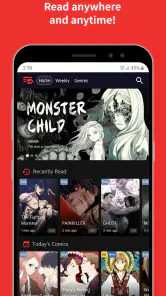
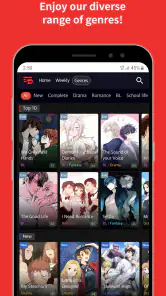
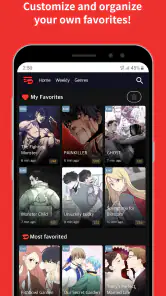
The first thing that struck me about Toomics was its vast library. Whether you’re into action-packed adventures, swoon-worthy romances, or gripping thrillers, this app has got you covered. I spent hours scrolling through endless genres, each offering a unique narrative style and stunning artwork. It’s like having a personal comic store right in your pocket!
User-Friendly Interface
One of the most impressive aspects of Toomics is its user-friendly interface. Navigating through the app is a breeze, with everything neatly categorized and easy to find. The search function is also pretty robust, allowing you to quickly locate your favorite titles or discover new ones that match your interests. Plus, the reading experience is seamless, with smooth transitions between pages and an option to adjust viewing settings to suit your preference.
More From Our News Desk

Weather by Xiaomi Review: Clear at a Glance, Less Clear Up Close

X Under Pressure: Can It Recover When Posting Goes Wrong?

Clash of Clans Is Won Between the Battles

Android Auto Makes the Case for Quieter Car Software

MobiOffice: Transforming Mobile Productivity with Seamless Integration

EA SPORTS FC™ Mobile Soccer: Redefining Mobile Sports Gaming
For a smoother first session, I’d separate discovery from reading: use one visit to browse and shortlist, then come back when I’m ready to concentrate on a story. That approach is especially handy on a small screen, where jumping between titles can make it harder to remember what caught my eye. Search is most useful once I have a title or clear subject in mind; for an open-ended browse, genre sections give me a better starting point.
Exclusive Content
What sets Toomics apart from other comic apps is its exclusive content. Many of the comics available on the app are original series that you won’t find anywhere else. This exclusivity gives you the chance to explore fresh stories and unique art styles, making every reading session feel like an adventure. It's definitely a must-have for any comic aficionado looking for something new and exciting.
That original material is also a reason to judge a series by more than its thumbnail. I’d give the opening enough attention to see whether the artwork, pacing and tone work for me before deciding to follow it. If I’m choosing between several candidates, comparing their premises first is more useful than sampling a page from each and ending up with a scattered reading queue. Readers who primarily want familiar, already-collected print editions may find a conventional digital bookstore a better match.
Subscription and Features
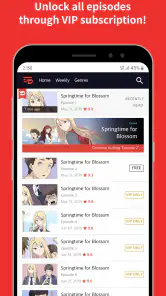
To fully enjoy all the premium content Toomics has to offer, you’ll need a subscription. It’s worth mentioning that the app provides a free trial period, which I found incredibly useful to explore what’s on offer before committing. The subscription unlocks a world of premium comics, allowing you to binge-read to your heart’s content. Additionally, the offline reading feature is a game changer for those long commutes or when you find yourself without internet access.
Because the app is free to install but offers in-app purchases, I’d treat the first visit as a chance to learn how access works on my own account rather than assume every comic is included at no cost. Before purchasing, I’d read the terms shown in the app and check whether the available access suits how often I expect to read. The listed purchase range runs from $4.99 to $99.99 per item, so it makes sense to pause and understand the specific option before confirming anything.
Offline reading can be valuable when a connection is unreliable, but I’d test it before depending on it for a commute or trip. A practical routine is to check the reading options while connected, prepare only the series I genuinely intend to continue, and open it once before leaving. That avoids building plans around an offline capability without knowing how it behaves for the content I want. If I mostly read at home, this matters less than finding a series I’ll actually return to.
Where it fits among comic apps
I’d choose this over a general digital bookshelf when I’m specifically in the mood to discover serial comics and sample stories from different genres in one service. A broad comics catalog can be more convenient than buying individual volumes when I’m still figuring out what I like. On the other hand, readers who want to own particular collected editions, browse a publisher’s backlist, or keep a permanent library may prefer a storefront or a dedicated collection app. The right choice depends on whether discovery and ongoing reading matter more to you than ownership.
That distinction also helps with the cost question. The app is free to download, while in-app purchases range from $4.99 to $99.99 per item. I’d check the purchase details in the app before committing, decide how much I expect to read, and avoid treating a large catalog as a reason to buy access before I’ve found a series worth following. The average rating is 4.0 from around 28,000 ratings, with about 1,300 written reviews; useful context, but I’d still judge it by whether its available stories match my taste.
Compared with reading comics through a general web browser, a dedicated app gives me a more focused place to browse and continue a series. Compared with a store built around buying single books, its appeal is less about building a permanent shelf and more about discovering what I want to read next. Neither model is automatically better: if I know the exact volume I want to keep, a bookstore is straightforward; if I want to explore serial stories, Toomics is more naturally aligned with that habit.
Practical trade-offs before committing
Toomics has over 5 million installs, and its current version is 1.6.4; it was released on October 17, 2018. Those details make it an established option, but the more important test for me is how it fits my reading habits today. If I mainly read during commutes, I’d check connectivity and any offline options before leaving home rather than assume every title will be ready without a connection. If I share a device or help a younger reader choose comics, I’d also look at the age rating and the content of individual series instead of relying on genre labels alone.
A useful way to avoid spending on the wrong thing is to shortlist a couple of series first, compare their premises and art, then decide whether premium access suits the amount I’ll read. That works better than opening many titles at once and losing track of which ones actually caught my attention. The service will suit curious readers who like trying different kinds of comics; it may frustrate someone who wants a simple, fixed collection with no purchase decisions.
For an everyday routine, I’d use a brief evening window to choose what I want to read, then save the actual reading for a quiet break the next day. It sounds small, but separating those moments keeps browsing from swallowing the time I meant to spend with a story. If a series doesn’t hold my attention after a fair sample, I’d move on rather than keep it in rotation just because I opened it once. That makes a large catalog feel useful instead of overwhelming.
Who will enjoy it most
I’d recommend Toomics to readers who like serialized comics, want several genres to explore and don’t mind weighing paid access against their reading pace. It is less suited to someone who only wants occasional single issues, insists on owning every book outright, or prefers a tightly curated collection over a large selection. If you’re unsure, start with browsing and a short reading session, then see whether the stories—not just the promise of variety—make you want to return.
It can also work well for someone whose reading taste changes with their free time: a lighter story for a short pause and a more involved serial for a longer session. The key is to keep the choice manageable. I’d pick one or two prospects, read them in a consistent setting, and decide whether the pace and artwork suit me before committing to paid access. If I want a quiet, finite read with a clear ending, a collected graphic novel may be more satisfying than a continuing series.
Parents should make their own judgment about suitability rather than treating the Teen rating as a guarantee that every title will fit every young reader. I’d look at the individual comic and consider the reader’s maturity, especially if the device is shared. That extra check is more useful than assuming that a broad genre label tells the whole story.
Subscription and Features
To fully enjoy all the premium content Toomics has to offer, you’ll need a subscription. It’s worth mentioning that the app provides a free trial period, which I found incredibly useful to explore what’s on offer before committing. The subscription unlocks a world of premium comics, allowing you to binge-read to your heart’s content. Additionally, the offline reading feature is a game changer for those long commutes or when you find yourself without internet access.
In practice, I’d make the access decision only after I’ve found a specific series I’m eager to continue. A generous-looking library can make a paid option seem attractive before I know whether I’ll use it, so a short list and an honest estimate of my reading time are better guides. I’d also revisit the purchase screen carefully if my plans change; an option that suits a regular reader may not make sense for someone who opens comics only now and then.
Toomics is more than just a comic app; it’s a gateway to a world of stories where each page turn brings a new thrill. Whether you’re a comic newbie or a seasoned fan, this app is bound to become your go-to for your comic fix. So, why wait? Dive into the fantastic world of Toomics and let your imagination run wild!
A balanced last word
My verdict is positive, with a practical caveat: the selection and browsing experience are the strongest reasons to try it, while premium access means readers should be deliberate about spending. The app runs on Android 9 or later, so checking device compatibility is a sensible first step. For readers who enjoy discovering a new serial and returning to it regularly, it can be a rewarding routine; for those who value ownership or only read now and then, another comics option may fit better.
My practical recommendation is to begin with one genre, test the reading view on a few pages, and note which series genuinely make me want to continue. Then I’d compare the access option with my likely reading frequency instead of deciding based on the size of the catalog. That small sequence answers the questions that matter most: whether I like the stories, whether the format suits my screen and whether the cost fits how I read.
For a reader who wants a focused home for discovering serialized comics, it’s worth a look. For someone who mainly wants to buy and keep specific books, or who dislikes evaluating paid access, a digital bookstore will be the clearer choice. I’d use Toomics when curiosity and regular reading are the priority, and keep expectations grounded: the best reason to stay is finding stories I want to come back to.
Toomics - Read Premium Comics Frequently Asked Questions
Can I browse comics before paying for anything?
Toomics is free to download, so you can install it and explore the app before deciding whether to make a purchase. The service includes free and premium content, though access to the full range of comics may require a subscription or other in-app purchase. Review the available options in the app before committing, especially if you want to keep track of your spending.
What genres can I expect to find in Toomics?
Toomics describes itself as a premium comic service with genres for a wide range of readers. Its library includes comics across different tastes, with stories such as romance, action, drama, and fantasy. Since readers may respond differently to individual series, browsing the selection is a useful way to see whether the available themes and storytelling styles appeal to you.
Is Toomics suitable for younger readers?
Toomics is rated Teen, so readers and families should consider that age guidance before installing it. The app offers comics across a range of genres, and the suitability of individual stories can vary. If a younger reader will use the app, it is sensible for a parent or guardian to review the available content and decide whether it is appropriate.
Does Toomics cost anything to download, and what purchases are available?
Toomics is free to download, so you can install the app before deciding whether its comic selection suits you. It also offers in-app purchases, with individual items ranging from $4.99 to $99.99. Those purchases are worth bearing in mind if you plan to unlock more content, and checking the purchase options in the app can help you choose what fits your budget.
What is Toomics and what kind of content does it offer?
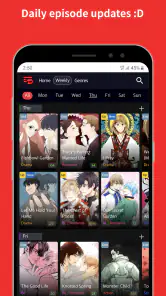
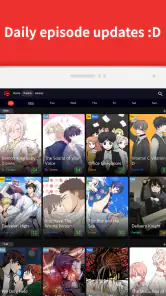
Toomics is a premium comic reading application that provides access to an extensive library of comics across various genres, including romance, action, drama, fantasy, and more. It caters to diverse tastes and interests, offering both popular series and hidden gems. The platform regularly updates its collection, ensuring users have access to the latest episodes of their favorite comics. The app is designed to provide high-quality graphics and an immersive reading experience, making it a go-to choice for comic enthusiasts.
Pros
- Extensive library of premium comics.
- User-friendly interface enhances reading.
- Regular updates with new content.
- Offline reading feature available.
- High-quality illustrations and stories.
Cons
- Subscription required for full access.
- Limited free content available.
- Ads present in free version.
- No customization for text size.
- Occasional app crashes reported.
- Category
- Comics
- Version
- 1.6.4