Tile: Making Things Findable
- 54.15K
- 4.8
- Installs
- 10.00M
- Price
- Free

Screenshots
Analysis by Reviewed
I use a tracker app most when I’m already in a hurry, so its value depends on more than a neat map or a quick setup. Tile is a Lifestyle app from Tile Inc. that connects the phone to compatible Bluetooth trackers, turning a familiar problem—forgetting where I put an everyday item—into a search I can manage from the app. It’s free to download, rated for Everyone, and has a 4.8 average from around 259,000 ratings. That popularity makes it easy to see why people try it, but the best fit is still someone whose routine includes a few frequently misplaced belongings.
Finding things nearby, and beyond
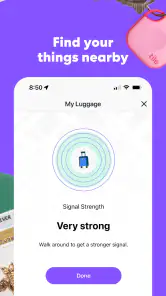
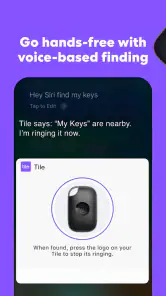
The Tile: Making Things Findable app, paired with its nifty Bluetooth trackers, promises to make losing things a thing of the past. It's like magic, really. Once you attach a Tile to an item, you can track it through the app. If you’ve misplaced something, just open the app, tap a button, and the Tile on the lost item will play a loud tune until you find it. It's a lifesaver, especially for those of us who are a bit scatterbrained!
Setting Up: Easy Peasy
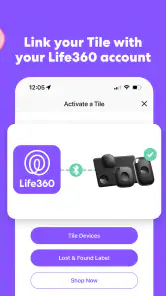
Setting up Tile is a breeze. After downloading the app and creating an account, you simply press the button on the Tile to activate it, and the app does the rest. It’s like the app holds your hand through the entire process, making it super user-friendly. Plus, the app's interface is sleek and intuitive, which I appreciate because who has time for complicated tech?
When the connection is not immediate
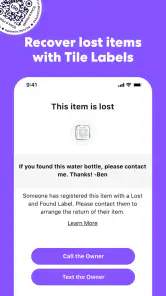
Tile’s most straightforward job is helping locate a tracker that is within Bluetooth range: I open the app and ask the tagged item to ring. That makes it handy for a bag left somewhere in the house, but it is not the same as live, unlimited tracking. If the item is farther away, the community find option offers a different route: mark it as lost, and another Tile user’s phone can help report its location when it comes within range. That is useful, but it depends on another user passing nearby, so I would treat it as a possible recovery aid rather than a guarantee.
Real-World Use: A Game Changer
I've been using Tile for about a month now, and let me tell you, it’s been a game-changer. Whether it's my backpack, keys, or even my wallet, I can find them in seconds. What’s even cooler is the community find feature. If something is lost out of Bluetooth range, you can mark it as lost in the app, and if another Tile user comes within range of your item, you’ll be notified of its location. It's like a community of modern-day treasure hunters!
A routine that makes the tracker worthwhile
For me, the most useful habit is attaching a tracker to an item I carry often, then checking the app before I leave if something feels missing. A realistic example: I’m heading out, can’t see my keys, and have only a few minutes. I can use the app to ring the tracker nearby instead of checking every pocket and room at random. The same approach works for a wallet or backpack, though I’d choose one important item first rather than tagging everything and creating more to manage.
This is also where Tile differs from relying on memory, retracing your steps, or calling a lost phone from another device. Those options cost nothing extra, but they depend on remembering where to look or having help at hand. A Bluetooth tracker makes the nearby search more direct; the community feature may help when an item is farther away, but its usefulness depends on another Tile user being in range. If you need dependable location updates at a distance, I wouldn’t treat this as a substitute for a dedicated tracking service.
More From Our News Desk

Weather by Xiaomi Review: Clear at a Glance, Less Clear Up Close

X Under Pressure: Can It Recover When Posting Goes Wrong?

Clash of Clans Is Won Between the Battles

Android Auto Makes the Case for Quieter Car Software

MobiOffice: Transforming Mobile Productivity with Seamless Integration

EA SPORTS FC™ Mobile Soccer: Redefining Mobile Sports Gaming
What the phone and connection change
Tile makes the most sense when you have your phone with you and can open the app at the moment you notice something missing. In a noisy place, a ringing tracker may be harder to hear, so I’d still check likely pockets and compartments while listening. For an item left elsewhere, the app’s lost-item route is more relevant than repeatedly trying to ring it from far away. Keeping the app available and the phone connected gives the tracker a practical role in your routine; it cannot make a misplaced object instantly visible in every situation.
One helpful, easy-to-miss habit is to decide in advance which belongings deserve a tracker and where it will sit. A tag buried deep in a packed bag may be less convenient to hear than one attached where its sound can escape. I’d also use the app’s lost status when an item is genuinely missing, rather than assuming a nearby ring attempt will solve a distant search. These small choices make the system more useful without turning it into a constant checking ritual.
Using it across a changing day
The app’s usefulness can shift with the place you are searching. At home, a ring can narrow the hunt to a room or bag; in a busy station, shop, or shared office, sound and movement make the same search less straightforward. I would pause somewhere safe, check the app, and listen in a quieter moment rather than walking around staring at the phone. The tracker is best treated as a way to guide a search, not as a reason to stop paying attention to your surroundings.
A small workflow improvement is to attach a tracker before the item goes missing, then make sure you know which Tile entry corresponds to which belonging. If you tag a few things, memorable names help avoid ringing the wrong object while you are rushing. I’d also test the sound in the setting where I expect to use it, such as inside a zipped bag, so I know whether it is audible through the material. That gives a more realistic expectation than assuming every ring will be obvious from across a crowded room.
Tile is a stronger match for people who move between home, work, and errands with the same keys or bag, and who are comfortable keeping a phone app in their routine. Someone who misplaces an item only once in a while may get more value from a consistent landing spot near the door. Likewise, if you need to follow a person, vehicle, or item continuously at a distance, a Bluetooth tracker is the wrong category of tool. I would choose a service designed for that specific need rather than expecting Tile’s nearby connection and community reports to behave like uninterrupted tracking.
Recovery depends on the kind of loss
There are two different problems that can feel like “losing something”: an object nearby but out of sight, and an object that has left your immediate area. The first is where I’d try ringing it; the second calls for marking it lost and allowing the community option to help if another Tile user comes within range. Knowing which situation you are in keeps you from repeating the same unsuccessful action. If the item may be somewhere public, I’d also retrace the last places I visited and contact the relevant venue rather than relying on an app notification alone.
That distinction matters because a tracker cannot make every recovery equally likely. A lost bag in a place with other Tile users nearby has a different prospect from an item left in a quiet or isolated location. If the item is valuable, I would use Tile as one part of a sensible response: secure accounts or cards where relevant, contact a venue, and avoid sharing sensitive details unnecessarily. The app can help with the location side of a search, but it cannot replace those practical steps.
Battery, wear, and sensible expectations
One of the concerns I had initially was the battery life. However, the Tile boasts a pretty impressive lifespan. Depending on the version, some Tiles have replaceable batteries, while others are sealed and last up to a year. As for durability, these little guys can withstand quite a bit of wear and tear, which is perfect for someone like me who tends to be a bit rough on their gadgets.
The tracker is only helpful while it is ready to respond, so I’d make battery and condition part of occasional maintenance rather than waiting for a stressful search to reveal a problem. I’d also think about the trade-off between convenience and cost before buying several trackers: the app itself is free, while in-app purchases range from $2.99 to $99.99 per item. That range is a reason to check what an optional purchase actually provides before paying, especially if you only need to locate one set of keys.
On the phone side, I would make sure the app remains usable in my everyday routine instead of assuming I can ignore it until an emergency. Phone settings, connectivity, and whether the phone is with me all affect how quickly I can start a search. If I am travelling with a low battery or leave my phone behind, I lose the most direct way to ask a nearby tracker to ring. That is a practical limitation of this setup, not a flaw that a different naming choice or app screen could fix.
Choosing Tile over familiar alternatives
Compared with a routine of emptying pockets, retracing steps, or calling a phone from another device, Tile adds a direct way to prompt a compatible tracker nearby. That is its clearest advantage: it turns “where did I put it?” into a more focused search without requiring me to remember the exact place. The trade-off is carrying or attaching an extra device and maintaining a connection between it and the app. A fixed bowl for keys is simpler if the problem is only at home; Tile earns its place when the item travels with me and gets misplaced in different settings.
It also differs from a dedicated GPS-style tracking service in what I would expect from it. Tile is built around Bluetooth proximity and possible reports from the user community, not a promise that I can watch an item move continuously from anywhere. That distinction is especially important for luggage or a bag left in transit: the app may help in some circumstances, but I would not make it my only recovery plan. For everyday objects that tend to be nearby, the simpler tracker approach is more appropriate and less demanding than a system intended for continuous remote location.
Data-conscious habits and account care
Because the app connects a personal phone with tagged belongings, I’d keep the setup as deliberate as the objects I choose to track. I would use clear names that identify an item without putting private details in the label, and avoid showing the app screen to strangers while searching in public. This is ordinary device hygiene rather than a special Tile feature, but it matters when an app becomes part of how I manage a wallet, keys, or a work bag. I would also keep access to the account secure, just as I would for other apps tied to everyday routines.
Before buying optional features, I’d consider whether they solve a problem I actually have, rather than paying simply because a search felt stressful once. The free download makes it easy to try the basic routine, while the listed in-app purchase range is broad enough that I would inspect the specific item and its terms before committing. For a person who mainly needs help locating keys around the house, a simple setup may be enough; someone with several items to manage should compare the added convenience with the extra cost and maintenance.
Final Thoughts
Tile is not the right choice for everyone. If you rarely misplace items, do not want to carry or attach another device, or need guaranteed recovery of something lost far away, a tracker may add more fuss than value. For someone who repeatedly searches for keys, a wallet, or a bag, it offers a focused alternative to relying on memory alone. The app has over 10 million installs, runs on iOS 9 or later, and its current version is 2.140.0, giving prospective users a clear sense of the platform and release they’ll encounter.
For Android users, I’d check that their device meets the app’s minimum OS requirement of Android 9 before setting up, just as iPhone users should check for iOS 9 or later. It is also worth noticing that Tile has been around since December 16, 2014, and has 54,000 written reviews alongside its ratings; its established presence is reassuring, though popularity cannot guarantee that the community will be nearby when one particular item goes missing. I would judge it by whether its everyday nearby searches save me time, not by install totals alone.
My recommendation is practical rather than universal: try Tile if a few portable belongings repeatedly disrupt your day, and start with the one item that causes the most friction. Keep expectations grounded about distance, make the tracker easy to hear, and treat community location help as a chance rather than a certainty. With those habits, it can be a useful little safety net for ordinary forgetfulness. If your needs are occasional, highly location-sensitive, or require constant remote updates, a simpler routine or a different kind of tracking service will suit you better.
In a world where we have a million things to keep track of, the Tile: Making Things Findable app is a true lifesaver. It's simple, effective, and honestly, a bit of a tech miracle. If you're someone who, like me, often finds themselves in a frantic search for their belongings, this app is definitely worth a try. You might just find it becomes an essential part of your daily routine.
Tile: Making Things Findable Frequently Asked Questions
Does Tile work with items other than keys and wallets?
Yes. Tile is designed to help you find and track everyday belongings, with phones, wallets, and keys among the examples it supports. You can attach or pair a compatible Tile tracker with an item and use the app to ring it or check its location. It is most useful for belongings you often misplace and can keep within Bluetooth range or locate through the app’s other finding features.
Who makes the Tile app, and what kind of app is it?
Tile is a lifestyle app developed by Tile Inc. It works with Bluetooth trackers to help you find belongings such as a phone, wallet, or keys. Rather than being a general-purpose map or navigation app, its main role is to connect you with Tile devices and provide tools for ringing or locating them. The app is free to download, with optional in-app purchases.
Which phones and operating systems can run the Tile app?
Tile is a lifestyle app from Tile Inc. for managing Bluetooth trackers that help you find items such as a phone, wallet, or keys. The app requires Android 9 or later, so check your phone’s operating system before downloading. Once installed, it serves as the place to ring a Tile, view its location, and use the available finding features.
Is the Tile app free to download, and are there optional purchases?
The Tile app is free to download, and its basic tracking and ringing features can be used without a subscription. Optional in-app purchases are available, with listed prices ranging from $2.99 to $99.99 per item. These purchases are separate from downloading the app, so you can begin with the free option and decide whether additional features suit your needs.
What is Tile and how does it work?
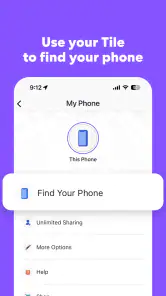
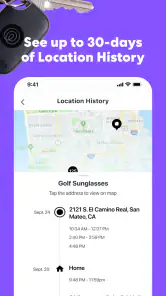
Tile is a Bluetooth tracking device that helps you find your misplaced items such as keys, wallets, and phones. After attaching a Tile to your item, you can use the Tile app to make the device ring, locate it on a map, or leverage the community find feature to help locate it if it's out of Bluetooth range. The app also allows you to ring your phone from the Tile device, even when it's on silent.
Pros
- User-friendly interface makes navigation easy.
- Supports a wide range of devices.
- Real-time tracking feature is highly accurate.
- Customizable alerts for item movements.
- Long-lasting battery life for prolonged use.
Cons
- Subscription required for premium features.
- Limited coverage in remote areas.
- Device compatibility issues may occur.
- Initial setup can be time-consuming.
- High dependency on app for tracking.
- Category
- Lifestyle
- Version
- 2.140.0











