Thunder VPN - Fast, Safe VPN
- 66.00K
- 4.8
- Installs
- 100.00M
- Price
- Free

Screenshots


Analysis by Reviewed
I think the first question to ask about a phone VPN is not whether it sounds powerful, but what job you actually need it to do. If you want a quick way to add a VPN connection before checking email on public Wi-Fi, a simple app can be appealing. If you expect a VPN to guarantee anonymity, protect every account, or reliably reach any blocked service, you’ll need to look much more carefully at its privacy terms and limits.
Choose by the task, not the promise
I’d judge a mobile VPN on a few practical points: how easy it is to connect, whether the connection stays usable for your routine, what its privacy policy says, and whether its costs make sense for how often you’ll use it. A fast connection is useful, but it does not answer the privacy question by itself. I treat speed and trust as separate decisions rather than assuming one proves the other.
Thunder VPN is a free tools app from Secure Signal Inc. Its store description is aimed at quick connections, and the app’s simple setup makes that kind of short, occasional use its clearest fit. It is rated 4.8 on average from around 1.8 million ratings, with over 100 million installs. Those figures show that it has broad reach, but popularity alone cannot tell me whether a particular VPN’s policies match my comfort level.
A practical fit for short, uncomplicated sessions
One everyday example: I’m waiting at a café, need to check a travel confirmation, and would rather make that brief session through a VPN than connect directly to the public network. A straightforward connect-and-browse workflow is helpful here because I don’t want to spend the whole break configuring settings. I would still use the official site or app for the booking and keep account protections such as a strong, unique password in place; a VPN is not a substitute for either.
There is a useful habit that applies especially to one-tap VPNs: connect before opening the sensitive app or page, then check that the VPN is still active if the phone changes networks. If I move from café Wi-Fi to mobile data, I don’t assume the connection carried over without interruption. For anything involving banking, work files, or private messages, I would pause and verify the connection rather than relying on a quick glance at the app’s earlier status.
What simplicity does—and does not—tell you
A minimal interface lowers the effort of getting started, but it leaves less room for informed choices if you want fine control over how a VPN behaves. I would not take a large connect button as proof that all traffic is protected in every situation. Before making this a regular privacy tool, I’d read the privacy policy and consider what information the service handles, how its terms fit my needs, and what I would do if the VPN disconnects.
It is also worth separating a VPN’s role from other security tools. It can change the route your traffic takes and may be useful on networks you do not control, but it does not make a phishing page safe, hide activity from every service you log into, or prevent an account from being compromised. I still look for secure connections on websites, avoid unfamiliar downloads, and use account-level security. That combination is more sensible than expecting one app to solve every privacy concern.
More From Our News Desk

Weather by Xiaomi Review: Clear at a Glance, Less Clear Up Close

X Under Pressure: Can It Recover When Posting Goes Wrong?

Clash of Clans Is Won Between the Battles

Android Auto Makes the Case for Quieter Car Software

MobiOffice: Transforming Mobile Productivity with Seamless Integration

EA SPORTS FC™ Mobile Soccer: Redefining Mobile Sports Gaming
When another kind of VPN may suit you better
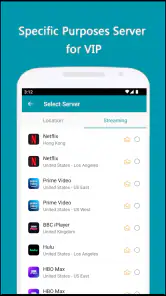
If your main goal is to reach a particular streaming library or service, I would not choose any VPN solely on a general speed claim. Access can vary by service and location, and a VPN may be blocked or may not work as expected. For regular streaming, remote work, or travel where dependable access matters, compare providers by the specific service you need, their policies, and the controls they explain—not just by how quickly the app connects.
Likewise, someone who needs detailed connection settings or wants a clearly documented privacy approach may prefer a more configurable VPN service. That can mean more setup and decisions, which is a real trade-off; it is not automatically better for a person who simply wants a quick connection. Thunder VPN makes more sense when low friction matters more than extensive controls, while a privacy-sensitive or work-critical user should do a closer policy and feature comparison before relying on it.
Think through the switch before paying
The app is free to download, and its content rating is Everyone. It has been available since November 3, 2017, and the current version is 5.4.1, with Android 6.0 as the minimum operating-system requirement. Those details help with basic compatibility, but they do not replace checking that your own device and needs are a good match.
In-app purchases range from $1.99 to $59.99 per item, so I’d look at the exact offer shown in the app before buying anything. I would first use the free option for the tasks I actually have, note whether connection reliability and location choices are enough, and only then decide whether a paid purchase solves a real problem. Paying for a VPN does not, by itself, prove that it has stronger privacy practices or that it will work with a particular site.
Switching VPNs can also be mildly inconvenient: I may need to disconnect one service before trying another, revisit the privacy policy, and test the new setup on the networks I use most. I would avoid changing providers in the middle of an important work session or while depending on a location-sensitive service. A short, low-stakes test makes it easier to spot problems without confusing a VPN issue with a problem in the website or app itself.
Who I’d recommend it to
I’d point a first-time VPN user toward Thunder VPN if they want a simple starting point for occasional browsing and understand that a VPN is only one part of online safety. I would not recommend treating it as an all-purpose anonymity tool, nor would I rely on it without reviewing the privacy policy for sensitive work or personal activity. If you need predictable access to a particular service, extensive configuration, or clear assurances tailored to a strict privacy requirement, compare alternatives in that category first.
Have you ever felt like your online privacy is slipping through your fingers? Well, you’re not alone. In today’s digital age, protecting your personal information is more crucial than ever. That’s where Thunder VPN comes in. I’ve taken this app for a spin, and here’s what I’ve discovered about this fast, safe VPN service.
Getting Started with Thunder VPN
First things first, installing Thunder VPN is a breeze. Available for both Android and iOS, you just head to your app store, download, and you’re good to go. No need to mess around with complicated settings or account setups. It’s practically a one-tap setup, which I found incredibly convenient.
User Interface and Experience
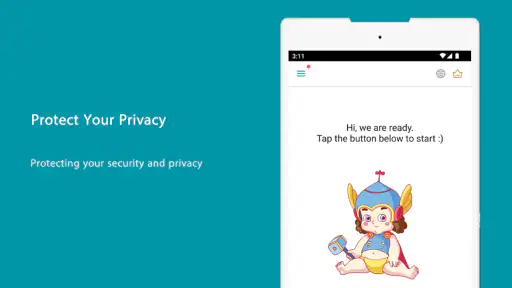
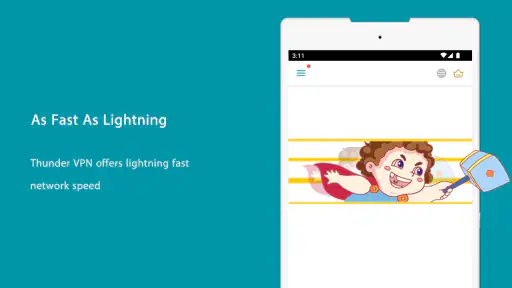
When you open the app, you’re greeted by a clean and straightforward interface. It’s not cluttered with unnecessary features, which is a relief. Just a big power button to connect, and you’re off. Honestly, this simplicity is a huge plus for anyone, especially those who aren’t tech-savvy.
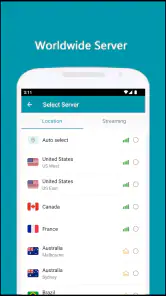
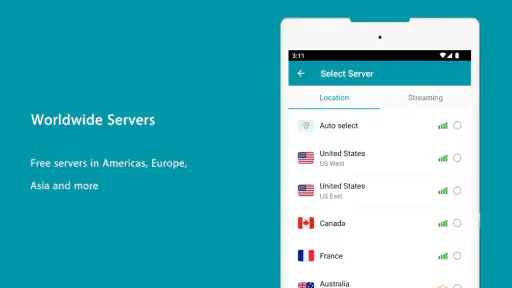
The app also offers a list of servers to choose from, scattered across different countries. Switching between them is as easy as pie. Plus, the connection speed? Lightning fast, just like the name suggests. I didn’t experience any significant lags, even when streaming high-quality video.
Security Features
Now, let’s talk security because, let’s face it, that’s the whole reason you’re considering a VPN. Thunder VPN promises military-grade encryption to keep your data safe from prying eyes. While I couldn’t exactly test the encryption strength myself, the app reassures users that their information remains private.
One thing to note, though, is that Thunder VPN doesn’t require you to register or log in, which means it’s not collecting personal information. However, it’s always wise to dive into the privacy policy, just to be sure you’re comfortable with what data might be accessed.
Performance and Speed
In terms of performance, Thunder VPN holds its own. I tested it under various conditions, from simple browsing to streaming videos. The connection remained stable, and the speeds were impressive. It’s not quite the same as your regular internet speed, but it’s pretty close.
What’s more, the app doesn’t seem to drain my phone’s battery excessively, even after a few hours of use. That’s a big win in my book, especially for those who are constantly on the move and need to conserve battery life.
Free vs. Premium
Now, let’s address the elephant in the room: is it worth going premium? Thunder VPN offers a free version which is surprisingly robust. However, if you’re someone who needs to bypass more sophisticated firewalls or require faster speeds consistently, the premium version might be worth considering.
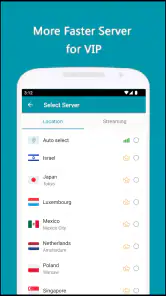
The premium service offers more server options and potentially faster speeds. But, for casual users, the free version does a commendable job, making it an attractive option if you want to dip your toes into the VPN world without spending a dime.
Final Thoughts
So, is Thunder VPN worth your time? I’d say yes. It’s user-friendly, provides quick connections, and offers a level of security that is reassuring for most users. Whether you’re a VPN newbie or a seasoned pro, it’s definitely worth checking out.
However, as with any app, it’s essential to dig into the details that matter to you. Read through the policies, test the speeds, and assess if the free version meets your needs before making any commitments.
For the privacy-conscious digital wanderer, Thunder VPN is a handy tool to have in your pocket. So, why not give it a shot and see how it fits into your internet browsing life?
Make a low-stakes first test
Before relying on a VPN for a task that matters, I’d try it with ordinary browsing on the network where I expect to use it. Open a familiar page, switch between Wi-Fi and mobile data only when you can tolerate a brief interruption, and check whether the app shows an active connection afterward. This simple routine helps answer a practical question: does the connection behave reliably enough for your everyday use, rather than merely connecting once in ideal conditions?
I’d also test a second server location if the first feels slow or a site behaves differently than expected. That is not a promise that another location will fix the issue; it is a way to separate a local server problem from a problem with the website or network. If a service still refuses to work, I would not keep cycling through locations for a sensitive login. I’d switch to the direct connection or a provider better suited to that particular task.
Be clear about what “private” means to you
People often use “privacy” to mean several different things: reducing exposure on shared Wi-Fi, limiting what a network operator can see, or keeping activity from being associated with an account. A VPN can help with some network-level concerns, but it does not make the services you sign into forget who you are. I’d decide which concern matters most before choosing a provider, then read its policy with that specific question in mind instead of treating a security label as a complete answer.
For a family member who mainly wants a simple connection while browsing away from home, the low-effort setup may be the main benefit. For someone handling confidential client material, the decision is different: they should follow their employer’s approved security tools and rules rather than installing a consumer VPN as a substitute. That distinction is important even when an app is easy to use and popular, because convenience and suitability for sensitive work are not the same thing.
Choose the right alternative for the job
The usual alternatives fall into a few broad groups. A built-in network option may be enough for someone who only needs access to a workplace or home network, while a paid, configurable VPN may suit a person who wants detailed controls and a clearly explained privacy model. A browser’s private mode addresses a different concern altogether; it does not replace a VPN connection. I would compare these choices by the problem they solve, not assume that one category is automatically safer for every person.
Thunder VPN’s appeal is the short path from opening the app to trying a connection. That can be a sensible advantage for occasional use, especially if complex settings would stop you from using a VPN at all. The trade-off is that a simple workflow gives me fewer opportunities to tailor the connection. If I need a specific configuration, consistent access for work, or a provider whose policies I can assess in depth, I’d spend more time comparing alternatives before switching.
My recommendation in practice
I’d consider Thunder VPN for casual, low-stakes browsing when a quick mobile connection is the priority and I am comfortable checking the policy before making it part of a routine. I would start with a brief test, avoid assuming that a connection survives every network change, and keep account security habits in place. Those steps make it easier to judge the app on the job I actually need it to do.
I’d skip it as my default choice if I needed a documented solution for confidential work, dependable access to a particular streaming service, or extensive control over connection behavior. In those cases, a more specialized option may be worth the extra setup and cost, provided its policies and features suit the need. My overall view is that this is an approachable entry point, not a universal privacy guarantee: use it where its simplicity helps, and choose a more suitable tool when the stakes or requirements are higher.
Thunder VPN - Fast, Safe VPN Frequently Asked Questions
Can Thunder VPN help when I use public Wi-Fi?
A VPN can be useful when you connect to public Wi-Fi because it routes your internet traffic through a VPN connection rather than leaving it exposed in the same way as an unprotected connection. Thunder VPN is designed to provide an additional layer of privacy while using mobile internet. It is still sensible to use secure websites and take care with sensitive account details.
Is Thunder VPN suitable for streaming or accessing websites while traveling?
Thunder VPN’s description emphasizes connecting to the world quickly, which may appeal if you want to use a VPN while browsing away from home. Whether a particular website or streaming service works as expected can depend on its own access rules and your network conditions. Consider checking the service’s terms and local requirements before using a VPN to reach its content.
What devices can I use Thunder VPN on, and what system version is required?
Thunder VPN is a mobile VPN app available on Android and iOS, so it can suit people who want protection while browsing on a phone or tablet. On Android, the app requires version 6.0 or later. It is listed in the Google Play Store and Apple’s App Store, making it straightforward to find on either platform.
Who makes Thunder VPN, and is it intended for general users?
Thunder VPN is developed by Secure Signal Inc. and is categorized as a Tools app. Its content rating is Everyone, so its audience is broad rather than limited to adults. The app is built around connecting through a VPN, which may be useful when you want an additional layer of privacy while using mobile internet.
What platforms is Thunder VPN available on?
Thunder VPN is available for both Android and iOS devices. Users can download the app from the Google Play Store or Apple’s App Store. It's designed to offer a seamless experience across different mobile devices, ensuring that you can stay secure and private while browsing on the go.
Pros
- Fast connection speeds across servers.
- User-friendly interface for easy navigation.
- No registration required for use.
- Unlimited bandwidth for all users.
- Supports multiple devices simultaneously.
Cons
- Contains ads that can be intrusive.
- Limited server locations compared to others.
- May slow down during peak times.
- No advanced features for tech-savvy users.
- Lacks a kill switch for added security.
- Category
- Tools
- Version
- 5.4.1









