Secure VPN-Safer Internet
- 61.93K
- 4.7
- Installs
- 100.00M
- Price
- Free

Screenshots
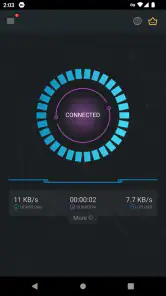
Analysis by Reviewed
When I weigh a VPN, I care less about a promise of effortless privacy than about what I can actually verify and control. Secure VPN-Safer Internet is a free tools app from Secure Signal Inc., and its large audience—over 100 million installs and a 4.7 average from around 2.3 million ratings—makes it easy to find, but popularity alone doesn’t tell me how a service handles sensitive traffic. I’d treat it as a convenient connection tool, not as proof that every privacy concern has been solved.
Popularity is not the same as proof
A VPN asks me to route traffic through a service, so I think about trust before convenience. A sizeable audience can tell me that many people have installed an app, but it cannot by itself establish what information the service handles or what protections are in place. I would make that distinction especially carefully with any tool used for work, financial accounts, or personal messages.
Before relying on a VPN, I look for clear explanations of its data practices and the choices it gives users. I also pay attention to what appears during setup and while connecting, rather than treating a reassuring name or an easy interface as evidence. A useful privacy habit is to separate what an app visibly lets me do from what I would need documented information to trust.
What I would check before connecting
A VPN sits between a device and the sites or services it contacts, so I would pause before granting any permission or accepting any prompt. Read the wording shown on your own device, and consider whether the requested access makes sense for the task. I wouldn’t assume that an app is safe simply because it is easy to use, nor would I treat a privacy claim as a substitute for understanding the choices presented in the app and its store information.
That caution matters most when a connection could expose something important: signing in to a bank, handling work documents, or entering account recovery details. My practical rule is to avoid doing high-stakes tasks on unfamiliar networks unless I have a reason to trust the VPN and understand the service’s data practices. If I can’t establish that confidence, I’d wait for a trusted network instead of relying on a reassuring interface.
Where a VPN helps—and where it doesn’t
In everyday use, I’d consider a VPN when connecting through public Wi-Fi at a café, hotel, or airport, especially if I need a basic layer between my device and that local network. I would still use secure sites, strong account passwords, and multi-factor authentication where available. A VPN does not make a phishing page legitimate, prevent every kind of tracking, or protect an account after I hand over my login details.
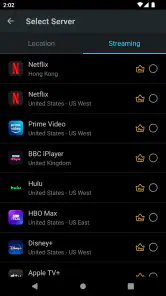
It’s also worth separating location changes from privacy. A different apparent location may help with some access situations, but services can block VPN traffic or apply their own regional rules. I wouldn’t plan a work call, payment, or time-sensitive stream around a location change working every time. For privacy-focused users who want detailed control or independently documented practices, a paid VPN with clear technical and policy information may be a better fit; for a one-tap connection, a simpler app can feel more approachable.
More From Our News Desk

Weather by Xiaomi Review: Clear at a Glance, Less Clear Up Close

X Under Pressure: Can It Recover When Posting Goes Wrong?

Clash of Clans Is Won Between the Battles

Android Auto Makes the Case for Quieter Car Software

MobiOffice: Transforming Mobile Productivity with Seamless Integration

EA SPORTS FC™ Mobile Soccer: Redefining Mobile Sports Gaming
Using the app in ordinary routines
For me, the practical question is not whether a VPN sounds reassuring, but whether it fits the moments when I need one without creating new problems. A travel day, a shared network, or a quick search in a café can make a VPN useful. A trusted home connection and a service that rejects VPN traffic can make it unnecessary. Thinking through those situations before switching on protection helps me avoid treating a VPN as an automatic answer to every online risk.
Getting Started with Ease
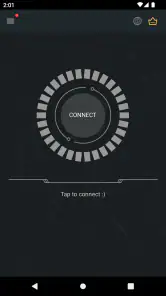
First things first, the installation process is as smooth as butter. You can find Secure VPN-Safer Internet on both Android and iOS platforms, making it accessible no matter your device preference. Once you download and fire it up, the app greets you with a clean and intuitive interface that doesn’t require a degree in rocket science to navigate. I was up and running in less than a minute, which is quite impressive!
That low-friction start is helpful if you have never used a VPN and do not want to work through a complicated setup before getting online. I would still take a moment to read each prompt rather than tapping through automatically. The first connection is a good time to notice what the app asks me to approve and what choices I can make, because those are the user-facing details I can assess directly.
Features that Stand Out
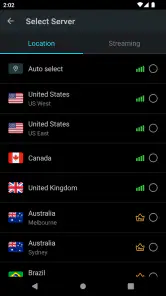
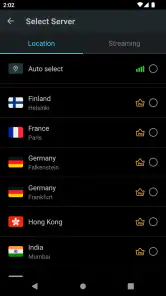
Now, let’s talk features. This app offers a range of servers across various countries, allowing you to virtually teleport your location. Whether you want to access content that’s geo-restricted or simply browse anonymously, the choice is yours. What I found particularly cool is the app’s ability to maintain high-speed connections even when you switch between servers. There’s nothing more satisfying than streaming your favorite shows without any pesky buffering.
Server choice is best treated as a practical adjustment, not a promise that every location will work equally well for every task. If a page or app behaves strangely, I would try a nearby option before cycling through distant choices. I would also avoid making an urgent booking or payment depend on a location switch: a service can respond differently when it detects a VPN, and the app cannot control the rules of the site I am visiting.
Another feather in its cap is the no-log policy. In a world where data privacy is paramount, knowing that your online activities aren’t being tracked is a huge relief. Couple that with strong encryption standards, and you’ve got yourself a fortress protecting your sensitive information. It’s like having your personal bodyguard in the digital realm.
Even with privacy features, I would not treat any VPN as a substitute for careful account security. I would keep multi-factor authentication enabled where I can, avoid unfamiliar login pages, and refrain from sharing sensitive information just because a VPN is active. That distinction is especially useful when travelling: the VPN may change how traffic is routed, but it does not validate the identity of a website or stop me from approving a fraudulent request.
User Experience and Performance
Let’s chat about user experience. One of the standout aspects is its simplicity. Even if you’re not tech-savvy, the app’s straightforward design ensures that you won’t get lost in a maze of options. Everything you need is right at your fingertips. And in terms of performance, I was pleasantly surprised. The app consistently delivered stable connections without noticeable dips in speed, regardless of the server I connected to.
My advice is to judge performance in the setting where you actually plan to use it. A connection that feels fine on a strong home network may behave differently on crowded public Wi-Fi or a mobile connection. If speed matters for a particular task, I would test it ahead of time and compare a nearby server with my normal connection. That quick check is more useful than assuming the same result everywhere.
Battery consumption is also something worth mentioning. VPN apps are notorious for draining battery life, but Secure VPN-Safer Internet seems to have cracked the code on this one. It’s optimized to ensure your device doesn’t conk out halfway through your browsing session, which is a win in my book.
I would still decide deliberately when to leave a VPN connected. Keeping it on can be convenient during a long stretch of unfamiliar networks, while switching it off when I no longer need it may reduce friction with services that object to VPN traffic. On a day when battery life matters, I would also pay attention to how the phone behaves during my own routine instead of assuming every device and network will feel identical.
Choosing it for your routine
For a realistic weekday use, imagine checking messages and looking up a train change on café Wi-Fi before heading to work. I’d connect before opening anything personal, then disconnect when I’m back on a network I trust if I no longer need the tunnel. That small habit avoids leaving a VPN running through every app by default, which can matter when a service refuses a VPN connection or a location-sensitive feature behaves unexpectedly.
A similar approach works on a short trip: I would connect before browsing on a hotel network, then test navigation, messaging, and any booking service I expect to use. If something stops loading, I would first check whether the VPN is the cause rather than repeatedly changing settings or assuming the site is down. For a work call or a purchase with a deadline, I would have a backup connection plan instead of discovering a compatibility problem at the last minute.
There is a trade-off to the one-tap approach: a simple interface is friendly, but it may not satisfy someone who wants to inspect detailed connection behavior or tune advanced settings. If your priority is uncomplicated browsing on the go, that simplicity is useful. If you need a VPN for sensitive professional work, strict privacy requirements, or carefully managed network rules, compare providers on their published policies and controls before choosing; convenience should not be the only deciding factor.
Compared with leaving a phone on its usual connection, a VPN adds a layer between the device and the local network, but it also routes traffic through the VPN service and can trigger extra sign-in checks. Compared with a more configurable paid provider, a simpler tool may be easier to start using but offer less room for a person to evaluate or tailor the setup. I would choose based on the job: casual protection while travelling is different from a workplace requirement or a privacy plan that needs detailed, documented controls.
Plans, compatibility, and practical limits
The app is free to install and is rated for Everyone, with optional in-app purchases ranging from $1.99 to $59.99 per item. I’d check the purchase screen carefully before confirming anything, especially if I only want occasional protection; the free starting point does not mean every option or use is necessarily free. Secure Signal Inc. released it on March 16, 2018, and version 4.3.10 supports Android 5.0 and later, which helps readers with older Android devices judge basic compatibility before installing.
Its audience is substantial, with around 62,000 written reviews alongside those ratings. I see that as useful context for a prospective user, not as a substitute for deciding whether the app’s choices suit their needs. The right test is personal and concrete: install it only if the permissions and purchase prompts feel appropriate, try a low-stakes connection, and see whether the services you rely on still work as expected.
If a connection seems slow, I’d first try a nearby server rather than repeatedly hopping between distant locations: distance and the network you’re already using can affect the experience. I’d also test the apps I rely on before a trip, not while standing at an airport gate with a time-sensitive task. That is a modest but useful check, because VPNs can sometimes interfere with sign-ins, streaming, or services that flag unusual locations.
That test can be simple: connect, open the everyday apps you need, and note whether they ask you to verify your identity again or refuse to load. If they do, I would decide whether the VPN’s benefit is worth that friction for the specific activity. For banking, work access, and account recovery, I would follow the organisation’s own security guidance rather than assuming a consumer VPN is the preferred route.
Who will find it useful
I can see this app suiting someone who wants a straightforward way to try a VPN for routine browsing, particularly when they often use cafés, hotels, or other shared networks and do not want a complex configuration process. Its free entry point also makes it easier to assess whether a VPN belongs in a person’s habits before paying for a different service. The main benefit for that user is approachability, not a guarantee of privacy in every situation.
I would steer a different user toward a more thoroughly documented or configurable option: someone with strict workplace requirements, a need to compare technical settings, or a low tolerance for interruptions to essential services. A person who only wants to get around a single site’s regional restrictions should also check that site’s rules and be ready for access to fail. In both cases, the deciding factor is not how quickly the VPN connects, but whether its limits match the task.
Final Thoughts
So, is Secure VPN-Safer Internet worth your time and data? Absolutely! It’s a reliable companion in the quest for privacy and unrestricted internet access. Whether you’re a frequent traveler needing to bypass censorship or someone who values their online anonymity, this app has got you covered. With its robust features, user-friendly interface, and commendable performance, it’s a solid pick in the VPN market.
To sum it up, if you’re on the lookout for a VPN that blends security with ease of use, look no further. Secure VPN-Safer Internet ticks all the right boxes and then some. So, why not give it a whirl and see how it transforms your internet experience?
My cautious recommendation is to try it for low-risk browsing first, then decide whether its straightforward setup and available choices suit your needs. I’d skip it if I needed guarantees beyond what I can personally verify, or if a VPN routinely breaks the services I depend on. For occasional public-network use, the approachable design may be enough; for sensitive work or a strict privacy checklist, I’d choose a provider whose documented controls I can evaluate in detail.
Secure VPN-Safer Internet Frequently Asked Questions
Is Secure VPN safe to download?
Secure VPN is a Tools app developed by Secure Signal Inc. and is rated for Everyone. As with any app, download it from the official store for your device and check that the developer name matches before installing. A VPN can help protect the connection between your device and the internet, but it is still sensible to review the app’s permissions and privacy options.
What does Secure VPN cost, and are there in-app purchases?
Secure VPN is free to download, and it also offers in-app purchases. Paid items range from $1.99 to $59.99 per item, so check the purchase details shown in the app before confirming anything. If you only want to try the basic experience, start with the free option and decide whether any paid features are useful to you.
Is Secure VPN suitable for beginners?
Secure VPN is designed as a straightforward VPN app, so it can be a practical starting point if you have not used this kind of tool before. A VPN works by routing your internet traffic through a remote server, and the app’s purpose is to provide a safer, more private connection. As with any VPN, review the connection and privacy options before relying on it for sensitive activity.
Which devices and operating systems can run Secure VPN?
Secure VPN is available for Android and iOS devices. On Android, the minimum operating system requirement is version 5.0, so check your device’s software version before downloading. The app is listed for users of all ages, but device compatibility still matters: make sure you choose the version intended for your platform and install it through the relevant app store.
What is Secure VPN and how does it work?
Secure VPN is a virtual private network application that encrypts your internet connection to provide a safer and more private online experience. By rerouting your internet traffic through secure servers, it helps protect your data from hackers and surveillance. It's an essential tool for maintaining privacy, especially when using public Wi-Fi networks.
Pros
- Fast connection speeds
- User-friendly interface
- No-log policy
- Multiple server locations
- Unlimited bandwidth
Cons
- Occasional connection drops
- Limited free version features
- Inconsistent customer support
- Ads in free version
- May slow down device
- Category
- Tools
- Version
- 4.3.10









