Threema. The Secure Messenger
- 728.00
- 3.8
- Installs
- 5.00M
- Price
- $7.49
Screenshots


Analysis by Reviewed
When a household uses one tablet at the kitchen table, messages can easily become mixed up with someone else’s plans or personal conversations. I like the idea of choosing a messenger around privacy rather than handing out a phone number by default, but I would still treat each person’s conversations as their own. Threema is best approached as a personal account, not a shared family inbox: a distinct identity makes it easier to know who is speaking and to keep boundaries clear.
Keep each person’s identity separate
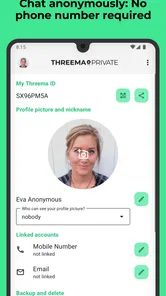
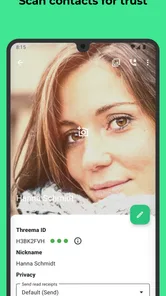
Registration with a Threema ID rather than a phone number can be useful when you want to connect without giving out that number. In practical terms, I’d share the ID only with people I actually want to reach me, and make sure a family member knows which contact belongs to whom. That small bit of care prevents the common shared-device muddle of replying from the wrong profile or assuming a message was meant for everyone.
Threema is a paid communication app from Threema GmbH. Its listed price is $7.49, so it asks for a purchase rather than relying on the familiar free-to-start approach of many mainstream messengers. That can be a sensible trade if privacy is a real priority, but it is also a hurdle if you are trying to persuade a whole household or group of friends to install another app. The service’s 5M+ installs and 4.0 average rating suggest it has an established audience, though neither figure guarantees that your contacts already use it.
How it fits a normal day
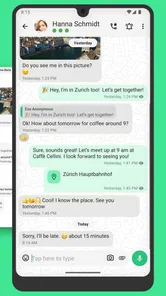
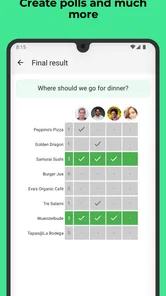
Picture a parent arranging a pickup with another adult: one person sends a short message, shares a location or file if needed, then uses a group chat to settle a change of plan. A poll can help when several people need to choose between options, without making the conversation disappear into a long chain of “which time works?” replies. For everyday coordination, I’d keep the group small and give it a clear purpose; that makes it easier to spot a useful update among casual chat.
A useful habit in that scenario is to put the decision itself in the group, not just the discussion that led to it. If a poll settles who can collect someone or which time works, I’d follow up with one clear message confirming the outcome. That way, a relative who opens the chat later does not have to infer the plan from scattered replies. It is a simple workflow rather than a special feature, but it makes group messaging more dependable.
The main practical question is not whether the app can send messages, but whether the people you need will join you there. WhatsApp, Signal and similar services often have an advantage simply because friends, relatives and clubs already use them. Threema’s phone-number-free identity is a meaningful distinction if you prefer not to connect a messenger to that number, but it does not remove the social friction of asking people to switch. I would choose it for a group that values the privacy trade-off and is willing to adopt it together, rather than as a universal replacement for every conversation.
Age, trust and household expectations
The content rating is Everyone, and the current version is 6.2.1; the app was released on May 27, 2013, and requires Android 7.0 or later. Those details help with basic compatibility and age context, but they do not make a messenger a substitute for family conversations about online contact. If a younger person uses it, I’d agree together on who may contact them and what they should do with an uncomfortable message. Privacy tools can support trust, but they cannot make good judgement automatic.
More From Our News Desk
 CapCut - Video Editor
CapCut Power User Guide: Build a Faster, More Repeatable Editing Workflow
CapCut rewards a little setup. Learn the settings, timeline habits, and feature combinations that turn quick phone edits into a repeatable, polished workflow.

 CarX Highway Racing
 Turns Traffic Gaps into Small Victories
A sharp, fast highway racer built around nerve, traffic gaps, and the pleasure of improving one more car. Its best runs are hard to leave unfinished.

 Pou
Pou’s Quiet Comeback Shows the Pull of Small Daily Routines
Pou is resurfacing because its small, low-pressure routines fit a shareable mobile era. The real test is whether care, customization, and mini-games can keep players coming back.

 SHEIN-Shopping Online
How SHEIN Made Browsing a Shopping Habit
SHEIN’s edge is not simply low prices. It is a fast, highly renewable stream of discovery that makes a quick browse feel like the start of a new wardrobe.

 Booking.com: Hotels & Travel
Booking.com Makes Booking Clear, but Finding Your Way Back Is Harder
A close look at how Booking.com guides travelers from a broad search to a confident reservation—and where its busy interface makes recovery harder than it should be.
 MX Player
 and the Small, Private Rituals of Mobile Viewing
A practical video player reveals how mobile viewing has become private, portable, and woven into the spare minutes of ordinary life.
Latest News



For a household, I would also decide in advance what “available” means. A message sent to a personal account is not automatically a family announcement, and a quiet reply should not be treated as proof that everyone has seen the plan. For urgent changes, agree on a separate way to get someone’s attention; for ordinary updates, let people answer when they can. Setting that expectation matters more than adding another chat group, especially when different people have different schedules.
Privacy at Its Core
One of the standout features of Threema is its commitment to privacy. Unlike many other messaging apps that require your phone number for registration, Threema allows you to stay completely anonymous. You get a unique Threema ID instead, which means you can chat away without ever revealing your personal details. How cool is that?
End-to-End Encryption
Now, let’s talk about security. Threema offers end-to-end encryption for all your messages, voice calls, and even files. This means that nobody, not even the folks at Threema, can read your chats. It’s all scrambled up in a way that only you and the person you’re communicating with can understand. So, whether you’re sharing sensitive information or just planning a surprise party, your secrets are safe.
That protection is most useful when both sides understand what it does and still use sensible habits. I would not treat an encrypted chat as a reason to send information carelessly, share a device unlocked, or assume that a recipient will keep a message private. Encryption addresses the path between participants; it does not control what someone does after reading a message. That distinction is worth keeping in mind when deciding whether a conversation belongs in any messenger at all.
Feature-Packed Messaging
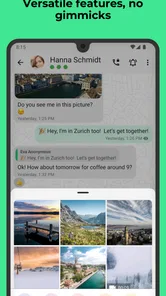
But hey, security doesn’t mean you have to compromise on features. Threema comes loaded with all the goodies you’d expect from a modern messaging app. You can send text and voice messages, make voice calls, share images and videos, and even create group chats. Plus, it’s got a nifty polling feature for when you need to make group decisions. It's like having a Swiss Army knife for your communication needs!
For a less obvious use, I’d keep a dedicated group for a recurring practical topic—say, coordinating a shared ride or deciding who can help with a one-off task—rather than adding every relative to one sprawling household chat. A poll works well when the choices are clear and limited; it is less helpful when the real issue needs a longer conversation or when someone’s availability is uncertain. In those cases, a direct exchange can avoid making a quick vote look more settled than it is.
File sharing can also make a focused group more useful than a stream of unrelated messages. A household might send a photo of a meeting point or share a document relevant to a specific plan, then keep the follow-up in that same conversation. I would still give the group an unmistakable name and remove it from everyday chatter once the task is finished, where appropriate. The aim is not to turn the messenger into a filing cabinet; it is to keep the coordination easy to find while it is active.
User-Friendly Interface
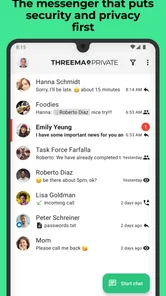
Now, I know what you’re thinking—"All these features must make it complicated to use." But fear not! Threema boasts a clean and intuitive interface that makes navigating the app a breeze. You don’t need to be a tech wizard to get the hang of it. Everything is laid out neatly, making it easy for anyone to use, from tech-savvy teens to tech-averse grandparents.
Even when an interface feels straightforward, the first few minutes are a good time to establish a personal routine. I’d check that I am messaging the intended person before sending anything private, especially after adding contacts or joining a group. If several household members use the same physical device, I would be extra cautious about who can see the screen and which account is active. The app’s ease of use cannot remove the need for those boundaries.
Cross-Platform Availability
And the cherry on top? Threema is available on both Android and iOS. So, no matter what device you’re on, you can enjoy secure messaging. Plus, they’ve got a web client, so you can keep the conversation going on your computer. It’s all about flexibility and ensuring you stay connected, securely.
That flexibility is useful when one person prefers a phone and another wants to answer from a computer, but I would not confuse a web option with a reason to share one identity among several people. A household needs to know whose conversation is open, who is expected to reply, and whether a message is personal or meant for a group. If a computer is used by multiple people, logging out or otherwise keeping access separate is a sensible part of the routine.
Where I’d draw the line
For a household, the useful distinction is between sharing access to a device and sharing an account. I would avoid treating one person’s Threema identity as the family contact point: replies, private chats and group membership can become confusing when several people speak under the same name. If you need a single place to post chores or meal plans, a shared calendar or household list may be clearer; Threema is better for actual conversations between identifiable people.
There is also a practical adoption question. A messenger is only convenient when the other side is reachable there, so I’d keep an existing channel for contacts who are not ready to install a paid app. For close friends, a private group or a small coordination circle can make the switch worthwhile. For a large club where members come and go, a widely used alternative may be easier to manage simply because fewer people need convincing.
The payment changes the decision in a way that a free download usually does not. Before asking a household or group to move, I’d check whether the people who matter are willing to pay and whether they have compatible devices. If only one or two people adopt it, it may become a second inbox rather than a replacement for the service everyone already checks. That is not a flaw in its privacy approach, but it is a real cost in attention and coordination.
Compared with Signal, WhatsApp and other familiar choices, the important difference for me is not a vague claim that one app is right for everyone. The better choice depends on what the group values. If phone-number separation and a paid model fit your priorities, Threema has a clear case. If broad reach with relatives, school contacts or a changing volunteer group matters more, the service those people already use may be more practical. I would not move every conversation at once; I’d start with one small group that has a genuine reason to prefer this setup.
It is also worth asking what kind of coordination you actually need. A messaging app is good for questions, quick updates and discussion, but a household that needs a durable chore rota or a persistent shared shopping list may be better served by a dedicated organizer. Threema can carry a conversation about those tasks, yet a chat thread is not the same as a structured record that everyone can scan at a glance. Choosing the right tool for the job avoids expecting a private messenger to solve every household-management problem.
My household verdict
I’d recommend Threema to adults and families who want a more private place for direct chats, calls, file sharing and small-group decisions, and who are comfortable paying for that choice. It is less suitable if your priority is getting every relative, school contact or community member onto one messenger with minimal effort. The best setup is simple: keep identities personal, agree on which groups are for which plans, and use a different tool when a shared household task needs a persistent checklist rather than a conversation.
For a family considering it, my practical starting point would be two or three adults who already agree on the reason for using it. Set up personal identities, exchange them deliberately, and use one small group for a real recurring need rather than creating a stack of chats before anyone has settled in. After that, see whether the conversation is genuinely easier to maintain. If most participants still rely on another app, keeping Threema for a narrower set of contacts is a reasonable outcome.
I would be more cautious about making it the default for a young person simply because the age rating is broad. A household should decide what kinds of contact are appropriate, how to handle strangers or uncomfortable messages, and what privacy means on a shared screen. Those are family choices, not settings I would assume a messenger can make on someone’s behalf. The same applies to older relatives: a short, patient introduction and a clear contact list are more helpful than asking them to learn several features at once.
In a world where data breaches and privacy concerns are all too common, having a messaging app like Threema gives you peace of mind. With its robust security features, user-friendly design, and cross-platform availability, it’s a solid choice for anyone looking to keep their conversations private. So, go ahead, give Threema a try and chat with confidence. Your secrets are yours to keep!
Threema. The Secure Messenger Frequently Asked Questions
Can I move my chats and contacts from another messenger to Threema?
If you are considering switching to Threema, think about how you want to bring your conversations and contacts into your new messaging routine. Your contacts will need to be reachable on Threema to chat with them there, so it can help to tell important people where to find you. The app’s privacy focus may be a reason to make the change, but the transition also depends on your contacts.
Can I use Threema for group conversations and sharing media?
Threema is designed as a messenger, so it can be considered for everyday communication as well as private conversations. The app emphasizes security and privacy, which may matter when discussing personal topics or sharing content with people you trust. Before choosing it as your main group chat, consider whether the people in those groups are willing to use Threema too.
Does Threema work on older phones?
Threema can run on devices with a compatible operating system, so check your phone’s software version before downloading. The current version is 6.2.1, and Android devices need version 7.0 or later. If your phone meets that requirement, you can consider whether the app’s privacy-focused approach and paid purchase fit what you want from a messenger.
Can I contact people who use other messaging apps?
Threema is a messenger for communicating with people who can be reached on Threema. Someone using another messaging app will need to join Threema if you want to chat with them there. That makes it worth considering how many of your regular contacts would be willing to use a separate service before you decide to download it.
Is Threema easy to get started with if I value privacy?
Threema’s privacy focus is central to its appeal, and its registration approach does not require a phone number or email address. Instead, the app creates a Threema ID that you can use to communicate. If you are new to privacy-focused messengers, consider whether you are comfortable asking your contacts to use the same app so you can stay in touch there.
Pros
- End-to-end encryption for all messages.
- No phone number required for registration.
- Anonymous and privacy-focused app.
- Regular security audits ensure safety.
- Supports voice and video calls securely.
Cons
- Limited user base compared to competitors.
- Not entirely free; requires a one-time fee.
- Fewer integrations with other apps.
- No cloud backup for messages.
- Occasional connectivity issues reported.