Synthesia
- 5.30K
- 3.8
- Installs
- 10.00M
- Price
- Free
Screenshots
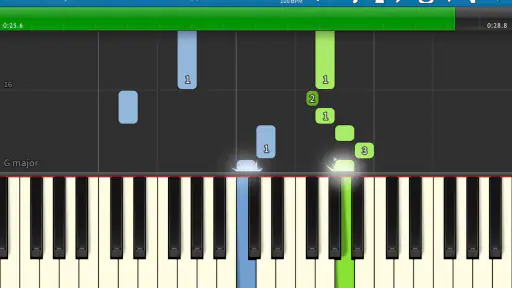
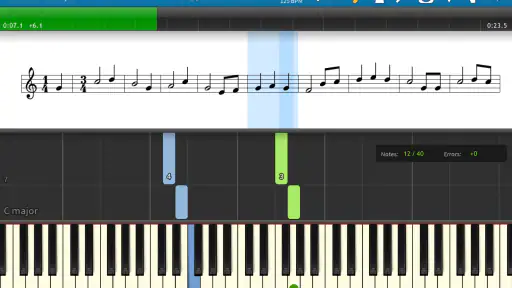
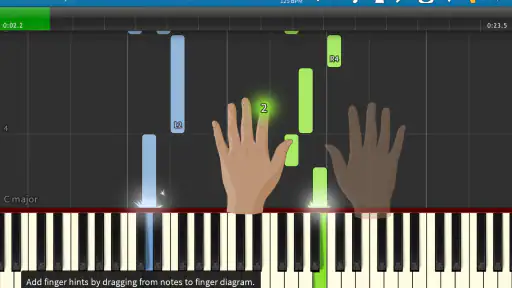
Analysis by Reviewed
I find the biggest hurdle with a piano-learning app is often not motivation but getting a useful practice session started. Synthesia is most rewarding when you already have access to a piano or keyboard and can try the notes as they appear; tapping along on a phone screen is a less convincing substitute for learning the feel of real keys. Before a first session, I’d make sure the instrument is ready and choose a short passage rather than expecting to master a whole song at once.
Small setup checks that make practice smoother
Give yourself a clear view of the falling notes and keep the phone or tablet somewhere you can glance at without twisting away from the keyboard. If the display feels crowded, a larger screen can make following the visual cues easier. I’d also start with a familiar, simple tune: that helps separate the challenge of reading the app’s prompts from the challenge of coordinating both hands.
When a passage feels too fast, resist the urge to replay the entire piece from the beginning. Work on the difficult few notes, then reconnect them to the surrounding phrase. This is a useful way to turn the app’s pause-and-practice approach into a focused routine instead of a stop-start test of patience.
Recovering when a session goes off track
If the notes stop making sense, first check whether you have selected a piece and section that match your current ability. A more demanding song can make a basic coordination problem look like a technical issue. I’d also restart the practice passage and pay attention to one hand at a time before trying to combine both; that simple reset can reveal whether the trouble is timing, note recognition, or just too much happening at once.
Importing a MIDI file can be useful when you want to work on a particular piece, but it also shifts some responsibility to you: the file needs to be a suitable musical version of what you want to learn. If the on-screen notes do not resemble the arrangement you expected, check the file itself before assuming the app is displaying the music incorrectly.
Know what the visual method can and cannot teach
The falling-note display is an inviting practice aid, but it is not the same as learning to read conventional notation or developing technique with a teacher. It can help you find notes and repeat a passage, while posture, fingering habits, touch, and musical expression still benefit from deliberate attention away from the screen. If your main goal is formal music reading or detailed feedback on technique, lessons or a notation-focused tool may be a better fit.
That distinction matters when comparing it with other music-learning options. Unlike a lesson video, Synthesia gives you a visual cue to follow while you play; unlike a traditional method book, it makes the notes move and can feel more immediately engaging. I see that as a different route into practice, not a replacement for every other way of learning piano.
More From Our News Desk

Weather by Xiaomi Review: Clear at a Glance, Less Clear Up Close

X Under Pressure: Can It Recover When Posting Goes Wrong?

Clash of Clans Is Won Between the Battles

Android Auto Makes the Case for Quieter Car Software

MobiOffice: Transforming Mobile Productivity with Seamless Integration

EA SPORTS FC™ Mobile Soccer: Redefining Mobile Sports Gaming
The Magic of Synthesia
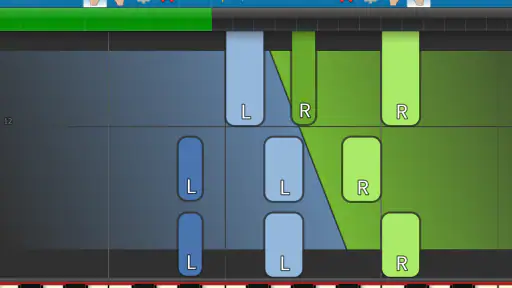
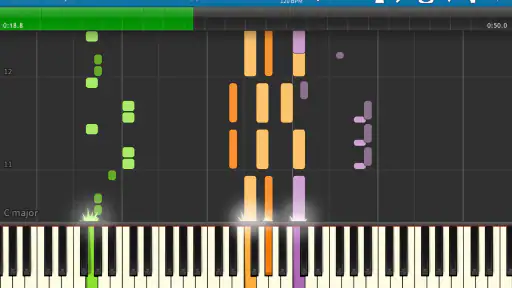
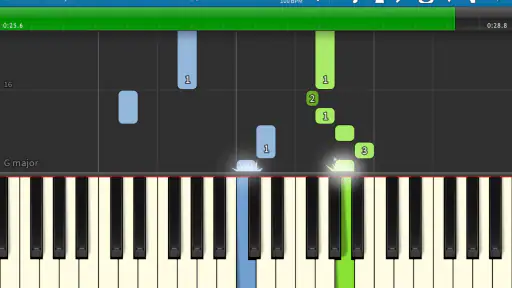
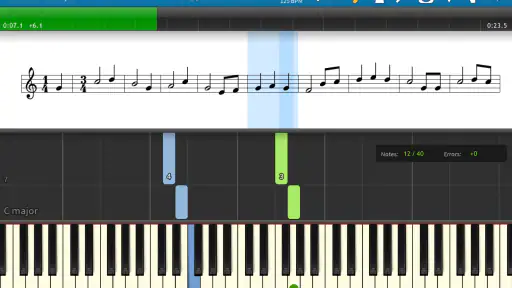
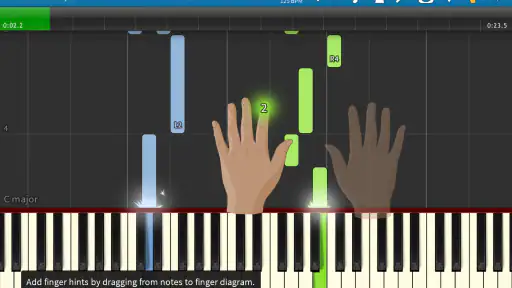
So, what is Synthesia all about? In simple terms, it's a piano learning app that uses a mesmerizing combination of falling notes and sheet music to guide you through songs. Think of it as a musical version of "Guitar Hero," but for the piano. The app is available for both Android and iOS, making it super accessible no matter what device you're on.
Features That Hit the Right Notes
One of the first things you'll notice is how user-friendly the app is. Whether you're a complete beginner or a seasoned pianist, Synthesia caters to all skill levels. You can start with simple tunes and gradually work your way up to more complex pieces. The app allows you to play at your own pace, pausing and practicing tricky sections until you get them right.
Another standout feature is the vast library of songs. We're talking everything from classical pieces to modern hits. You can even import your own MIDI files, which is a game-changer if you have specific songs in mind that you'd like to master.
Learning Made Fun and Interactive
What sets Synthesia apart is its interactive learning experience. As the notes cascade down your screen, you feel like you're playing a game rather than practicing an instrument. This gamified approach keeps you engaged and motivated, which is often the hardest part of learning anything new.
The app also tracks your progress, giving you a sense of accomplishment as you see your skills improve over time. It’s like having a personal piano teacher in your pocket, minus the pressure.
Who Will Get the Most from It?
I’d recommend it especially to self-directed learners who enjoy visual prompts, already have a keyboard available, and want a low-pressure way to build a regular habit. It also suits a lapsed player returning to familiar pieces: following notes can make it easier to get moving again than starting with a dense page of notation. For a realistic routine, I might use it after dinner to practise one short section, then stop once I can play it steadily rather than turning a casual session into a long screen-heavy chore.
On the other hand, it may frustrate someone who expects the app to choose every piece, explain music theory in depth, or correct posture and hand technique. A teacher is better for personal feedback, while a notation-first resource is more appropriate if reading sheet music is the central goal. Synthesia works best as a practice companion, not as a promise that visual guidance alone will make every part of piano playing effortless.
Cost, compatibility, and a practical verdict
Synthesia LLC’s music and audio app is free to download, with in-app purchases listed at $7.99 per item. It has an average rating of 3.8 from around 90,000 ratings, and more than 10 million installs. The app is rated for Everyone, with a minimum Android requirement of version 6.0; its current version is 10.10.6001. It was released on December 18, 2014, so it has been around long enough to become a familiar option for people seeking a visual way into piano practice.
For a free starting point, I’d try a short session before deciding whether its approach suits you. Keep the goal modest: learn a phrase, notice where your hands lose coordination, and repeat that section at a comfortable pace. If you want a relaxed, game-like prompt for practising songs, it is worth considering. If your priority is a structured course, formal notation, or hands-on instruction, I’d choose a tool built specifically for that need instead.
If you're anything like me, you've probably found yourself daydreaming about playing the piano like a pro, but then reality hits, and you realize that you don't have the time or patience to sit through endless lessons. Well, let me introduce you to Synthesia, the app that promises to turn your piano dreams into reality without the hassle of traditional lessons.
A grounded recommendation
I like the app most when I treat it as a clear visual guide rather than a complete piano course. Its strongest use is helping me approach songs in manageable pieces, with enough repetition to make practice feel approachable. The trade-off is that a moving note display can encourage copying without understanding why the music works, so I’d occasionally pause and identify the notes or rhythms rather than simply chasing the next cue.
That small habit makes the experience more useful: after following a phrase, try playing it once without watching the screen. If it falls apart, return to the cue and narrow the passage again. This lets you use the visual support without becoming dependent on it, and it gives you a more honest sense of what you have actually learned.
Choosing the right expectations
For someone choosing between this and a conventional lesson, I’d ask what gets them to the keyboard. If a teacher’s schedule or a book’s notation feels like a barrier, the visual format may help you begin. If you need someone to diagnose tense hands, inefficient fingering, or a persistent rhythm problem, a person who can observe you will offer something an app cannot. The two approaches can also complement each other: use the app to practise a passage, then bring specific questions to a lesson.
My practical verdict is that Synthesia is appealing for casual learners and returning players who want song-focused practice with visual guidance. It is less suitable as a stand-alone route to comprehensive musicianship. I’d start with a piece you genuinely want to play, keep sessions short enough to stay attentive, and judge progress by whether you can reproduce a phrase—not just whether you can follow the falling notes.
Making a song choice work for you
One decision that has a bigger effect than it first appears is which song to practise. A favourite track can make you eager to return, but the full arrangement may be far beyond your current coordination. I’d choose a passage with a recognizable melody and a manageable amount of movement, then treat the more ambitious sections as later goals. That keeps motivation tied to something personal without making every session feel like a struggle against the whole piece.
There is also a useful trade-off between learning a complete song and building a specific skill. If your hands keep losing their place when they move in opposite directions, a short passage that exposes that problem may teach you more than repeatedly playing an easy section you already know. Conversely, if you are returning to piano after a break, beginning with a familiar melody can help rebuild confidence before you tackle a technical challenge.
Use the screen as a guide, not a metronome for your attention
The visual stream is helpful because it shows where notes belong in relation to one another, but it can pull your eyes away from your hands. I’d glance at the display to understand the next phrase, then look down when you need to confirm where your fingers are landing. If you have to stare at the screen continuously, reduce the passage to a few notes and learn their positions before adding more. The point is to make the cue support your playing, not to make your eyes do all the work.
This is especially useful when practising with a tablet or phone placed beside a keyboard. Before starting, check that the device is stable and visible from a natural playing position. Reaching to adjust it mid-phrase interrupts concentration, and repeatedly turning your head can make a simple exercise feel awkward. A small setup adjustment is often more helpful than trying to push through a session where the display is hard to see.
What to expect from MIDI practice
A personal MIDI file can make practice feel much more relevant than choosing a song simply because it is available, but the file is not automatically a well-prepared lesson. Different arrangements of the same piece can vary in difficulty and detail. I’d listen to or inspect the musical version you intend to practise before loading it, and start with a section you can recognize. If the notes seem unexpectedly dense or do not match the version in your head, reassess the arrangement before blaming your playing.
That makes MIDI import a particularly good fit for someone who already knows what song they want and is comfortable choosing a suitable file. It is less convenient if you expect every personal selection to arrive in a beginner-friendly arrangement. In that case, a curated lesson course may save time by presenting material in a planned order, while Synthesia’s flexibility leaves more of the selection and difficulty judgment in your hands.
When a different learning tool makes more sense
For a learner who wants a step-by-step curriculum, explanations of rhythm and theory, and regular checks on technique, I would look beyond a song-following tool. A teacher can respond to how you play, while a course organized around notation can make reading music a central part of each session. Synthesia’s appeal is narrower and more immediate: it helps make the notes of a piece visible and gives you a way to practise them at your own pace.
That narrower focus is not a flaw for everyone. If your goal is to learn a melody for personal enjoyment, test whether piano practice fits your routine, or regain comfort with a keyboard, a visual guide may be more inviting than a formal course. If you are preparing for an exam, trying to develop reliable sight-reading, or looking for detailed correction, it should be a supplement rather than your main source of instruction.
A useful routine for busy days
On an ordinary evening, I’d set a modest target before opening the app: perhaps one phrase, one hand at a time, and then both hands together only if the first part feels secure. After a few attempts, I’d stop and try the phrase without following the display. That final check matters because getting through a passage while watching the notes is not quite the same as remembering and playing it independently.
If the phrase still breaks down, I would not automatically add more time. I’d identify the exact point where it goes wrong, make the passage smaller, and return to the larger section only when the troublesome transition feels steadier. This makes short practice more deliberate and helps avoid the familiar trap of replaying a whole song while making the same mistake at the same place.
Keeping expectations realistic
The app can make practice more approachable, but it cannot remove the ordinary work of learning an instrument. Repetition, attention to fingering, and listening to how the notes connect still matter. The experience is most satisfying when the moving cues help you get started, then gradually become less necessary as a phrase becomes familiar. If you enjoy visual learning and have a keyboard ready, I think that is a worthwhile way to build a habit; if you want a complete substitute for instruction, the limitations will become clear.
Ultimately, I’d choose it for focused, song-based practice rather than for a promise of instant fluency. Start with a piece you care about, make the first goal small, and use the screen to solve a specific musical problem. That approach gives the app a clear role alongside other learning methods and makes it easier to tell whether its visual style genuinely helps you.
Synthesia Frequently Asked Questions
Is Synthesia the same app as the AI avatar video platform?
No. Synthesia is a Music & Audio app for learning piano, not a text-to-video tool with AI presenters. Its store summary describes the experience as learning to play the piano using falling notes. If you are looking for video creation, check the app’s name and developer carefully before downloading so you choose the product you actually need.
What should I know about Synthesia before installing it?
Synthesia is a free piano-learning app developed by Synthesia LLC. It is rated for Everyone and is intended for devices running Android 6.0 or later. The app has an average rating of 3.8 from around 90,000 ratings, with more than 5,000 written reviews and over 10 million installs. These details can help you decide whether it is worth trying.
What is Synthesia and what can it be used for?
Synthesia is an innovative video creation platform that allows users to create professional-grade videos by converting text into speech with realistic AI avatars. It's commonly used for creating training videos, marketing content, and personalized video messages without the need for a camera or microphone. This makes it a versatile tool for businesses, educators, and content creators.
Is Synthesia user-friendly for beginners?
Yes, Synthesia is designed to be user-friendly, making it accessible for beginners and professionals alike. The platform offers an intuitive interface where users can easily input text, choose from a variety of avatars and languages, and generate videos in minutes. Additionally, it provides templates and tutorials to help new users quickly learn the ropes.
What languages does Synthesia support for video creation?
Synthesia supports over 60 languages, making it an ideal tool for global communication and diverse audiences. Users can select from multiple languages and accents for their AI avatars, ensuring that the content is not only accurate but also culturally relevant. This feature is particularly beneficial for multinational companies and educators.
Pros
- Easy-to-use interface
- Wide range of languages
- High-quality video output
- Customizable avatars
- Great customer support
Cons
- Limited free features
- Requires stable internet
- High subscription cost
- Occasional app crashes
- Limited avatar options
- Category
- Music & Audio
- Version
- 10.10.6001











