Starbucks
- 258.69K
- 4.8
- Installs
- 10.00M
- Price
- Free

Screenshots
Analysis by Reviewed
For a household where several people stop at Starbucks, the app can make a shared coffee run easier—but it works best when each person is clear about whose account and payment they are using. I find it most useful as a personal ordering and loyalty tool, not as a family account or a substitute for deciding together what everyone wants.
One trip, several people, different orders
A practical use is the weekday pickup: one person is already heading out, so others send their choices before the order is placed. Customization can help avoid a string of verbal instructions at the counter, especially when everyone wants a familiar drink. Still, the person submitting the order should check each item and its changes carefully. A saved favorite can speed up a repeat, but it is worth confirming the size and customizations rather than assuming an old choice suits today.
This is also where the app differs from simply walking in and ordering. In person, each person can explain their own preferences and pay separately; ordering through one phone can be quicker, but it puts the order and payment in one person’s hands. For a larger or changing group, collecting everyone’s choices first is less stressful than trying to edit a rushed order at the last moment.
Keep account and payment choices deliberate
Because an account can hold payment and rewards activity, I would avoid treating one signed-in profile as a casual household login. If different adults use the same device, agree who is placing the order and which account is active before paying. That small check helps prevent confusion about whose card is being used or where purchase activity and rewards are recorded. The app is free, but the coffee and food ordered through it are not made free by downloading it.
For a one-off shared order, a person can place it and let the others reimburse them separately if that is how the household handles expenses. For regular use, individual accounts give each person a clearer boundary around their own choices and rewards. There is no need to hand over account access just to coordinate a pickup; a shared message with the order details may be enough.
Who benefits—and when another option is better
I would recommend it most to people who already visit Starbucks, have repeat orders, and value placing an order before reaching the counter. It is less compelling if you only visit occasionally, prefer to choose after seeing the menu in person, or usually buy coffee from whichever independent café is nearby. A café’s own ordering system, where available, is naturally more useful for its regular customers; for a spontaneous stop, ordering face to face can also be simpler than setting up another account.
One useful habit is to treat the app as a way to prepare, not as a guarantee that every visit will be frictionless. Check the selected store and the order details before completing checkout, then follow the pickup instructions shown for that order. Store choice matters when you are coordinating for someone else: sending the location as well as the order helps avoid a perfectly correct drink being collected at the wrong place.
More From Our News Desk

Weather by Xiaomi Review: Clear at a Glance, Less Clear Up Close

X Under Pressure: Can It Recover When Posting Goes Wrong?

Clash of Clans Is Won Between the Battles

Android Auto Makes the Case for Quieter Car Software

MobiOffice: Transforming Mobile Productivity with Seamless Integration

EA SPORTS FC™ Mobile Soccer: Redefining Mobile Sports Gaming
Making a shared order less error-prone
When I’m coordinating several drinks, I’d ask everyone to send a complete choice in one message rather than build the order from scattered replies. That means the drink, size, and any changes arrive together, making it easier to compare the request with the items on screen. It also gives the person placing the order a moment to catch a mismatch before checkout, instead of trying to remember who asked for what while standing in a busy café.
For a household with different routines, it helps to agree on a simple cutoff: once the order is submitted, late changes become a separate decision rather than a reason to rush through edits. The app makes ordering convenient, but it cannot resolve a family’s last-minute coordination for you. If someone has a particular preference or needs to explain a request, they may be better off ordering in person rather than relying on another person to interpret it.
Another small but useful distinction is between sharing the order and sharing the device. A family member can send their choice without handling the phone or signing into the account. That keeps the task of entering payment and confirming the location with the person who has agreed to manage the purchase. It is a modest boundary, but it makes the app easier to use without turning one person’s account into a communal wallet.
Ever felt like you needed a little caffeinated motivation to jumpstart your day? Well, the Starbucks app might just be your new best friend! I recently took it for a spin, and let me tell you, it’s more than just a coffee shop in your pocket. Whether you're a coffee connoisseur or just someone who loves a good snack on the go, this app aims to elevate your Starbucks experience.
Seamless Ordering Experience
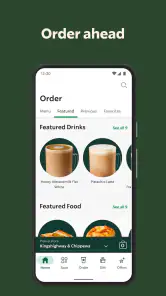
One of the standout features of the Starbucks app is the mobile ordering capability. Imagine skipping the line in the morning rush, grabbing your coffee, and getting on with your day. It’s a game-changer for anyone who’s ever been in a hurry. You can customize your order to the last pump of syrup, making sure your drink is just how you like it. Plus, the app remembers your favorite orders, which means less time deciding and more time sipping!
Rewards System: Sip, Score, Repeat
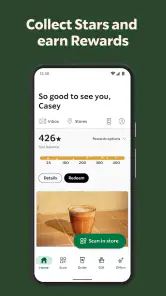
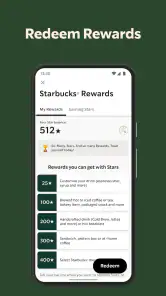
Let’s talk about the Starbucks Rewards program. It’s as if the app rewards you for your caffeine addiction. Every purchase earns you stars, and those stars can be redeemed for free drinks, food, and even select merchandise. It's a sweet deal that makes your daily coffee run feel a little more rewarding. Trust me, watching those stars add up is almost as satisfying as that first sip of a hot latte.
Rewards are most useful when they fit a habit you already have, rather than becoming a reason to add an unnecessary stop or extra item. I’d treat stars as a pleasant return on purchases I was already planning to make. That mindset keeps the program simple: check the rewards activity when it is relevant, but don’t let the promise of earning more turn a quick coffee run into a bigger spend than intended.
There is also a practical trade-off in putting orders and rewards through one account on a shared run. The account holder may receive the rewards activity even when several people contributed to the purchase. That can be perfectly fine if everyone agrees, but it is worth settling beforehand rather than assuming that a group order automatically divides its benefits. For households that value clear individual tracking, separate orders may be preferable to combining everything under one person’s profile.
Customization and Convenience
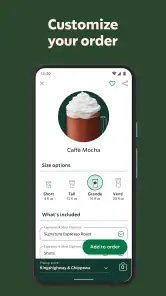
Another cool aspect is the level of customization the app offers. You can tweak your drink to fit your exact preferences. Want an extra shot of espresso or a specific type of milk? No problem. It's all just a tap away. Plus, the app’s user-friendly interface makes it super easy to navigate. The convenience of paying directly through the app is a bonus, ensuring a quick in-and-out experience at your local store.
The trade-off is that mobile ordering asks you to make decisions before you arrive. If you are unsure what you want, or need to clarify a request with a barista, ordering in person may be the better choice. I would also review customizations each time instead of relying on memory: a familiar drink is convenient, but a saved order is only useful when it still matches what you actually want.
That makes the app particularly handy for a predictable stop, such as picking up the same breakfast and drink on the way to work. It is less helpful when the visit is exploratory: browsing a menu, asking what suits your taste, or changing your mind after seeing the options are easier face to face. I would use saved choices as a starting point, not as an instruction to reorder without checking. A quick review of the item details is a sensible final step whenever the order matters to someone else, too.
Stay Updated with the Latest
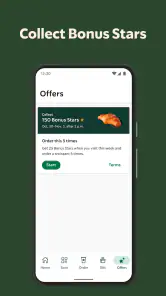
One of my favorite things about the app is how it keeps you in the loop with exclusive offers and new products. Whether it’s a new seasonal drink or a special promotion, you’ll be among the first to know. It’s like having a barista friend who always gives you the inside scoop. And, if you’re a fan of Starbucks merchandise, the app showcases the latest items available for purchase.
I would treat those updates as optional browsing rather than a reason to open the app every day. They can be useful if you enjoy trying changing menu choices or want to see what is available, but they are not the main reason I would keep it installed. If your goal is simply to get a regular order with as little fuss as possible, the ordering and payment tools matter more than promotional discovery.
Age, trust, and shared devices
The app is rated for Everyone, but that age label is not a reason to share an adult’s account or payment details with a child. For a younger family member, I would have an adult handle checkout and make sure the drink and store are right before the order goes through. Older household members can still help choose items without needing access to the account itself. That approach keeps the convenience while leaving payment and account decisions with the person responsible for them.
On a shared phone or tablet, I would make the account boundary explicit before anyone starts tapping through an order. The person using the device should know whether the active account belongs to them or another adult, and should avoid saving or changing payment details casually. If a device is passed around, it is safer to have the account holder take over for checkout than to rely on everyone remembering which profile is open. This is ordinary household care, not a special feature the app provides.
For a teenager who wants to help plan a pickup, the useful role may simply be choosing items and sending the details to the adult who will place the order. That keeps the coordination collaborative without giving account access by default. For younger children, an adult can make the final decision about the order and payment. The Everyone rating describes the app’s content suitability; it does not answer household questions about spending, permissions, or who is responsible for an account.
Starbucks Coffee Company develops this free Food & Drink app. It has a 4.8 average from around 1.5 million ratings, with over 10 million installs, and its current version is 6.111; it runs on OS 10 or later. Those figures suggest it has a large audience, but the practical question is whether you regularly use Starbucks. The app earns its place on my phone when mobile ordering, saved choices, and rewards make repeat visits easier—not simply because it is popular.
In everyday use, I would think of it as a Starbucks-specific tool rather than a general café finder or a way to compare every nearby coffee option. If you are already choosing Starbucks, it can bring ordering, payment, and rewards together in one place. If you are deciding among independent cafés or want one app to cover a range of local businesses, a broader search or map tool is a better fit. The best choice depends less on the number of features than on where you actually buy coffee.
There is a similar distinction between ordering ahead and paying at the counter. Paying in person is more flexible when your plans are uncertain, you want to ask a question, or you are choosing for a group whose requests are still changing. The app makes more sense when the choice is settled and the selected store is right. I would not use it just to avoid a brief conversation if that conversation is what will make the order accurate.
In conclusion, the Starbucks app is more than just a tool for ordering coffee. It's a comprehensive companion for any Starbucks enthusiast. With its seamless ordering, rewarding loyalty program, and constant updates, it truly enhances your coffee shop experience. So next time you’re heading out for your daily dose of java, give the app a try and see how it transforms your Starbucks visit. Cheers to that perfect cup of coffee, every single time!
A sensible household verdict
My recommendation is straightforward: use it when Starbucks is already part of your routine, and keep account access personal even if the coffee run is shared. For a household, one person can coordinate the order, double-check the store and customizations, and keep everyone informed about pickup. If those steps feel like more work than ordering at the counter, skip mobile ordering that day. Used with those boundaries, it is a convenient option rather than something every family member needs to manage.
For a simple routine, the app is easiest to justify when it saves a real decision or reduces a repeated bit of effort: placing a familiar order before leaving, keeping track of rewards, or collecting several settled requests in one trip. For an occasional visitor, the extra account and checkout steps may not repay themselves. A walk-in order remains a perfectly sensible alternative, especially when the visit is spontaneous or the group has not settled on what it wants.
My household verdict is therefore practical rather than universal. I would install it for the person who regularly chooses Starbucks and wants a convenient way to handle their own orders. I would not ask every family member to use the same login, nor would I rely on the app to coordinate a complicated group order without a quick check. Keep the account personal, share the order details clearly, and use the counter when conversation or flexibility matters more than advance preparation.
Starbucks Frequently Asked Questions
Can I use the Starbucks app without creating an account?
Some of the app’s core functions, such as placing an order, paying, managing a Starbucks Card, and tracking rewards, are tied to an account or registered card. The app is intended for customers who want to handle these tasks from their phone. If you prefer not to set up an account, you can still visit Starbucks and order in person, but you may not be able to use the app’s account-based features.
What can I do with the Starbucks app besides ordering drinks?
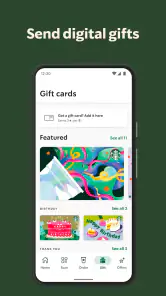
The app brings several Starbucks tasks together in one place. You can order drinks and food, customize selections, pay, reload a Starbucks Card, and track or redeem rewards. It can also help you find a store and view special offers. The main appeal is having ordering, payment, and rewards tools available from your phone rather than handling each step separately during a store visit.
Is the Starbucks app free to download, and what devices can run it?
The Starbucks app is free to download and is available for Android and iOS. It is a Food & Drink app from Starbucks Coffee Company, and its age rating is Everyone. Before installing, check that your device meets the minimum operating-system requirement of version 10. The app is designed for customers who want to order, pay, reload a Starbucks Card, and keep track of rewards from their phone.
What is the Starbucks app and how does it work?
The Starbucks app is a mobile application available for both Android and iOS devices that allows users to order and pay for their favorite Starbucks drinks and food items ahead of time. It offers features like mobile order and pay, store locator, and the ability to track and redeem rewards through the Starbucks Rewards program. Users can also customize their orders, reload their Starbucks Card, and receive special offers. It's a convenient way to enjoy your Starbucks experience with ease.
How can I earn and redeem rewards on the Starbucks app?
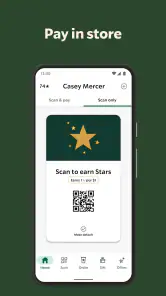
To earn rewards on the Starbucks app, you need to join the Starbucks Rewards program, which is free to sign up for. By making purchases using the app or a registered Starbucks Card, you earn stars for every dollar spent. These stars can be redeemed for free drinks, food items, and select merchandise. The app also sometimes offers bonus star opportunities and special promotions. Rewards can be easily redeemed in-store by scanning your app at checkout.
Pros
- User-friendly interface
- easy navigation.
- Rewards program offers great perks.
- Order ahead feature saves time.
- Customizable drink options.
- Frequent updates and improvements.
Cons
- Limited payment options available.
- Occasional app crashes reported.
- Requires internet to function.
- High data consumption on updates.
- Limited features without account.
- Category
- Food & Drink
- Version
- 6.111











