Starbucks México
- 309.00
- 3.7
- Installs
- 5.00M
- Price
- Free

Screenshots
Analysis by Reviewed
I like to think of the Starbucks México app less as a coffee shop in my pocket and more as a handy household tool for people who already visit Starbucks. It can help with choosing a familiar order, keeping track of Stars and paying, but it works best when each person is clear about whose account and balance they are using. That small distinction matters when a phone or coffee budget is shared.
A useful routine for shared coffee runs
Picture a weekday morning when one person is heading out and two people at home want drinks. The app can make it easier to settle the order before reaching the counter: agree on each drink, check the details, and have one person handle checkout. For a regular customer, reusing a familiar order can reduce the back-and-forth; for someone who rarely visits, ordering directly in person may be simpler than learning an app for a one-off stop.
The practical trade-off is that a shared phone does not automatically make a shared account convenient. A saved order or payment method may belong to the account holder, and rewards are tied to the account being used. I would decide whose account is active before placing a group order, rather than assume everyone’s purchases or preferences will stay separate.
Getting Started with Starbucks México
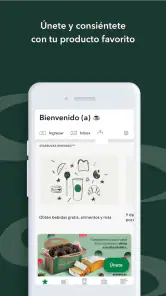
First things first, downloading the Starbucks México app was a breeze. Available on both Android and iOS, it's a quick install and you're ready to go. Once you're in, the app greets you with a clean and intuitive interface. It's like stepping into a digital version of your favorite local Starbucks.
Setting boundaries around accounts and payments
The app is free, and Starbucks Coffee Company is the developer. I’d treat setup as a personal account decision, especially on a device used by several people. Before adding funds or using an in-app payment option, make sure the person paying is comfortable with the account being used and knows which balance is involved. That avoids an awkward moment at the register and helps keep spending intentional.
If you’re setting it up for someone else, let them make their own choices about the account and payment details rather than casually handing over a phone that is already signed in. I also wouldn’t assume that a digital gift card, a stored balance and Stars are interchangeable: check the relevant screen before relying on one to cover a particular purchase. The app can simplify checkout, but it doesn’t remove the need to keep track of who is paying.
Features That Perk You Up
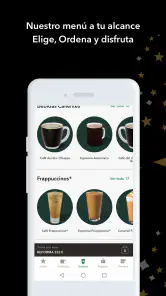
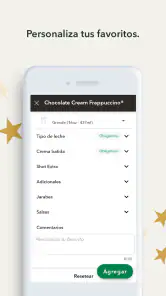
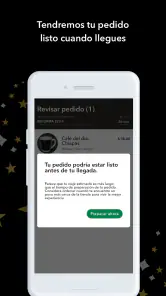
One of my favorite features is the ability to order ahead. Gone are the days of impatiently waiting in line when you're in a rush. With a few taps, you can customize your order exactly how you like it, and it'll be waiting for you when you arrive. Plus, the app keeps track of your previous orders, which is perfect if you're a creature of habit like me.
More From Our News Desk

Weather by Xiaomi Review: Clear at a Glance, Less Clear Up Close

X Under Pressure: Can It Recover When Posting Goes Wrong?

Clash of Clans Is Won Between the Battles

Android Auto Makes the Case for Quieter Car Software

MobiOffice: Transforming Mobile Productivity with Seamless Integration

EA SPORTS FC™ Mobile Soccer: Redefining Mobile Sports Gaming
That history is most useful as a shortcut, not as a reason to stop checking the order. When I’m buying for someone else, I’d confirm drink size and customizations before reordering; a remembered choice can save time, but it may not match what they want today. For a household with different tastes, the app is better for coordinating a specific run than for assuming one person’s past preferences speak for everyone.
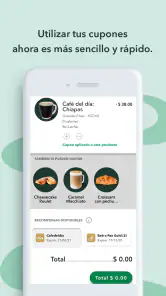
And let's not forget about the rewards program. Every coffee purchase brings you closer to earning free drinks and other delightful perks. It's a caffeine lover's dream come true. Plus, the app notifies you of any special promotions or discounts, so you're always in the loop.
Coordinating a stop without overcomplicating it
Stars make the app more appealing if Starbucks is already part of your routine; they are a less persuasive reason to choose it if you usually buy coffee elsewhere. With an average rating of 3.7 from around 70,000 ratings and over five million installs, it has a substantial audience, though that doesn’t mean every customer will find the workflow ideal. I’d use it for repeat visits and rewards tracking, while keeping another payment option available if the app isn’t the quickest choice on a particular stop.
For a shared morning run, one person can collect everyone’s choices first, then place the order and tell the group what was submitted. That simple check is especially useful when drinks have customizations. If the group is still deciding, ordering at the counter may be less stressful than trying to settle several preferences on one screen while in a hurry.
Making a planned order work in real life
I find the app most useful when the decision is already made: I know which Starbucks I’m visiting, I have a usual drink in mind, and I want to avoid sorting out every detail at the counter. It is less helpful as a tool for an unplanned coffee break when I’m still choosing what sounds good. In that situation, browsing a menu in person can be more comfortable than committing to a customized order on a phone.
A practical approach is to use the app before leaving, not while walking or driving. I would check the drink details, confirm the location, and then keep the phone accessible for the handoff or payment. That sequence matters for a group order: the person carrying the phone can focus on collecting the drinks rather than trying to resolve last-minute choices while others wait.
One small but useful habit is to repeat the submitted order to the group in plain language. “Two drinks, one with these changes, from this location” is a better confirmation than simply saying the order is done. It gives everyone a chance to catch a mistaken size or customization before the person heads out, without turning the app into a complicated household ordering system.
Finding Your Nearest Starbucks
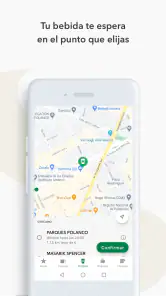
If you're like me and love trying out different Starbucks locations, the app's store locator is a lifesaver. It pinpoints your location and shows you all the nearby stores, complete with details on their amenities and opening hours. Whether you're traveling or just exploring your city, you'll never be far from your next cup of joy.
I’d still check the selected location before committing to an order, particularly when you’re away from your usual neighborhood. Choosing a nearby store is only useful if it fits the route and timing of your day. For someone who wants to compare independent cafés or browse a broad mix of restaurants, a general maps or dining app is a better starting point; this one is focused on Starbucks rather than the wider food-and-drink scene.
When another option is the better choice
Compared with ordering face to face, the app gives regular customers a way to prepare a familiar purchase and keep rewards activity close by. The counter has a different advantage: it is easier to ask a question, change your mind while ordering, or avoid signing into an account just to buy a drink. If I’m visiting a Starbucks only occasionally, that straightforward interaction can be more valuable than having an app ready.
Compared with general maps or restaurant-search apps, Starbucks México is narrower by design. It makes sense when Starbucks is the destination and you want its ordering and rewards tools; it is not my first choice when the real question is which café nearby has the right atmosphere, menu or convenience. I would choose the tool based on the decision I need to make, rather than expect one app to cover both jobs.
Age, trust, and everyday use
The app is rated for Everyone, which makes it broadly suitable to browse, but a payment account and purchases still call for a grown-up’s judgement when a child is using a shared device. I wouldn’t treat the age rating as a household spending setting or assume it creates separate family profiles. Keep account access and payment decisions with the person responsible for them, and make sure younger users understand that tapping through an order can lead to a real purchase.
The current version is 8.2.0, and the app is free to install. I see it as most worthwhile for people who regularly buy Starbucks in Mexico and want ordering, rewards and payment in one place. If you prefer cash, rarely visit, or want to compare many coffee shops before choosing, the usual in-person checkout or a general local-search app may suit you better.
Payment Made Easy
Another neat feature is the integrated payment system. You can load funds onto your Starbucks card through the app, making checkout a breeze. Just scan your phone at the register, and you're good to go. It's fast, convenient, and one less card to carry around in your wallet.
For a shared-device household, I’d be cautious about treating a loaded card as communal spending money. Agree on who adds funds and who can use them, and check the balance before relying on it for a group purchase. The convenience is real, but the best setup is the one where the account holder and the people ordering understand the same payment plan.
For those who love gifting, the app also allows you to send digital gift cards. Whether it's a birthday or just because, it's a thoughtful way to brighten someone's day with their favorite brew.
Keeping rewards useful rather than confusing
I’d think of Stars as an extra attached to purchases I would make anyway, not as a reason to stretch a coffee budget or place an order I do not really want. That keeps the rewards side enjoyable instead of turning it into a chore. When more than one person is involved, it also helps to agree whose account is being used before paying, since a group purchase does not automatically mean the rewards or account activity will be shared in the way everyone expects.
Promotions can add a reason to open the app before a visit, but I would check the terms shown for the offer and make sure the planned purchase fits. A promotion is only useful if it applies to what I actually intend to order. This is a better way to approach notifications than treating every alert as a prompt to buy something immediately.
Overall, the Starbucks México app is a delightful companion for any coffee enthusiast. It's packed with features that not only make getting your coffee fix easier but also more rewarding. So, if you're a fan of Starbucks and haven't tried the app yet, what are you waiting for? Dive in and let the coffee adventures begin!
Who will get the most from it?
I’d recommend it to a regular Starbucks customer who values repeat ordering and wants Stars and checkout close at hand. It is less compelling for someone who only wants to find the nearest coffee shop, prefers not to manage an account, or usually chooses whichever café is convenient. The app’s strongest case is not that it replaces every way of buying coffee; it’s that it can make a familiar Starbucks visit more organized.
It can also suit a household where one person already handles the coffee run and others occasionally send requests. The key is to keep the phone holder in a coordinating role, not to assume the app will sort out preferences, payment boundaries or who receives rewards. If each person wants a separate record of purchases, distinct account arrangements may matter more than the convenience of sharing one device.
A household verdict that depends on routine
My household verdict is positive with a little care: use it when one person is coordinating a planned stop, keep account and payment boundaries clear, and double-check the selected store and customized drinks. If those habits fit your routine, it can remove small hassles. If a shared account would cause confusion or you want broader café choice, ordering in person or using a general search tool is the simpler option.
Starbucks México is a focused Food & Drink app from Starbucks Coffee Company, with a 3.7 average across around 70,000 ratings and over five million installs. Those figures suggest plenty of people use it, but the right test for me is simpler: does it fit the way I already buy coffee? If the answer is yes, the combination of ordering, Stars and payment can be worthwhile. If not, there is no need to make a routine more complicated just to use an app.
Starbucks México Frequently Asked Questions
What kind of app is Starbucks México, and is it intended for customers in Mexico?
Starbucks México is a Food & Drink app from Starbucks Coffee Company, built around using Starbucks services in Mexico. Its store description highlights earning Stars with coffee purchases and earning rewards. If you regularly visit Starbucks and want to keep rewards and app-based ordering options together, it may be worth considering before your next visit.
Who developed Starbucks México, and when was it released?
Starbucks México was developed by Starbucks Coffee Company and was released on November 1, 2023. That background makes it the company’s own app rather than an independent ordering service. Its current version is 8.2.0, so checking that your device meets the operating-system requirement before downloading is a sensible first step.
Is Starbucks México free to download, and which devices can run it?
Starbucks México is a free Food & Drink app from Starbucks Coffee Company. Its current version is 8.2.0, and it requires Android 5.0 or later on Android devices. The app is rated Everyone, making it suitable for a general audience. Before installing, check that your device’s operating system meets the requirement and that you have room for the app.
What features does the Starbucks México app offer?
The Starbucks México app provides a range of convenient features including mobile ordering, where you can order and pay for your favorite drinks and food before arriving at the store to skip the line. It also allows you to locate nearby stores, track your Starbucks Rewards points, and receive exclusive offers and promotions directly through the app.
How can I earn and redeem Starbucks Rewards using the app?
Earning Starbucks Rewards is simple with the Starbucks México app. Every purchase made with a registered Starbucks Card or through the app earns you Stars, which accumulate towards free drinks and food. To redeem, just apply your Stars during checkout in-store or through the app. The app keeps track of your Stars and notifies you of your rewards and offers.
Pros
- User-friendly interface with easy navigation.
- Frequent updates with new features and improvements.
- Loyalty program offers great rewards.
- Secure payment options ensure data safety.
- Exclusive promotions for app users.
Cons
- Limited features compared to international version.
- Occasionally slow customer support response.
- Requires constant internet connection.
- Some features are region-locked.
- In-app notifications can be overwhelming.
- Category
- Food & Drink
- Version
- 8.2.0











