Spam Call Blocker for Android
- 3.52K
- 4.3
- Installs
- 1.00M
- Price
- Free

Screenshots

Analysis by Reviewed
Spam calls are especially disruptive when they arrive at the worst possible moment: during a work call, while you are caring for someone, or just as you have finally drifted off. I like the idea of a tool focused on that one irritation, but the real test is whether it still helps after the first burst of curiosity. Spam Call Blocker is a free Android communication app from Dingtone Communications Ltd, and its lasting value depends less on novelty than on whether its call screening fits naturally into your routine.
Why the first week can feel useful
At first, the appeal is easy to understand: you can check how the app handles incoming calls, decide whether to trust its warnings, and add numbers you already know you do not want to hear from again. Its custom blocklist is particularly practical for repeat nuisances, since it lets you take direct action instead of waiting for a caller to be identified as spam. Blocking hidden numbers may also suit someone who rarely expects legitimate calls from private numbers, though I would be cautious if work, healthcare, or family contacts sometimes call that way.
The app is rated for Everyone, has an average rating of 4.3 from around 20,000 ratings, and has passed one million installs. Those figures suggest it has found an audience, but they do not answer the more personal question: will it help with the calls that actually bother you? I would treat the first few days as a chance to see whether its warnings and your own blocking choices match your needs, rather than assuming every unfamiliar caller is unwanted.
Getting Started with Ease
The first thing I noticed about the Spam Call Blocker is how straightforward the installation process is. Within moments, I had it up and running, ready to safeguard my peace. The interface? Sleek and intuitive, making navigation a breeze even for the most tech-averse among us. It’s like the developers knew exactly what we were looking for – simplicity!
Features that Stand Out
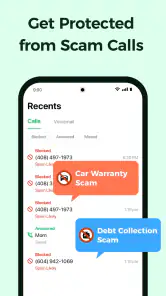
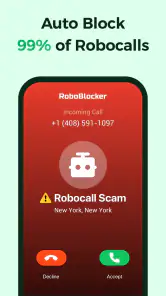
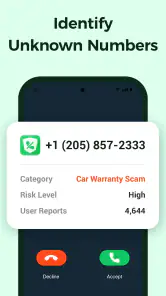
Once inside the app, you're greeted by a host of features that promise to keep those pesky spammers at bay. The real-time call identification feature is a game-changer. It identifies incoming calls and warns you if they’re potential spam. I found this particularly helpful, as it gives me the power to decide whether to answer or not. It’s like having a personal assistant screening your calls.
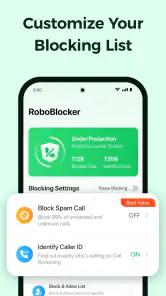
Another nifty feature is the custom blocklist. You can manually add numbers that you never want to hear from again. Trust me, once you start using it, you’ll wonder how you ever managed without it. There’s also an option to block calls from hidden numbers, which is a huge relief for those of us who dread unknown callers.
Making it work beyond the novelty
A useful habit is to review a call before blocking it, especially when a number is unfamiliar rather than clearly unwanted. If you are expecting a delivery, a clinic callback, or a call from a new client, a cautious approach can prevent an awkward missed connection. I would reserve the blocklist for numbers you recognize as repeat disturbances and use the warning as a prompt to make a decision, not as automatic proof that a caller is fraudulent.
You May Like

Clash of Clans Is Won Between the Battles

Android Auto Makes the Case for Quieter Car Software

MobiOffice: Transforming Mobile Productivity with Seamless Integration

EA SPORTS FC™ Mobile Soccer: Redefining Mobile Sports Gaming

How Microsoft OneDrive Became a Mobile Productivity Giant

How Google Translate Breaks Language Barriers Effortlessly
Picture a busy weekday: you are helping a customer, your phone rings from an unknown number, and you cannot safely answer. A warning can help you decide whether to let the call pass and check later, while a known nuisance number can be added to the blocklist when you have a moment. That small distinction is where screening tools are most useful: they reduce interruptions without asking you to treat every stranger as a threat.
Who benefits, and what to compare
This is most appealing if unwanted calls are a recurring problem and you want a dedicated place to manage your personal blocking decisions. If your main need is simply to silence unknown callers, your phone’s built-in call controls may be enough and may mean one less app to maintain. Likewise, anyone who depends on calls from new customers, patients, or service providers should be careful with broad blocking choices; missing an important call can cost more than answering an occasional nuisance.
Compared with relying only on a phone’s basic blocking tools, a dedicated caller-identification app can offer a more focused screening experience, while the built-in option may be simpler and less dependent on an extra app. I would choose based on the problem: use this app if its warnings and blocklist add value to your day, but stick with the phone’s controls if you only need to silence a few known numbers. It is not a substitute for judgment, and I would not assume that every warning guarantees a scam or that every legitimate call will be recognized.
Performance and Reliability
I’ve been using the app for a couple of weeks now, and it’s been rock solid in terms of performance. No crashes, no glitches – just seamless operation. The app runs quietly in the background, without hogging system resources or draining the battery. It’s like it knows not to be a bother, precisely what you want from an app designed to reduce disruptions!
Keeping the routine low-effort
Long-term usefulness comes down to a simple maintenance habit: add only numbers you are confident you want blocked, and occasionally reconsider entries if your circumstances change. A former nuisance contact could become relevant, while a private-number block could interfere with an expected callback. If the app stops earning its place because you rarely receive unwanted calls, removing it and using your phone’s built-in controls is a reasonable choice rather than keeping another tool out of habit.
The app is free to install, with in-app purchases ranging from $1.99 to $59.99 per item. I would start with the free experience and decide whether it solves a real, repeated annoyance before spending anything. Its current version is 3.8.4 and it requires Android 7.0 or later, so it is aimed at Android users with a compatible device; it is not an option for someone looking for an iPhone app.
When a dedicated blocker earns its place
The clearest reason to keep this app is not that it can make every incoming call harmless; it is that it gives you a repeatable way to handle a pattern. If the same sorts of unwanted calls keep interrupting your day, a dedicated place to review warnings and maintain a personal list can be more convenient than repeatedly blocking numbers one by one in the phone app. That distinction matters most for people who receive enough nuisance calls for the task to feel ongoing, rather than for someone who only needs to block a single persistent caller.
I would also think about how you use your number. Someone who gives it to customers, contractors, or prospective employers may hear from unfamiliar people for perfectly ordinary reasons. For that person, screening is useful as a pause for judgment, but aggressive blocking could work against them. By contrast, if most important contacts are already saved and unknown numbers rarely have a legitimate reason to reach you, the app’s warnings and blocklist may fit more naturally into your day.
A practical routine for busy days
Here is a realistic way I would use it: during a shift, I might be unable to pick up while assisting someone, and an unrecognized call comes in. Rather than answering automatically or immediately blocking the number, I can take the warning into account, let the call pass if the moment is unsuitable, and decide later whether it was a repeat nuisance. If I am waiting for a delivery or a medical callback, I would keep the threshold for blocking higher and check missed calls carefully. The app is most helpful when it supports that small decision process, not when it replaces it.
One practical tip is to separate certainty from suspicion. A number you recognize as a recurring unwanted caller is a good candidate for the manual list; an unfamiliar number that appears once is not necessarily one. Another is to reconsider broad rules when your circumstances change, such as starting a job that relies on calls from new people or expecting a private callback. Those checks take little effort, but they reduce the chance that a tool intended to protect your attention becomes a reason to miss an important conversation.
What to expect from caller warnings
A warning is best treated as useful context, not a verdict. Caller identification can help you make a more informed choice, but I would still use common sense when deciding whether to answer, return a call, or share information. If a caller claims to represent an organization, a cautious response is to contact that organization through a number you already trust rather than relying on the incoming call alone. The blocker can help you manage interruptions; it cannot make every caller’s intentions certain.
That limitation is also why I would not judge the app only by whether it catches every unwanted call. A screening tool has to fit the calls you actually receive, and even a sensible warning can be inconvenient if it makes you second-guess legitimate contacts. I would give it a short trial during a typical week, notice whether the warnings are relevant to your real call patterns, and then adjust your use of the blocklist. If the app adds more hesitation than relief, the simpler option may be better.
How it compares with simpler alternatives
Your Android phone’s own call controls are the natural alternative. They are a sensible starting point if you want to block a known number or reduce calls from people you do not recognize, and they keep the task within tools you already use. This app is more appealing when you want a focused screening layer and a custom list together. I would not install a separate utility just because it sounds more specialized; I would keep it only if its caller warnings make decisions easier or its list is genuinely more useful in your routine.
There is a trade-off between stronger filtering and availability. A broad approach can bring quiet, but it can also make it harder for new contacts to reach you. A narrow approach preserves more incoming calls but asks you to make decisions more often. For people who rely on occasional calls from unfamiliar numbers, I favor the narrow approach and careful review. For someone whose phone is repeatedly interrupted by obvious nuisance calls, firmer blocking may feel worthwhile, provided they remain comfortable with what it could screen out.
Costs, compatibility, and staying power
Because the app is free to install, trying it does not require an upfront purchase, but the available in-app purchases mean I would not assume every option is included at no cost. I would first decide whether the basic experience handles the problem that brought me here. If it does, there is no need to spend simply because a purchase is offered; if it does not, I would compare the added value with the phone’s built-in controls before paying. That makes the choice practical rather than driven by curiosity.
Compatibility is straightforward for Android users: version 3.8.4 supports devices running Android 7.0 or later. It is specifically an Android option, so iPhone owners should look at the call-screening controls and apps available for their own platform instead. The age rating is Everyone, which makes the intended audience broad, although anyone sharing a device or managing a family member’s calls should still review blocking choices together so an important contact is not excluded by accident.
When I would skip it
I would skip a dedicated blocker if unwanted calls are rare, if the phone’s existing controls already handle the few numbers that bother you, or if you cannot afford to miss calls from people who are not in your contacts. I would also hesitate to use broad hidden-number blocking when private calls are part of your work or care arrangements. In those situations, the app may still be useful as a source of context, but a restrained setup—or no extra app at all—could be the better fit.
Likewise, this is not a magic answer for every kind of unwanted contact. It is centered on incoming calls, so someone mainly looking to manage email, text messages, or general online safety should choose tools aimed at those problems instead. Keeping expectations narrow helps: use it for call screening and personal blocking decisions, and do not treat it as a replacement for careful handling of suspicious requests or a universal privacy solution.
The Final Verdict
In a world where spam calls seem to multiply by the day, having the Spam Call Blocker is like having a personal shield against unwanted interruptions. It’s easy to use, packed with useful features, and most importantly, it’s effective. If you’re tired of spam calls wrecking your day, I’d say this app is definitely worth a download. After all, who wouldn’t want a little more peace and quiet?
My longer-term recommendation is more measured: keep it if the caller warnings and manual list consistently save you from interruptions, and be selective about what you block. Dingtone Communications Ltd has built a focused communication utility, not a reason to ignore every unfamiliar call. With a 4.3 average and a free starting point, it is easy to try, but the best test is whether it makes your own calling routine calmer without causing you to miss people you actually need to hear from.
Spam Call Blocker for Android Frequently Asked Questions
Will Spam Call Blocker stop every unwanted call automatically?
Spam Call Blocker is designed to help stop spam and scam calls on Android, but call blocking depends on how its options are configured and which numbers are identified as unwanted. You can use its blocking features and customize block lists to suit your needs. Review those settings after installation so the app’s behavior aligns with the calls you want to avoid.
Can I choose which phone numbers Spam Call Blocker blocks?
Yes. The app includes customizable block lists, so you can tailor blocking to the numbers you want to avoid instead of relying only on automatic filtering. You can also report new spam numbers to contribute to its community-driven database. Before relying on any blocker, take time to review the options and make sure they fit the way you handle calls.
Is Spam Call Blocker compatible with my Android device?
Spam Call Blocker is an Android communication app that requires Android 7.0 or later. Check your device’s Android version before downloading; if it meets that requirement, you can install the app and explore its call-blocking features. The app is rated for Everyone, so its content rating is suitable for a broad audience.
Who makes Spam Call Blocker, and what do users think of it?
Spam Call Blocker is developed by Dingtone Communications Ltd. It has an average rating of 4.3 from around 20,000 ratings, and it has received around 3,500 reviews. Those figures offer a useful snapshot of user feedback, though individual experiences can vary depending on how the app’s blocking options fit a person’s needs.
What features does the Spam Call Blocker app offer?
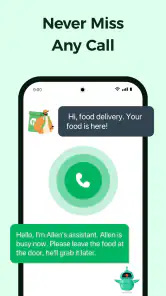
The Spam Call Blocker app offers a variety of features designed to protect users from unwanted calls. It includes real-time call blocking, a comprehensive spam database, customizable block lists, and the ability to automatically block calls from unknown numbers. Users can also report new spam numbers to enhance the community-driven database.
Pros
- Easy to set up and use.
- Blocks most spam calls effectively.
- Customizable block list.
- Minimal battery usage.
- Does not require constant updates.
Cons
- May miss some spam calls.
- Occasional false positives.
- Limited free version features.
- Ads in free version.
- Requires internet for updates.

- Category
- Communication
- Version
- 3.8.4












