Sound Amplifier
- 2.77K
- 3.7
- Installs
- 100.00M
- Price
- Free

Screenshots
Analysis by Reviewed
When I use a phone to listen more carefully, the first obstacle is often figuring out what the app can realistically improve. Sound Amplifier, made by Google LLC, is a free communication app for listening to nearby sound through a phone, rather than a general-purpose volume booster for every audio problem. I’d consider it when voices are difficult to follow in a particular setting, but I wouldn’t expect it to repair a faulty speaker or make every noisy room easy to hear in.
Where people can get stuck
The biggest practical hurdle is the listening setup: an app that works with sound picked up by a phone depends on where the phone is placed and what it can hear. If the microphone is pointed away from the person speaking, or the phone is buried in a bag, raising amplification alone may not make speech clearer. I’d put the phone closer to the speaker, keep its microphone unobstructed, and try a short test before relying on it for a long conversation.
There is also a difference between making sound louder and making speech easier to understand. In a café, clattering dishes and nearby conversations may be picked up along with the voice you want. Filtering can help, but it cannot guarantee that one speaker will stand out in every environment. A quieter seat or a closer position can matter as much as an adjustment in the app.
Getting Started with Ease
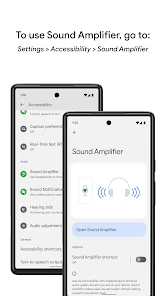
First things first, installing the app is a breeze. Available for both Android and iOS, you can find it on Google Play Store and Apple App Store. Once installed, you're greeted with a user-friendly interface that even the most tech-challenged users can navigate. It's not cluttered with unnecessary features, which is a big win in my book.
Features That Make a Difference
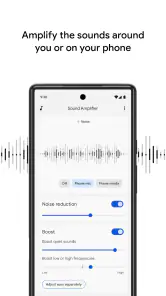
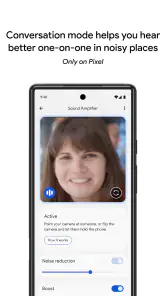
One of the standout features is its ability to separate speech from background noise. Imagine being able to hear a friend's voice clearly at a bustling café or catching every word during a lecture. The app uses your phone's microphone to amplify the sound around you, filtering out the noise that doesn't matter. It's like having a personal audio assistant in your pocket.
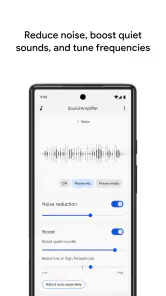
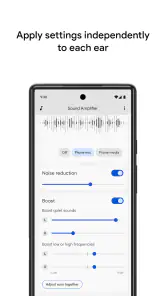
Customization is another strong suit. You can tweak the amplification settings to match your specific needs. Whether it's boosting the bass or enhancing the treble, Sound Amplifier gives you control over how you hear the world. And for the visually inclined, there's a handy visualizer that shows you the sound levels in real-time.
Setup checks that save time
Before adjusting the sound repeatedly, I’d check the basics: make sure the phone is stable, the microphone is facing the conversation, and any connected listening equipment is working as expected. Then I’d change one setting at a time and listen to the same short stretch of speech. That makes it easier to tell whether a change actually helps, instead of confusing a louder result with a clearer one.
More From Our News Desk

Weather by Xiaomi Review: Clear at a Glance, Less Clear Up Close

X Under Pressure: Can It Recover When Posting Goes Wrong?

Clash of Clans Is Won Between the Battles

Android Auto Makes the Case for Quieter Car Software

MobiOffice: Transforming Mobile Productivity with Seamless Integration

EA SPORTS FC™ Mobile Soccer: Redefining Mobile Sports Gaming
A useful everyday test is a conversation at home with someone sitting a few feet away. Try the app in the position you expect to use it, then move the phone closer or turn it toward the speaker and compare. This simple check helps reveal whether the issue is placement, the room’s noise, or the sound adjustment. It also gives you a sensible starting point before using the app in a lecture or meeting.
Real-World Applications
So, where does Sound Amplifier shine the most? For starters, it's a game-changer for those with hearing impairments. It provides a level of independence by allowing users to adjust the audio to their liking, making conversations more accessible. But it's not just for those with hearing challenges. Any of us can benefit from its features in various settings.
Think about enjoying a movie night at home without cranking the volume up to ear-shattering levels. Or maybe you're in a meeting and need to catch every detail being discussed. This app proves invaluable in both scenarios. It's like the Swiss Army knife of audio apps, versatile and ready for any situation.
A workflow for everyday listening
For a practical outing, I’d open the app before a conversation rather than wait until I’ve missed several sentences. I’d place the phone near the person speaking, keep it clear of papers or clothing, and make a quick adjustment while they say something familiar. In a group, I’d aim for the person I most need to hear and accept that nearby voices may still compete. This is a focused listening aid, not a way to isolate every voice in a crowd.
If the sound suddenly seems wrong, I’d retrace the setup before assuming the app has stopped working: check the phone’s position, confirm the selected listening arrangement is still in place, and restart the listening attempt. If only one room or one speaker is difficult, changing seats or asking the speaker to face you may be more effective than pushing amplification higher. Those small resets can prevent an uncomfortable, overly loud result.
When another approach is better
Compared with ordinary phone volume controls, this app is aimed at listening to sound around you, not simply turning up music or a video played by the phone. That distinction makes it useful for a nearby conversation, but it also means it is not the right fix for quiet recordings, a weak built-in speaker, or sound coming from far across a room. For media playback, the device’s own audio controls or a suitable speaker may be the more direct option.
I’d also be realistic about noisy settings. A quieter place, moving closer, or using a dedicated hearing solution may be a better choice when speech remains hard to follow. The app can be a convenient aid, but it should not be treated as a substitute for professional hearing advice or equipment chosen for ongoing hearing needs. If listening feels uncomfortable, I’d lower the level or stop rather than keep increasing it.
Who is likely to benefit
I see the strongest fit for someone who wants a simple way to make nearby speech easier to follow in changing situations, such as a family conversation, a class, or a meeting. It can also be useful to someone helping a relative test whether better phone placement and sound adjustment make a particular conversation more accessible. Since it is free and rated for Everyone, trying it is a low-commitment way to see whether this style of listening assistance suits a person’s routine.
It is less suited to someone expecting a hands-free fix for a distant speaker or a dependable solution in every loud public place. People who mainly want louder phone media should look elsewhere, and anyone who needs consistent support throughout the day may prefer dedicated hearing equipment. I’d treat it as a practical tool to try, not a universal replacement.
Availability and expectations
The app has an average rating of 3.7 from around 87,000 ratings, with roughly 2,800 written reviews and over 100 million installs. Those figures suggest it has reached a broad audience, but they don’t tell me whether it will work well with a particular phone, listening setup, or hearing need. My best advice is to test it in the actual situation where you want help, rather than judge it from a quick trial in a quiet room.
Small choices that improve a listening test
I’d treat a first trial as a comparison, not a pass-or-fail test. Listen to the same speaker with the phone in two sensible positions, and change only one sound adjustment between attempts. If several things change at once, it becomes hard to tell whether the improvement came from placement, filtering, or simply a louder level. A familiar sentence is useful because you can judge how much you understood rather than rely on a vague impression.
There is a trade-off in where to put the phone. Closer to the speaker can make their voice more prominent, but it may be awkward during a meal or a conversation where the phone would interrupt the interaction. On a table, the phone is convenient and unobtrusive, though its microphone may pick up more room noise. I’d choose the least distracting placement that still gives a useful result, rather than chase a perfect setup.
For a lecture or meeting, I’d test the arrangement before the discussion begins and keep the phone in a stable position with a clear path to the main speaker. That is more practical than handling it continuously while trying to follow what is being said. If people take turns speaking from different parts of the room, a setup aimed at one location may not serve the whole conversation equally well; moving closer or choosing a better seat may be the simpler fix.
What to expect from phone-based amplification
Sound Amplifier belongs to a different corner of communication apps from messaging, calling, or voice-recording tools. Its purpose is immediate listening to nearby sound, so its success depends on the room and the microphone’s view of the speaker. A hearing-assistance device may be a better match for someone who needs regular support, while ordinary volume controls are more appropriate for music and video. I see the app as a useful middle ground for occasional, situational help.
That distinction also answers a common practical question: will turning it up make every voice clearer? Not necessarily. If the microphone captures several sounds at once, increasing the level can make all of them more noticeable. I’d first reduce competing noise where possible, then adjust the sound gently. If the result is louder but still difficult to understand, I would change position or pause the trial instead of continuing to raise it.
Everyday use without making it a distraction
Picture a family dinner where one person is speaking from the other end of the table. I’d try placing the phone nearer that person before the meal gets going, check whether the voice becomes easier to follow, and leave it alone once the setup works. If the conversation shifts around the table, the benefit may fade; moving the phone or sitting closer could help, but constantly repositioning it may be more trouble than it is worth. That is a good example of a situation where a quick trial can tell you whether the app fits the moment.
For a short appointment, I’d also think about comfort and courtesy. A phone set out to pick up speech can be noticeable, so I would choose a position that feels natural and explain what I’m doing if needed. For a long conversation, comfort matters as much as the sound result: a setup that requires holding the phone at an awkward angle is unlikely to be practical for the whole visit. The app is most useful when its help does not become another task to manage.
When the room, not the app, is the problem
If a test works at home but not in a crowded room, that does not automatically mean the app has failed. Reverberation, overlapping voices, distance, and sudden background sounds can all make speech harder to pick out. I’d try a quieter corner, a closer seat, or a direct conversation before deciding whether another adjustment is worthwhile. Some environments simply give a phone microphone too much competing sound to produce a comfortable result.
Likewise, if the issue affects listening across many settings, an app trial may be too limited to answer the larger question. A professional hearing assessment can help clarify what kind of support is appropriate. I would not use a successful moment with amplification as proof that hearing needs have been fully addressed, or keep using a level that causes discomfort. Convenience is valuable, but it is not a substitute for suitable care.
Summing It Up
To wrap it all up, Sound Amplifier is not just an app; it's a solution to a common problem many of us face daily. Its simplicity, combined with powerful features, makes it a standout choice for anyone looking to enhance their auditory experience. Whether you're hard of hearing or just want to drown out the world's chaos to focus on what's important, this app is your go-to.
In a world where sound plays such a vital role in our daily interactions, having the ability to control and enhance it is a game-changer. So, give it a try and see how it transforms your listening experience. You might just find yourself wondering how you ever lived without it!
Sound Amplifier Frequently Asked Questions
What should I check before downloading Sound Amplifier?
Sound Amplifier is an Android app for filtering, augmenting, and amplifying sound around you and on your device. Before downloading, consider whether you want to adjust nearby sounds or audio from your device, and whether you have headphones or another listening device available. It is a communication app developed by Google LLC, and it is free to use.
Can Sound Amplifier help me hear conversations in noisy places?
Sound Amplifier is intended to filter and amplify sounds around you, which may help when you want to focus on nearby audio in a busy setting. Its usefulness can depend on the environment, your device, and the headphones or other listening equipment you use. Try its listening features in a comfortable setting first and adjust them to suit what you are trying to hear.
Is Sound Amplifier free, and who makes it?
Sound Amplifier is a free communication app developed by Google LLC. Its straightforward purpose is to filter, augment, and amplify sound around you and on your device, rather than provide a general-purpose audio recording or editing experience. If you are considering downloading it, the key question is whether its sound-enhancement features fit how you use your Android device and headphones.
Who can use Sound Amplifier, and is it appropriate for all ages?
Sound Amplifier has an Everyone content rating, so its listed age category is suitable for a broad audience. It is an accessibility-focused tool that may be useful to people who want to hear surrounding sounds more clearly, including people with hearing difficulties. The app is not a substitute for professional hearing care, but users can explore its listening features to see whether they suit their needs.
What is Sound Amplifier and how does it work?
Sound Amplifier is an accessibility app designed by Google to enhance audio quality on Android devices. It works by using a combination of algorithms to filter, augment, and clarify sounds around you. By connecting headphones, users can amplify quiet sounds or reduce loud background noise, making it easier to hear conversations and enjoy media in noisy environments. The app is especially beneficial for individuals with hearing impairments.
Pros
- Enhances audio clarity effectively
- User-friendly interface
- Customizable sound settings
- Works with most headphones
- Improves sound for hearing impaired
Cons
- Requires Android 6.0 or newer
- Limited to Android devices
- May drain battery faster
- Can occasionally lag
- Not effective in very noisy environments
- Category
- Communication
- Version
- Varies with device