Songsterr Guitar Tabs & Chords
- 6.45K
- 4.2
- Installs
- 5.00M
- Price
- Free

Screenshots
Analysis by Reviewed
I’d begin with a small expectation check: a tab app can show you how a song is mapped, but it cannot make every transcription feel instantly playable. When a part sounds wrong under your fingers, I first check whether I’m looking at the right instrument and section, then compare the rhythm with the recording. That simple pause saves me from practicing a note sequence that only seemed confusing because I was reading ahead too quickly.
Where the first practice snags tend to happen
The moving play-along display is useful, but it can feel busy if you are still learning how tab notation works. I get more from it when I treat one phrase as a short exercise: watch the notes once, then play the same passage at a comfortable pace rather than trying to keep up with the full track immediately. Slowing a difficult section is more valuable as a way to hear its shape than as a shortcut to mastering it.
Songsterr is especially handy for a guitarist or bassist who wants to check a part while holding an instrument, rather than switch between a song video and a static page of numbers. The catalog also includes drum tabs and chords, so it can help when I want to understand more of an arrangement. It is less suitable if I need a structured course, detailed theory lessons, or a teacher to explain why a fingering works.
Checks that make a practice session smoother
Before relying on a tab away from home, I would open the song while connected and make sure the material I want is available in the way I expect. The app is free to start, with in-app purchases listed at $9.99 per item, so I would check the current purchase details in the app before paying for anything. I would also test the player with my instrument nearby; a tab that looks clear on a screen may still need adjustment to suit my technique or the version of a song I know.
A useful everyday routine is to pick one song for a short evening practice, identify its hardest transition, and work on that spot before playing the whole part. If the notes move too quickly, slow the playback and focus on clean timing; if the passage feels manageable, restore the pace and use the player to check whether your entrances line up. This turns a large song library into a focused practice tool instead of another place to browse endlessly.
Discovering a World of Tabs
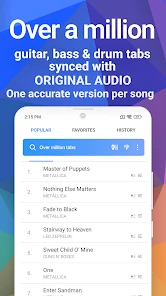
So, I stumbled upon Songsterr Guitar Tabs & Chords while searching for an easy way to find guitar tabs. And boy, was I in for a treat! This app is like having a massive library of guitar and bass tabs right in your pocket. Whether you’re into rock, blues, jazz, or even pop, you’ll find tabs for all your favorite songs. The best part? It’s super easy to navigate. Just type in the song or artist, and voilà, you’re ready to start strumming away.
Play Along with Interactive Tabs
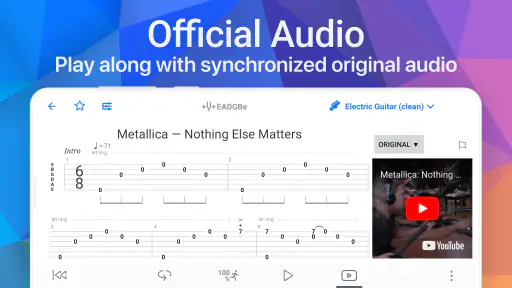
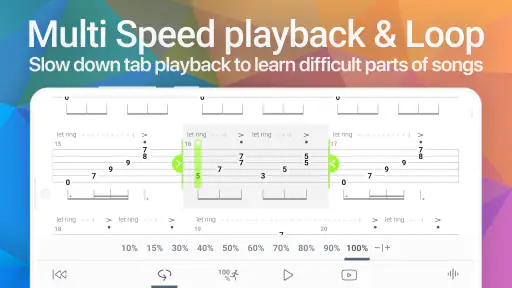
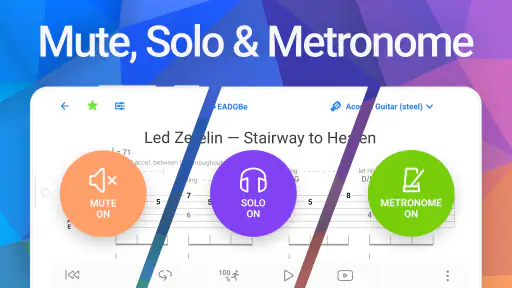
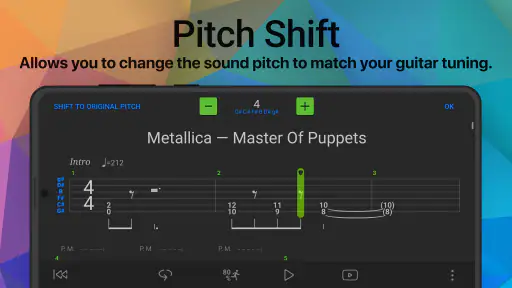
What sets Songsterr apart from other tab apps is its interactive feature. You can actually play along with the tabs in real-time, and it highlights the notes as the song progresses. This makes learning new songs a breeze, especially for beginners. Plus, you can slow down the tempo if you’re trying to master those tricky solos! I’ve found this incredibly helpful for honing my skills and nailing those fast-paced riffs.
More From Our News Desk

Weather by Xiaomi Review: Clear at a Glance, Less Clear Up Close

X Under Pressure: Can It Recover When Posting Goes Wrong?

Clash of Clans Is Won Between the Battles

Android Auto Makes the Case for Quieter Car Software

MobiOffice: Transforming Mobile Productivity with Seamless Integration

EA SPORTS FC™ Mobile Soccer: Redefining Mobile Sports Gaming
Offline Access to Your Favorite Tabs
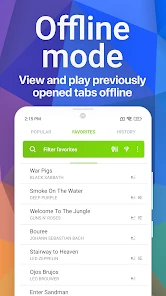
One of my favorite features is the offline mode. You can download your favorite tabs and access them anytime, anywhere, even without an internet connection. This is perfect for those spontaneous jam sessions when you’re out camping or just away from Wi-Fi. Trust me, it’s a lifesaver!
User-Friendly Interface
I’ve used quite a few tab apps in my time, and I must say, Songsterr’s interface is one of the most user-friendly I’ve come across. It’s clean, intuitive, and doesn’t overwhelm you with ads. Everything is laid out logically, making it easy for even the least tech-savvy among us to navigate. I appreciate how it focuses on the music and makes practicing enjoyable.
Subscription Benefits
While the app offers a lot for free, there’s also a premium subscription option that unlocks additional features. With a subscription, you get access to more songs, the ability to loop sections of a song, and even print tabs. If you’re serious about your playing, it’s worth considering. I opted for the premium version, and it’s been worth every penny.
In conclusion, if you’re passionate about playing guitar or bass, Songsterr Guitar Tabs & Chords is a must-have app. It’s packed with features that cater to musicians of all levels, from beginners to seasoned pros. Whether you’re practicing alone or jamming with friends, this app will keep you inspired and motivated. So grab your guitar, download Songsterr, and let the music take over!
How it fits beside other tab options
Compared with a plain text tab page, the moving playback gives me a clearer sense of when notes land, which matters most for riffs with tight timing. A video lesson can be better when I need to see a hand position or get a teacher’s explanation; Songsterr is more direct when I already know the song and want a playable reference. I would not treat any tab as the final authority: recordings, arrangements, and player technique can differ, so use your ears as well as the screen.
When a glitch may be somewhere else
If playback or loading does not behave as expected, I avoid changing several settings at once. I check that the connection is working, reopen the song, and try again before deciding the tab itself is the problem. For offline practice, I prepare the material ahead of time rather than assuming every page will be ready without a connection. If the notes still do not match what I hear, I compare the part against the recording and make a note of the discrepancy instead of drilling it repeatedly.
Who I’d recommend it to
The app is a strong fit for self-directed players who can read tab or are willing to learn, especially guitarists and bassists who want a quick reference between lessons or during a casual jam. Its music-and-audio focus is clear, and Songsterr, the developer, has built a familiar tool for people who prefer practicing with a song in front of them. The app is free, rated 4.2 on average from around 57,000 ratings, and has more than 5 million installs; it is intended for teens. Version 6.3.4 supports devices running Android 7.0 or later. Those details make it easy to judge basic compatibility, while the purchase screen is the place to check what an optional item currently includes.
I would skip it if I mainly want lessons, notation instruction, or a guided practice plan; a course-based app or an in-person teacher would serve those needs better. For tab-focused practice, though, the balance is appealing: search for a song, inspect the part, and work through it at your own pace. My practical advice is to save browsing for later, choose one small passage, and use the playback as a timing guide rather than a substitute for listening. That makes the large library feel useful instead of overwhelming.
Make the player work for your practice goal
I find the interactive view most useful when I give it a job beyond simply following along. For a guitarist, that might mean tracing a repeating riff and noticing where the same shape returns. For a bassist, it can be a way to separate the low part from a busy arrangement and check how it supports the pulse. With drums or chords, the same idea applies: use the displayed part to orient yourself, then listen for how it sits against the rest of the recording. This is a more practical approach than treating every highlighted note as something to memorize immediately.
A small but useful habit is to stop playback after a phrase and say—or hum—the rhythm before starting again. If I can keep the rhythm in my head, I’m less likely to rely on the moving cursor and lose my place as soon as I look down at my hands. I also make a quick note of the section that needs attention, rather than repeatedly restarting from the beginning. That keeps a short practice session purposeful and makes the app useful even when I only have a few minutes.
Search with a specific version in mind
When a familiar song appears in more than one arrangement or recording, I don’t assume the first result will match what I know. I check the instrument part and listen for a recognizable passage before committing to it. A tab can be internally consistent and still differ from a live performance, an alternate recording, or the way another player approaches the song. If I’m learning for a casual jam, I focus on the version the group plans to play; if I’m studying a recording, I use that recording as the reference point.
This matters especially for beginners, because a mismatch can look like a technique problem. Before changing fingerings or speeding up, I compare a short phrase against the audio and make sure the part and arrangement make sense. If they do not, moving on to another result is often more productive than forcing the first one to fit. The app is a reference, not a promise that every transcription will suit every version or player.
Choose the right tool for the question
Songsterr’s main strength is the space between static tabs and full instruction. A printed or plain text tab can be easier to scan when I already know the rhythm and just need a quick reminder. A video tutorial is stronger when I need to see a hand move, understand a technique, or hear someone explain a musical idea. Here, the moving notes make timing and sequence easier to follow, so I reach for it when I want to work out what happens in a part rather than learn a broad skill from scratch.
That distinction also helps decide whether an optional purchase is worthwhile. If I regularly use the player and need its extra practice conveniences, checking the in-app purchase details may make sense. If I only look up an occasional chord or riff, I would start with the free experience and see whether it covers that modest need. Since individual purchase terms can change, I would read the screen carefully before confirming rather than assume that a paid option solves a problem it does not address.
Keep expectations realistic across devices and sessions
For a practice session at home, I would set up the song before picking up my instrument: find the part, check that the display is on the instrument I intend to play, and give the audio a brief test. If something feels off, I would close and reopen the song, then check the connection before making broader changes. When I’m preparing to practice somewhere with unreliable service, I would confirm access in advance instead of waiting until I’m there. These are ordinary checks, but they prevent a simple loading issue from turning into a wasted session.
The app is for Android and iOS, though the compatibility detail here is specific to Android: version 6.3.4 supports Android 7.0 and later. I’d still check the relevant app store on the device I plan to use, because a requirement for one platform should not be assumed to describe the other. If the player works but the part itself seems questionable, that points to a transcription or version mismatch rather than a device setup issue; comparing with the recording is the sensible next step.
A practical fit for independent players
For me, the best case is a player who already has a song in mind and wants to make progress without turning practice into a research project. The catalog is broad enough to invite exploration, but the real benefit comes from choosing a specific task: learn a chorus entrance, check a bass movement, or untangle a short guitar phrase. A teen or adult who enjoys learning by trying and listening is likely to get more from it than someone who wants lessons arranged in a fixed order.
I would also recommend it as a companion to lessons rather than a replacement. A teacher can correct posture, explain a technique, and adapt a part to a student’s level; a tab player can help the student revisit the song between lessons and arrive with more specific questions. That division of labor feels sensible to me. It keeps the app in its strongest role—an accessible song reference—without asking it to provide the personal feedback that only a human instructor can give.
My practical verdict
Songsterr works best when I use it with my ears, my instrument, and a clear practice target. Its moving tab display gives a useful timing reference, and its guitar, bass, drum, and chord material makes it more flexible than a single-instrument lookup tool. The main trade-off is that a large catalog and an animated player cannot guarantee that every arrangement matches the recording or that a new player will understand the notation without help.
Songsterr Guitar Tabs & Chords Frequently Asked Questions
Can I use Songsterr to practice a song at a slower pace?
Songsterr’s interactive player lets you listen while following a tab, which can help you connect the notation with the sound of the part as you practice. You can use that playback to follow along with the music rather than relying on written tab alone. If you are deciding whether the app suits your practice routine, consider whether listening and reading a part together is useful to you.
Does Songsterr include chords as well as tabs?
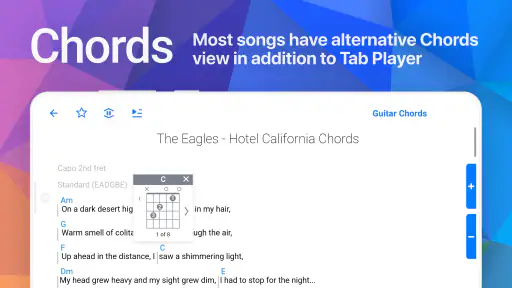
Yes. Songsterr is presented as a library of tabs and chords, with material for guitar, bass, and drums. Its interactive player lets you listen as you follow a tab, making it useful for exploring how a written part sounds. The range of content may suit players looking for song material to practice, whether they want to work on a part or learn alongside other musicians.
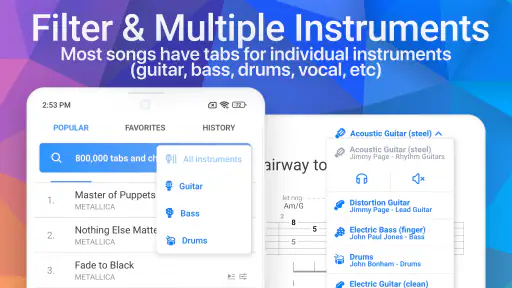
Can I choose tabs for guitar, bass, and drums in Songsterr?
Yes. Songsterr covers guitar, bass, and drum tabs, so it can be useful whether you are practicing on your own or learning a part alongside other musicians. The app’s interactive player lets you listen as you follow the tab, which helps connect the written notation with how a part sounds. Its library is described as containing over a million tabs and chords.
What should I know about Songsterr before installing it?
Songsterr is a Music & Audio app from Songsterr, with a Teen content rating. It is free to download, and the app is designed around finding and playing tabs and chords with an interactive player. Its current version is 6.3.4, and it requires Android 7.0 or later. These basics can help you decide whether it fits your device and the kind of music practice you have in mind.
What is Songsterr Guitar Tabs & Chords and how does it work?
Songsterr Guitar Tabs & Chords is a music app designed for guitarists to learn and play their favorite songs. It provides users with access to a vast library of over 500,000 tabs and chords. The app features interactive tabs, which allow users to listen to the tabs being played in real time. This makes it easy to follow along and practice. Whether you’re a beginner or an advanced player, Songsterr offers a user-friendly interface and a variety of songs across different genres.
Pros
- Extensive library of guitar tabs.
- High-quality audio playback.
- Includes chords for many instruments.
- Offline mode available for premium users.
- User-friendly interface for beginners.
Cons
- Limited features in free version.
- Ads can be intrusive.
- No sheet music for some songs.
- High subscription cost for full access.
- Requires internet for free version.
- Category
- Music & Audio
- Version
- 6.3.4











