Smule: Karaoke, Sing & Record
- 128.30K
- 4.0
- Installs
- 100.00M
- Price
- Free

Screenshots






Analysis by Reviewed
I like karaoke most when it feels easy to start: pick a song, follow the words, and sing without needing to set up a roomful of equipment. That is the appeal of Smule: Karaoke, Sing & Record. It turns a spare moment into a small performance, whether I am warming up alone or inviting someone else to join. It is a music and audio app from Smule, and its focus is less on polished music production than on making singing and sharing feel approachable.
A simple routine that makes singing easier
My preferred way to use it is to choose a song before I start recording, check that the lyrics are easy to follow, then do a quick vocal warm-up rather than trying to nail a difficult chorus cold. On a regular evening, I might sing one familiar track after work, listen back once, and decide whether I want to keep the take or try again. That small loop makes the app useful even when I have no plan to publish anything.
The on-screen lyrics help keep the performance moving, while the choice between audio-only and video gives me control over how public or personal a session feels. If I am recording in a noisy room, I would rather wait for a quieter moment than expect effects to solve every problem. A basic headset can also make it easier to hear the accompaniment and my own voice, though the best setup depends on the phone and room.
Sing Your Heart Out
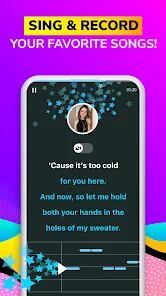
One of the standout features of Smule is its vast library of songs. From the latest chart-toppers to classic hits, you'll find a wide variety of tracks to choose from. It's like having a karaoke bar in your pocket! The app also provides lyrics on screen, so you can follow along easily and hit those high notes with confidence.
Collaborate and Connect
But wait, there's more! Smule isn't just about singing solo. You can also collaborate with friends or other users from around the globe. Imagine harmonizing with someone from another country or duetting with your favorite artist! The app makes it super easy to connect and create music together, making it a social experience like no other.
Plus, Smule's community is incredibly supportive. You can share your performances and receive feedback from fellow music lovers. It's a great way to improve your skills and maybe even gain a few fans along the way.
Recording habits and settings to check
Before sharing a take, I find it helpful to listen through with headphones and notice one thing at a time: whether the lyrics line up with my timing, whether my voice is clear, and whether the accompaniment is overpowering it. Changing several things between attempts makes it hard to tell what helped. Effects can add character, but a light touch usually keeps the vocal recognizable; they cannot replace a clean performance or a quiet recording space.
More From Our News Desk

Weather by Xiaomi Review: Clear at a Glance, Less Clear Up Close

X Under Pressure: Can It Recover When Posting Goes Wrong?

Clash of Clans Is Won Between the Battles

Android Auto Makes the Case for Quieter Car Software

MobiOffice: Transforming Mobile Productivity with Seamless Integration

EA SPORTS FC™ Mobile Soccer: Redefining Mobile Sports Gaming
For a duet, I would decide first whether I want to start a new collaboration or join another singer’s invitation, then choose a song I can comfortably sing without rushing. That is a better first step than chasing a complicated harmony immediately. Repeating the same song on separate occasions can also reveal whether a steadier tempo or a different vocal approach suits me, even if I never share the result.
Where it fits—and where it doesn’t
Compared with a basic karaoke player, Smule puts more emphasis on recording and singing with other people; compared with a full music-making app, it is less about building arrangements from scratch and more about performing over a song. That makes it a good fit for casual singers, friends who want a remote duet, and anyone who enjoys hearing different interpretations of familiar tracks. If I only want a private lyric prompt, a simpler karaoke option may feel less social. If I need precise editing or studio-style control, a dedicated recording tool is the better choice.
There are trade-offs to that social focus. Sharing can make a casual hobby more motivating, but it may also feel uncomfortable if I want every take to stay private or dislike receiving reactions from strangers. I would start with audio-only if being on camera feels awkward, and treat feedback as optional rather than as a measure of singing ability. The app is rated Teen, so it is sensible for younger users and families to approach public sharing thoughtfully.
Collaborate and Connect
But wait, there's more! Smule isn't just about singing solo. You can also collaborate with friends or other users from around the globe. Imagine harmonizing with someone from another country or duetting with your favorite artist! The app makes it super easy to connect and create music together, making it a social experience like no other.
Plus, Smule's community is incredibly supportive. You can share your performances and receive feedback from fellow music lovers. It's a great way to improve your skills and maybe even gain a few fans along the way.
Record and Share Your Performances
If you're proud of your performance, why not share it with the world? Smule lets you record your sessions with high-quality audio and video, so you can showcase your talent on social media or save it for posterity. The app also offers various audio effects and filters to enhance your recordings, giving them a professional touch.
And for those who are a bit camera shy, don't worry. You can choose to record audio only or use fun video effects to add a touch of creativity to your performances.
Smule truly makes singing accessible to everyone, regardless of skill level. It's a fantastic way to unwind, express yourself, and connect with others through the universal language of music.
How it feels after regular use
For a beginner, the most useful habit is to save the first attempt for comparison rather than judging it immediately. Listening back can expose rushed words or breathless phrases that are difficult to notice while singing. More experienced users may get more from choosing songs that suit their range and using effects consistently, so changes in a recording come from the performance rather than a different sound treatment.
Smule is free to download, with in-app purchases ranging from a cent to just under a hundred dollars per item, so I would check the purchase details before committing to anything. It has an average rating of 4.0 from around 4.1 million ratings, and more than 100 million installs. Version 12.6.5 supports Android 6.0 and newer. Those figures suggest a well-established audience, but they do not guarantee that every song, collaboration, or social interaction will suit my taste.
Final Thoughts
In a nutshell, Smule: Karaoke, Sing & Record is a must-have app for music enthusiasts. It offers endless entertainment, a chance to improve your singing skills, and an opportunity to connect with a global community of singers. So, what are you waiting for? Grab your phone, download the app, and let your voice be heard!
Smule: Karaoke, Sing & Record Frequently Asked Questions
Can I use Smule without creating public performances?
Smule is built around singing, recording, and sharing music, so it is worth thinking about how you want to participate before downloading. You can focus on recording songs for your own enjoyment, but the app also encourages interaction with other singers and a music community. Check the available sharing and audience settings when you set up your account, and choose options that match your comfort level.
Does Smule work for singers who are new to karaoke?
Smule can be approachable for beginners as well as people who already enjoy singing. You can choose a song, record a performance, and experiment with smart voice tools and audio effects to shape the sound. Singing along with music can be a relaxed way to practice, while duet and group performances provide opportunities to join other singers. You do not need to treat every recording as a polished performance.
Can I listen to recordings before joining a collaboration?
Smule supports duet and group performances, including invitations to join performances started by other users. Before participating, take time to review the available song and performance details so you know what you are joining. Collaboration can be asynchronous, allowing one singer to record a part and another to add theirs later, which makes it easier to take part on your own schedule.
Do I need headphones or a separate microphone to record on Smule?
You can use Smule on a compatible phone or tablet, and its built-in microphone may be enough to try singing and recording. Headphones are worth considering because they let you hear the music clearly while you sing and can help keep the playback from interfering with your recording. Check that your device’s microphone works as expected before starting a performance; you can decide later whether extra equipment suits your needs.
Can I use Smule to practice songs privately before sharing them?
Smule lets you sing karaoke and record performances, so it can be used to practice as well as to share music with others. You can experiment with a song and its vocal effects before deciding whether you want other people to hear the result. Since the app also supports community participation and social sharing, review your choices before posting a performance if you prefer to keep your singing to yourself.
Pros
- Extensive song library to choose from.
- High-quality audio and video recording.
- Collaborate with friends and artists.
- User-friendly interface design.
- Regular content updates and events.
Cons
- Requires stable internet connection.
- In-app purchases for premium features.
- Occasional app crashes reported.
- Limited offline functionality.
- Ads can be intrusive at times.
- Category
- Music & Audio
- Version
- 12.6.5











