Simple Radio: Live AM FM Radio
- 34.23K
- 4.8
- Installs
- 50.00M
- Price
- Free

Screenshots
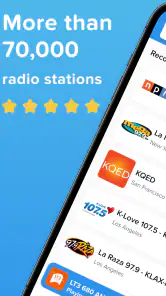
Analysis by Reviewed
At home, radio often becomes a shared choice: one person wants the morning news, someone else wants music while cooking, and another may be happy with whatever is playing in the background. I like that Simple Radio: Live AM FM Radio keeps the basic task easy to understand: find a station and listen. It is a music and audio app from Streema, Inc., and its uncluttered approach makes it easier to hand a phone to someone who does not want to learn a complicated player.
Everyday listening, with a few boundaries
I find the household side of radio works best when everyone treats the phone as a shared listening point, not as a collection of private profiles. A short, clearly named set of favorites can make handoffs easier, while a quick station check helps avoid surprises when the audience changes. That practical routine also makes it worth thinking about which preferences belong on the shared device and which are better kept separate.
A shared radio without a shared account
On a shared device, saved stations can make regular listening quicker. I would set up a small set of household favorites rather than leave a long list for everyone to sort through. That gives different listeners a simple starting point, although favorites on one device are not the same as separate profiles: people using the same phone may see the same app setup.
The app does not require registration or a login for the listening experience described here, which is convenient when a family member only wants to tune in. It also means I would not treat it as a personal account system for managing each person’s preferences. If several people want independent station lists, using their own devices is a cleaner arrangement than expecting one shared installation to keep those choices separate.
Making household listening smoother
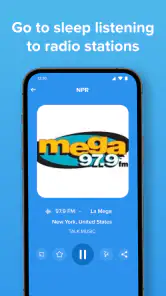
A practical routine is to choose a familiar station before handing over the phone, then let the next listener use search or browsing when they want something different. The sleep timer suits a quieter evening routine: I can start a station for someone settling down and have playback stop after the chosen interval, rather than leaving audio running indefinitely. It is a small detail, but useful when the phone is also needed the next morning.
For a household that follows local news or sports, browsing by location can help when the goal is a station from a particular place; genre and language filters are more useful when the listener knows the kind of programming they want but not the station name. I would still make a short favorites list for repeat listening, since browsing is better for discovery than for quickly returning to the same station every day.
One trade-off of live radio is that the listener follows the station’s schedule, not an on-demand queue. That is part of the appeal for news, sports, and the feeling of turning on a real broadcast, but it is less convenient if someone wants to replay a specific song or choose exactly what comes next. For that, a music service with on-demand playback is the better fit.
More From Our News Desk

Weather by Xiaomi Review: Clear at a Glance, Less Clear Up Close

X Under Pressure: Can It Recover When Posting Goes Wrong?

Clash of Clans Is Won Between the Battles

Android Auto Makes the Case for Quieter Car Software

MobiOffice: Transforming Mobile Productivity with Seamless Integration

EA SPORTS FC™ Mobile Soccer: Redefining Mobile Sports Gaming
Age, trust, and choosing the right listener
The app is rated for Teen audiences, so I would not assume every station is suitable for younger children just because the interface is simple. Radio programming comes from individual stations, and a parent or caregiver should listen along or check a station before making it a regular choice for a child. The app’s straightforward controls can help a teen find a station, but they do not replace household decisions about what is appropriate.
Simple Radio is free to download, with in-app purchases listed from $0.99 to $19.99 per item. I would check the purchase screen before confirming anything, especially on a device used by several people. Its average rating is 4.8 from around 800,000 ratings, and it has over 50 million installs; those figures suggest broad use, but they do not tell me whether a particular station will suit a particular listener.
What it does well—and where alternatives win
Compared with a traditional radio, this app can make it easier to explore stations beyond the local dial, and saving favorites avoids repeated searching. Compared with a podcast player or an on-demand music app, though, it offers a different kind of control: the station determines what is on, and the experience is built around live listening rather than selecting individual episodes or tracks. I find that distinction useful when deciding what to open, rather than expecting one app to cover every audio habit.
It is most appealing if you enjoy broadcast radio, want news or sports in real time, or like discovering music through a station’s programming. I would skip it as a main player if offline listening, precise song selection, or separate household profiles are essential. Streaming also depends on a working internet connection, so a saved favorite is a shortcut to a station, not a downloaded recording for a journey without connectivity.
All About Simplicity
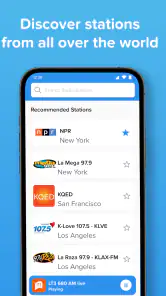
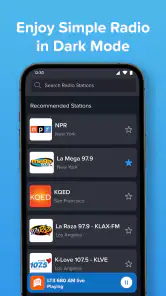
So, let’s dive into what makes Simple Radio stand out. Right off the bat, the app does exactly what its name suggests. You can tune into your favorite AM and FM stations from around the globe without any fuss. The user interface is minimalistic, which means you won’t get lost in a sea of buttons and tabs. Instead, you get a search bar and a list of stations. Simple, right?
Features You’ll Love
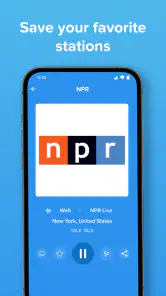
One of my favorite features is the ability to save your favorite stations. It’s like having your personal radio playlist ready at any time. Plus, you don’t need to register or log in, which is a huge plus for those who value privacy and just want to get straight to their tunes. The app also boasts great sound quality, so you can enjoy your music without any irritating static.
Another cool feature is the sleep timer. If you love falling asleep to the soothing sounds of classical music or the latest hits, this feature lets you set a timer so the app turns off automatically. No more worrying about your phone battery dying overnight!
Worldwide Access
Whether you’re a fan of rock stations from the U.S. or want to catch the latest news from the UK, Simple Radio gives you access to thousands of stations worldwide. It’s like having a passport to global radio, right in your pocket. The app connects quickly and streams smoothly, so you won’t miss a beat.
Also, for those moments when you’re feeling nostalgic or adventurous, you can explore stations by genre, language, or location. It’s a fantastic way to discover new music or get a taste of home when you’re abroad. The app’s flexibility and reach are simply impressive.
Listening habits that suit live radio
The app makes the most sense when I treat it as a companion for a particular part of the day, rather than a replacement for every audio app. I might put on a familiar station while making breakfast, then switch to a local news broadcast during a commute or while doing chores. In those moments, not having to choose every song is an advantage: the station supplies a continuous stream and the presenter or schedule gives the listening a sense of place.
That same hands-off quality can be a poor fit for focused listening. If I need a specific album, a particular podcast episode, or a playlist that stays consistent, live radio adds uncertainty rather than convenience. A useful household rule is to decide whether the listener wants a stream to accompany an activity or has a specific item in mind. The first points toward radio; the second usually points toward an on-demand service.
Small choices that improve discovery
When I am looking for something new, I start with a broad clue rather than scrolling without a plan. A location search is helpful for a local perspective, while language can narrow the field when I want familiar speech or practice hearing another language. Genre is a sensible starting point for music, but it does not guarantee that every station will match my taste, so I treat the first result as a sample, not a commitment.
Once I find a station that works, saving it is more useful than relying on memory or repeating the same search. I would keep the favorites list deliberately short and recognizable, especially on a shared phone. That makes the app easier for less confident users: they can choose a known station without needing to understand how the catalog is organized. For discovery, browse; for routine listening, return to favorites.
Practical expectations for streaming
Radio over a phone is not identical to receiving a local broadcast on a battery radio. Simple Radio needs an internet connection for streaming, so I would check connectivity before depending on it during a trip, in a basement, or anywhere service may be unreliable. It is a good option at home or at work when the connection is steady, but it is not the right choice if the plan is to prepare audio in advance and listen offline.
Live streams can also have the ordinary limitations of internet audio: a station may take a moment to load, or the listening experience can be interrupted if the connection changes. If a particular news bulletin or match matters, I would open the station early rather than wait until the exact moment I want to hear it. That small habit leaves time to switch to another station if the first one is unavailable or not carrying the expected program.
Who should choose it—and who should not
I would recommend Simple Radio to someone who misses the serendipity of turning on a radio, enjoys presenters and scheduled programming, or wants to compare stations from different places without buying a separate receiver. It can also work well for a household that wants background listening and is comfortable agreeing on a handful of shared favorites. The appeal is strongest when listeners value easy access to broadcasts more than control over each track.
I would steer a listener toward another kind of audio app if they need offline playback, want to build a precise queue, or expect the app to remember separate preferences for everyone in the home. It is also not an ideal substitute for a dedicated emergency radio, since internet access and a charged phone are part of the setup. Those are not flaws in the radio format so much as practical boundaries worth knowing before relying on it.
Version and platform fit
The current Android release is version 6.1.0, and the stated minimum operating system is Android 6.0. That makes the app a possible option for some older Android phones, though the actual experience still depends on the device and its connection. On iOS, the same general decision applies: the key question is whether the device can run the current app and maintain a reliable stream, rather than whether it has a traditional FM tuner built in.
Because this is a free app with in-app purchases, I would look closely at the purchase prompt before tapping through, particularly if the phone is shared or a younger listener uses it. The app’s Teen rating is useful context, but it does not make every broadcast appropriate for every age. I would choose stations deliberately and keep the device’s purchase settings in mind rather than treating a simple interface as a guarantee of a controlled listening environment.
Final Thoughts
To wrap it up, if you’re looking for a no-frills radio app that delivers on its promise of simplicity and efficiency, Simple Radio: Live AM FM Radio is definitely worth checking out. It’s perfect for those who just want to hit play and enjoy their favorite stations without any hassle. Trust me, this app is like having a trusty old radio, but with the modern perks of the digital age. Give it a try, and let the music play!
Simple Radio: Live AM FM Radio Frequently Asked Questions
Can I listen to radio without using mobile data?
Simple Radio streams live stations over the internet, so listening requires Wi-Fi or a mobile data connection. If you want to avoid using your cellular allowance, connect to Wi-Fi before you start a station. Since the app is focused on live streaming, it is best suited to situations where you have a dependable internet connection.
Who makes Simple Radio, and is it a well-established app?
Simple Radio is developed by Streema, Inc. It has been available since December 12, 2014, and is a long-running option in the music and audio category. The app has more than 50 million installs, with an average rating of 4.8 from around 800,000 ratings, giving prospective listeners a useful sense of its broad reach and reception.
Is Simple Radio suitable for listening to news and sports as well as music?
Yes. Simple Radio is presented as a tuner for music, news, and sports radio, so it can be useful if you want more than music playlists. You can look for stations that match what you want to hear, whether that is live programming, news coverage, or sports broadcasts. The experience centers on tuning in to radio stations rather than choosing individual songs.
Can I use Simple Radio while doing other things on my phone?
Simple Radio is designed for listening to live radio, so it can suit everyday situations such as relaxing, working, or keeping up with music, news, and sports. You can browse stations and save favorites for quicker access. Streaming does require an internet connection, so keep that in mind when listening away from Wi-Fi.
Is Simple Radio free to download, and are there paid options?
Simple Radio is free to download, with optional in-app purchases. A premium option removes ads for an uninterrupted listening experience, and may include additional features such as higher audio quality and more customization options. Purchases are offered within the app, so you can try the free version first and decide whether the paid option suits your listening habits.
Pros
- Wide selection of stations globally.
- User-friendly interface.
- Quick buffering and streaming.
- Minimal ads for free version.
- Supports background play.
Cons
- Limited features without premium.
- Occasional playback interruptions.
- No offline listening option.
- Basic UI lacks customization.
- No recording feature available.
- Category
- Music & Audio
- Version
- 6.1.0











