Sendwave—Send Money
- 12.22K
- 4.6
- Installs
- 5.00M
- Price
- Free

Screenshots

Analysis by Reviewed
When I choose a money-transfer app, I care less about a polished promise than about whether it suits the route and recipient I actually need. Sendwave—Send Money is a free finance app from Sendwave, and its focus is receiving money from the US. That makes it worth considering if you regularly help someone who relies on funds sent from the United States, but it is not automatically the right choice for every international payment.
Cost, fit, and the details that matter
There is no purchase price to download the app, so trying it does not mean paying an upfront app fee. That is useful, but it should not be confused with a guarantee that every transfer is free or that every exchange rate will suit you. Before confirming a payment, I would check the amount the recipient is due to receive and any costs shown for that particular transfer. For remittances, the final delivered amount is more useful than a fee headline alone.
What the free app gives you
Sendwave has an average rating of 4.6 from around 119,000 ratings, and it has been installed over 5 million times. Those figures suggest that many people have tried it, though they cannot tell you whether it supports your exact route or delivery needs. The app is rated for Everyone, and its current version is 25.23.2. It has been available since 2014 and supports devices running Android 7.0 or later.
The main value is having a phone-based way to arrange a transfer instead of treating a bank visit or a remittance counter as the default. For someone who sends money to the same person repeatedly, a familiar app can make the process easier to fit around work, family responsibilities, or an unexpected request. Still, convenience is only valuable when the recipient can use the money in the way they need.
Check the route before relying on it
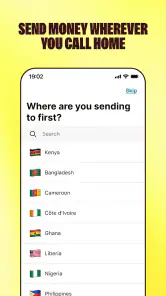
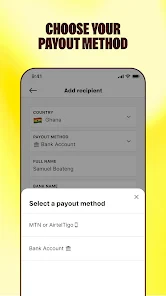
The key practical question is whether the recipient’s country and preferred way of receiving funds are supported. I would settle that before entering payment details or promising a family member that money will arrive through this service. Support for international transfers is not universal across every destination, and a service that works for one family’s route may not fit another’s.
A useful habit is to compare the amount the recipient will actually get with the amount shown by your usual bank or transfer provider. Do this for the same destination and transfer amount, and look at the total outcome rather than focusing only on a fee label. Exchange-rate differences can matter to the person receiving the funds, particularly when they are counting on a specific amount for groceries, transport, or a bill.
Convenience has tradeoffs
For a routine transfer, using a phone can spare you an extra errand. But I would not assume that a digital process removes every possible delay or makes every transfer instantaneous. If the money is needed urgently, check the expected delivery details in the app before submitting, and keep a backup plan for a time-sensitive obligation. A transfer service is most reassuring when the sender and recipient agree on what to expect.
More From Our News Desk

Weather by Xiaomi Review: Clear at a Glance, Less Clear Up Close

X Under Pressure: Can It Recover When Posting Goes Wrong?

Clash of Clans Is Won Between the Battles

Android Auto Makes the Case for Quieter Car Software

MobiOffice: Transforming Mobile Productivity with Seamless Integration

EA SPORTS FC™ Mobile Soccer: Redefining Mobile Sports Gaming
There is also a difference between a service designed around sending money from the US and a general-purpose payment app. If you need to pay someone locally, split a meal, or move funds between your own accounts, a local payment tool or your bank may be simpler. If you need a destination or payment method Sendwave does not support, comparing another remittance provider is the sensible next step rather than trying to force this app into the job.
Good for recurring family support
Picture a familiar situation: a relative messages after work to say they need help with a household expense. If you already know the route works, you can use the app from your phone instead of waiting for a convenient trip to a counter. Before sending, confirm the recipient details and the amount they expect to receive. That small check is especially worthwhile when you are sending to someone for the first time or responding to a last-minute request.
I see the strongest fit for people in the US who send money abroad regularly and whose recipients can receive it through the options available in the app. It is less compelling for occasional senders whose bank already handles their specific route well, or for anyone who needs a payment type beyond international remittances. In those cases, the usual alternative may be more familiar or better matched, even if using a dedicated transfer app sounds convenient.
Plan around the recipient, not just the sender
One useful step is to ask the recipient how they need to use the money before choosing a transfer route. Someone who needs funds for a bill may care most about a predictable arrival and a particular delivered amount, while another person may have flexibility about timing. Confirming those priorities first helps you compare the options that matter instead of treating convenience on your phone as the whole decision.
For repeat support, I would keep a simple note of the route and the recipient details that worked, while still checking the information shown before each transfer. A previous successful payment is reassuring, but it is not a reason to skip a fresh review of the destination, amount, and delivery information. That habit can catch a changed need or a mistyped detail before you confirm.
Where it sits among transfer options
Compared with a bank transfer, a dedicated remittance app can be easier to use when you want to arrange support from your phone rather than fit a branch visit into your day. A bank may still be the better choice if it already serves your route clearly and you value keeping the payment within an account you use routinely. The practical comparison is not “app versus bank” in the abstract; it is the recipient’s final amount, the expected timing, and the receiving method for this particular payment.
Other remittance services are worth checking when a destination or collection method is unavailable, or when the total amount delivered is more favorable elsewhere. I would compare providers using the same sending amount and the same recipient needs, then make the decision based on the amount that arrives and the timing shown. Switching apps simply because one advertises a lower fee can be misleading if the overall exchange leaves the recipient with less.
Getting started with ease
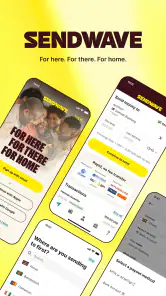
Right off the bat, downloading and setting up Sendwave—Send Money was a breeze. Available on both Android and iOS, this app doesn't discriminate. The interface is intuitive, making it easy even for tech novices to navigate. I quickly registered my account, entered my payment details, and was ready to send money across borders.
Speed and convenience
I must say, the speed of transactions is commendable. Within minutes, my recipient had the funds, which is a game-changer compared to traditional bank transfers that can take days. The app supports transfers to several countries, predominantly in Africa and Asia, which is perfect if you have family or friends in those regions.
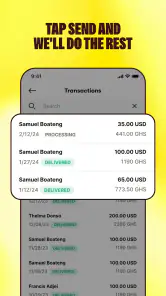
What I particularly appreciate is the convenience of doing this from my phone, without needing to visit a bank or remittance center. Plus, the app sends you notifications at every step of the process, so you're never left in the dark about the status of your transaction.
Security you can trust
Of course, when dealing with money transfers, security is paramount. Sendwave—Send Money employs top-notch encryption to ensure your data is safe. I felt reassured knowing that my financial information is protected. Moreover, the app is regulated by financial authorities in the countries it operates, adding an extra layer of trust.
Fees and exchange rates
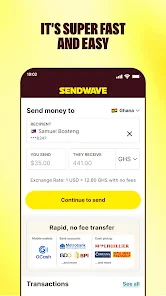
One of the standout features of this app is its transparency regarding fees. Unlike some services that surprise you with hidden charges, Sendwave lays it all out upfront. The exchange rates are competitive, and knowing exactly what you're paying gives you peace of mind.
Decide before making it your default
I would not make any transfer app my automatic choice just because its first use felt straightforward. Revisit the displayed total when the amount or destination changes, and compare again if the recipient’s needs have shifted. For a regular family payment, that small pause is a sensible routine; for an unusual or urgent transfer, it is even more important to read the on-screen details rather than rely on memory.
Sendwave is best approached as a route-specific tool, not a universal wallet. If your usual payment is local, involves moving your own money, or depends on a receiving option that is not available for your recipient, another service is a better fit. If the route is supported and the recipient’s expected amount and timing make sense, the convenience of arranging it from your phone may be worthwhile.
My verdict
In a world where time is money, Sendwave—Send Money provides a solution that is both efficient and reliable. The ease of use, combined with fast transactions and robust security, makes it a must-have app for anyone needing to send money internationally. Whether you're helping out family, paying for services, or just sending a gift, this app gets the job done without a hitch.
So, if you're tired of the hassle and high costs associated with traditional money transfers, I highly recommend giving Sendwave a try. It's like having your own personal remittance service right in your pocket.
My practical recommendation is to treat the first transfer as a careful comparison, not a leap of faith: verify the destination, check the recipient details, and review the final amount before committing. If those details work for your needs, the free app may be a handy addition to your routine. If they do not, choose a provider or bank that better matches the route and timing you need.
Sendwave—Send Money Frequently Asked Questions
Is Sendwave free to download, and is it different from the cost of sending money?
Sendwave is free to download, so installing the app does not have a stated purchase price. That is separate from the cost of making a transfer: fees and exchange rates can depend on the destination and amount. Before confirming a payment, review the details shown in the app so you understand the total cost and the amount the recipient is expected to receive.
Can I receive money with Sendwave, or is it only for sending transfers?
Sendwave’s store summary describes it as an app for receiving money from the US, while its broader purpose is international money transfers. Whether you are sending or receiving, the relevant options depend on the transfer route and the services available for the people involved. Check the app’s instructions for your situation before relying on it for a particular transaction.
Can I use Sendwave on my phone?
Sendwave is a finance app for mobile devices, with a minimum operating-system requirement of version 7.0. Before downloading, check that your phone meets that requirement and that you are installing the app published by Sendwave. The app is free to download, and its Everyone age rating makes it suitable for a broad audience.
What is Sendwave and how does it work?
Sendwave is a mobile application designed to facilitate quick and easy money transfers internationally. Users can send money directly from their bank accounts to recipients in various countries. The app operates by allowing users to input recipient details, select the amount to transfer, and complete the transaction securely within the app. It's known for its user-friendly interface and low transaction fees. Its store summary also describes it as an app for receiving money from the US.
Is Sendwave safe to use for transferring money?
Yes, Sendwave is considered safe for transferring money. The app uses advanced security measures, including encryption and secure servers, to protect user data and transactions. Additionally, Sendwave is regulated by financial authorities in various countries, ensuring compliance with financial regulations and standards. Users should ensure they download the app from official app stores to avoid any security risks.
Pros
- No transfer fees for most transactions.
- Instant transfers to many countries.
- User-friendly interface.
- High security and encryption.
- Supports multiple currencies.
Cons
- Limited to select countries.
- Requires internet connection.
- No cash pickup option.
- High fees for certain cards.
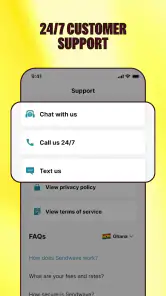
- Limited customer support.
- Category
- Finance
- Version
- 25.23.2











