Seeing
- 1.80K
- 3.7
- Installs
- 500.00K
- Price
- Free

Screenshots
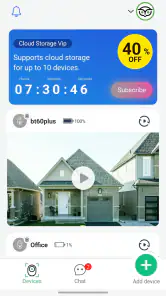
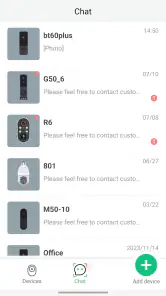
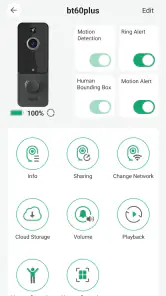
Analysis by Reviewed
For a shared household, the most useful question about Seeing is not simply what a phone can recognize; it is who is holding the phone, what they need to see, and whether the result is enough to act on. I’d treat it as a practical visual aid for moments when a person wants help interpreting something in front of them, rather than as a system for monitoring family members or coordinating everyone’s devices.
A useful handoff, not a shared family dashboard
Picture a household where one person is sorting unfamiliar items in the garden while another is preparing dinner. Passing over a phone with Seeing could let the second person try its visual tools without needing to learn a complicated workflow first. That kind of informal handoff is where a straightforward camera-based tool can fit naturally: use it for a specific question, then put the phone away.
I would still keep expectations modest. A visual result can be a helpful clue, but it should not become the only basis for a safety-sensitive decision, such as identifying something that may be harmful to eat or touch. In that situation, a trusted expert or a more appropriate dedicated resource is the better choice. This distinction matters in a shared home, where another person may assume that a quick answer is more certain than it really is.
Keep accounts and expectations clear
Before letting several people use one phone, I’d decide whose device and account it is and make sure everyone knows the app is being opened for a particular task. Shared access to a handset is different from a shared household account, and I would not assume that Seeing provides family profiles, activity oversight, or controls for separating one person’s use from another’s. If those boundaries are essential, choose a tool that explicitly supports them.
A practical tip is to agree on a simple handoff routine: the person using the phone frames the object or text, checks the result themselves, and returns the device when finished. This avoids turning the app into an unexplained background fixture on a family phone. It also makes it easier to notice whether the camera view is clear enough for a useful result instead of accepting a guess from a hurried glance.
Where it fits among visual tools
Compared with asking someone nearby to read a label or using a general camera app, Seeing is aimed at interpreting what the camera is pointed toward. That can save a step when the user wants spoken help with text or an object. A regular camera is still better when the goal is simply to take a photograph, while a dedicated accessibility or translation tool may suit someone who needs a specialized, repeatable workflow rather than a broad visual aid.
For a household, the key trade-off is convenience versus reliance. It can be handy to have one app available for occasional questions, but a family should not mistake that convenience for a dependable coordination feature. It is most appropriate when each person can judge whether an answer is useful and can ask for human help when it is not.
More From Our News Desk

Weather by Xiaomi Review: Clear at a Glance, Less Clear Up Close

X Under Pressure: Can It Recover When Posting Goes Wrong?

Clash of Clans Is Won Between the Battles

Android Auto Makes the Case for Quieter Car Software

MobiOffice: Transforming Mobile Productivity with Seamless Integration

EA SPORTS FC™ Mobile Soccer: Redefining Mobile Sports Gaming
So, I’ve just spent the last week diving into the world of Seeing, an app that promises to transform how we interact with our surroundings using our smartphones. If you’re anything like me, you’ve probably got a dozen apps on your phone that claim to revolutionize your life, but Seeing has managed to stand out in quite a unique way.
Getting Started with Seeing
First things first, let’s talk about getting the app up and running. Downloading Seeing was a breeze, whether you’re on Android or iOS. A quick trip to the app store and you’re in. Setting it up is straightforward, with a user interface that’s both sleek and intuitive. You don’t need to be a tech wizard to figure things out, which is always a relief.
The moment you launch the app, you’re greeted with a clean, minimalistic design that doesn’t bombard you with too much information at once. The developers have clearly put a lot of thought into making sure the app is accessible for everyone, regardless of their tech-savviness.
Features Galore
Now, let’s dive into what Seeing actually does. The app is equipped with a range of features designed to enhance your daily life by utilizing your smartphone’s camera to interpret the world around you. It’s particularly useful for anyone who might need a little extra help in navigating their surroundings.
The standout feature for me was the real-time object recognition. Point your phone at an object, and Seeing will identify it for you. It’s like having a little encyclopedia in your pocket. This is especially handy when you’re out and about and come across something unfamiliar. I found myself using it in the garden, identifying plants and flowers I’d never really paid attention to before.
Another nifty feature is the text reading capability. Imagine walking past a sign in a foreign language or needing to read a menu in a dimly lit restaurant. Just aim your camera, and the app reads it out loud for you. It’s a game-changer for those who travel often or find themselves in situations where reading text is challenging.
In the Real World
Okay, so it sounds great on paper, but how does Seeing perform in real life? I took it for a spin in various scenarios to see how it stacks up. In well-lit environments, the app performs like a dream. It’s fast, accurate, and makes exploring your surroundings a fun experience.
However, in dim lighting or crowded areas, it can struggle a bit. The app sometimes takes a little longer to process information, which can be a tad frustrating if you’re in a hurry. But, I’ve noticed the developers are constantly updating the software, so I’m hopeful these little hiccups will be ironed out over time.
The Verdict
So, would I recommend Seeing? Absolutely. It’s an app that brings a level of convenience and accessibility to your phone that I haven’t seen in many other apps. Whether you’re someone who could use a little help navigating the world or just a curious soul, this app is definitely worth a download.
In a world where information is at our fingertips, Seeing takes it a step further by making sure that information is accessible to everyone, everywhere. It’s a testament to how technology can enhance our daily lives when done right. So go ahead, give it a try, and see the world in a whole new way.
Who should try it, and what to check first
Seeing is a free tools app from Lonsen Electronics Limited, with an average rating of 3.7 from around 17,000 ratings and more than 500,000 installs. It is rated for Everyone, and its current version is 2.0.5, with Android 6.0 as the minimum operating system. The app has in-app purchases ranging from $19.99 to $99.99 per item, so I’d check the purchase details carefully before committing to anything beyond basic use.
I’d recommend trying it if you want a visual aid for occasional object recognition or reading text aloud, and you’re comfortable checking the result rather than treating it as unquestionable. It is less suitable if you need a highly specialized accessibility tool, strict account separation for several users, or a reliable answer in a dim, busy setting. In those cases, a dedicated alternative or help from another person may be more dependable.
Age, trust, and a sensible household routine
The Everyone age rating makes the app broadly suitable in age terms, but that does not mean every result is automatically appropriate for every situation. I’d show a younger household member how to point the camera steadily, make sure the text or object is in view, and ask an adult when the answer could affect health or safety. That is a sensible way to use a visual assistant without implying that the app includes parental controls.
If a result seems unclear, try improving the light and changing the angle before relying on it. For text, getting the camera closer and holding it still can be more useful than repeatedly aiming at a whole busy scene. Those small habits help users make a fair test of the app and reduce the temptation to treat a quick, uncertain reading as a firm conclusion.
My household verdict is that Seeing makes the most sense as an occasional, shared-use helper, not as the centerpiece of family communication or device management. Its camera-based approach can be convenient for a quick look at an unfamiliar object or a passage of text, while its performance limits and the need for sensible account boundaries call for a little care. If that matches what you need, it is worth trying; if your priority is specialized assistance or formal family controls, I’d look elsewhere.
Make a quick task easier to repeat
One useful way to judge whether the app belongs on a shared phone is to try the same kind of task at different times, rather than relying on a single impressive result. A family member might use it to read a package label, then another person can try a different label in better light. That gives everyone a more realistic sense of when the camera view is clear enough and when a person should take over. It also helps prevent the tool from being treated as an all-purpose answer machine.
For text, I’d first isolate the part that matters instead of sweeping the camera across a crowded counter or an entire page. A shorter, steadier view makes it easier to notice whether the spoken reading matches what is actually printed. If it does not, I would reposition the phone and check again rather than passing the first result along as fact. The same caution applies to objects: a broad view may offer a useful lead, but a closer look can reveal that the item is not what the first impression suggested.
Sharing one phone without sharing every decision
A shared handset can make Seeing convenient, but convenience brings a small coordination problem: the person who owns the phone may not be the person who needs the answer. I’d agree on a simple expectation that the user should ask before opening anything involving a personal message, document, or other private material. That is a household courtesy, not a feature of the app, and it matters especially when a phone is passed around casually.
It is also worth deciding who will handle a purchase prompt if one appears. The app is free to install, but some in-app items have prices from $19.99 to $99.99. I would not let a child or another occasional user make a purchase decision on a device shared with the household; the account holder should review the item and its terms first. That keeps trying a visual aid separate from agreeing to spend money.
When a specialist tool is the better fit
Seeing makes most sense when a person wants occasional help with a range of visual questions and is comfortable checking the answer. Someone who depends on assistive technology throughout the day may prefer a dedicated accessibility app designed around a consistent routine. Likewise, a traveler whose main need is translating menus and signs may be better served by a translation-focused tool. Those alternatives can be less convenient for a mixed bag of everyday questions, but their narrower purpose may make them a better match for a specific, recurring need.
I would also choose a human helper for a decision where a mistaken identification could matter. A quick camera-based suggestion is not the same as expert confirmation, and it should not replace professional advice or a reliable reference when the consequences are serious. Seeing’s strength is lowering the effort involved in an initial look, not removing the need for judgment.
What I would tell a first-time household user
Try it on an ordinary, low-stakes task first: a familiar package, a clear sign, or an object whose identity you can verify. That gives you a baseline for how it behaves on your phone before you rely on it in a hurry. If the result is delayed or vague, check the lighting and framing, then decide whether another method would be faster. This is a more useful test than pointing it at a complicated scene and expecting a definitive answer.
Seeing runs on Android 6.0 and later, so an older compatible phone may be enough for a household trial. Still, compatibility alone does not guarantee a smooth experience in every setting; lighting, movement, and visual clutter can affect how useful the camera view is. I’d test it in the rooms and situations where the family expects to use it, rather than assuming one successful attempt means every use will be equally easy.
A measured recommendation for shared homes
With a 3.7 average across around 17,000 ratings and about 1,800 written reviews, the overall response looks mixed enough to encourage a try-before-you-rely approach. That suits my own view: Seeing can be a handy addition for accessible, low-stakes visual checks, especially when a person wants spoken help without asking someone else every time. Its value depends on the task, the camera view, and the user’s willingness to verify what it says.
I’d keep it available for occasional reading and object questions, explain the limits to anyone borrowing the phone, and keep purchase decisions with the account holder. For a home that needs formal user profiles, dependable family coordination, or specialized support, I’d choose a tool built specifically for those needs. For a household looking for a flexible visual helper and willing to use common sense, Seeing is worth considering, with clear boundaries about when a second opinion matters.
Seeing Frequently Asked Questions
What is Seeing designed to do for visitors at your door?
Seeing is a Tools app built around talking with and seeing visitors through your smartphone. Its store summary describes this visitor-focused purpose, making it relevant if you want to use a phone to communicate with someone who arrives. Before downloading, consider whether that is the kind of visitor interaction you are looking for.
Who makes Seeing, and is it intended for a general audience?
Seeing is developed by Lonsen Electronics Limited and has an Everyone content rating, so it is intended for a broad audience. It is a practical option to consider if you want a visitor-focused tool on your phone. As with any app, it is sensible to review its features and purchase options before deciding whether it suits your household.
What does Seeing cost, and are there in-app purchases?
Seeing is free to download, so you can try the app without paying upfront. It also offers in-app purchases, with items priced from around $20 to $100. Consider whether those optional purchases fit your needs before downloading, and check the purchase details in the app store so you understand what is included.
What is Seeing’s age rating, and what devices can run it?
Seeing has an Everyone content rating and is intended for a broad audience. On Android, it requires version 6.0 or later, so check your device’s operating system before installing. The app is also available for iOS users. Reviewing the compatibility information for your specific device is a sensible step before downloading.
What is the primary function of the Seeing app?
The Seeing app is designed to assist visually impaired users by using the camera on their smartphone to identify and narrate the world around them. It can recognize text, objects, and even people, providing real-time audio feedback to help users navigate their environment more effectively.
Pros
- User-friendly interface for easy navigation.
- Real-time updates enhance user experience.
- Wide range of customization options available.
- Integrates seamlessly with other apps.
- Offers offline mode for data savings.
Cons
- Limited free features without subscription.
- Occasional lag on older devices.
- Requires stable internet for best performance.
- Ads can be intrusive at times.
- Limited support for older OS versions.
- Category
- Tools
- Version
- 2.0.5








