Screen Recorder - Record Video
- 483.00
- 4.0
- Installs
- 5.00M
- Price
- Free

Screenshots


Analysis by Reviewed
When a household shares a tablet or one person often helps another with phone tasks, a screen recording can be a practical way to show the steps instead of explaining them repeatedly. I’d use Screen Recorder - Record Video for a short walkthrough, a game clip, or a visual reminder, rather than treating it as a place to store sensitive conversations. Its appeal is the simple job it sets out to do: capture activity on the screen without turning the process into a project.
A useful fit for everyday demonstrations
The strongest reason I’d reach for this recorder is that a moving screen is often easier to explain than a still image. If I’m helping someone find a setting buried in menus, a short clip can show not only where to tap but what changes after the tap. That makes it useful for relatives who prefer to follow instructions at their own pace, or for anyone who keeps forgetting a sequence of steps.
It also suits quick gameplay captures and brief visual notes. I’d keep those recordings focused: one task, one clip, and a quick review before sending it along. That approach makes the result easier to understand and avoids turning a simple question into a large video that takes longer to watch than the original task.
Plan the capture before pressing record
A small amount of preparation can improve a screen recording more than extra editing. I’d decide what I want the viewer to learn, close unrelated apps, and navigate back to the starting point before I begin. If the task involves several menus, I’d rehearse the route once. That reduces pauses and accidental detours, and it makes the final clip feel intentional even when the recording itself is simple.
For voice commentary, I’d make a brief test first and listen back. A spoken explanation can make a clip clearer, but background noise or talking too quickly can undermine it. If the steps are self-explanatory, a silent capture may be easier to share with people who prefer to watch without sound. Either way, I’d check the finished video from the viewer’s perspective rather than assuming the recording came out as planned.
Getting Started with Ease
When I first launched Screen Recorder - Record Video, I was pleasantly surprised by how intuitive it is. Setting it up was a breeze. You just install it and boom, you’re ready to start recording. The interface is clean and straightforward, which is a huge plus for someone like me who doesn’t want to fumble through complex settings. Plus, it doesn’t bombard you with ads, which is a rare gem in free apps!
Features that Stand Out
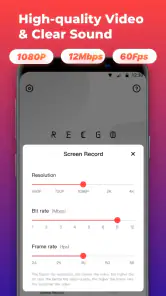
One of the standout features is the ability to record in high definition. I tested this out while playing a graphics-intensive game, and the recording was smooth as butter. There was no lag, and the quality was top-notch. You can even record audio, either from your device or through the microphone, which is great if you’re doing voiceovers or commentary.
More From Our News Desk

Weather by Xiaomi Review: Clear at a Glance, Less Clear Up Close

X Under Pressure: Can It Recover When Posting Goes Wrong?

Clash of Clans Is Won Between the Battles

Android Auto Makes the Case for Quieter Car Software

MobiOffice: Transforming Mobile Productivity with Seamless Integration

EA SPORTS FC™ Mobile Soccer: Redefining Mobile Sports Gaming
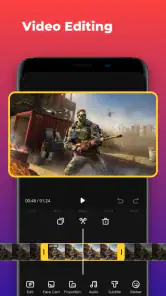
Another cool feature is the floating control panel. It’s super handy because it lets you start, pause, or stop recording without having to switch screens. This means you can focus on what you’re doing without any interruption. There’s also a built-in video editor. It’s not as advanced as some standalone editors, but for quick trims and basic edits, it gets the job done.
A Better Fit for Short, Shared Walkthroughs
For a realistic household use, imagine a relative asking how to change a setting in an app. I’d record the steps once, trim away the opening fumbling, then send the clip through whatever sharing method we already use. The recipient can pause and replay each step at their own pace. That is more useful than a stream of screenshots when a menu changes after every tap.
The floating controls also help with this kind of demonstration: I can start the capture, move through the instructions, and stop without returning to the recorder between steps. A useful habit is to plan the route first and close unrelated screens before recording. That keeps the clip focused and reduces the chance of exposing notifications, account names, or other personal details. I would also review the recording before sharing it, especially if another person’s messages or information might appear.
Setup Boundaries and Coordination
On a shared device, I’d treat each recording as belonging to the person who made it, even if everyone uses the same tablet. A saved video can reveal more than the intended steps, so it’s worth agreeing who will record, who may view the clip, and when it should be deleted. The app’s recording tools do not replace those household decisions; they simply make capturing a demonstration easier.
For a group task, such as explaining a game route or showing a family member how to find a setting, one person can make a concise clip and another can check whether the instructions make sense. If the recording includes spoken commentary, a quiet room and a brief test capture can help catch unclear audio before making a longer video. For a one-off question, though, a quick live explanation may be simpler than creating and managing a file.
Keeping clips manageable
There is a practical trade-off between recording everything and recording only what matters. A long capture may include useful context, but it can also make the important part harder to find and the file less convenient to share. I’d pause or stop between separate topics and make distinct clips rather than trying to document an entire session. Before deleting anything, I’d confirm that the clip has been shared or saved where I actually need it.
That workflow matters especially on a tablet used by several people. A recording made for one person’s question may remain visible to the next person who opens the device. Since the app is a recorder rather than a household file-management system, I’d agree on a simple routine: name or identify the clip clearly if the device allows it, share it with the intended viewer, and remove it when it is no longer useful. The key is not to assume that a shared device automatically means shared permission to view every recording.
Performance and Reliability
I’ve been using this app for a couple of weeks now, and I must say, it’s pretty reliable. The recordings are saved directly to your device, so you don’t have to worry about losing them if the app crashes (which, by the way, it hasn’t for me). The app also supports multiple languages, which is a nice touch if English isn’t your first language.
What really caught my attention is how little battery it uses. I’ve had apps in the past that drained my battery faster than you can say “screen record,” but this one is gentle on the battery life, even during longer recording sessions.
Choosing between this and built-in tools
Android’s built-in recorder is often the quickest choice when I only need to capture something once and don’t want another app in my workflow. This app makes more sense when I value its own recording controls and the convenience of trimming a clip without switching straight to a separate editor. The difference is less about one being universally better and more about whether I want a direct, compact capture-and-cleanup routine.
Compared with a full video-editing app, the built-in editor here is intentionally modest. That is a benefit when I only need to remove a false start, but a limitation if I want titles, detailed narration edits, or a carefully arranged tutorial. I would not install a screen recorder expecting it to replace a production editor. For polished lessons, I’d record the material and then move to a tool designed for more involved editing.
Where It Sits Among Screen Recorders
Android users may already have a screen-recording tool built into the device, and for a quick capture that can be the most convenient option. I’d consider this app when I want its direct recording workflow and the convenience of trimming a clip in the same place. By contrast, a dedicated video editor is the better choice for polished tutorials with captions, layered footage, or detailed edits; this recorder’s editor is meant for basic cleanup, not a full production workflow.
It is also worth thinking about the recording itself before you start. Capturing a long session can create a video that is awkward to find or share, so I’d split a tutorial into short, clearly focused clips and check that the finished file is the one I intended to keep. If you need advanced control over output or a complete editing suite, the simpler approach here may feel limiting. The app is most appealing when ease matters more than extensive creative options.
When I would choose another approach
If the person I’m helping is beside me, a live demonstration may be faster and more private than recording a video. If I need to preserve a detailed training session, a more capable editor and a deliberate file-storage routine are a better fit. And if a built-in Android tool already handles my occasional capture cleanly, there may be no reason to add another recorder. This app earns its place when I expect to make short clips often enough that its controls and basic trimming save effort.
I’d also avoid using it as a substitute for a secure way to keep personal material. Screen capture can include account details, private messages, or notifications without those being the intended subject. A quick scan before sharing is essential, and for sensitive information I’d choose a safer method that does not create a replayable copy of the screen.
Age, Trust, and Practical Limits
The app is free to download and is rated for Everyone, though that does not mean every recording is suitable for every viewer. I’d be thoughtful about what appears onscreen, particularly when a child is using a shared device or when an account contains private messages. A recording can be replayed or passed along, so I would not capture a call or someone else’s screen activity without their awareness and permission.
Kevin’s Lab has made a focused utility rather than a family-management tool. The current version is 1.3.10, and the app requires Android 6.0 or later. It has a 4.0 average from around 80,000 ratings and has passed five million installs. Optional in-app purchases range from $3.99 to $15.99 per item, so I’d check the purchase screen before choosing anything beyond the free use. The app was released on July 23, 2021, and its straightforward purpose remains most relevant to people who want a quick capture rather than a broader media workspace.
Who will get the most from it
For me, the best fit is someone who regularly explains phone or tablet steps, makes short gameplay clips, or wants a quick way to capture something visible on screen and trim the beginning or end. The app’s straightforward controls are useful when a learner needs to replay instructions, and the audio options can help when a visual sequence needs a spoken explanation. It is less suitable for people who rarely record, want elaborate editing, or need a shared archive with carefully managed access.
The free download makes it easy to try the basic workflow, but I would not assume that every household member should use the same account or share every output. Optional purchases are available, so I’d review the purchase choices with whoever manages spending on the device before making one. A recorder can be simple to operate while still producing files that deserve the same care as any other personal video.
Final Thoughts
In a world where capturing screen activity is becoming increasingly important, Screen Recorder - Record Video is a must-have app. Whether you’re a gamer, a tutor, or just someone who likes to keep a record of video calls, it ticks all the boxes. It’s user-friendly, efficient, and doesn’t cost a dime, making it a winner in my book. So, if you’re on the lookout for a reliable screen recording app, give this one a shot. You won’t be disappointed!
My household verdict is more measured: I’d recommend it for short demonstrations, gameplay clips, and simple recordings that benefit from quick trimming. I’d skip it if you need a sophisticated editor, dependable long-term file organization, or a tool to manage who in a family can access recordings. For ordinary screen captures, its low-friction controls and on-device workflow make it a handy option, provided you stay deliberate about what you record and share.
Screen Recorder - Record Video Frequently Asked Questions
Can I use Screen Recorder - Record Video to capture tutorials or gameplay?
Screen Recorder - Record Video is intended for recording videos of your device screen, so it may suit tasks such as keeping a visual record of on-screen activity or preparing a tutorial. The app describes its recording as one-click and ultra-clear. Whether it fits a particular workflow depends on what you want to capture and how you plan to use the resulting video.
Is Screen Recorder - Record Video suitable for children?
The app has an Everyone content rating, which makes it suitable for a broad audience. Parents may still want to consider how a child will use a screen-recording app and what content they might capture or share. The app is free to download, although optional in-app purchases are available, so it is worth discussing purchases with younger users before installation.
Does Screen Recorder - Record Video work on Android devices?
Screen Recorder - Record Video is an Android app, and it requires Android 6.0 or later. Before downloading, check your device’s Android version in its settings to make sure it meets that requirement. The app is free to download, and its Everyone age rating makes it suitable for a broad audience.
Who makes Screen Recorder - Record Video, and is it widely used?
The app is developed by Kevin's Lab and is listed in the Video Players & Editors category. It has over 5 million installs and an average rating of 4.0 from around 80,000 ratings, giving prospective users a sense of its reach and overall reception. As with any app, individual experiences can vary.
What are the key features of Screen Recorder - Record Video?
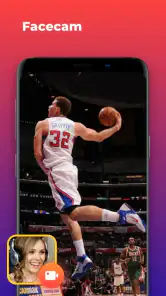
Screen Recorder - Record Video offers a range of features that make capturing your screen easy and efficient. It allows users to record high-quality videos with audio, utilize live streaming capabilities, and make use of video editing tools directly within the app. Additionally, it supports recording from both the front and back cameras, providing a comprehensive recording experience.
Pros
- High-quality video recording
- User-friendly interface
- Supports multiple resolutions
- No time limit for recording
- Records audio and video simultaneously
Cons
- Contains ads
- Limited editing features
- Requires internet connection
- Consumes significant battery
- May lag on older devices
- Category
- Video Players & Editors
- Version
- 1.3.10











