Scanner Radio - Police Scanner
- 66.33K
- 4.7
- Installs
- 10.00M
- Price
- Free
Screenshots
Analysis by Reviewed
Have you ever found yourself curious about what's happening in your neighborhood or even across the globe? Well, that's where Scanner Radio - Police Scanner comes into play. This app opens up a whole new world of real-time audio feeds, and let me tell you, it's quite the experience!
A practical first listen
I’d treat the app as a way to follow public audio feeds, not as a dependable substitute for emergency services or official alerts. If a storm is moving through, for example, you could check a relevant weather or emergency feed while also following local authority updates. The audio may help you understand what is unfolding, but it can be delayed, incomplete, or unavailable, so I would never base an urgent safety decision on a scanner alone.
That distinction also makes the app more useful in ordinary life. Someone curious about how dispatch activity changes during a busy evening may enjoy listening for a short stretch; someone who needs a clear, verified answer about a road closure should look to an official local source. I find it helps to decide what I want from a session before opening a feed: general awareness, a particular area, or simply a better understanding of how emergency services communicate.
What's the Buzz About?
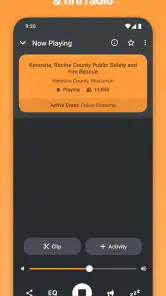
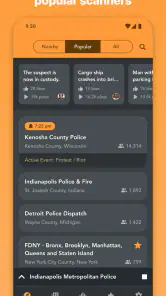
Scanner Radio - Police Scanner is a nifty little app that lets you listen in on police, fire, and emergency services broadcasts from all over. Imagine tuning into live feeds from your local police department or even from another country. It's like having a backstage pass to the world of emergency services!
Features That Keep You Hooked
The app is loaded with features that make it both fun and practical. First off, the interface is super user-friendly. You don’t need to be a tech whiz to navigate through the app. With just a few taps, you can dive into a sea of live broadcasts.
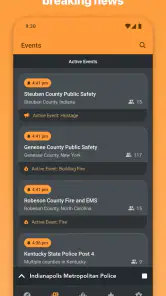
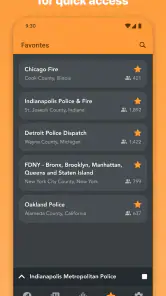
One of my favorite features is the ability to bookmark your favorite feeds. So, if there’s a particular channel you find yourself drawn to, you can easily access it without having to search for it every time. Plus, there's an alert feature that notifies you when a certain number of listeners tune into a feed, indicating something big might be happening. It's like having your own little intelligence agency!
Making a repeatable routine
Bookmarks are most useful when I keep them selective. I’d save a feed I genuinely return to, rather than bookmarking every interesting result; a short, familiar list makes it quicker to get started and easier to notice when a feed is unavailable. Listener alerts can point to a sudden increase in attention, but they don’t explain why people are listening. I treat them as a prompt to check context, not proof that a major incident is underway.
More From Our News Desk

Weather by Xiaomi Review: Clear at a Glance, Less Clear Up Close

X Under Pressure: Can It Recover When Posting Goes Wrong?

Clash of Clans Is Won Between the Battles

Android Auto Makes the Case for Quieter Car Software

MobiOffice: Transforming Mobile Productivity with Seamless Integration

EA SPORTS FC™ Mobile Soccer: Redefining Mobile Sports Gaming
A realistic routine might be to open a saved local feed briefly after hearing about a nearby disruption, then check an official source for confirmation before changing plans. If I’m listening while doing something else, I keep the volume low enough to avoid turning every burst of radio traffic into a distraction. For anyone wondering whether the app is suited to background listening, that depends on the feed and the situation: short, intentional sessions are easier to follow than leaving unpredictable emergency audio on all day.
For a commuter, that routine can stay practical without turning the feed into a constant companion. I might check a familiar area before setting out, listen long enough to understand whether activity is relevant to my route, and then put the phone away. If a broadcast mentions a location I do not recognize, I would not guess at its meaning or assume it refers to my journey. A map or local news source can help establish where an event is, while the scanner is better for hearing the cadence of the radio traffic itself.
Settings and habits worth checking
I’d also make a first session deliberately simple: choose one feed, listen for a few minutes, and learn how its voices, pauses, and terminology sound before adding more. That gives me a baseline for recognizing the difference between ordinary bursts of traffic and a feed that has gone quiet. It is a small habit, but it prevents a long list of unfamiliar channels from becoming a confusing wall of audio.
Before relying on a saved feed, I’d test it at the time of day I expect to use it. A feed that is available during one session may be offline later, and the app’s wider reach does not make every local broadcast continuously accessible. I’d keep one or two alternatives only when they genuinely serve a different purpose, such as a nearby area or a type of public-safety activity I want to follow. That is more useful than switching among several feeds that all sound similar.
The same restraint applies to listener alerts. I would decide in advance whether a notification is worth interrupting me, then treat it as a reason to investigate rather than a signal to act. A sudden jump in listeners could have several explanations; it does not tell me what happened, where it happened, or whether I am affected. If the situation matters to my safety, official alerts and local authorities remain the sources I would trust for instructions.
Why You Might Want to Tune In
Listening to live emergency broadcasts isn't just for thrill-seekers. It can be incredibly informative and educational. You'll gain insights into how emergency services operate and maybe even pick up some valuable safety tips along the way.
Plus, during emergencies or natural disasters, having access to real-time information can be crucial. It can give you a sense of what's happening on the ground and help you make informed decisions.
I’d be careful with that last point: the audio can add context, but it is not a reliable way to decide whether to evacuate, shelter, or travel. Those decisions call for clear instructions from the relevant authorities. The app makes more sense as a way to listen alongside verified updates, especially for someone who wants to understand how a situation is unfolding without confusing an incomplete radio exchange with a complete picture.
It can also appeal to people who enjoy learning how dispatch communication works, provided they are patient with shorthand and fragmented conversations. If I were sharing the app with a friend, I’d suggest starting with a familiar local feed and listening without trying to interpret every line. The experience is more rewarding when curiosity leads and assumptions stay in check.
Who will get the most from it
For me, the strongest fit is a curious listener who wants to explore public-safety audio, compare activity in different places, or follow a feed they already know is relevant to them. Scanner Radio is a news-and-magazines app from GordonEdwards.net LLC, and its reach is reflected in over 10 million installs. It is free to download, carries an Everyone age rating, and offers in-app purchases. That makes it easy to try, though I’d check the purchase details in the app if I’m considering optional paid items.
It is less suitable for anyone who expects polished news summaries, searchable transcripts, or guaranteed coverage during a crisis. A conventional news app is better for concise reporting and confirmed updates; official alert services are the better choice for instructions that affect personal safety. Scanner listening asks for patience: radio exchanges can be brief, technical, and hard to interpret without local knowledge. I would also avoid treating what I hear as entertainment at the expense of the people involved.
There is a useful distinction between wanting to hear an event and needing to know what to do about it. For the first, a live feed can be compelling; for the second, I would choose an official alert or a reliable local report. If I mostly want headlines during a short break, a regular news app is more efficient. If I want the unedited rhythm of public radio traffic and accept that it may be confusing, Scanner Radio offers a different experience rather than a replacement for those services.
Families or people who are easily unsettled by emergency audio may also prefer not to keep a feed playing in shared spaces. The broadcasts can involve stressful real-world situations, and the app does not turn them into calm, edited explanations. I’d use headphones and choose a deliberate listening window if I wanted to explore, rather than letting unpredictable audio dominate a household or workday.
Is It All Sunshine and Rainbows?
While the app is fantastic, it's worth noting that not all feeds are available at all times. Sometimes, you might encounter a channel that's offline or not broadcasting. But hey, that's just the nature of live audio feeds, right?
Also, it's important to use the app responsibly. Remember, these are real people and real situations you're listening in on. It's essential to respect privacy and adhere to any local laws regarding the use of police scanners.
Another limitation is the amount of interpretation the listener has to supply. A feed may contain clipped calls, local place names, or references that make sense to regular listeners but not to a newcomer. I would not assume that one unclear exchange tells the whole story, and I would avoid repeating unverified details as fact. The app is strongest when I can listen with a specific, modest question in mind rather than expecting it to explain every incident.
If I am choosing between this and a conventional scanner receiver, the app’s appeal is convenience: I can explore available online feeds on a phone rather than setting up dedicated radio equipment. A physical scanner may be preferable for someone who needs a particular local signal or wants a purpose-built listening setup, but it also involves its own equipment and coverage considerations. Neither option should be treated as an emergency-warning system by itself; the right choice depends on whether I value easy access to online feeds or a dedicated receiver for a known use.
What to expect from the listening experience
Compared with the usual alternatives, this app offers something a written news feed cannot: the sound and pace of live radio traffic. That immediacy is compelling, but it also brings more ambiguity. A headline or official notice usually gives you a clear summary; a scanner feed can require you to recognize place names, follow clipped exchanges, and accept that you may not hear the full story. I’d choose the format based on the question I have, rather than expecting one app to do both jobs.
The app’s current version is 8.19, and it has been available since April 25, 2010. It has a 4.7 average from around 477,000 ratings, with roughly 66,000 written reviews. Those figures suggest a well-established audience, but they don’t guarantee that a particular feed will suit your location or interests. I’d start with a single feed, learn how it behaves, and only then build a small set of bookmarks. The minimum operating-system requirement is version 10, so it is worth checking your device before installing.
One question I’d ask before downloading is whether I want live sound or a digest I can scan quickly. Scanner Radio is for the former. There is no shortcut around listening carefully, and a busy feed may demand more attention than a headline list. Another practical question is whether my device meets the minimum operating-system requirement; checking that first saves a fruitless install attempt. The app is free to download, while optional in-app purchases range from $2.99 to $39.99 per item, so I would review the specific purchase before deciding whether it adds value to my own routine.
For a first-time listener, my advice is to avoid opening several feeds at once. One channel at a time makes it easier to learn what the voices and pauses mean, and to notice whether that feed is actually relevant. Once a familiar feed feels understandable, bookmarking it gives the next session a clear starting point. This simple sequence—sample, assess, save—works better than trying to build a large collection before knowing what you enjoy.
A confident but careful way to use it
The app’s 4.7 average and large audience make it an established choice, but I would still judge it by the feeds I can actually hear and the way I plan to use them. Popularity cannot guarantee local availability, clarity, or a good match for my interests. I’d keep the app if I found a few useful or enjoyable channels; if I wanted reliable summaries, I would move that task to a news source instead of trying to make scanner audio fill the gap.
My best habit is to keep a clear boundary between listening and acting. A feed can satisfy curiosity or provide another perspective on public activity, but it does not replace official instructions, and an alert about listener activity is not an emergency notice. That boundary makes the app more enjoyable too: I can appreciate the unusual access to radio traffic without placing more weight on it than it can carry.
All in all, Scanner Radio - Police Scanner is a fascinating app for anyone interested in the inner workings of emergency services or just looking for a new way to stay informed. It's like having a window into a world that's usually kept behind closed doors. So, if you're curious and ready to explore, give it a try. You might just find yourself hooked!
My recommendation comes with a boundary: use it for curiosity and supplementary awareness, not as your only source when safety or a time-sensitive decision is involved. With a few carefully chosen bookmarks, sensible expectations about offline feeds, and respect for the people behind the broadcasts, it can become a distinctive listening habit. If you want fast, verified explanations, choose a news outlet; if you want to hear public radio traffic directly, this is the more unusual option I’d try.
Scanner Radio - Police Scanner Frequently Asked Questions
Can I listen to scanner broadcasts while using other apps?
Yes. Scanner Radio - Police Scanner supports background listening, so audio can continue while you use other apps or have the screen off. This can make it easier to follow a stream without keeping the app open in front of you. Keep in mind that listening uses your device’s audio and internet connection, so your experience may depend on your connection and how you use your device.
Does Scanner Radio - Police Scanner work without an internet connection?
The app is built around listening to live audio streams, so you should plan to use an internet connection when accessing broadcasts. A stable connection can help streams play more smoothly, while weak or interrupted service may affect playback. If you are considering it for travel or use in areas with limited connectivity, it is sensible to check your connection before relying on a live stream.
Can I choose which broadcasts and alerts I hear?
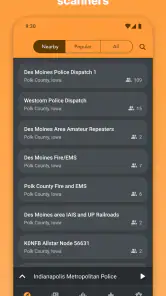
The app lets you browse streams by location or genre and customize alerts for specific channels, which can help you focus on broadcasts that interest you. You can also explore its top live streams rather than searching from scratch. Since scanner feeds can vary in availability, it is useful to browse and adjust your selections to find options that suit your interests.
Is Scanner Radio - Police Scanner suitable for children?
Scanner Radio - Police Scanner has an Everyone content rating, so it is classified for a broad audience. However, the app carries live scanner audio, and the subject matter of broadcasts can vary depending on the channel and current events. Parents may want to listen alongside younger users and help them choose appropriate streams, especially when exploring public safety or breaking-news audio.
Can I record broadcasts with Scanner Radio - Police Scanner?
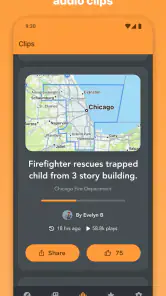
The app includes an audio recording feature, which may be useful if you want to revisit a broadcast you are listening to. As with any live scanner audio, recordings should be treated as a record of that particular stream rather than a complete or official account of an event. Be considerate about how recordings are used or shared, and follow applicable rules and privacy expectations.
Pros
- Wide range of channels available
- Real-time emergency updates
- User-friendly interface
- Customizable alert notifications
- Runs in background with audio
Cons
- Ads can be intrusive
- Limited free version features
- Occasional streaming delays
- Requires stable internet connection
- Privacy concerns for some users
- Category
- News & Magazines
- Version
- 8.19











