Roomster® 5M+Downloads
- 8.05K
- 3.3
- Installs
- 5.00M
- Price
- Free

Screenshots
Analysis by Reviewed
When a household needs to find a new room quickly, the search often becomes a second job: comparing locations, budgets, and the people who might share the space. I see Roomster as a practical place to bring those two parts of the search together. It is a free lifestyle app from Roomster Corp., built around finding rooms and potential roommates, though some options cost extra and the best fit still depends on careful conversations beyond the screen.
A shared search, not a shared account
A realistic use for Roomster is a household where one person is moving out and the remaining roommates need a replacement. One person can browse profiles and spaces, then share promising candidates with the others for a second opinion. That can make the search less scattered than dividing the work across unrelated posts and message threads. I would still have each person use their own account and make their own decisions rather than passing around a login; a roommate search involves personal details and conversations that are better kept under individual control.
It is also useful when you are moving to a new area and do not yet know which neighborhoods or living arrangements will suit you. You can compare rooms and people in the same search rather than treating the housing question and the compatibility question as separate errands. The trade-off is that an appealing profile is only a starting point: it cannot tell you whether someone’s daily habits will work in your actual home.
Planning the search around a real move
I would start by agreeing on the practical constraints before opening the app: the area that is workable, the amount each person can contribute, the date the room needs to be occupied, and any household routines that are genuinely non-negotiable. Keep preferences separate from deal-breakers. That distinction helps avoid rejecting a workable room over a minor preference while also preventing an important concern from getting lost in a group discussion.
For example, if a roommate is leaving at the end of the month, one person can scan for possible rooms or candidates during a commute, while the household reviews a short list together later. Rather than sending every interesting profile into a busy group chat, share only options that meet the agreed basics and include the reason each one made the cut. It is a simple workflow, but it makes the app more useful as a shared search without turning one person into the unaccountable decision-maker.
Finding Your Ideal Roommate
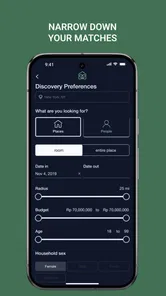
One of the coolest features of Roomster is its ability to connect you with potential roommates based on your preferences. Whether you're a night owl who thrives in chaos or a neat freak who loves tranquility, there’s a match for everyone. The app allows you to filter users by lifestyle, interests, and even budget. I mean, who wants to end up with someone who blasts heavy metal at 3 AM, right?
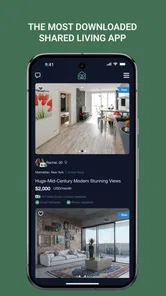
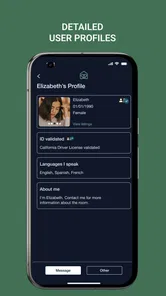
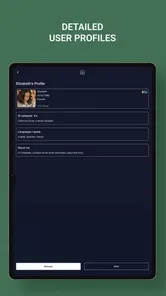
The app's user interface is sleek and straightforward. You can set up your profile, outlining your lifestyle preferences and what you're looking for in a roommate. It’s almost like a dating app for roomies but without the awkward first date vibes. You can browse through profiles, check out photos, and read through bios to find someone who clicks with your vibe.
More From Our News Desk

Weather by Xiaomi Review: Clear at a Glance, Less Clear Up Close

X Under Pressure: Can It Recover When Posting Goes Wrong?

Clash of Clans Is Won Between the Battles

Android Auto Makes the Case for Quieter Car Software

MobiOffice: Transforming Mobile Productivity with Seamless Integration

EA SPORTS FC™ Mobile Soccer: Redefining Mobile Sports Gaming
Making a profile useful to a household
When several people in a home are involved, I would agree on the must-haves before anyone starts swiping through possibilities: a budget ceiling, the move-in timing, and any non-negotiable routines. Then put the relevant details into the profile or search choices. This gives the household a shared yardstick and makes it easier to compare candidates without letting one attractive photo or a vague bio dominate the decision.
For a person listing a room, the same discipline helps. Explain the practical expectations clearly when describing the space, and ask interested people about the routines that matter to you. A profile can help start that conversation, but it is not a lease, a background check, or proof that someone will be a good housemate. I would use it to find leads, then verify important details directly before agreeing to anything.
Keeping household decisions manageable
Roomster can help a group discover options, but it should not be expected to settle disagreements about who is a good fit. If one person cares most about a short commute and another about a quiet home, compare those priorities explicitly instead of treating profile browsing as a vote. A useful next step is to write down the question each person needs answered before contacting a candidate, then bring the replies back to the same conversation.
This also makes the app easier to use on a shared household device without blurring account boundaries. I would avoid leaving an account open for everyone to browse or reply from, particularly if messages include personal circumstances or contact details. Use the device to discuss general options if that is convenient, but let the person responsible for the search handle their own account and conversations.
Explore Listings with Ease
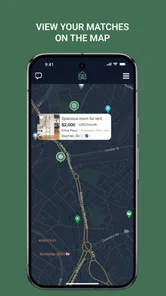
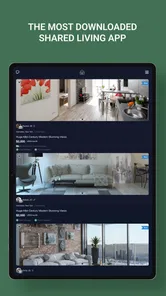
Besides playing matchmaker, Roomster also offers a plethora of listings for available rooms and apartments. The search function is pretty robust, allowing you to narrow down your options by location, price range, and other key amenities. Whether you’re hunting for a cozy studio or a sprawling apartment, the app's got you covered.
For those who are listing a space, the app provides a simple way to upload photos, include a detailed description, and set your terms. It’s designed to make the process as painless as possible, letting you focus on the important stuff—like packing up your life in boxes!
Turning search results into a decision
I would not treat a promising listing as a finished answer. Save the details that matter to your household in a simple comparison note: total monthly cost, what is included, location, availability, and questions still waiting for a clear answer. Confirm those points with the person offering the room, then arrange a suitable conversation or viewing before making a commitment. This small extra step is especially helpful when different household members are weighing different priorities.
Compared with general classified listings, Roomster puts roommate profiles alongside room searches, which is handy when compatibility matters as much as location. Compared with asking friends or posting in a neighborhood group, it can widen the pool beyond people already in your network. Those alternatives may feel more personal or local, though, so I would use them too if the app’s results do not match the area or timing you need.
Reading a listing with a careful eye
Photos and concise descriptions are useful for narrowing choices, but they can leave the details that matter most unresolved. I would ask what the listed amount covers, whether the space is available for the dates I need, how shared areas are used, and what expectations apply to guests or quiet hours. Asking the same core questions of each candidate makes comparisons fairer and can reveal when two listings that look similar would lead to very different day-to-day arrangements.
There is a trade-off between speed and certainty. A room that looks promising may attract interest quickly, but rushing because of that pressure can make it easier to overlook a mismatch or unclear term. I would use Roomster to find and contact leads, then take enough time to check the space and understand the arrangement. If the person offering a room avoids ordinary questions or pushes for an immediate commitment, I would pause rather than treating urgency as proof that the listing is a good opportunity.
Community and Safety Features
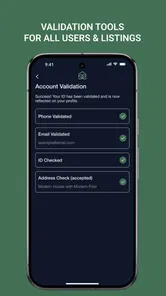
Roomster’s community features are another highlight. The app encourages users to link their social media accounts, which adds an extra layer of transparency. You can verify a user’s profile through Facebook, Instagram, and other platforms. It’s like a little safety net that gives you peace of mind when meeting new people.
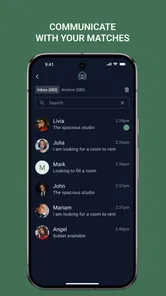
There’s also a messaging feature, letting you chat directly with potential roommates or landlords. It’s a great way to get a feel for someone before committing to a lease or a move-in date. Trust me, avoiding surprises is key when it comes to shared living!
Age, trust, and sensible boundaries
The app is rated Everyone, but that broad age rating is not the same as a recommendation for a child to manage a housing search. Rooms, budgets, and in-person meetings are adult responsibilities. If a household is discussing a move together, I would keep the account and direct conversations with the people who are actually arranging the housing, rather than relying on a child or a shared device to handle contact.
Social account links can offer context, but I would not treat them as a guarantee of identity, honesty, or a safe meeting. Ask specific questions, compare answers with the listing, and meet in a sensible way before making a decision. If a conversation feels rushed or someone avoids basic questions, it is reasonable to step back and consider another lead.
What the app can—and cannot—coordinate
For a household, the useful role here is discovery and early conversation, not complete move management. I would not assume that finding a promising person in the app also resolves the lease, payment arrangements, move-in logistics, or everyone’s agreement at home. Keep those tasks in the channel the household already trusts, and confirm important terms directly with whoever is responsible for the room.
That separation is especially useful when a search involves more than one decision-maker. One person may handle initial messages, but other household members should have a chance to raise concerns before an invitation or commitment is made. Roomster can widen the set of people you consider; it cannot make a shared decision on your behalf.
Subscription and Pricing
Now, let’s talk about the nitty-gritty—cost. Roomster offers a subscription model, which gives you access to all the premium features. You can choose from different plans based on your needs. While some might balk at the idea of paying for an app, consider it an investment in finding the right living situation. It’s like buying insurance for your sanity.
There are free features as well, but the subscription provides a more comprehensive experience. You’ll get to unlock advanced filters, view more listings, and connect with more users. If you’re serious about finding the perfect place or roommate, the subscription is worth considering.
Deciding whether to pay
Roomster is free to download, and in-app purchases range from $7.99 to $59.99 per item. I would begin with the free experience and decide whether the available search and contact options are enough for the move I am planning. If a paid option seems useful, check exactly what it unlocks and whether it fits your timeframe before buying; paying cannot make an unsuitable listing or roommate a better match.
The app has a 3.4 average from around 36,000 ratings, alongside roughly 7,900 written reviews. That is a mixed reception, so I would approach it as one useful channel rather than the only route to a home. Its 5 million-plus installs suggest that many people have tried it, but neither popularity nor a profile badge replaces checking a room and asking direct questions.
When another route makes more sense
If you already have a strong local network, asking trusted friends, colleagues, or neighborhood contacts may be the better first move: those conversations can come with useful context about the area and the people involved. If you need a formal vetting process or a guaranteed supply of suitable rooms, do not mistake a roommate-search app for that kind of service. Roomster is most helpful when you want another place to look and are prepared to evaluate each lead yourself.
It may also be a poor fit if the timing or location of your move is very specific and the available results do not meet those constraints. In that situation, widen the search through other local channels rather than paying simply because the app is already installed. For a person who values lifestyle compatibility and wants to compare people and spaces in one place, it is a more natural fit than a basic classifieds feed; for someone who only needs a room from a trusted referral, the extra discovery layer may add little.
Final Thoughts
In the grand scheme of things, Roomster offers a well-rounded solution for anyone navigating the housing market. It’s a blend of practicality and community, making the often-daunting task of finding a roommate or home a breeze. The app is user-friendly, the search functions are robust, and the community features add a touch of security.
Sure, there’s a cost involved, but when you weigh it against the potential nightmare of a mismatched living situation, it’s a small price to pay. So if you're in the market for a new place or a new roomie, give Roomster a whirl. It might just make your next move the best one yet!
Roomster was released on March 15, 2016, and the current version is 1.1.088, with Android support starting at version 5.0. I would recommend it most to adults who want to compare room options and roommate profiles in one place, especially when several household members need a consistent way to discuss candidates. If you need a deeply vetted housing service, prefer relying on personal referrals, or cannot find relevant local listings, another route may be a better fit. For everyone else, it is worth trying as a search tool while keeping the final checks—and the final decision—in your own hands.
Roomster® 5M+Downloads Frequently Asked Questions
What is Roomster, and who is it designed for?
Roomster is a Lifestyle app from Roomster Corp. for people searching for rooms to rent or hoping to find someone to share a home with. It brings room listings and roommate profiles together, so you can explore possible living arrangements in one place. It may be useful whether you are moving locally or looking for a place in another city.
Is Roomster free to download, and are there paid features?
Roomster is free to download, and users can create profiles and browse listings without paying. It also offers in-app purchases, with prices ranging from $7.99 to $59.99 per item. Some features, such as contacting potential roommates or using advanced search tools, may require payment, so check the options in the app before choosing a plan.
Does Roomster help with both finding a room and finding a roommate?
Yes. Roomster is designed for people looking for rooms to rent as well as people seeking someone to share a home with. You can browse available rooms or post a listing, and profiles help you compare potential roommates. As with any housing search, take time to review the details and communicate clearly about expectations before making plans.
What features does Roomster offer to help users find roommates?
Roomster provides a comprehensive platform for finding roommates, including advanced search filters, user profiles with detailed information, and the ability to view potential roommates’ social media profiles. Users can also post listings or search for available rooms, making it easier to find a living arrangement that suits their needs.
Is Roomster free to use, or does it require a subscription?
Roomster is free to download, and users can create profiles and browse listings without paying. It also offers in-app purchases, with prices ranging from $7.99 to $59.99 per item. Some features, such as contacting potential roommates or using advanced search tools, may require payment, so check the options in the app before choosing a plan.
Pros
- User-friendly interface for easy navigation.
- Extensive filter options for precise searching.
- Direct messaging with potential roommates.
- Integration with social media profiles.
- Regular updates improve app stability.
Cons
- Some listings may be outdated or inaccurate.
- Premium features require subscription.
- Limited free access to certain features.
- Occasional app crashes reported by users.
- Profile verification process can be slow.











